Beta testing
Beta testing is the last test of a developed product before it is definitely released to the end user. It is carried out by a group of enthusiastic users to check performance in real life situations, across a wide range of devices and needs.
What are the benefits of beta testing?
· Users can enjoy new features earlier.
· Developers can detect bugs and other issues that could have gone undetected during the initial test of the product.
· The product can be checked against a wide range of devices and versions in real life conditions.
What are the nuances of beta testing?
· The application may crash more often.
· New tools may not be fully functional.
· We expect testers to give us detailed feedback.
· We may follow the feedback with further questions.
· We may collect data on the use made of the product (device type, tools used...).
If beta testing feels like a burden, we kindly ask users not to join for beta testing, or unregister if you already are.
JOIN BETA TESTING
· Install NaturaList -> Join for beta testing.
· NaturaList is already installed: Join for Beta testing. There is no need to re install the application
LEAVE BETA TESTING
· Leave beta testing > Uninstall the application > Re install the application.
Beta testing
How to participate
Any interested user can register as a beta tester by themselves. There is no need to request us.
It can be done when installing the application or at a later stage with no need to uninstall.
To become a beta tester for NaturaList, either:
· https://play.google.com/apps/testing/ch.biolovision.naturalist. Note the link will allow you to sign in/sign out depending on your current status.
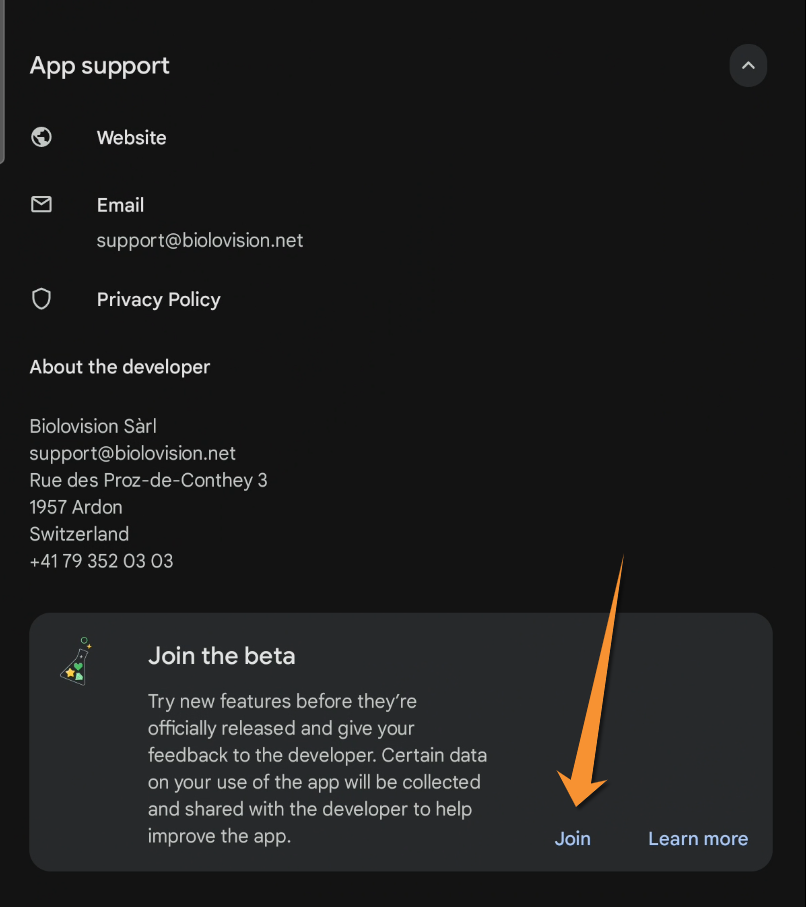
· Go to Play Store > NaturaList app > App support and join the beta.
· For Apple version we do not require testers at the moment.
|
Join using link. |
Join through Play Store. |


NOTE
If using the link https://play.google.com/apps/testing/ch.biolovision.naturalist do so
· from the device you installed NaturaList, or
· logged in with the same google account in the device you use the link on and on the device you have NaturaList.
How to know if I am a beta tester?
· Use link https://play.google.com/apps/testing/ch.biolovision.naturalist to check if you are currently a beta tester. If are, you will be offered to leave. Otherwise, you will be offered to join.
· Go to Play Store and access the application.

See if you are a beta tester.
NOTE
It is not currently possible to be a beta tester on one device and a normal user on another. Your status as a beta tester applies across all devices.
[Top to How to participate]
[Back to Beta testing]
How to send feedback
If you are a beta tester, please do send us feedback. If something is not working as expected do not assume we know or you did something wrong: it may be a bug we are not aware of. This is the purpose of beta testing: detecting problems we missed before the final version is released. Reporting it will help us repair it before the definite version is released.
SEND FEEDBACK
If something is not working properly, do not assume we know or you did something wrong. We would love to hear about it!.
· Write to support@biolovision.net.
· Leave as many details as possible.
· Additionally we may require screenshots, NaturaList version and device model.
To send us feedback:
· Write to support@biolovision.net, or
· Go to PlayStore > Private feedback to developer and
rate the application, or
click to Write feedback for full feedback (see image below).
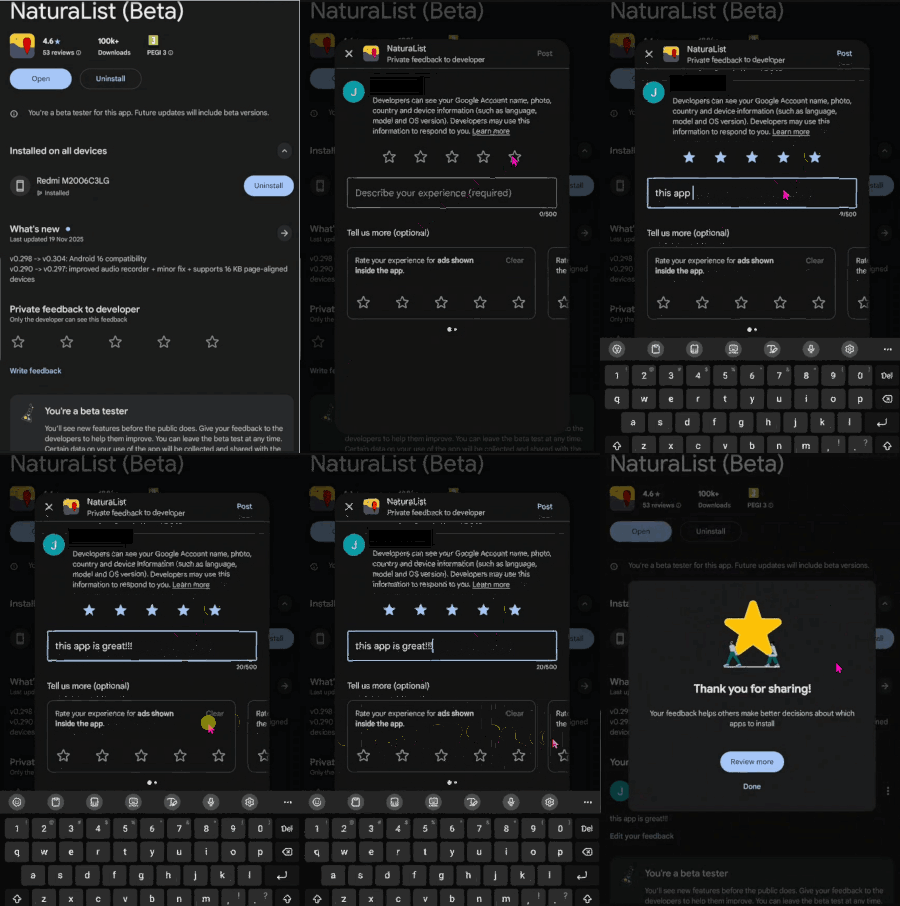
Leave feedback through Google Play Store.
In your message, include:
· Details on what happens and when. Is it a recurrent error or only occurs when using a certain tool/protocol/project/species list?, for example.
· The option to enter species you are using, protocol, or project.
· The species list you selected.
· Let us know you are beta testing. We do not have a list of testers!
We may ask you further details, for example:
· Screenshots.
· NaturaList version you are using, and
· the device brand and model.
[Top to How to participate]
[Back to Beta testing]
How to stop collaborating
Current beta testers can stop collaborating and revert to the normal NaturaList version.
To unregister, either:
· https://play.google.com/apps/testing/ch.biolovision.naturalist. Note the link will allow you to sign in/sign out depending on your current status.
· Go to Play Store > NaturaList app > App support and leave.
· For Apple version we do not have testers at the moment.
· Uninstall and re-install NaturaList to continue using it as a regular user, not as a Beta tester. Note it may take few hours until the public version is available for you to download.
To continue using NaturaList as a regular user after leaving beta testing,
· Leave beta testing,
· uninstall NaturaList, and
· re install NaturaList.
Note it may take few hours until the public version is available for you to download.
|
Leave using link. |
Leave through Play Store. |


NOTE
According to GDPR restrictions, we do not have a list of beta testers and cannot unsubscribe you manually.