Management of the agenda: Difference between revisions
No edit summary |
No edit summary |
||
| (13 intermediate revisions by 2 users not shown) | |||
| Line 1: | Line 1: | ||
<br/> | <br/> | ||
Administration > Management of the agenda <br/> | |||
<br/> | <br/> | ||
<center> | |||
<div class="toc" style="border-radius:5px;background-color:#ffffff;padding-left:8px;padding-right:8px;padding-bottom:8px;width:300px;"> | |||
[[File:2023-04-22 Management of the agenda.png|300px|link=https://help.biolovision.net/images/7/7e/2023-04-22_Management_of_the_agenda.png]] | |||
<div class="toc" style="border-radius:5px;padding-left:15px;text-align:left; font-size:12px;width:275px;"> | |||
'''Management of the agenda.''' | |||
</div> | |||
</div> | |||
</center> | |||
<br/> | |||
<br/> | <br/> | ||
[[File:2023-04-25 Management of agenda.png|700px| | List of planned events. Use arrows under titles to alternate between ascending and descending order (see [[Media:2023-03-27 example arrows.png|image as an example]]).<br/> | ||
<p style=" | <br/> | ||
<center> | |||
<div class="toc" style="border-radius:5px;background-color:#ffffff;padding-left:8px;padding-right:8px;padding-bottom:8px;width:700px;"> | |||
[[File:2023-04-25 Management of agenda.png|700px|link=https://help.biolovision.net/images/c/c8/2023-04-25_Management_of_agenda.png]] | |||
<div class="toc" style="border-radius:5px;padding-left:15px;text-align:left; font-size:12px;width:675px;"> | |||
'''List of events.''' | |||
</div> | |||
<p style="color:black;font-size:12px;padding-left:30px;text-align:left;column-count:2;"> | |||
<b>1.</b> [[Management of the agenda#Search 1|Search]] <br /> | |||
<b>2.</b> [[Management of the agenda#Details 1|Details]] <br/> | |||
<b>3.</b> [[Management of the agenda#Edit 1|Edit]] <br /> | |||
<b>4.</b> [[Management of the agenda#Delete 1|Delete]] <br/> | |||
<b>5.</b> [[Management of the agenda#New 1|NEW]] <br/> | |||
</p> | |||
<br/> | |||
<p style="color:black;font-size:12px;padding-left:5px;text-align:left;column-count:1;padding-right:5px;"> | |||
'''Start date:''' Date the event starts. <br/> | '''Start date:''' Date the event starts. <br/> | ||
'''Title:''' Title of event. | '''Title:''' Title of event. <br/> | ||
</p><br/> | </p> | ||
</div> | |||
</center> | |||
<br/> | |||
<br/> | |||
<span id="Search 1"></span> | |||
:'''1. Search''' <br/> | |||
Select page number and/or number of items per page.<br/> | |||
<br/> | |||
<span id="Details 1"></span> | |||
:'''2. Details''' <br/> | |||
Click to see details of selected event. <br/> | |||
<br/> | |||
<center> | |||
<div class="toc" style="border-radius:5px;background-color:#ffffff;padding-left:8px;padding-right:8px;padding-bottom:8px;width:700px;"> | |||
[[File:2023-04-27 details admin events.png|700px|link=https://help.biolovision.net/images/5/59/2023-04-27_details_admin_events.png]] | |||
<div class="toc" style="border-radius:5px;padding-left:15px;text-align:left; font-size:12px;width:675px;"> | |||
'''Details admin events.''' | |||
</div> | |||
<p style="color:black;font-size:12px;padding-left:30px;text-align:left;column-count:2;"> | |||
<b>6.</b> [[Management of the agenda#Start date 2|Start date]] <br /> | |||
<b>7.</b> [[Management of the agenda#End date 2|End date]] <br/> | |||
<b>8.</b> [[Management of the agenda#Insertion date 2|Insertion date]] <br /> | |||
<b>9.</b> [[Management of the agenda#Title 2|Title]] <br/> | |||
<b>10.</b> [[Management of the agenda#Creator 2|Message creator]] <br/> | |||
<b>11.</b> [[Management of the agenda#Content 2|Content]] <br/> | |||
</p> | |||
<br/> | |||
<p style="color:black;font-size:12px;padding-left:5px;text-align:left;column-count:1;padding-right:5px;"> | |||
'''BACK:''' Go to previous screen without saving. <br/> | |||
'''EDIT:''' Modify details. See sub-section '''Edit''' below to know more. <br/> | |||
'''DELETE:''' Delete event. You will be asked to confirm. <br/> | |||
</p> | |||
</div> | |||
</center> | |||
<br/> | |||
<br/> | |||
<span id="Start date 2"></span> | |||
:::'''6. Start date''' <br/> | |||
::Starting date of event. <br/> | |||
<span id="End date 2"></span> | |||
:::'''7. End date''' <br/> | |||
::Ending date of event. <br/> | |||
<span id="Insertion date 2"></span> | |||
:::'''8. Insertion date''' <br/> | |||
::Date and time of creation or last update. <br/> | |||
<span id="Title 2"></span> | |||
:::'''9. Title''' <br/> | |||
::Title of event in all available languages. <br/> | |||
<span id="Creator 2"></span> | |||
:::'''10. Message creator''' <br/> | |||
::Name and email address of creator. <br/> | |||
<span id="Content 2"></span> | |||
:::'''11. Content''' <br/> | |||
::Text of event in all available languages. <br/> | |||
<br/> | |||
<span id="Edit 1"></span> | |||
:'''3. Edit''' <br/> | |||
Modify / complete information about the event. <br/> | |||
<br/> | |||
<center> | |||
<div class="toc" style="border-radius:5px;background-color:#ffffff;padding-left:8px;padding-right:8px;padding-bottom:8px;width:700px;"> | |||
[[File:2023-04-27 Edit admin events.png|700px|link=https://help.biolovision.net/images/5/5b/2023-04-27_Edit_admin_events.png]] | |||
<div class="toc" style="border-radius:5px;padding-left:15px;text-align:left; font-size:12px;width:675px;"> | |||
'''Edit admin events.''' | |||
</div> | |||
<p style="color:black;font-size:12px;padding-left:30px;text-align:left;column-count:2;"> | |||
<b>6.</b> [[Management of the agenda#Start date 3|Start date]] <br /> | |||
<b>7.</b> [[Management of the agenda#End date 3|End date]] <br/> | |||
<b>9.</b> [[Management of the agenda#Title 3|Title]] <br /> | |||
<b>11.</b> [[Management of the agenda#Content 3|Content]] <br /> | |||
</p> | |||
<br/> | |||
<p style="color:black;font-size:12px;padding-left:5px;text-align:left;column-count:1;padding-right:5px;"> | |||
'''BACK:''' Go to previous screen withoust saving. <br/> | |||
'''MODIFY:''' Save changes. <br/> | |||
</p> | |||
</div> | |||
</center> | |||
<br/> | |||
<br/> | |||
<span id="Start date 3"></span> | |||
:::'''6. Start date''' <br/> | |||
::Modify starting date of event by clicking on the calendar and selecting a date from the expandable menu. <br/> | |||
<span id="End date 3"></span> | |||
:::'''7. End date''' <br/> | |||
::Modify ending date of event by clicking on the calendar and selecting a date from the expandable menu. <br/> | |||
<span id="Title 3"></span> | |||
:::'''9. Title''' <br/> | |||
::Modify / add event's title by selecting a language from the tabs on top (a) and typing title in the selected language (b). Repeat process for any other language. <br/> | |||
<span id="Content 3"></span> | |||
:::'''11. Content''' <br/> | |||
::Modify / add event's information by selecting a language from the tabs on top (a) and typing the text in the selected language (b). Repeat the process for any other language. <br/> | |||
<br/> | |||
<span id="Delete 1"></span> | |||
:'''4. Delete''' <br/> | |||
Delete the selected event from the list. You will be asked to confirm.<br/> | |||
<br/> | |||
<span id="New 1"></span> | |||
:'''5. NEW''' <br/> | |||
Create a new event. <br/> | |||
<br/> | |||
<center> | |||
<div class="toc" style="border-radius:5px;background-color:#ffffff;padding-left:8px;padding-right:8px;padding-bottom:8px;width:700px;"> | |||
[[File:2023-04-27 New event.png|700px|link=https://help.biolovision.net/images/1/1f/2023-04-27_New_event.png]] | |||
<div class="toc" style="border-radius:5px;padding-left:15px;text-align:left; font-size:12px;width:675px;"> | |||
'''Adding a new event.''' | |||
</div> | |||
<p style="color:black;font-size:12px;padding-left:30px;text-align:left;column-count:2;"> | |||
<b>6.</b> [[Management of the agenda#Start date 4|Start date]] <br /> | |||
<b>7.</b> [[Management of the agenda#End date 4|End date]] <br/> | |||
<b>9.</b> [[Management of the agenda#Title 4|Title]] <br /> | |||
<b>11.</b> [[Management of the agenda#Content 4|Content]] <br /> | |||
</p> | |||
<br/> | |||
<p style="color:black;font-size:12px;padding-left:5px;text-align:left;column-count:1;padding-right:5px;"> | |||
'''BACK:''' Go to previous screen without saving. <br/> | |||
'''ADD:''' Save new entry. <br/> | |||
</p> | |||
</div> | |||
</center> | |||
<br/> | |||
<br/> | |||
<span id="Start date 4"></span> | |||
:::'''6. Start date''' <br/> | |||
::Indicate a starting date of event by clicking on the calendar and selecting a date from the expandable menu. <br/> | |||
<span id="End date 4"></span> | |||
:::'''7. End date''' <br/> | |||
::Indicate an ending date of event by clicking on the calendar and selecting a date from the expandable menu. <br/> | |||
<span id="Title 4"></span> | |||
:::'''9. Title''' <br/> | |||
::Add event's title by selecting a language from the tabs on top (a) and typing title in the selected language (b). Repeat process for adding a different language. <br/> | |||
<span id="Content 4"></span> | |||
:::'''11. Content''' <br/> | |||
::Add event's information by selecting a language from the tabs on top (a) and typing the text in the selected language (b). Repeat the process for adding a different language. <br/> | |||
<br/> | |||
Latest revision as of 15:29, 1 November 2024
Administration > Management of the agenda
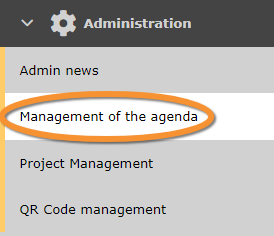
Management of the agenda.
List of planned events. Use arrows under titles to alternate between ascending and descending order (see image as an example).


- 1. Search
Select page number and/or number of items per page.
- 2. Details
Click to see details of selected event.

Details admin events.
6. Start date
7. End date
8. Insertion date
9. Title
10. Message creator
11. Content
BACK: Go to previous screen without saving.
EDIT: Modify details. See sub-section Edit below to know more.
DELETE: Delete event. You will be asked to confirm.
- 6. Start date
- 6. Start date
- Starting date of event.
- 7. End date
- 7. End date
- Ending date of event.
- 8. Insertion date
- 8. Insertion date
- Date and time of creation or last update.
- 9. Title
- 9. Title
- Title of event in all available languages.
- 10. Message creator
- 10. Message creator
- Name and email address of creator.
- 11. Content
- 11. Content
- Text of event in all available languages.
- 3. Edit
Modify / complete information about the event.
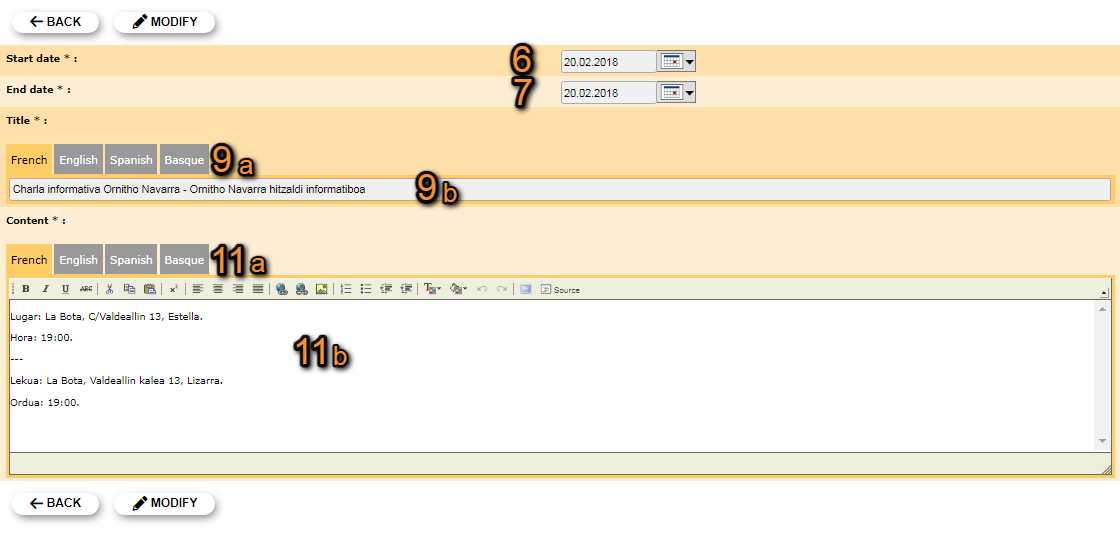
Edit admin events.
6. Start date
7. End date
9. Title
11. Content
BACK: Go to previous screen withoust saving.
MODIFY: Save changes.
- 6. Start date
- 6. Start date
- Modify starting date of event by clicking on the calendar and selecting a date from the expandable menu.
- 7. End date
- 7. End date
- Modify ending date of event by clicking on the calendar and selecting a date from the expandable menu.
- 9. Title
- 9. Title
- Modify / add event's title by selecting a language from the tabs on top (a) and typing title in the selected language (b). Repeat process for any other language.
- 11. Content
- 11. Content
- Modify / add event's information by selecting a language from the tabs on top (a) and typing the text in the selected language (b). Repeat the process for any other language.
- 4. Delete
Delete the selected event from the list. You will be asked to confirm.
- 5. NEW
Create a new event.
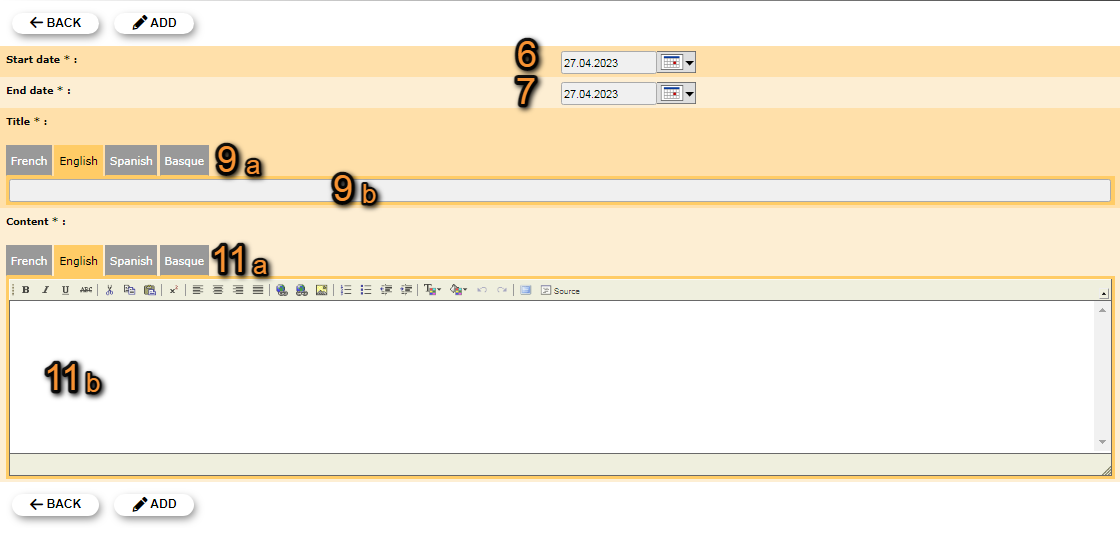
Adding a new event.
6. Start date
7. End date
9. Title
11. Content
BACK: Go to previous screen without saving.
ADD: Save new entry.
- 6. Start date
- 6. Start date
- Indicate a starting date of event by clicking on the calendar and selecting a date from the expandable menu.
- 7. End date
- 7. End date
- Indicate an ending date of event by clicking on the calendar and selecting a date from the expandable menu.
- 9. Title
- 9. Title
- Add event's title by selecting a language from the tabs on top (a) and typing title in the selected language (b). Repeat process for adding a different language.
- 11. Content
- 11. Content
- Add event's information by selecting a language from the tabs on top (a) and typing the text in the selected language (b). Repeat the process for adding a different language.