Rarity reports: Difference between revisions
| (41 intermediate revisions by the same user not shown) | |||
| Line 27: | Line 27: | ||
==Ballot open== | ==Ballot open== | ||
<br/> | |||
Species that are still open to vote. <br/> | |||
<br/> | <br/> | ||
| Line 67: | Line 70: | ||
See [[Rarity reports#Ballot details|Ballot details]] for more information. <br/> | See [[Rarity reports#Ballot details|Ballot details]] for more information. <br/> | ||
<br/> | |||
<span id="My vote"></span> | |||
:<b>My vote</b><br/> | |||
<span id="Vote progress"></span> | |||
:<b>Vote progress</b><br/> | |||
[[Rarity reports#Ballot open|[Top to Ballot open]]] <br/> | |||
[[Rarity_reports#Ballots_status|[Top to Ballots status]]] <br/> | |||
[[#top|[Back to Rarity reports]]] <br/> | |||
<br/> | <br/> | ||
==Ballot closed== | ==Ballot closed== | ||
<br/> | |||
Species in which voting is closed. <br/> | |||
<br/> | <br/> | ||
| Line 113: | Line 131: | ||
<span id="My vote 2"></span> | <span id="My vote 2"></span> | ||
:<b>My vote</b><br/> | :<b>My vote</b><br/> | ||
[[Rarity reports#Ballot closed|[Top to Ballot closed]]] <br/> | |||
[[Rarity_reports#Ballots_status|[Top to Ballots status]]] <br/> | |||
[[#top|[Back to Rarity reports]]] <br/> | |||
<br/> | |||
==All ballots== | ==All ballots== | ||
<br/> | |||
List of all ballots, opened and closed. <br/> | |||
<br/> | <br/> | ||
| Line 166: | Line 193: | ||
<span style="color: #000000; margin-left: 25px;"><b>· </b>[[Rarity reports#Ballot open|Ballot open]]: <br/> | <span style="color: #000000; margin-left: 25px;"><b>· </b>[[Rarity reports#Ballot open|Ballot open]]: <br/> | ||
<span style="color: #000000; margin-left: 25px;"><b>· </b>[[Rarity reports#Ballot closed|Ballot closed]]: <br/> | <span style="color: #000000; margin-left: 25px;"><b>· </b>[[Rarity reports#Ballot closed|Ballot closed]]: <br/> | ||
<br/> | |||
[[Rarity_reports#All ballots|[Top to All ballots]]] <br/> | |||
[[Rarity_reports#Ballots_status|[Top to Ballots status]]] <br/> | |||
[[#top|[Back to Rarity reports]]] <br/> | |||
<br/> | <br/> | ||
<center> | |||
<div class="toc" style="border-radius: 5px; padding: 25px; text-align: left; font-family: sans-serif; color: black; width: 95%; background-color:white;"> | |||
==Ballot details== | ==Ballot details== | ||
<br/> | |||
See details of species. <br/> | |||
<br/> | <br/> | ||
<center> | <center> | ||
<div class="toc" style="border-radius:5px;background-color:#ffffff;padding-left:8px;padding-right:8px;padding-bottom:8px;width: | <div class="toc" style="border-radius:5px;background-color:#ffffff;padding-left:8px;padding-right:8px;padding-bottom:8px;width:700px;"> | ||
[[File:Ballot details.png| | [[File:Ballot details.png|700px|link=https://help.biolovision.net/images/6/6e/Ballot_details.png]] | ||
<div class="toc" style="border-radius:5px;padding-left:15px;text-align:left; font-size:12px;width: | <div class="toc" style="border-radius:5px;padding-left:15px;text-align:left; font-size:12px;width:675px;"> | ||
'''Ballot details.''' | '''Ballot details.''' | ||
</div> | </div> | ||
| Line 200: | Line 238: | ||
1. Select from the expandable menu the map layer. <br/> | 1. Select from the expandable menu the map layer. <br/> | ||
2. Click <b>Generate report</b> to | 2. Click <b>Generate report</b> to create the .pdf file. <br/> | ||
3. Click [[File:pdf.png|frameless|20px|link=https://help.biolovision.net/images/6/6b/Pdf.png]] to open the report on a new tab. <br/> | |||
<br/> | <br/> | ||
If | If a report for the sighting has already been created, the date and time of latest report is shown on the right. <br/> | ||
<br/> | <br/> | ||
| Line 214: | Line 253: | ||
<p style="color:black;font-size:12px;padding-left:30px;text-align:left;column-count:2;"> | <p style="color:black;font-size:12px;padding-left:30px;text-align:left;column-count:2;"> | ||
<b>1.</b> Select map layer. <br /> | <b>1.</b> Select map layer. <br /> | ||
<b>2.</b> | <b>2.</b> Generate report. <br/> | ||
<b>3.</b> Open report. <br/> | |||
</p> | </p> | ||
</div> | </div> | ||
| Line 223: | Line 263: | ||
<span id="Ballot"></span> | <span id="Ballot"></span> | ||
:<b>Ballot</b><br/> | :<b>Ballot</b><br/> | ||
See ballot results and list of users allowed to vote. <br/> | |||
<br/> | |||
<center> | |||
<div class="toc" style="border-radius:5px;background-color:#ffffff;padding-left:8px;padding-right:8px;padding-bottom:8px;width:600px;"> | |||
[[File:Ballot.png|600px|link=https://help.biolovision.net/images/2/20/Ballot.png]] | |||
<div class="toc" style="border-radius:5px;padding-left:15px;text-align:left; font-size:12px;width:575px;"> | |||
'''Ballot details. Ballot.''' | |||
</div> | |||
</div> | |||
</center> | |||
<br/> | |||
<br/> | |||
<span id="Discussion"></span> | <span id="Discussion"></span> | ||
:<b>Discussion</b><br/> | :<b>Discussion</b><br/> | ||
<span id="Main information"></span> | <span id="Main information"></span> | ||
:<b>Main information | :<b>Main information</b><br/> | ||
<span id="Other information | <span id="Other information"></span> | ||
:<b>Other information</b><br/> | :<b>Other information</b><br/> | ||
<span id="Map"></span> | <span id="Map"></span> | ||
:<b>Map</b><br/> | :<b>Map</b><br/> | ||
Map positioning all sightings, and list of observation details. <br/> | |||
<br/> | |||
<span id="Media"></span> | <span id="Media"></span> | ||
:<b>Media</b><br/> | :<b>Media</b><br/> | ||
Media files associated to the sighting. <br/> | |||
<br/> | |||
[[Rarity reports#Ballot details|[Top to Ballot details]]] <br/> | |||
[[Rarity reports#All ballots|[Top to All ballots]]] <br/> | |||
[[Rarity_reports#Ballots_status|[Top to Ballots status]]] <br/> | |||
[[#top|[Back to Rarity reports]]] <br/> | |||
<br/> | |||
</div> | |||
</center> | |||
<br /> | |||
=Individual reports= | =Individual reports= | ||
| Line 251: | Line 322: | ||
</center> | </center> | ||
<br/> | <br/> | ||
<br/> | |||
<center> | |||
<div class="toc" style="border-radius:5px;background-color:#ffffff;padding-left:8px;padding-right:8px;padding-bottom:8px;width:700px;"> | |||
[[File:Ind reports.png|700px|link=https://help.biolovision.net/images/6/6b/Ind_reports.png]] | |||
<div class="toc" style="border-radius:5px;padding-left:15px;text-align:left; font-size:12px;width:675px;"> | |||
'''Individual reports.''' | |||
</div> | |||
<p style="color:black;font-size:12px;padding-left:30px;text-align:left;column-count:2;"> | |||
<b>1.</b> [[Rarity reports#Status 4|Report status]] <br /> | |||
<b>2.</b> [[Rarity reports#Search 4|Search]] <br/> | |||
<b>3.</b> [[Rarity reports#Details 4|Details]] <br /> | |||
<b>4.</b> [[Rarity reports#Report 4|Report]] <br /> | |||
</p> | |||
<br/> | |||
<p style="color:black;font-size:12px;padding-left:5px;text-align:left;column-count:1;padding-right:5px;"> | |||
'''ID:''' <br/> | |||
'''Committee:''' <br/> | |||
'''Observer:''' Name, contact details and user number of observer.<br/> | |||
'''Species:''' Species the report refers to.<br/> | |||
'''Report:''' .pdf file containing the report about this observation.<br/> | |||
</p> | |||
</div> | |||
</center> | |||
<br/> | |||
<br/> | |||
<span id="Status 4"></span> | |||
:<b>Report status</b><br/> | |||
Select from the tab which list of reports to visualise: <br/> | |||
<span style="color: #000000; margin-left: 25px;"><b>· Undecided:</b> List of observations pending validation. <br/> | |||
<span style="color: #000000; margin-left: 25px;"><b>· Approved:</b> List of observations already accepted. <br/> | |||
<span style="color: #000000; margin-left: 25px;"><b>· Refused:</b> List of observations rejected. <br/> | |||
<span style="color: #000000; margin-left: 25px;"><b>· All reports:</b> List of all observations independently of their status. <br/> | |||
<br/> | |||
<span id="Search 4"></span> | |||
:<b>Search</b><br/> | |||
Select page number and/or number of items per page.<br/> | |||
<br/> | |||
<span id="Details 4"></span> | |||
:<b>Details</b><br/> | |||
See details of the observation. <br/> | |||
<br/> | |||
<span id="Report 4"></span> | |||
:<b>Report</b><br/> | |||
Download the .pdf file containing the observation's report. <br/> | |||
<br/> | |||
<br/> | |||
[[Rarity reports#Individual reports|[Top to Individual reports]]] <br/> | |||
[[#top|[Back to Rarity reports]]] <br/> | |||
<br/> | <br/> | ||
| Line 265: | Line 395: | ||
</center> | </center> | ||
<br/> | <br/> | ||
<br/> | |||
[[Rarity reports#Combined reports|[Top to Combined reports]]] <br/> | |||
[[#top|[Back to Rarity reports]]] <br/> | |||
<br/> | <br/> | ||
Latest revision as of 13:09, 28 August 2026
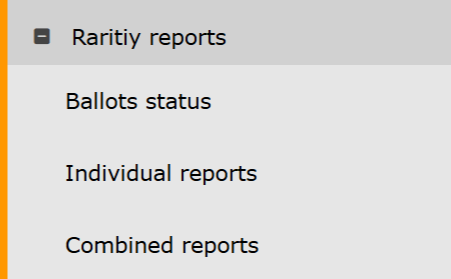
Rarity reports. Menu.
Ballots status
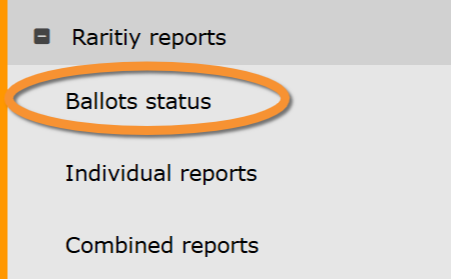
Rarity reports. Ballots status.
Ballot open
Species that are still open to vote.
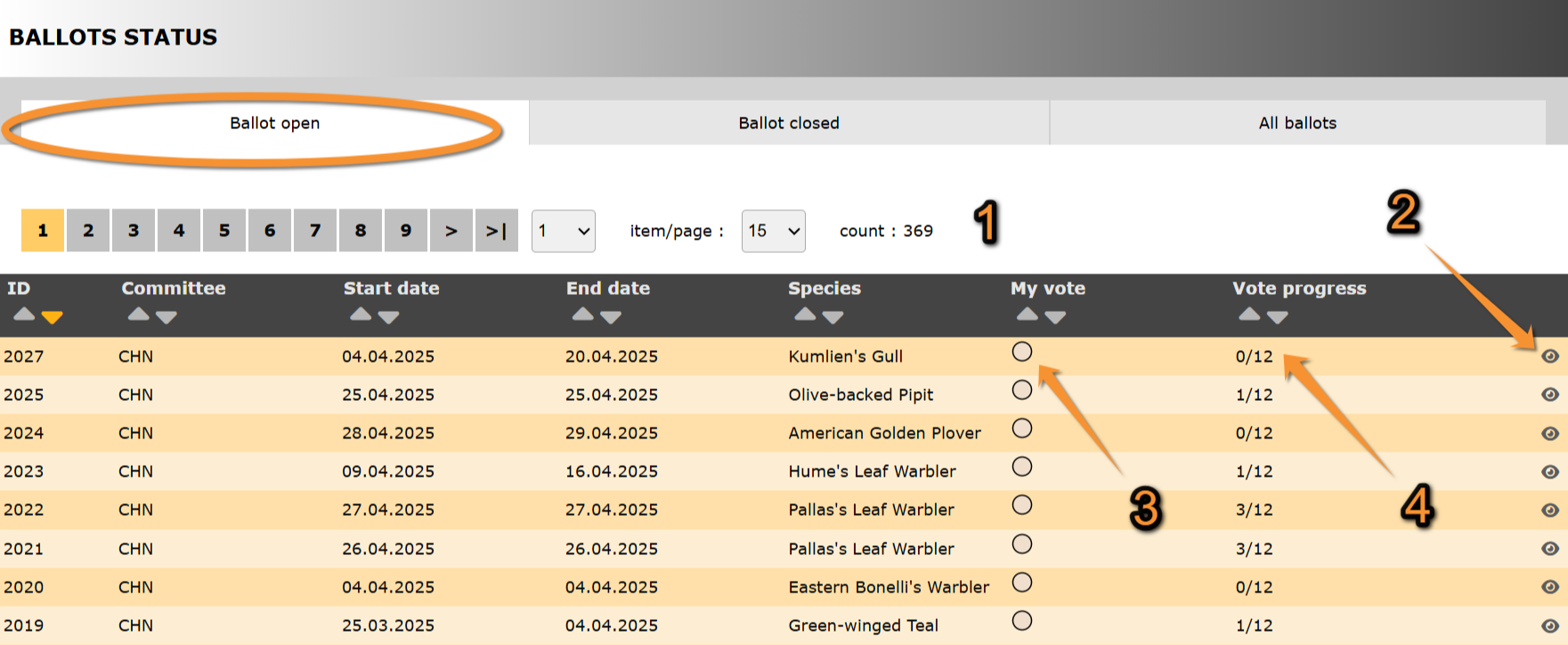
Ballot open.
ID: Text 1.
Committee: Text 2.
Start date: Text 1.
End date: Text 2.
Species: Text 1.
3. My vote: Text 2.
4. Vote progress: Text 2.
- Search
Select page number and/or number of items per page.
- Details
See details about this sighting and its rarity report associated.
See Ballot details for more information.
- My vote
- Vote progress
[Top to Ballot open]
[Top to Ballots status]
[Back to Rarity reports]
Ballot closed
Species in which voting is closed.
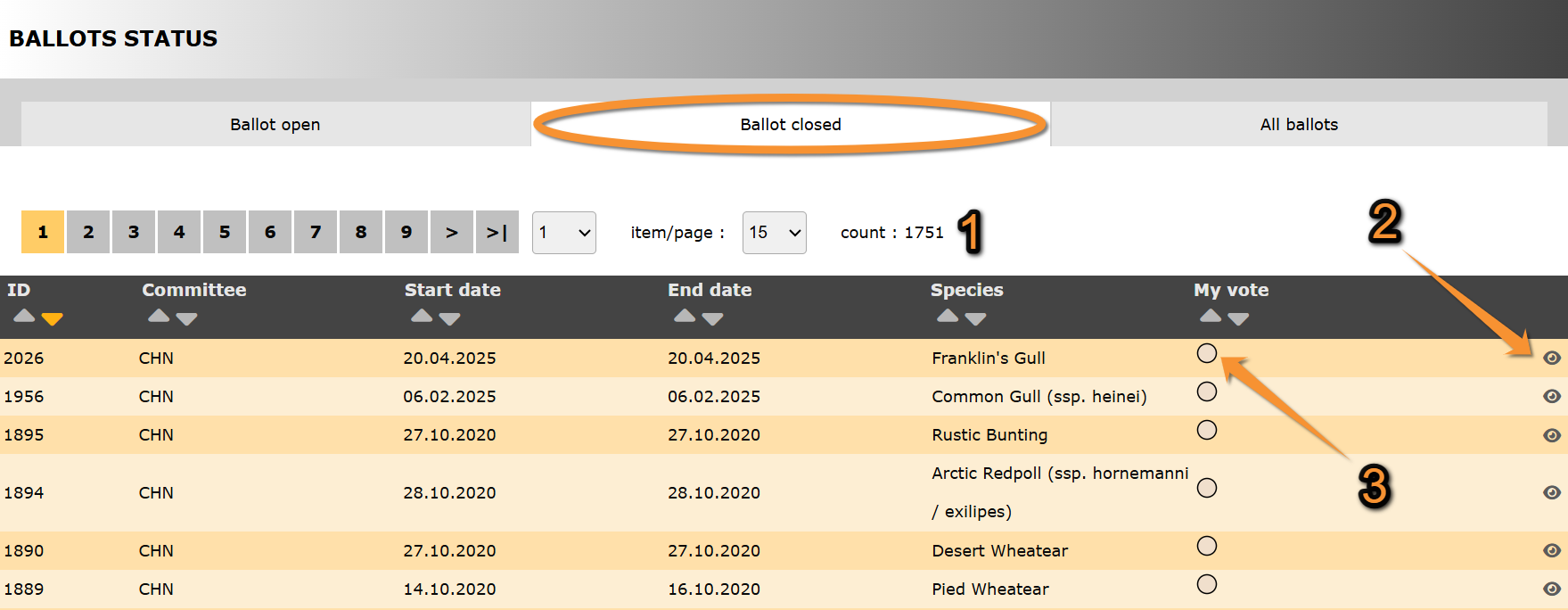
Ballot closed.
ID: Text 1.
Committee: Text 2.
Start date: Text 1.
End date: Text 2.
Species: Text 1.
3. My vote: Text 2.
- Search
Select page number and/or number of items per page.
- Details
See details about this sighting and its rarity report associated.
See Ballot details for more information.
- My vote
[Top to Ballot closed]
[Top to Ballots status]
[Back to Rarity reports]
All ballots
List of all ballots, opened and closed.
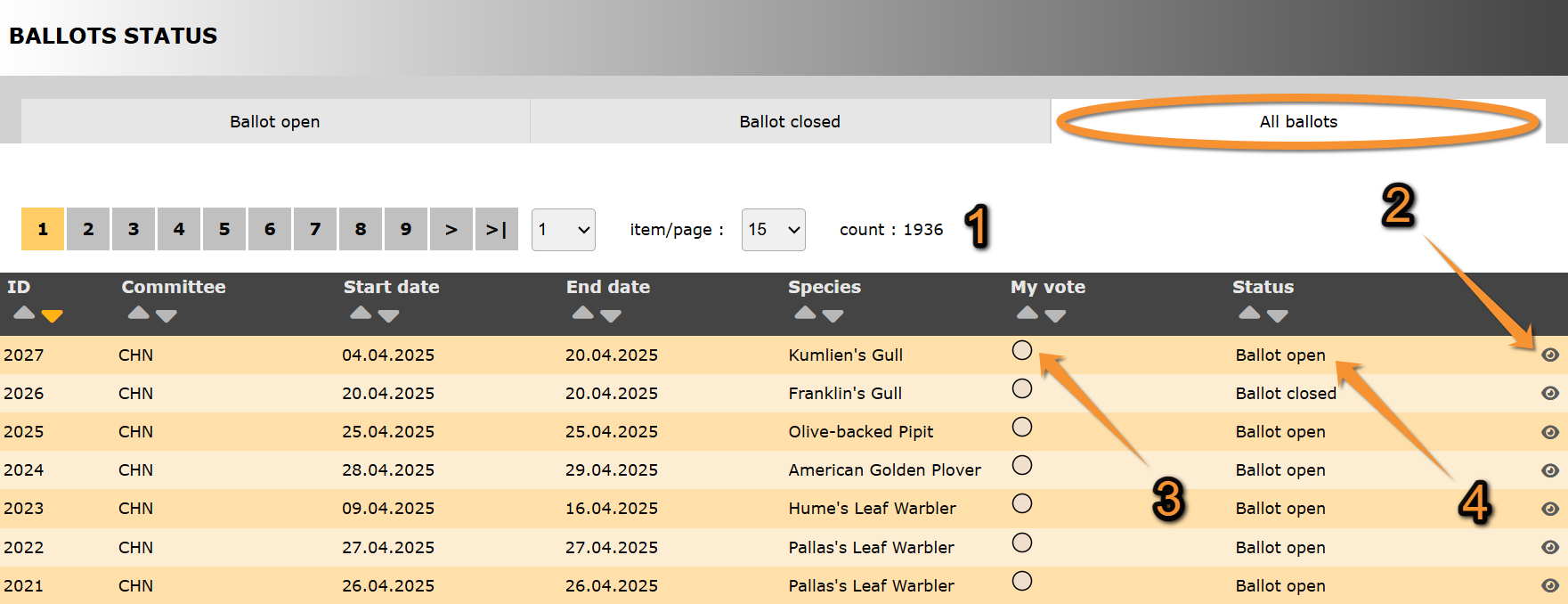
All ballots.
ID: Text 1.
Committee: Text 2.
Start date: Text 1.
End date: Text 2.
Species: Text 1.
3. My vote: Text 2.
4. Status: Text 2.
- Search
Select page number and/or number of items per page.
- Details
See details about this sighting and its rarity report associated.
See Ballot details for more information.
- My vote
- Status
Indicates in which state are all ballots listed:
· Ballot open:
· Ballot closed:
[Top to All ballots]
[Top to Ballots status]
[Back to Rarity reports]
Ballot details
See details of species.
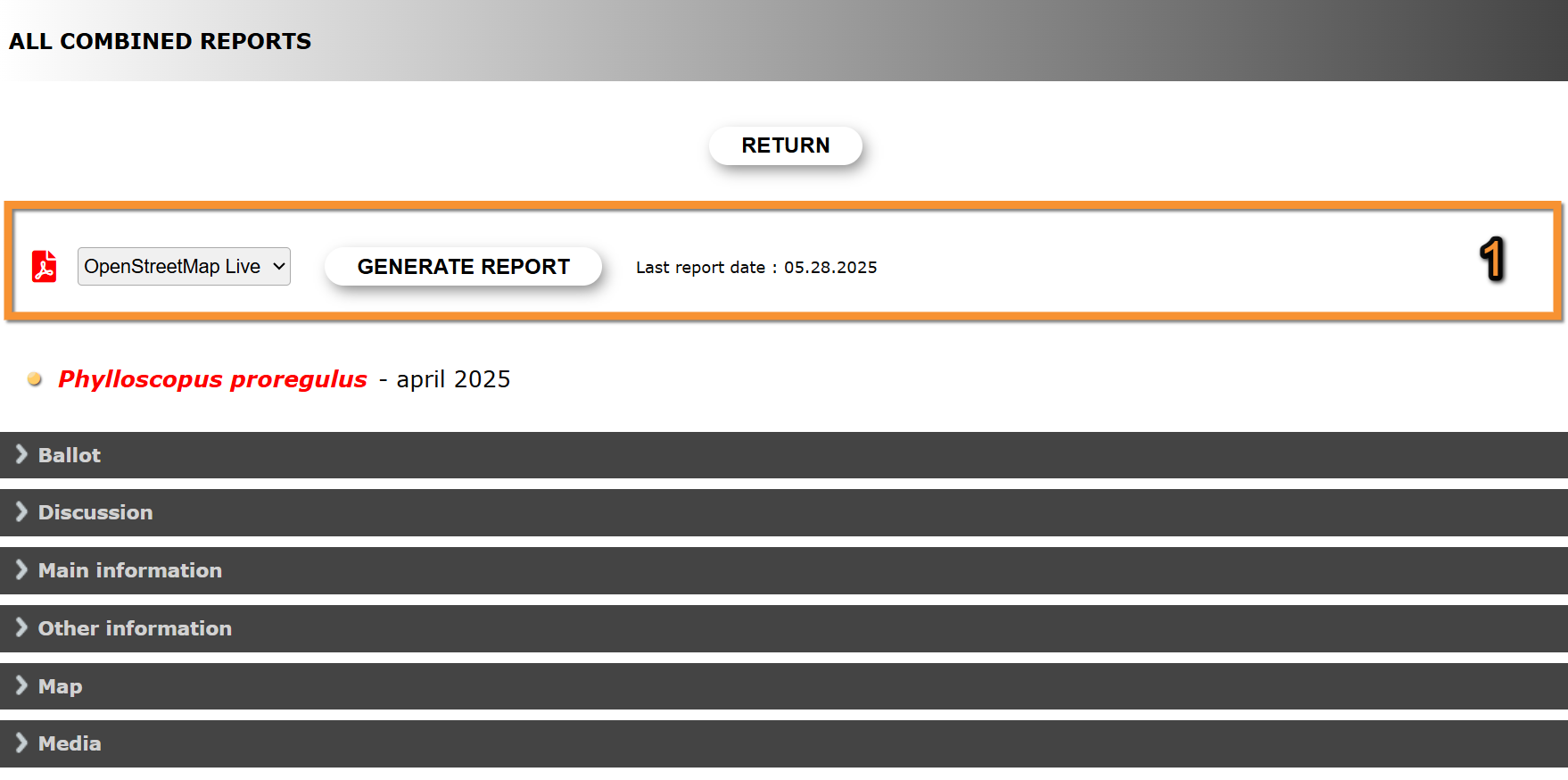
Ballot details.
Return: Go to previous screen.
1. Report:
2. Ballot: Text 2.
3. Discussion: Text 1.
4. Main information: Text 2.
5. Other information: Text 1.
6. Map: Text 2.
7. Media: Text 1.
- Report
Create a downloadable report as a .pdf file with information about the species sighting.
1. Select from the expandable menu the map layer.
2. Click Generate report to create the .pdf file.
3. Click  to open the report on a new tab.
If a report for the sighting has already been created, the date and time of latest report is shown on the right.

Download report.
1. Select map layer.
2. Generate report.
3. Open report.
- Ballot
See ballot results and list of users allowed to vote.
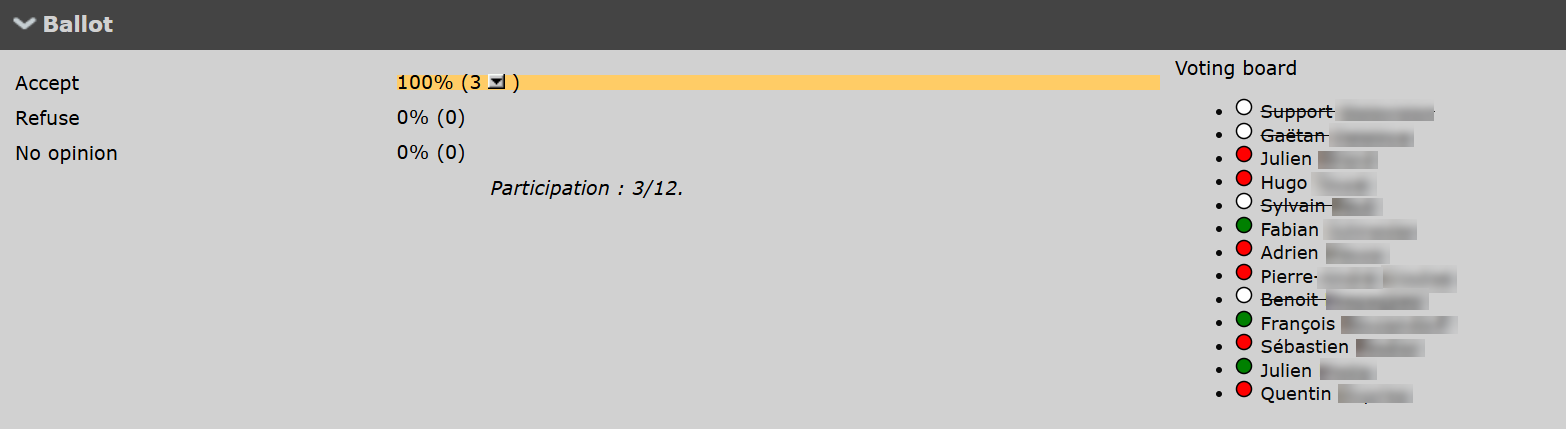
Ballot details. Ballot.
- Discussion
- Main information
- Other information
- Map
Map positioning all sightings, and list of observation details.
- Media
Media files associated to the sighting.
[Top to Ballot details]
[Top to All ballots]
[Top to Ballots status]
[Back to Rarity reports]
Individual reports
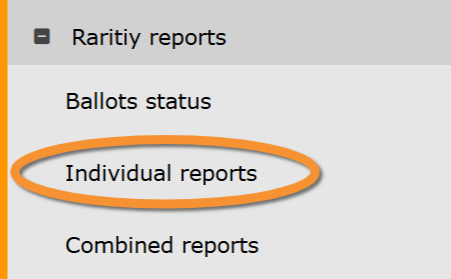
Rarity reports. Individual reports.
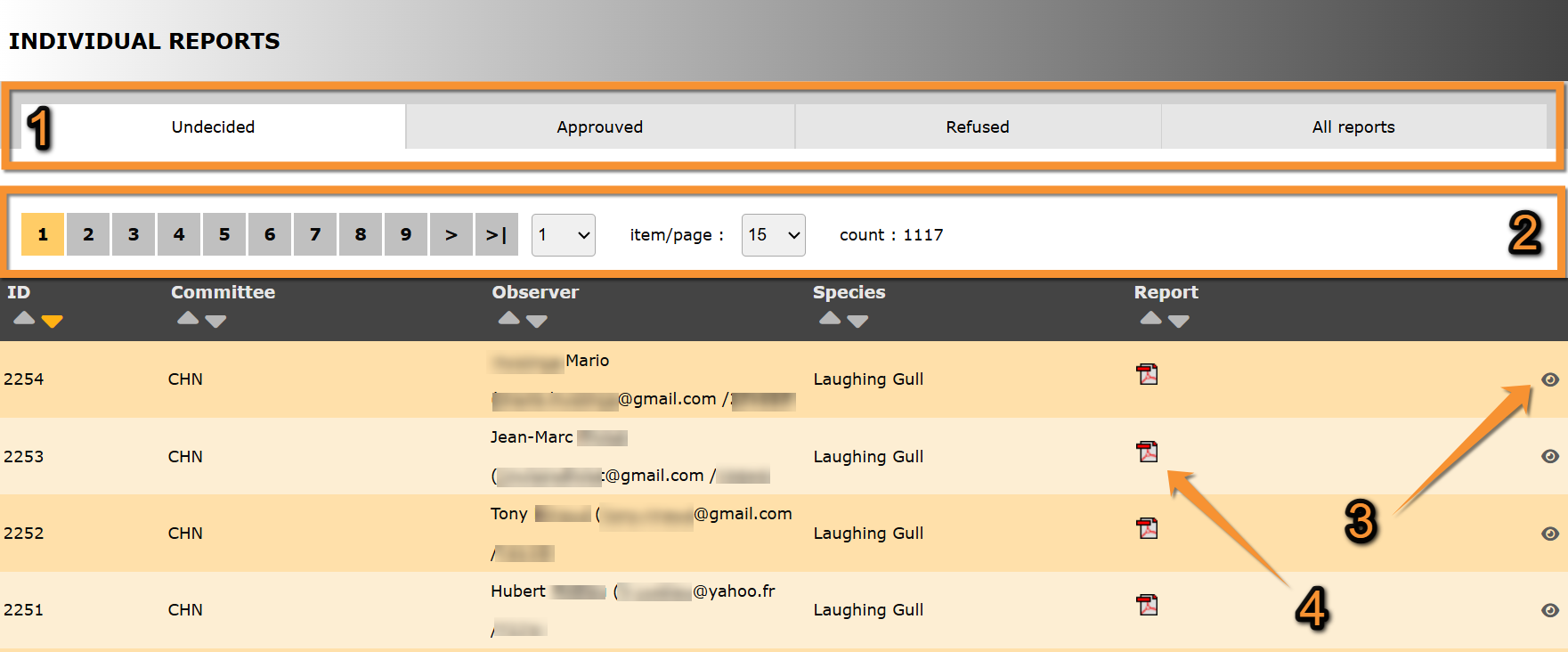
Individual reports.
1. Report status
2. Search
3. Details
4. Report
ID:
Committee:
Observer: Name, contact details and user number of observer.
Species: Species the report refers to.
Report: .pdf file containing the report about this observation.
- Report status
Select from the tab which list of reports to visualise:
· Undecided: List of observations pending validation.
· Approved: List of observations already accepted.
· Refused: List of observations rejected.
· All reports: List of all observations independently of their status.
- Search
Select page number and/or number of items per page.
- Details
See details of the observation.
- Report
Download the .pdf file containing the observation's report.
[Top to Individual reports]
[Back to Rarity reports]
Combined reports
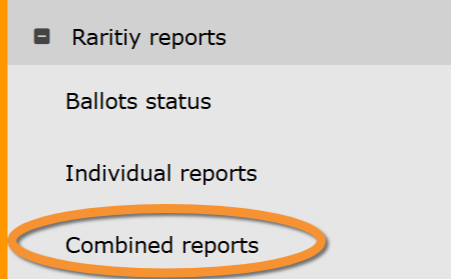
Rarity reports. Combined reports.