Changing personal data, password or email: Difference between revisions
No edit summary |
No edit summary |
||
| Line 7: | Line 7: | ||
<br /> | <br /> | ||
<br /> | <br /> | ||
{{Changing personal data, password or email}} | |||
Revision as of 15:26, 14 September 2022
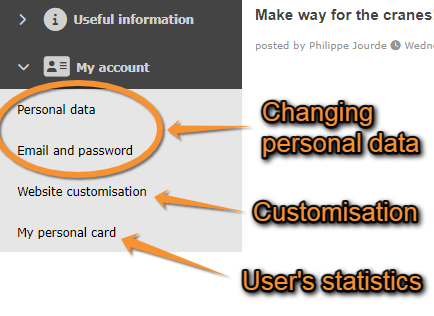
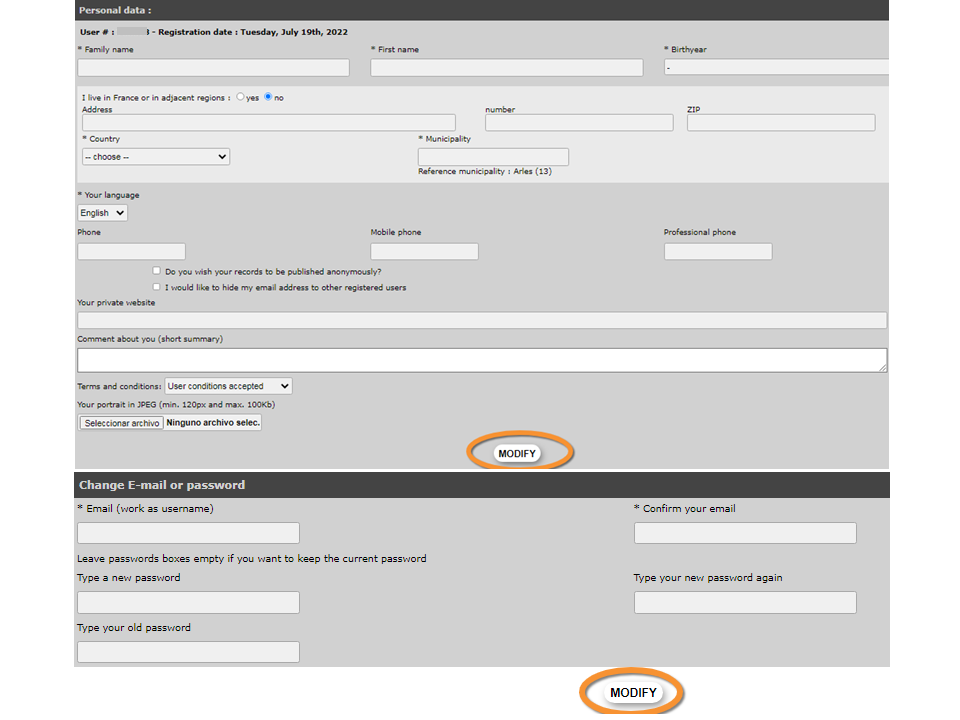
After logging in, a new section will appear at the bottom of the left-hand column titled My account. Under the different sections, you can modify your personal data, including email and password, customise the website and see some personal statistics (see image My account). Change the necessary fields in any of the sections (except in My personal card, these are the statistics) and click Modify (see image Changing personal data, password or email). Note fields marked with an asterisk need to be filled in.


After logging in, a new section will appear at the bottom of the left-hand column titled My account. Under the different sections, you can modify your personal data, including email and password, customise the website and see some personal statistics (see image My account). Change the necessary fields in any of the sections (except in My personal card, these are the statistics) and click Modify (see image Changing personal data, password or email). Note fields marked with an asterisk need to be filled in.