Free area tool: Difference between revisions
No edit summary |
No edit summary |
||
| Line 24: | Line 24: | ||
If interested, select an area to survey by clicking on a tab: <br/> | If interested, select an area to survey by clicking on a tab: <br/> | ||
<br/> | |||
<span style="color: #000000; margin-left: 25px;"><b>· [[Free area tool#map|Map with free area]]. </b><br/> | |||
<span style="color: #000000; margin-left: 25px;"><b>· [[Free area tool#list|List of free census]]. <br/> | |||
<br/> | <br/> | ||
<span id="map"></span> | |||
<b> Map with free area </b> | |||
Search a free site from a map. <br/> | |||
<br/> | <br/> | ||
| Line 33: | Line 39: | ||
<br/> | <br/> | ||
<span style="margin-left: 25px | <span style="margin-left: 25px;">Go to wiki section [[Navigating_the_map|Navigating the map]] to see how to navigate the map.<br/> | ||
<br/> | <br/> | ||
| Line 52: | Line 58: | ||
<span id="list"></span> | |||
<b>List of free census</b> | |||
If you know which site you would like to survey, select from a list. <br/> | |||
<br/> | |||
<span style="color: #000000; margin-left: 25px;"><b>· </b>Search an area by typing a site name (after using the search tool, click on [[Media:2023-03-17 Diplay full list.png|'''DISPLAY ALL''']] to revert selection), or <br/> | |||
<span style="color: #000000; margin-left: 25px;"><b>· </b>select page number and/or number of sites shown per page. <br/> | |||
<span style="color: #000000; margin-left: 25px;"><b>· </b>See details of selected site (image [[Media:2023-05-01 Site details from list.png|Site details from list]]), and email coordinator if interested (number 8 in image) or return to list (number 9 in image), or <br/> | |||
<br/> | <br/> | ||
<b>6.</b> [[Media:2023-05-01 email coordinator.png|E-mail coordinator]] directly. <br/> | |||
</p><br/> | |||
<span style="color: #000000; margin-left: 25px;"><b>· </b> | |||
[[File:2023-05-01 List of free census.png|700px | <center> | ||
<p style=" | <div class="toc" style="border-radius:5px;background-color:#ffffff;padding-left:8px;padding-right:8px;width:700px;"> | ||
<b>A.</b> Search an area by typing a site name | [[File:2023-05-01 List of free census.png|700px]] | ||
<div class="toc" style="border-radius:5px;padding-left:15px;text-align:left; font-size:12px;width:675px;"> | |||
'''List of free census.''' | |||
</div> | |||
<p style="color:black;font-size:12px;padding-left:5px;text-align:left;column-count:1;padding-right:5px;"> | |||
<b>A.</b> Search an area by typing a site name. <br/> | |||
<b>B.</b> Select page number and/or number of sites shown per page. <br/> | <b>B.</b> Select page number and/or number of sites shown per page. <br/> | ||
<br/> | <br/> | ||
<b>5.</b> See details of selected site. <br/> | |||
<b>6.</b> [[Media:2023-05-01 email coordinator.png|E-mail coordinator]] directly. <br/> | <b>6.</b> [[Media:2023-05-01 email coordinator.png|E-mail coordinator]] directly. <br/> | ||
</p><br/> | </p> | ||
</div> | |||
</center> | |||
<br/> | |||
<br/> | <br/> | ||
Revision as of 13:43, 25 July 2025
Choose a survey site to participate in more standardised studies.
Access tool through the main menu on the left hand column (see image below).
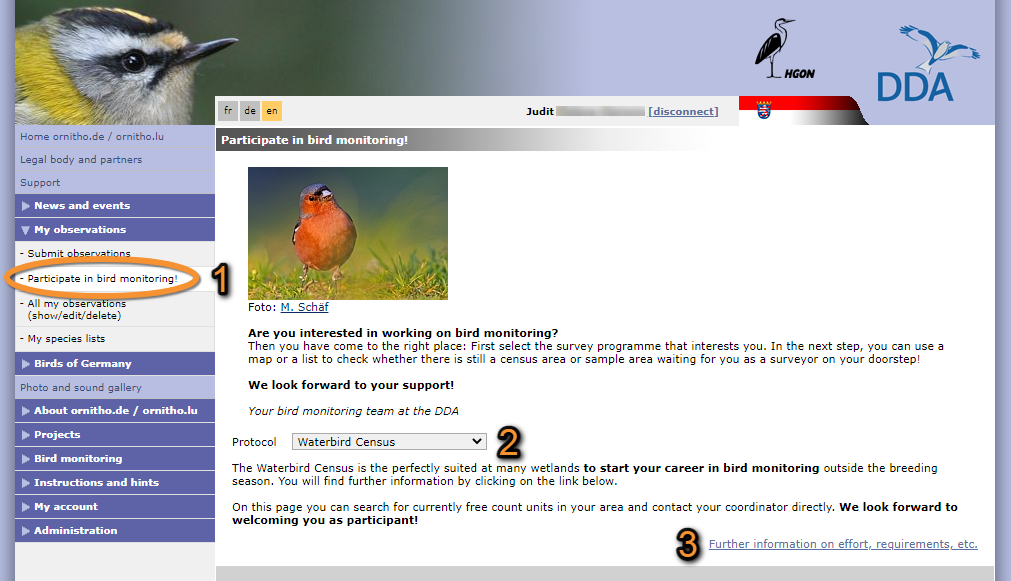
Accessing Free area tool.
1. Access Free area tool.
2. Select from the expandable menu the protocol in which you would like to participate.
3. See requirements for the selected protocol.
If interested, select an area to survey by clicking on a tab:
· Map with free area.
· List of free census.
Map with free area
Search a free site from a map.
· Search an area by typing a site name (after using the search tool, click on DISPLAY ALL to revert selection).
· Click on a dot to select a site. When a dot contains more than one site clicking on it zooms in the area. Then click on the polygon to see site details (close window on he top right cross icon).


Go to wiki section Navigating the map to see how to navigate the map.
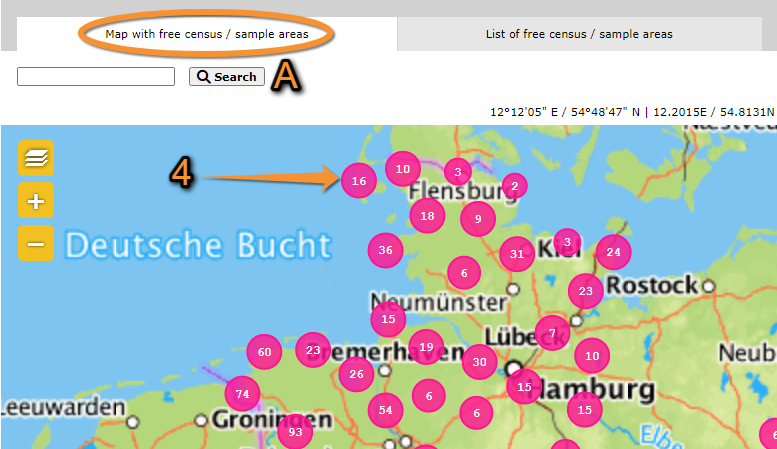
Map with free area.
A. Search an area by typing a site name.
4. Click on a dot to select a site.
List of free census
If you know which site you would like to survey, select from a list.
· Search an area by typing a site name (after using the search tool, click on DISPLAY ALL to revert selection), or
· select page number and/or number of sites shown per page.
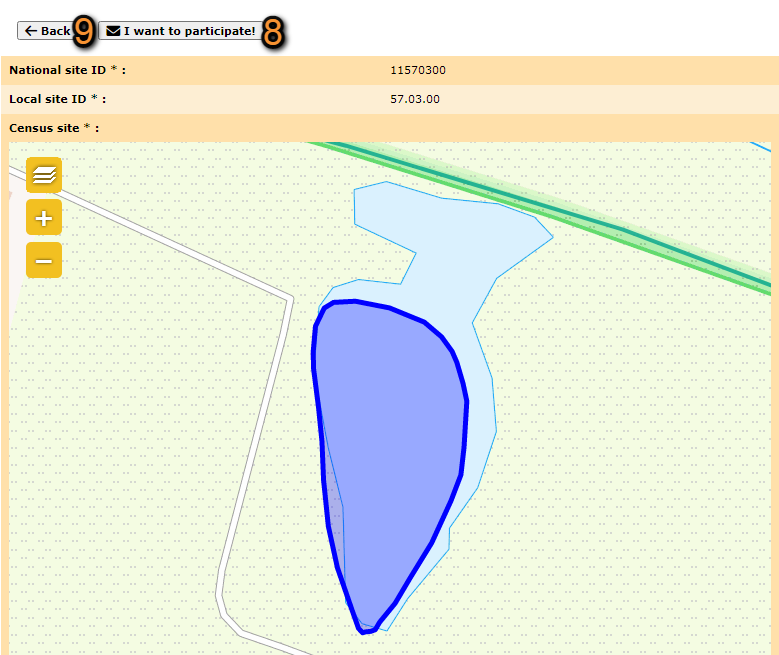
· See details of selected site (image Site details from list), and email coordinator if interested (number 8 in image) or return to list (number 9 in image), or
6. E-mail coordinator directly.

·

List of free census.
A. Search an area by typing a site name.
B. Select page number and/or number of sites shown per page.
5. See details of selected site.
6. E-mail coordinator directly.