Registration: Difference between revisions
No edit summary |
No edit summary |
||
| Line 1: | Line 1: | ||
To participate and share observations, one must first register. Other advantages include seeing observations, and getting information regarding sun and moon, tailored to your location. A registered user can also customise the web site and have access to sections hidden to anonymous visitors. Registration is free and fast. To do so, go to your local portal, or to that of any other participant organization. Examples will be drawn from the French portal Faune-France. Click register (see image [[:Media:14092022WIKI register 1.png|Registration Step 1]]) and register again (see image [[:Media:14092022WIKI register 2.png|Registration Step 2]]), and fill in the form page (see image [[:Media:Registration form.png|Example of registration form]]). Fields marked with an asterisk are mandatory. Please enter your real name and age as we need them for legal reasons. We will use your age also for statistics but it will never be public. We do recommend you to provide your real address because some tools will use it to offer you a better experience. For example, all maps will be centered at this location, you will see sun and moon information, including time of sunrise and sunset, at this locality, and you will see on the main interface the lastets sightins at your area. Note that while your observations and locations will generally be available to other users (check cases where data will be hidden), your personal data will only be used to contact you regarding confusing records. Equally, your name will be visible to all users and your email address to registered ones. Indicate if you want to submit your records anonimously by ticking the encircled cell 1, or if you want to hide your email address to other users by ticking encircled cell 2. If your name is hidden, your address is as well and there is no need to tick it. Note however, administrators and coordinators can still see your name and contact you at the registered email address regarding your observations.<br/> | To participate and share observations, one must first register. Other advantages include seeing observations, and getting information regarding sun and moon, tailored to your location. A registered user can also customise the web site and have access to sections hidden to anonymous visitors. Registration is free and fast. To do so, go to your local portal, or to that of any other participant organization. Examples will be drawn from the French portal Faune-France. Click register (see image [[:Media:14092022WIKI register 1.png|Registration Step 1]]) and register again (see image [[:Media:14092022WIKI register 2.png|Registration Step 2]]), and fill in the form page (see image [[:Media:Registration form.png|Example of registration form]]). Fields marked with an asterisk are mandatory. Please enter your real name and age as we need them for legal reasons. We will use your age also for statistics but it will never be public. We do recommend you to provide your real address because some tools will use it to offer you a better experience. For example, all maps will be centered at this location, you will see sun and moon information, including time of sunrise and sunset, at this locality, and you will see on the main interface the lastets sightins at your area. Note that while your observations and locations will generally be available to other users (check cases where data will be hidden), your personal data will only be used to contact you regarding confusing records. Equally, your name will be visible to all users and your email address to registered ones. Indicate if you want to submit your records anonimously by ticking the encircled cell 1, or if you want to hide your email address to other users by ticking encircled cell 2. If your name is hidden, your address is as well and there is no need to tick it. Note however, administrators and coordinators can still see your name and contact you at the registered email address regarding your observations.<br/> | ||
You will be able to modify your data at any time (see section [[Changing personal data, password or email|Web interface > Getting sarted > Changing personal data, password or email]]). When done, click '''Register''' at the bottom (see image [[:Media:Registration form.png| Example of registration form]]). | You will be able to modify your data at any time (see section [[Changing personal data, password or email|Web interface > Getting sarted > Changing personal data, password or email]]). When done, click '''Register''' at the bottom (see image [[:Media:Registration form.png| Example of registration form]]).<br/> | ||
<br/> | |||
[[File:14092022WIKI register 1.png|700px|thumb|left|Registration Step 1]] | [[File:14092022WIKI register 1.png|700px|thumb|left|Registration Step 1]] | ||
Revision as of 22:48, 15 September 2022
To participate and share observations, one must first register. Other advantages include seeing observations, and getting information regarding sun and moon, tailored to your location. A registered user can also customise the web site and have access to sections hidden to anonymous visitors. Registration is free and fast. To do so, go to your local portal, or to that of any other participant organization. Examples will be drawn from the French portal Faune-France. Click register (see image Registration Step 1) and register again (see image Registration Step 2), and fill in the form page (see image Example of registration form). Fields marked with an asterisk are mandatory. Please enter your real name and age as we need them for legal reasons. We will use your age also for statistics but it will never be public. We do recommend you to provide your real address because some tools will use it to offer you a better experience. For example, all maps will be centered at this location, you will see sun and moon information, including time of sunrise and sunset, at this locality, and you will see on the main interface the lastets sightins at your area. Note that while your observations and locations will generally be available to other users (check cases where data will be hidden), your personal data will only be used to contact you regarding confusing records. Equally, your name will be visible to all users and your email address to registered ones. Indicate if you want to submit your records anonimously by ticking the encircled cell 1, or if you want to hide your email address to other users by ticking encircled cell 2. If your name is hidden, your address is as well and there is no need to tick it. Note however, administrators and coordinators can still see your name and contact you at the registered email address regarding your observations.
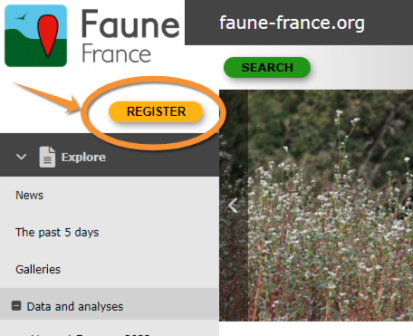


You will be able to modify your data at any time (see section Web interface > Getting sarted > Changing personal data, password or email). When done, click Register at the bottom (see image Example of registration form).


Once the form is submitted, you should read carefully our terms and conditions. These are your binding contract to us. You need to agree in order to continue with the registration form. You will then receive an email with your password. Make sure it does not go to your spam folder. With your username (the email address provided while registering) and the password you received, you can now start sharing your records!