Export records

Export data.
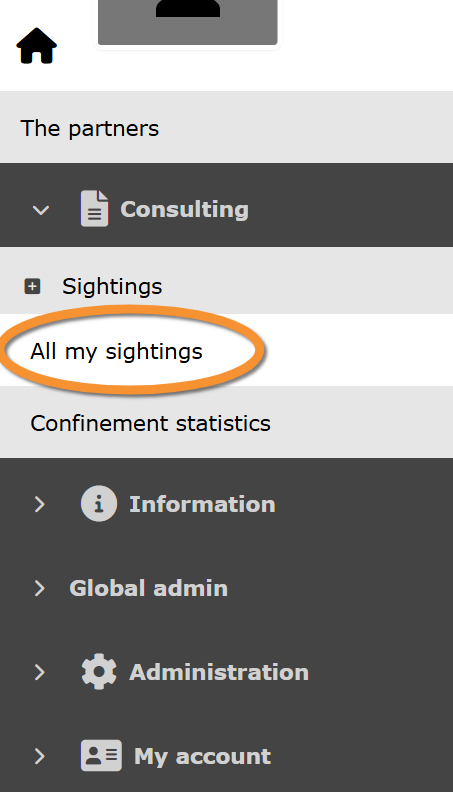
Export your data by going to Main menu > Consulting > Sightings > All my observations. All your observations, and go to Export section.
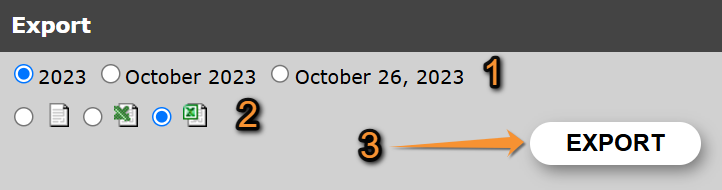
- 1. Select period
- 1. Select period
Select the period of time to export your data.
Check:
- a full year,
- a Full month, or
- only a day.
Change options by changing period selection on the above section 'Choose a date and a taxonomic group'. Year, month and day ready to export are those selected above.
- 2. Select format
- 2. Select format
Select how to export data.
Check one of the options:
 |
Export your data as a tab separated plain text(.txt). It can be opened with Microsoft Notepad, WordPad and TextEdit. |
 |
Export your data as a MS Excel file (.xlsx). It can be opened with Microsoft Excel. |
- 3. Start exporting
- 3. Start exporting
When period and format are selected, click
'EXPORT' to start exporting your observations, or
'EXPORT LISTS INFO' to start exporting information about lists, if available, and
select where to store your data in your computer. Export will start immediately. Fields downloaded are stated underneath:
| Field name | File description |
|---|---|
| ID ornitho 'Local portal' | Entry number at the local portal. It is automatically assigned. |
| Universal observation ID | Entry number at Biolovision products. It is automatically assigned. |
| Biolovision species ID | Number associated to the species. It is automatically assigned by the system. |
| Species | Species name in the language selected at 'Preferences'. |
| Latin name | Latin name of the species. |
| Taxonomic group | Taxonomic group of the observation. |
| Family | Family the observation belongs to. |
| Systematic order | |
| Date | Date of observation. |
| Day | Day number the observation took place. |
| Month | Month the observation took place. |
| Year | Year the observation took place. |
| Day of the year | Day the observation took place, starting the count on 1st January. |
| Pentad | Pentad (group of five days) of the year the observation took place. |
| Decade | Decade (group of ten days) of the year the observation took place. |
| Week number | Week number the observation took place, counting from the first week of January. |
| Timing | Time of observation. |
| Site | Site name and location where the observation took place. |
| Latitude (N) | Latitude coordinates in N-S position format. |
| Longitud (S) | Longitud coordinates in E-W position format. |
| Latitud (DMS) | Latitud in DMS format (degrees, minutes and seconds). |
| Longitud (DMS) | Longitud in DMS format (degrees, minutes and seconds). |
| UTM Zone North | Square the observation took place on a UTM grid. |
| UTM X (m) | Position on the X axe on a UTM grid. |
| UTM Y (m) | Position on the Y axe on a UTM grid. |
| Singing / hearing contact | Indicates if the individual/s observed was singing or vocalising. |
| Altitude | Altitude the observation took lace. It is determined automatically but can be modified when entering data. |
| Estimation | Count precision. Indicates how precise is the number of individuals recorded on the observation. |
| Number | Number of individuals recorded on the observation. |
| Details | Number of individuals per age/sex class, if provided. |
| Atlas code | Atlas code recorded for the observation. |
| Hidden | Indicates if the observation is public or hidden to the public. |
| Verify | |
| Comment | Public comment left about the observation. |
| Private comment | Private comment left about the observation. |
| Observer ID | Number automatically assigned to the user on the local portal. |
| Universal observer ID | Number automatically assigned to the user on Biolovision's products. |
| First name | First name of observer. |
| Family name | Family name of observer. |
| Observer's e-mail. | |
| Anonymous | Indicates if the observer wanted to report the observation anonymously. |
| Insertion date | Date the observation was recorded on the system. |
| Source | Indicates how the data was submitted. |
| Last modification date | Last date the observation was edited once entered. |
| SEARCH_EXPORT_TEXT_HAS_OFFSPRING_INFO | Indicates if the observation included offspring data. |