Getting started NaturaList
NaturaLlist is a worldwide compatible mobile application that allows browsing and sharing your biodiversity observations in a casual way like a field notebook, by list or with more advanced tools for protocolled collection of data.
Several languages are available. See a list of all available languages at wiki section Various > Available languages).
Most functions are available for both Android and Mac. Some advanced tools, like protocols, are currently only available on Android. The application NaturaList is linked to data.biolovision.net and the existing ornitho portals (see image Dataflow between our tools. Those portals give you full possibilities for using, backup and share your data after synchronization. See what you can do in each of the “tools” at the table below. To see the list of local portals, visit wiki section Various > Local portals and partners.

| Functions | NaturaList Android | Naturalist iOS | Data.biolovision.net | Local portal |
|---|---|---|---|---|
| Enter casual observations | YES | YES | NO | YES |
| Enter an observation list | YES | YES | NO | YES |
| Enter observations a posteriori | YES | YES | NO | YES |
| Projects | YES | NO | NO | YES |
| Protocols | YES1 | NO | NO | YES1 |
| Display data (including rare) | YES | YES | NO | YES2 |
| Offline maps | YES | NO | NO | NO |
| Offline use | YES3 | YES4 | NO | NO |
| Share the position of your observation and send it to google maps | YES | YES | NO | NO |
| Statistics and other information | NO | NO | YES, partly | YES |
| Species names in different languages tool | YES | YES | NO | NO |
| Download your own data | NO | NO | YES | YES |
| Worldwide use | YES | YES | YES | NO |
| Edit/delete your data | YES5 | YES5 | NO | YES6 |
| Display your data on a map | NO | NO | YES | YES6 |
| Have extended possibilities for languages for species | YES | YES | YES | YES7 |
1 Only for users with special rights. To know more about users with special rights go to wiki section...
2 By specific search or during the last 5 days within the territory covered by the corresponding portal.
3 Except for transmitting data, downloading maps and see what’s around you.
4 Except for transmitting data and see what’s around you.
5 Before synchronisation.
6 Only data within the territory covered by the corresponding portal.
7 Only languages available locally.
Downloading the application
Android
To download your application, go to Google Play in your phone. Search NaturaList and install (see image Downloading NaturaList). Do not confuse with other applications with close names, for example iNaturalist.


Alternatively, scan the QR to download the application:

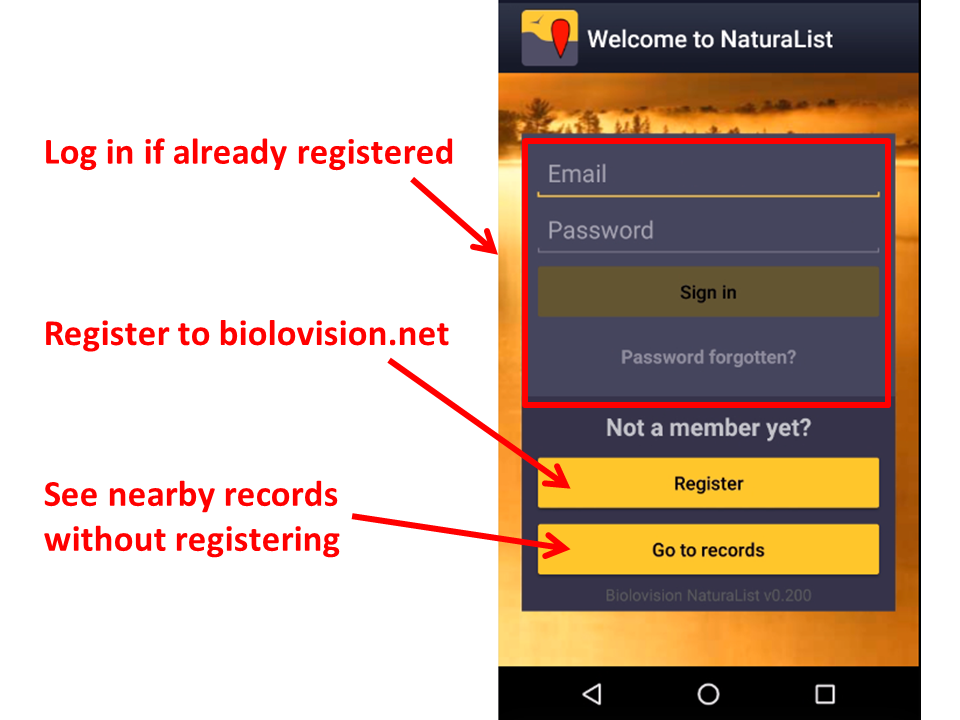
Once installed, open the application to log in if you are an existing user or to register if you have never done so before (see image Logging in).

Registration
Logging in
Once installed, log in with your existing credentials for any of the local portals (UNIQUE LOGIN), or register into biolovision.net if you are not yet registered in any local portal (see image). Go to wiki section Various > Local portals and partners to see a list of local portals.