Black Grouse census (NL): Difference between revisions
(Created page with "TETRAO_TETRIX <br/> <br/> <div class="toc" style="width:300px;"> <!-- La llargada s'ha de canviar aquí --> <div class="mw-collapsible mw-collapsed" data-expandtext="Show" data-collapsetext="Hide" style="width:250px;margin-bottom:0px;margin-top:0px;background-color:#f7f7f7;"> '''8 Black Grouse census''' <div class="mw-collapsible-content" style="width:300px;background-color:#f7f7f7;"> <!-- I també cal canviar la llargada aquí --> <ol>...") |
No edit summary Tag: Manual revert |
||
| (8 intermediate revisions by the same user not shown) | |||
| Line 5: | Line 5: | ||
<div class="toc" style="width:300px;"> <!-- La llargada s'ha de canviar aquí --> | <div class="toc" style="width:300px;"> <!-- La llargada s'ha de canviar aquí --> | ||
<div class="mw-collapsible mw-collapsed" data-expandtext="Show" data-collapsetext="Hide" style="width:250px;margin-bottom:0px;margin-top:0px;background-color:#f7f7f7;"> | <div class="mw-collapsible mw-collapsed" data-expandtext="Show" data-collapsetext="Hide" style="width:250px;margin-bottom:0px;margin-top:0px;background-color:#f7f7f7;"> | ||
''' | '''Black Grouse census''' | ||
<div class="mw-collapsible-content" style="width:300px;background-color:#f7f7f7;"> <!-- I també cal canviar la llargada aquí --> | <div class="mw-collapsible-content" style="width:300px;background-color:#f7f7f7;"> <!-- I també cal canviar la llargada aquí --> | ||
<ol> | <ol> | ||
1 [[Black Grouse census (NL)#Start_of_list|Start of list]] <br /> | |||
2 [[Black Grouse census (NL)#Entering_records|Entering records]]<br /> | |||
3 [[Black Grouse census (NL)#Ending_the_list|Ending the list]]<br /> | |||
4 [[Black Grouse census (NL)#Editing_records_and/or_protocols|Editing records and/or protocols]] <br /> | |||
5 [[Black Grouse census (NL)#Deleting_records_and/or_protocols|Deleting records and/or protocols]]<br /> | |||
6 [[Black Grouse census (NL)#Browsing_records|Browsing records]]<br /> </ol> | |||
</div> | </div> | ||
</div> | </div> | ||
| Line 21: | Line 21: | ||
<center> | <center> | ||
< | <div class="toc" style="border-radius: 5px; padding: 25px; text-align: left; font-family: sans-serif; color: black; width: 400px; background-color: #ffffdb"> | ||
<!-- GREEN BOX (Tips): hsl(157, 74%, 80%) | <!-- GREEN BOX (Tips): hsl(157, 74%, 80%) | ||
YELLOW BOX (Summaries): #ffffdb" | YELLOW BOX (Summaries): #ffffdb" | ||
| Line 30: | Line 28: | ||
<p> | <p> | ||
< | <span style="color: #000000; margin-left: 25px;"><b>· </b> Enter [[Media:BG Choose protocol.png|Black Grouse census]]. <br/> | ||
<span style="color: #000000; margin-left: 25px;"><b>· </b> Choose [[Media:Choice of a protocol site.jpg|the site]] to survey, if more than one. <br/> | |||
</p> | |||
</ | </div> | ||
</center> | </center> | ||
<br /> | <br /> | ||
| Line 43: | Line 40: | ||
<br/> | <br/> | ||
[[File:BG Choose protocol.png| | <center> | ||
<div class="toc" style="border-radius:5px;background-color:#ffffff;padding-left:8px;padding-right:8px;padding-bottom:8px;width:300px;"> | |||
[[File:BG Choose protocol.png|300px|link=https://help.biolovision.net/images/1/1c/BG_Choose_protocol.png|Click image to enlarge]] | |||
<div class="toc" style="border-radius:5px;padding-left:15px;text-align:left; font-size:12px;width:285px;"> | |||
'''Black Grouse census.''' | |||
</div> | |||
</div> | |||
</center> | |||
<br/> | |||
<br/> | <br/> | ||
| Line 67: | Line 72: | ||
<br/> | <br/> | ||
Enter observations as if in a [[Entering_records#With_a_detailed_list| ''' | Enter observations as if in a [[Entering_records#With_a_detailed_list| '''Enter a list of precise observations''']]. <br/> | ||
<br/> | <br/> | ||
| Line 81: | Line 86: | ||
<br/> | <br/> | ||
Visit Mobile interface > Entering records > | Visit Mobile interface > Entering records > Enter a list of precise observations > [[Entering_records#Number_of_individuals| Number of individuals]] if necessary.<br/> | ||
<br/> | <br/> | ||
:'''Plus'''<br/> | :'''Plus'''<br/> | ||
Enter additional information as if it where a [[Entering_records#With_a_detailed_list| ''' | Enter additional information as if it where a [[Entering_records#With_a_detailed_list| '''Enter a list of precise observations''']]. <br/> | ||
<br/> | <br/> | ||
See wiki section Mobile interface > Submitting records > | See wiki section Mobile interface > Submitting records > Enter a list of precise observations > [[Entering_records#Step_4_(non_mandatory_fields):_Additional_information| Step 4: Additional information]] on how to do it, if necessary.<br/> | ||
<br/> | <br/> | ||
| Line 139: | Line 144: | ||
:* After synchronisation<br/> | :* After synchronisation<br/> | ||
:: In [[Search_observations#Mine|<b>Mine</b>]]. See more details in wiki section [[Search_observations#Accessing_records'_details| | :: In [[Search_observations#Mine|<b>Mine</b>]]. See more details in wiki section [[Search_observations#Accessing_records'_details|Accessing records' details]].<br/> | ||
:: In [[Search_observations#Under_verification|<b>Under verification</b>]] (only if any data of the protocol needs more information)<br/> | :: In [[Search_observations#Under_verification|<b>Under verification</b>]] (only if any data of the protocol needs more information)<br/> | ||
Latest revision as of 16:35, 31 October 2025
TETRAO_TETRIX
Black Grouse census
· Enter Black Grouse census.
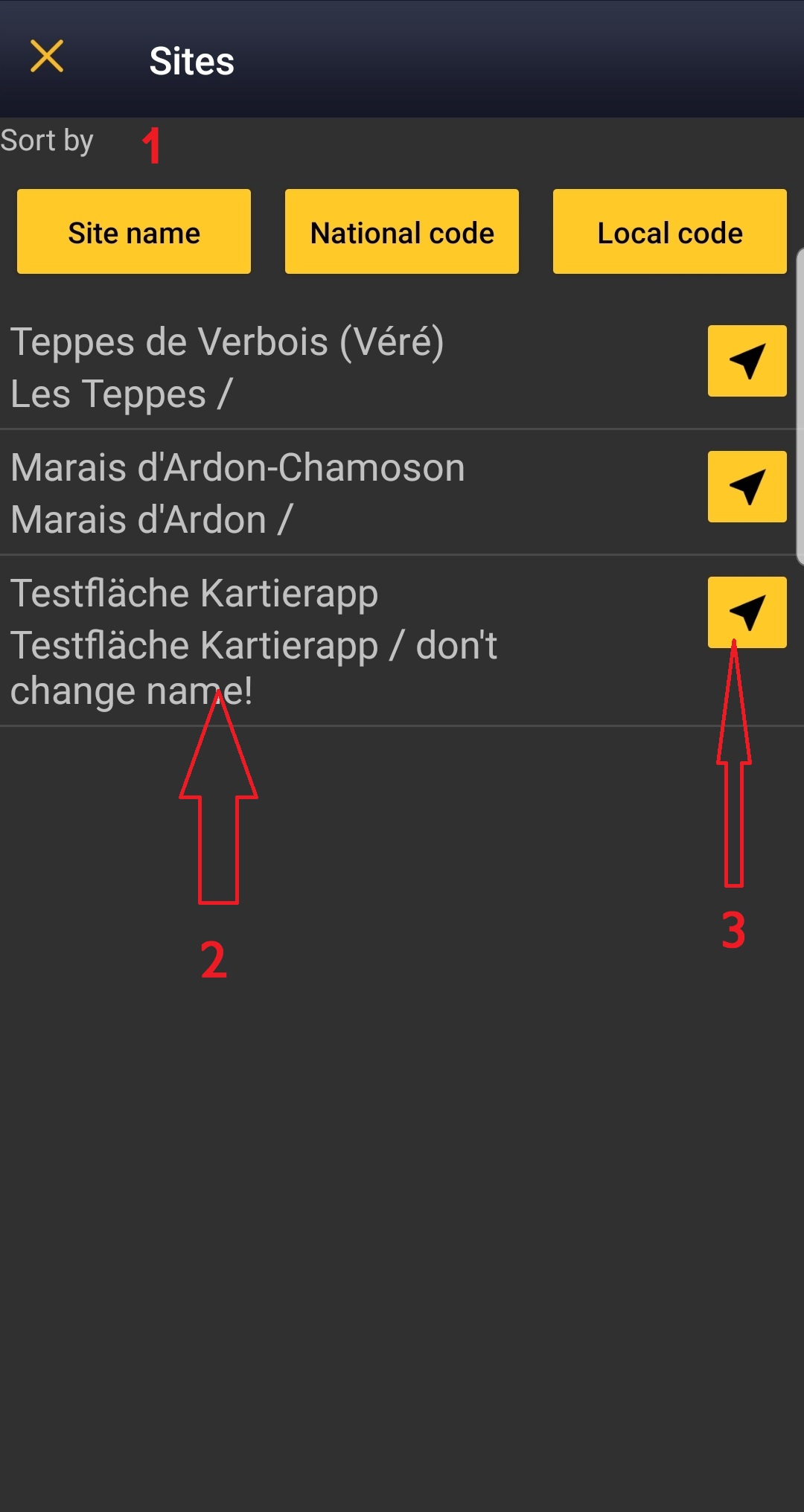
· Choose the site to survey, if more than one.

Open the menu as for Submitting records and choose Point count (see image below).

Black Grouse census.
Choose the site you want to count at as explained in wiki section Mobile interface > Protocols > Enter data.
TETRAO_TETRIX Start of list
Enter general information before starting the count. Fields are protocol dependent and may change from country to country.
Visit wiki section Mobile interface > Protocols > Enter data > Start of list for details.
Click Next when done.
TETRAO_TETRIX Entering records
Enter observations as if in a Enter a list of precise observations.
- Place
Place your observation within the study area.
See wiki section Mobile interface > Protocols > Enter data > Entering observations > Place on how to interpret the map and place your observation.
- Number of individuals
Enter number of individuals and precision count. Using the counter function may easy collecting your data.

Visit Mobile interface > Entering records > Enter a list of precise observations > Number of individuals if necessary.
- Plus
Enter additional information as if it where a Enter a list of precise observations.
See wiki section Mobile interface > Submitting records > Enter a list of precise observations > Step 4: Additional information on how to do it, if necessary.
When done, click Save. It will take you to the Place screen to continue entering observations.
TETRAO_TETRIX Ending the list
To finish the survey,
1. Stop recording,
2. Adjust time, if necessary,
3. Fill in/modify details, and
4. Choose type of list.
Visit wiki section Mobile interface > Enter data > Ending the list for details, if necessary.
Remember to synchronise your data as soon as possible after entering to avoid loosing it.
TETRAO_TETRIX Editing records and/or protocols
To edit records within a protocol, or to edit the protocol's general parameters, visit wiki section Mobile interface > Editing records > Editing protocols.
TETRAO_TETRIX Deleting records and/or protocols
To delete records within a protocol, or to delete the whole protocol, visit wiki section Mobile interface > Editing records > Deleting protocols.
TETRAO_TETRIX Browsing records
See your protocoled records:
- Before synchronisation
- In the phone. See more details in wiki section Accessing your own records.
- Before synchronisation
- After synchronisation
- In Mine. See more details in wiki section Accessing records' details.
- After synchronisation
- In Under verification (only if any data of the protocol needs more information)
- In Under verification (only if any data of the protocol needs more information)
- In the local portal. Go to the corresponding local portal, Menu > Explore > All my observations.
- In the local portal. Go to the corresponding local portal, Menu > Explore > All my observations.