Acoustic data: Difference between revisions
No edit summary |
|||
| (21 intermediate revisions by the same user not shown) | |||
| Line 19: | Line 19: | ||
<div class="toc" style="width:350px;"> <!-- La llargada s'ha de canviar aquí --> | <div class="toc" style="width:350px;"> <!-- La llargada s'ha de canviar aquí --> | ||
<div class="mw-collapsible mw-collapsed" data-expandtext="Show" data-collapsetext="Hide" style="width:300px;margin-bottom:0px;margin-top:0px;background-color:#f7f7f7;"> | <div class="mw-collapsible mw-collapsed" data-expandtext="Show" data-collapsetext="Hide" style="width:300px;margin-bottom:0px;margin-top:0px;background-color:#f7f7f7;"> | ||
''' | '''Acoustic data''' | ||
<div class="mw-collapsible-content" style="width:350px;background-color:#f7f7f7;"> <!-- I també cal canviar la llargada aquí --> | <div class="mw-collapsible-content" style="width:350px;background-color:#f7f7f7;"> <!-- I també cal canviar la llargada aquí --> | ||
<ol> | <ol> | ||
1 [[Acoustic data#Preparation_and_data|Preparation and data]] <br /> | |||
<ol> | <ol>1.1 [[Acoustic data#Add_observations|Add observations]]<br/> | ||
<ol> | <ol>1.1.1 [[Acoustic data#Starting the protocol|Starting the protocol]] <br/> | ||
1.1.2 [[Acoustic data#Entering observations|Entering observations]] <br/> | |||
1.1.3 [[Acoustic data#Ending the protocol|Ending the protocol]] <br/> </ol></ol></ol> | |||
<ol><ol> | <ol><ol> 1.3 [[Acoustic data#Display_on_map|Display on map]]<br/> | ||
1.4 [[Acoustic data#Modify_the_protocol|Modify the protocol]]<br/> | |||
1.5 [[Acoustic data#Census_results|Census results]]<br/> | |||
1.6 [[Acoustic data#Download_map|Download map]]</ol></ol> | |||
<ol> | <ol> 2 [[Acoustic data#Check_data|Check data]]<br/> | ||
3 [[Acoustic data#Map|Map]]<br/> </ol> | |||
</div> | </div> | ||
</div> | </div> | ||
| Line 59: | Line 59: | ||
<div class="toc" style="width:350px;"> <!-- La llargada s'ha de canviar aquí --> | <div class="toc" style="width:350px;"> <!-- La llargada s'ha de canviar aquí --> | ||
<div class="mw-collapsible mw-collapsed" data-expandtext="Show" data-collapsetext="Hide" style="width:300px;margin-bottom:0px;margin-top:0px;background-color:#f7f7f7;"> | <div class="mw-collapsible mw-collapsed" data-expandtext="Show" data-collapsetext="Hide" style="width:300px;margin-bottom:0px;margin-top:0px;background-color:#f7f7f7;"> | ||
''' | '''1 Preparation and data''' | ||
<div class="mw-collapsible-content" style="width:350px;background-color:#f7f7f7;"> <!-- I també cal canviar la llargada aquí --> | <div class="mw-collapsible-content" style="width:350px;background-color:#f7f7f7;"> <!-- I també cal canviar la llargada aquí --> | ||
<ol> | <ol> | ||
1.1 [[Acoustic data#Add observations|Add observations]]<br/> | |||
<ol> | <ol>1.1.1 [[Acoustic data#Starting the protocol|Starting the protocol]] <br/> | ||
1.1.2 [[Acoustic data#Entering observations|Entering observations]] <br/> | |||
1.1.3 [[Acoustic data#Ending the protocol|Ending the protocol]] <br/> </ol></ol> | |||
<ol> | <ol>1.2 [[Acoustic data#Results|Results]]<br/> | ||
1.3 [[Acoustic data#Display_on_map|Display on map]]<br/> | |||
1.4 [[Acoustic data#Modify_the_protocol|Modify the protocol]]<br/> | |||
1.5 [[Acoustic data#Census_results|Census results]]<br/> | |||
1.6 [[Acoustic data#Download_map|Download map]]</ol> | |||
</div> | </div> | ||
</div> | </div> | ||
| Line 104: | Line 104: | ||
[[File:Capture 2023-11-27 at 16.52.18.png|500px|link=https://help.biolovision.net/images/c/c9/Capture_2023-11-27_at_16.52.18.png]] | [[File:Capture 2023-11-27 at 16.52.18.png|500px|link=https://help.biolovision.net/images/c/c9/Capture_2023-11-27_at_16.52.18.png]] | ||
<div class="toc" style="border-radius:5px;width:485px;padding-left:15px;text-align:left; font-size:12px"> | <div class="toc" style="border-radius:5px;width:485px;padding-left:15px;text-align:left; font-size:12px"> | ||
''' | '''Entering data to a point. Example.''' | ||
</div> | </div> | ||
<p style="color:black;font-size:12px;padding-left:5px;text-align:left;column-count:1;padding-right:5px;"> | <p style="color:black;font-size:12px;padding-left:5px;text-align:left;column-count:1;padding-right:5px;"> | ||
| Line 128: | Line 128: | ||
<br/> | <br/> | ||
Click '''NEXT''' to start entering observations.<br/> | Click '''NEXT''' to start entering observations.<br/> | ||
<br/> | |||
[[Acoustic data#Add observations|[Top to Add observations]]] <br/> | |||
[[Acoustic data#Preparation and data|[Top to Preparation and data]]] <br/> | |||
[[#top|[Back to Acoustic data protocol]]]<br/> | |||
<br/> | <br/> | ||
| Line 216: | Line 221: | ||
<br/> | <br/> | ||
====ACOUSTIC | [[Acoustic data#Add observations|[Top to Add observations]]] <br/> | ||
[[Acoustic data#Preparation and data|[Top to Preparation and data]]] <br/> | |||
[[#top|[Back to Acoustic data protocol]]]<br/> | |||
<br/> | |||
<span id="Ending the protocol"></span> | |||
====ACOUSTIC Ending the protocol==== | |||
<br/> | <br/> | ||
| Line 222: | Line 233: | ||
'''ADD A SPECIES''' to enter data about a new species, or <br/> | '''ADD A SPECIES''' to enter data about a new species, or <br/> | ||
'''TERMINATE FORM''' to end entering records. <br/> | '''TERMINATE FORM''' to end entering records. <br/> | ||
<br/> | |||
See wiki section Web interface > Protocols > Preparation and data > Add observations > [[Protocols_web#Ending_the_protocol|Ending the protocol]] for more information. <br/> | |||
<br/> | |||
[[Acoustic data#Add observations|[Top to Add observations]]] <br/> | |||
[[Acoustic data#Preparation and data|[Top to Preparation and data]]] <br/> | |||
[[#top|[Back to Acoustic data protocol]]]<br/> | |||
<br/> | <br/> | ||
| Line 244: | Line 263: | ||
Visit wiki section Web interface > Protocols > Preparation and data > [[Protocols_web#Results|Results]] for details. <br/> | Visit wiki section Web interface > Protocols > Preparation and data > [[Protocols_web#Results|Results]] for details. <br/> | ||
<br/> | |||
[[Acoustic data#Preparation and data|[Top to Preparation and data]]] <br/> | |||
[[#top|[Back to Acoustic data protocol]]]<br/> | |||
<br/> | <br/> | ||
<span id="Display on map"></span> | <span id="Display on map"></span> | ||
===ACOUSTIC Display on map=== | ===ACOUSTIC Display on map=== | ||
<br/> | <br/> | ||
| Line 265: | Line 289: | ||
Visit wiki section Web interface > Protocols > Preparation and data > [[Protocols_web#Display_on_map|Display on map]] for details. <br/> | Visit wiki section Web interface > Protocols > Preparation and data > [[Protocols_web#Display_on_map|Display on map]] for details. <br/> | ||
<br/> | |||
[[Acoustic data#Preparation and data|[Top to Preparation and data]]] <br/> | |||
[[#top|[Back to Acoustic data protocol]]]<br/> | |||
<br/> | <br/> | ||
<span id="Modify the protocol"></span> | <span id="Modify the protocol"></span> | ||
===ACOUSTIC Modify the protocol=== | ===ACOUSTIC Modify the protocol=== | ||
<br/> | <br/> | ||
| Line 286: | Line 315: | ||
Visit wiki section Web interface > Protocols > Preparation and data > [[Protocols_web#Modify_the_protocol|Modify the protocol]] for details. <br/> | Visit wiki section Web interface > Protocols > Preparation and data > [[Protocols_web#Modify_the_protocol|Modify the protocol]] for details. <br/> | ||
<br/> | |||
[[Acoustic data#Preparation and data|[Top to Preparation and data]]] <br/> | |||
[[#top|[Back to Acoustic data protocol]]]<br/> | |||
<br/> | <br/> | ||
<span id="Census results"></span> | <span id="Census results"></span> | ||
===ACOUSTIC Census results=== | ===ACOUSTIC Census results=== | ||
<br/> | <br/> | ||
| Line 307: | Line 341: | ||
Visit wiki section Web interface > Protocols > Preparation and data > [[Protocols_web#Census_results|Census protocol]] for details. <br/> | Visit wiki section Web interface > Protocols > Preparation and data > [[Protocols_web#Census_results|Census protocol]] for details. <br/> | ||
<br/> | |||
[[Acoustic data#Preparation and data|[Top to Preparation and data]]] <br/> | |||
[[#top|[Back to Acoustic data protocol]]]<br/> | |||
<br/> | <br/> | ||
<span id="Download map"></span> | <span id="Download map"></span> | ||
===ACOUSTIC Download map=== | ===ACOUSTIC Download map=== | ||
<br/> | <br/> | ||
| Line 328: | Line 367: | ||
Visit wiki section Web interface > Protocols > Preparation and data > [[Protocols_web#Download_map|Download map]] for details. <br/> | Visit wiki section Web interface > Protocols > Preparation and data > [[Protocols_web#Download_map|Download map]] for details. <br/> | ||
<br/> | |||
[[Acoustic data#Preparation and data|[Top to Preparation and data]]] <br/> | |||
[[#top|[Back to Acoustic data protocol]]]<br/> | |||
<br/> | <br/> | ||
<span id="Check data"></span> | <span id="Check data"></span> | ||
==ACOUSTIC Check data== | ==ACOUSTIC Check data== | ||
<br/> | <br/> | ||
| Line 349: | Line 393: | ||
Visit wiki section Web interface > Protocols > Preparation and data > [[Protocols_web#Check_data|Check data]] for details. <br/> | Visit wiki section Web interface > Protocols > Preparation and data > [[Protocols_web#Check_data|Check data]] for details. <br/> | ||
<br/> | |||
[[Acoustic data#Check data|[Top to Check data]]] <br/> | |||
[[#top|[Back to Acoustic data protocol]]]<br/> | |||
<br/> | <br/> | ||
| Line 373: | Line 421: | ||
<br/> | <br/> | ||
[[Acoustic data#Map|[Top to Map]]] <br/> | |||
[[#top|[Top to Acoustic data protocol]]]<br/> | [[#top|[Top to Acoustic data protocol]]]<br/> | ||
[[Protocols_web|[Back to Protocols]]]<br/> | [[Protocols_web|[Back to Protocols]]]<br/> | ||
<br/> | <br/> | ||
Latest revision as of 17:22, 3 December 2025
ACOUSTIC
Access your protocol as described in wiki section Local portal > Protocols.
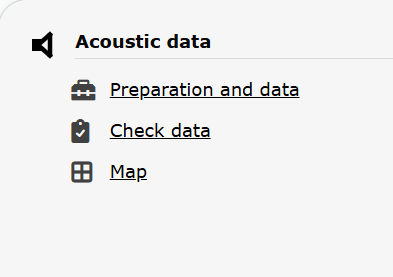
Acoustic data. Menu.
Acoustic data
-
1 Preparation and data
- 1.1 Add observations
- 1.1.1 Starting the protocol
1.1.2 Entering observations
1.1.3 Ending the protocol
- 1.3 Display on map
1.4 Modify the protocol
1.5 Census results
1.6 Download map
- 2 Check data
3 Map
ACOUSTIC Preparation and data
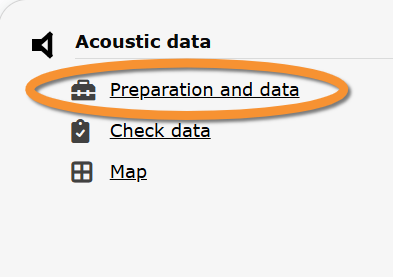
Acoustic data. Preparation and data.
Lists all sites available to the current profile and allows entering observations, downloading printable maps and seeing results.
1 Preparation and data
-
1.1 Add observations
- 1.1.1 Starting the protocol
1.1.2 Entering observations
1.1.3 Ending the protocol
- 1.2 Results
1.3 Display on map
1.4 Modify the protocol
1.5 Census results
1.6 Download map
ACOUSTIC Add observations
Click on Add observations (see image below) in the site you need to enter data to.

Acoustic data. Add observations.
1: Click on add data for this census: opens the list of points for the study site.
2: Choose point number.
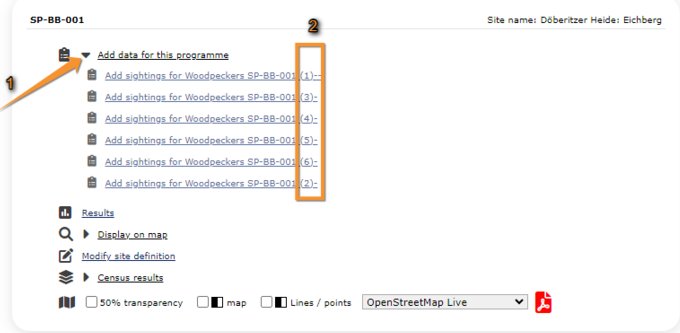
Entering data to a point. Example.
1. Add data.
2. Select point.
ACOUSTIC Starting the protocol
Before entering observations, it is required to enter general parameters regarding the protocol. Parameters are protocol specific. Fields marked with an asterisk are mandatory.
See wiki section Web interface > Protocols > Preparation and data > Add observations > Starting the protocol for details.
When done,
Click NEXT to start entering observations.
[Top to Add observations]
[Top to Preparation and data]
[Back to Acoustic data protocol]
ACOUSTIC Entering observations
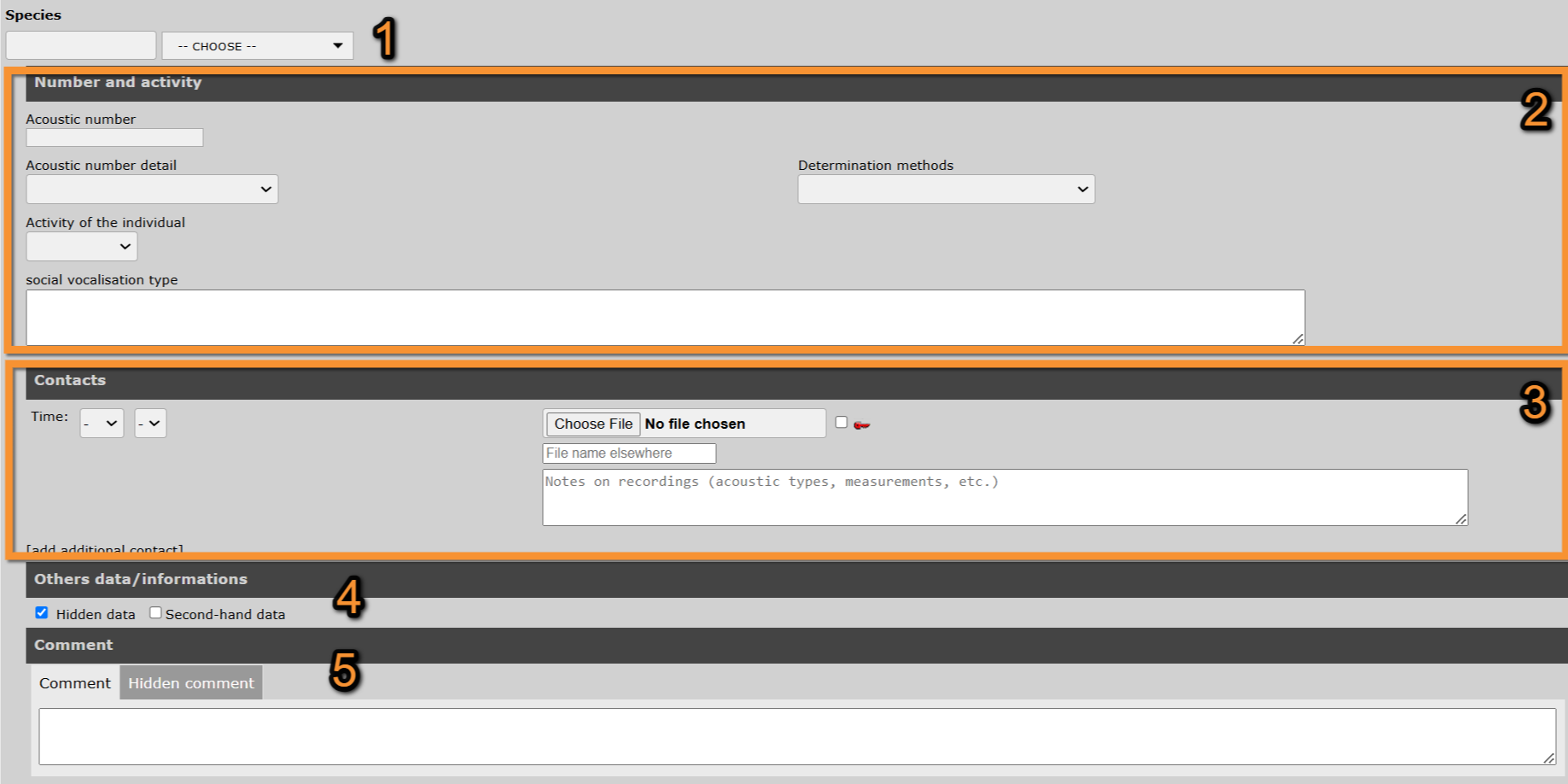
- 1. Species
- 1. Species
Start typing the name of the species on the left and select from the expandable menu on the right.
- 2. Number and activity
- 2. Number and activity
Enter number of recordings and activity. Fields available may change from platform to platform. Remember fields marked with an asterisk are mandatory.
See wiki section Web interface > Local portals > Protocols > Starting the protocol > Parameters for more inforation.
- 3. Contacts
- 3. Contacts
Provide information of any vocal contact encountered.
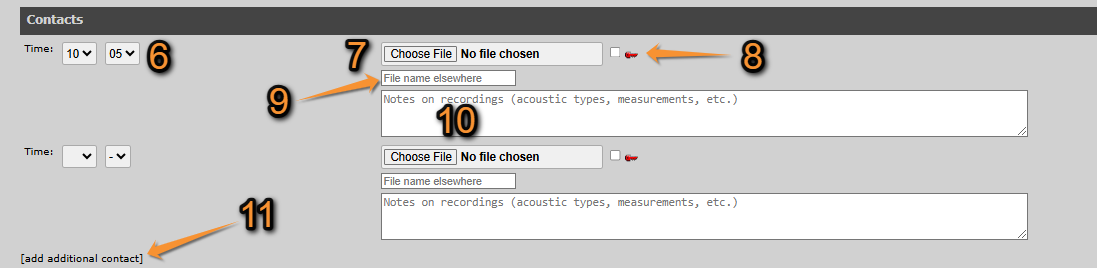
Acoustic data. Contacts.
6. Time: Use the expandable menu to indicate the time the contact took place.
7. Choose file: Click Choose file and select the sound file of the contact from your documents. The uploaded file will be shown on top and its name next to the button.
8. Hidden file: Check to hide your file from the public.
9. Name file: Type a new name for the uploaded file if you wish.
10. Comment: Type any further information you would like to share about the recording.
11. Add additional contact: Click to add a new entry.
- 3. Others data/information
- 3. Others data/information
Check
Hidden data to hide the record from the public.
Second-hand data to indicate you are reporting some else's observation.
- 4. Comment
- 4. Comment
Leave a comment about the record if necessary.
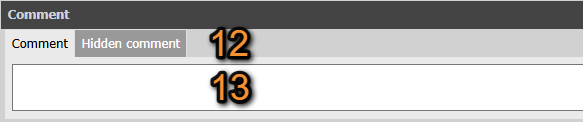
Acoustic data. Comment.
12. Select from the tabs if your comment will be public or private.
13. Type a comment about the record if necessary.
[Top to Add observations]
[Top to Preparation and data]
[Back to Acoustic data protocol]
ACOUSTIC Ending the protocol
When done, click:
ADD A SPECIES to enter data about a new species, or
TERMINATE FORM to end entering records.
See wiki section Web interface > Protocols > Preparation and data > Add observations > Ending the protocol for more information.
[Top to Add observations]
[Top to Preparation and data]
[Back to Acoustic data protocol]
ACOUSTIC Results

Acoustic. Results.
See some statistics about your surveys results.
Visit wiki section Web interface > Protocols > Preparation and data > Results for details.
[Top to Preparation and data]
[Back to Acoustic data protocol]
ACOUSTIC Display on map
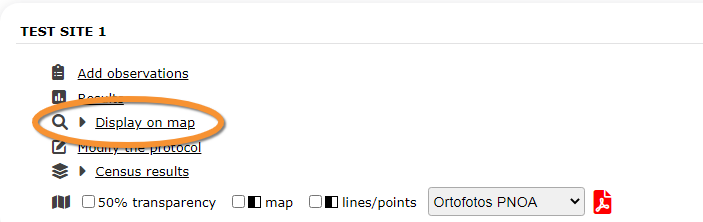
Acoustic. Display on map.
For the selected site, see the area to survey on a map. To know how to navigate the map, refer to wiki section Web interface > Navigating the map.
Visit wiki section Web interface > Protocols > Preparation and data > Display on map for details.
[Top to Preparation and data]
[Back to Acoustic data protocol]
ACOUSTIC Modify the protocol

Acoustic data. Modify the protocol.
Modify the site to survey.
Visit wiki section Web interface > Protocols > Preparation and data > Modify the protocol for details.
[Top to Preparation and data]
[Back to Acoustic data protocol]
ACOUSTIC Census results

Acoustic data. Census results.
Click on Census results to see all available years with data for this site (see image Protocol. Selecting year to visualise). Select the one to visualise.

Visit wiki section Web interface > Protocols > Preparation and data > Census protocol for details.
[Top to Preparation and data]
[Back to Acoustic data protocol]
ACOUSTIC Download map

Acoustic data. Download map.
Download maps ready to print.
Visit wiki section Web interface > Protocols > Preparation and data > Download map for details.
[Top to Preparation and data]
[Back to Acoustic data protocol]
ACOUSTIC Check data

Acoustic data. Check data.
Calendar showing visits to different sites and number of species detected.
Visit wiki section Web interface > Protocols > Preparation and data > Check data for details.
[Top to Check data]
[Back to Acoustic data protocol]
ACOUSTIC Map
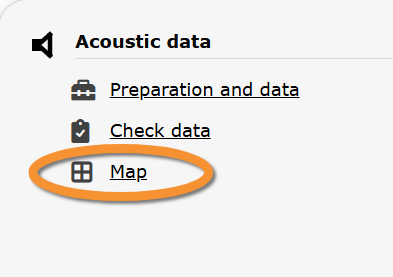
Acoustic data. Map.
Map and statistics for site.
Visit wiki section Web interface > Protocols > Preparation and data > Map for details.
[Top to Map]
[Top to Acoustic data protocol]
[Back to Protocols]