Species administation: Difference between revisions
| (25 intermediate revisions by the same user not shown) | |||
| Line 27: | Line 27: | ||
</center> | </center> | ||
<br/> | <br/> | ||
<br/> | |||
[[Species_administation#Species_sheets|[Top to Species sheet]]] <br/> | |||
[[#top|[Back to Species administration]]] <br/> | |||
<br/> | <br/> | ||
| Line 90: | Line 94: | ||
</div> | </div> | ||
<p style="color:black;font-size:12px;padding-left:30px;text-align:left;column-count:2;"> | <p style="color:black;font-size:12px;padding-left:30px;text-align:left;column-count:2;"> | ||
<b>1.</b> [[Species administration#Search|Search]] <br /> | <b>1.</b> [[Species administration#Search 1|Search]] <br /> | ||
<b>2.</b> [[Species administration#Page|Page and items]] <br/> | <b>2.</b> [[Species administration#Page 1|Page and items]] <br/> | ||
<b>3.</b> [[Species administration#Details|Details]] <br /> | <b>3.</b> [[Species administration#Details 1|Details]] <br /> | ||
<b>4.</b> [[Species administration#Edit|Edit]] <br/> | <b>4.</b> [[Species administration#Edit 1|Edit]] <br/> | ||
<b>5.</b> [[Species administration#Export|EXPORT]] <br/> | <b>5.</b> [[Species administration#Export 1|EXPORT]] <br/> | ||
</p> | </p> | ||
<br/> | <br/> | ||
| Line 112: | Line 116: | ||
<br/> | <br/> | ||
<span id="Search"></span> | <span id="Search 1"></span> | ||
<span id="Search 1"></span> | |||
:'''1. Search''' <br/> | :'''1. Search''' <br/> | ||
Reduce list by typing the name of a site, or part of it, and click '''SEACH'''. When a filter is applied, click on | Reduce list by typing the name of a site, or part of it, and click '''SEACH'''. When a filter is applied, click on | ||
| Line 118: | Line 123: | ||
<br/> | <br/> | ||
<span id="Page"></span> | <span id="Page 1"></span> | ||
:'''2. Page and items''' <br/> | :'''2. Page and items''' <br/> | ||
Select page number and/or number of items per page.<br/> | Select page number and/or number of items per page.<br/> | ||
<br/> | <br/> | ||
<span id="Details"></span> | <span id="Details 1"></span> | ||
:'''3. Details''' <br/> | :'''3. Details''' <br/> | ||
Click to see details of selected species. These include the species name in different languages and rarity level. See also the start and end date of automatic atlas code when available. <br/> | Click to see details of selected species. These include the species name in different languages and rarity level. See also the start and end date of automatic atlas code when available. <br/> | ||
| Line 143: | Line 148: | ||
<br/> | <br/> | ||
<span id="Edit"></span> | <span id="Edit 1"></span> | ||
:'''4. Edit''' <br/> | :'''4. Edit''' <br/> | ||
Modify / complete any species detail. <br/> | Modify / complete any species detail. <br/> | ||
| Line 166: | Line 171: | ||
<br/> | <br/> | ||
<span id="Export"></span> | <span id="Export 1"></span> | ||
:'''5. EXPORT''' <br/> | :'''5. EXPORT''' <br/> | ||
Download list as a .txt file. <br/> | Download list as a .txt file. <br/> | ||
<br/> | |||
[[Species_administation#Species|[Top to Species]]] <br/> | |||
[[Species_administation#Species_list|[Top to Species list]]] <br/> | |||
[[#top|[Back to Species administration]]] <br/> | |||
<br/> | <br/> | ||
| Line 181: | Line 191: | ||
<center> | <center> | ||
<div class="toc" style="border-radius:5px;background-color:#ffffff;padding-left:8px;padding-right:8px;padding-bottom:8px;width:600px;"> | <div class="toc" style="border-radius:5px;background-color:#ffffff;padding-left:8px;padding-right:8px;padding-bottom:8px;width:600px;"> | ||
[[File:2023-04-13 admin hidden species.png|600px]] | [[File:2023-04-13 admin hidden species.png|600px|link=https://help.biolovision.net/images/b/b9/2023-04-13_admin_hidden_species.png]] | ||
<div class="toc" style="border-radius:5px;padding-left:15px;text-align:left; font-size:12px;width:575px;"> | <div class="toc" style="border-radius:5px;padding-left:15px;text-align:left; font-size:12px;width:575px;"> | ||
'''Admin hidden species.''' | '''Admin hidden species.''' | ||
| Line 224: | Line 234: | ||
<center> | <center> | ||
<div class="toc" style="border-radius:5px;background-color:#ffffff;padding-left:8px;padding-right:8px;width:600px;"> | <div class="toc" style="border-radius:5px;background-color:#ffffff;padding-left:8px;padding-right:8px;width:600px;"> | ||
[[File:2023-04-13 Details admin hidden species.png|600px]] | [[File:2023-04-13 Details admin hidden species.png|600px|link=https://help.biolovision.net/images/d/dd/2023-04-13_Details_admin_hidden_species.png]] | ||
<div class="toc" style="border-radius:5px;padding-left:15px;text-align:left; font-size:12px;width:575px;"> | <div class="toc" style="border-radius:5px;padding-left:15px;text-align:left; font-size:12px;width:575px;"> | ||
'''Details admin hidden species.''' | '''Details admin hidden species.''' | ||
| Line 245: | Line 255: | ||
<center> | <center> | ||
<div class="toc" style="border-radius:5px;background-color:#ffffff;padding-left:8px;padding-right:8px;padding-bottom:8px;width:600px;"> | <div class="toc" style="border-radius:5px;background-color:#ffffff;padding-left:8px;padding-right:8px;padding-bottom:8px;width:600px;"> | ||
[[File:2023-04-13 edit hidden species.png|600px]] | [[File:2023-04-13 edit hidden species.png|600px|link=https://help.biolovision.net/images/e/ed/2023-04-13_edit_hidden_species.png]] | ||
<div class="toc" style="border-radius:5px;padding-left:15px;text-align:left; font-size:12px;width:575px;"> | <div class="toc" style="border-radius:5px;padding-left:15px;text-align:left; font-size:12px;width:575px;"> | ||
'''Edit Admin hidden species''' | '''Edit Admin hidden species''' | ||
| Line 276: | Line 286: | ||
<center> | <center> | ||
<div class="toc" style="border-radius:5px;background-color:#ffffff;padding-left:8px;padding-right:8px;padding-bottom:8px;width:600px;"> | <div class="toc" style="border-radius:5px;background-color:#ffffff;padding-left:8px;padding-right:8px;padding-bottom:8px;width:600px;"> | ||
[[File:2023-04-13 Hide a species.png|600px]] | [[File:2023-04-13 Hide a species.png|600px|link=https://help.biolovision.net/images/f/fb/2023-04-13_Hide_a_species.png]] | ||
<div class="toc" style="border-radius:5px;padding-left:15px;text-align:left; font-size:12px;width:575px;"> | <div class="toc" style="border-radius:5px;padding-left:15px;text-align:left; font-size:12px;width:575px;"> | ||
'''Hiding a species from the public.''' | '''Hiding a species from the public.''' | ||
| Line 298: | Line 308: | ||
:'''7.EXPORT''' <br/> | :'''7.EXPORT''' <br/> | ||
Download the list as a .txt file.<br/> | Download the list as a .txt file.<br/> | ||
<br/> | |||
[[Species_administation#Hidden_species|[Top to Hidden species]]] <br/> | |||
[[Species_administation#Species_list|[Top to Species list]]] <br/> | |||
[[#top|[Back to Species administration]]] <br/> | |||
<br/> | <br/> | ||
| Line 303: | Line 318: | ||
==Automatic filter== | ==Automatic filter== | ||
<br/> | |||
[[Species_administation#Automatic filter|[Top to Automatic filter]]] <br/> | |||
[[Species_administation#Species_list|[Top to Species list]]] <br/> | |||
[[#top|[Back to Species administration]]] <br/> | |||
<br/> | <br/> | ||
<span id="RCL"></span> | <span id="RCL"></span> | ||
==MENU_TEXT_BIRD_RCL== | ==MENU_TEXT_BIRD_RCL== | ||
<br/> | <br/> | ||
| Line 326: | Line 347: | ||
<center> | <center> | ||
<div class="toc" style="border-radius:5px;background-color:#ffffff;padding-left:8px;padding-right:8px;padding-bottom:8px;width:600px;"> | <div class="toc" style="border-radius:5px;background-color:#ffffff;padding-left:8px;padding-right:8px;padding-bottom:8px;width:600px;"> | ||
[[File:2023-04-14 Admin colonial species.png|600px]] | [[File:2023-04-14 Admin colonial species.png|600px|link=https://help.biolovision.net/images/f/f8/2023-04-14_Admin_colonial_species.png]] | ||
<div class="toc" style="border-radius:5px;padding-left:15px;text-align:left; font-size:12px;width:575px;"> | <div class="toc" style="border-radius:5px;padding-left:15px;text-align:left; font-size:12px;width:575px;"> | ||
'''Admin colonial species.''' | '''Admin colonial species.''' | ||
| Line 368: | Line 389: | ||
<center> | <center> | ||
<div class="toc" style="border-radius:5px;background-color:#ffffff;padding-left:8px;padding-right:8px;width:600px;"> | <div class="toc" style="border-radius:5px;background-color:#ffffff;padding-left:8px;padding-right:8px;width:600px;"> | ||
[[File:2023-04-14 Admin colonial species details.png|600px]] | [[File:2023-04-14 Admin colonial species details.png|600px|link=https://help.biolovision.net/images/1/1e/2023-04-14_Admin_colonial_species_details.png]] | ||
<div class="toc" style="border-radius:5px;padding-left:15px;text-align:left; font-size:12px;width:575px;"> | <div class="toc" style="border-radius:5px;padding-left:15px;text-align:left; font-size:12px;width:575px;"> | ||
'''Admin colonial species details.''' | '''Admin colonial species details.''' | ||
| Line 389: | Line 410: | ||
<center> | <center> | ||
<div class="toc" style="border-radius:5px;background-color:#ffffff;padding-left:8px;padding-right:8px;width:600px;"> | <div class="toc" style="border-radius:5px;background-color:#ffffff;padding-left:8px;padding-right:8px;width:600px;"> | ||
[[File:Capture 2023-04-14 Edit admin colonial species.png|600px]] | [[File:Capture 2023-04-14 Edit admin colonial species.png|600px|link=https://help.biolovision.net/images/c/c2/Capture_2023-04-14_Edit_admin_colonial_species.png]] | ||
<div class="toc" style="border-radius:5px;padding-left:15px;text-align:left; font-size:12px;width:575px;"> | <div class="toc" style="border-radius:5px;padding-left:15px;text-align:left; font-size:12px;width:575px;"> | ||
'''Editing colonial species list.''' | '''Editing colonial species list.''' | ||
| Line 418: | Line 439: | ||
<center> | <center> | ||
<div class="toc" style="border-radius:5px;background-color:#ffffff;padding-left:8px;padding-right:8px;width:600px;"> | <div class="toc" style="border-radius:5px;background-color:#ffffff;padding-left:8px;padding-right:8px;width:600px;"> | ||
[[File:2023-04-14 Admin new colonial species.png|600px]] | [[File:2023-04-14 Admin new colonial species.png|600px|link=https://help.biolovision.net/images/7/78/2023-04-14_Admin_new_colonial_species.png]] | ||
<div class="toc" style="border-radius:5px;padding-left:15px;text-align:left; font-size:12px;width:575px;"> | <div class="toc" style="border-radius:5px;padding-left:15px;text-align:left; font-size:12px;width:575px;"> | ||
'''Admin New colonial species.''' | '''Admin New colonial species.''' | ||
| Line 438: | Line 459: | ||
:'''7. EXPORT''' <br/> | :'''7. EXPORT''' <br/> | ||
Download list as a .txt file. <br/> | Download list as a .txt file. <br/> | ||
<br/> | |||
[[Species_administation#Colonial_species|[Top to Colonial species]]] <br/> | |||
[[Species_administation#Species_list|[Top to Species list]]] <br/> | |||
[[#top|[Back to Species administration]]] <br/> | |||
<br/> | <br/> | ||
==Managing synonyms== | ==Managing synonyms== | ||
<br/> | |||
[[Species_administation#Managing_synonyms|[Top to Managing synonyms]]] <br/> | |||
[[Species_administation#Species_list|[Top to Species list]]] <br/> | |||
[[#top|[Back to Species administration]]] <br/> | |||
<br/> | <br/> | ||
| Line 451: | Line 482: | ||
<center> | <center> | ||
<div class="toc" style="border-radius:5px;background-color:#ffffff;padding-left:8px;padding-right:8px;padding-bottom:8px;width:600px;"> | <div class="toc" style="border-radius:5px;background-color:#ffffff;padding-left:8px;padding-right:8px;padding-bottom:8px;width:600px;"> | ||
[[File:Capture 2023-04-14 Managing species groups.png|600px]] | [[File:Capture 2023-04-14 Managing species groups.png|600px|link=https://help.biolovision.net/images/1/15/Capture_2023-04-14_Managing_species_groups.png]] | ||
<div class="toc" style="border-radius:5px;padding-left:15px;text-align:left; font-size:12px;width:575px;"> | <div class="toc" style="border-radius:5px;padding-left:15px;text-align:left; font-size:12px;width:575px;"> | ||
'''Managing species groups.''' | '''Managing species groups.''' | ||
| Line 493: | Line 524: | ||
<center> | <center> | ||
<div class="toc" style="border-radius:5px;background-color:#ffffff;padding-left:8px;padding-right:8px;padding-bottom:8px;width:600px;"> | <div class="toc" style="border-radius:5px;background-color:#ffffff;padding-left:8px;padding-right:8px;padding-bottom:8px;width:600px;"> | ||
[[File:2023-04-14 Edit managing species groups.png|600px]] | [[File:2023-04-14 Edit managing species groups.png|600px|link=https://help.biolovision.net/images/9/91/2023-04-14_Edit_managing_species_groups.png]] | ||
<div class="toc" style="border-radius:5px;padding-left:15px;text-align:left; font-size:12px;width:575px;"> | <div class="toc" style="border-radius:5px;padding-left:15px;text-align:left; font-size:12px;width:575px;"> | ||
'''Details managing species groups.''' | '''Details managing species groups.''' | ||
| Line 514: | Line 545: | ||
<center> | <center> | ||
<div class="toc" style="border-radius:5px;background-color:#ffffff;padding-left:8px;padding-right:8px;padding-bottom:8px;width:600px;"> | <div class="toc" style="border-radius:5px;background-color:#ffffff;padding-left:8px;padding-right:8px;padding-bottom:8px;width:600px;"> | ||
[[File:Capture 2023-04-14 Editing managing species groups.png|600px]] | [[File:Capture 2023-04-14 Editing managing species groups.png|600px|link=https://help.biolovision.net/images/6/68/Capture_2023-04-14_Editing_managing_species_groups.png]] | ||
<div class="toc" style="border-radius:5px;padding-left:15px;text-align:left; font-size:12px;width:575px;"> | <div class="toc" style="border-radius:5px;padding-left:15px;text-align:left; font-size:12px;width:575px;"> | ||
'''Editing managing species groups.''' | '''Editing managing species groups.''' | ||
| Line 544: | Line 575: | ||
<center> | <center> | ||
<div class="toc" style="border-radius:5px;background-color:#ffffff;padding-left:8px;padding-right:8px;padding-bottom:8px;width:600px;"> | <div class="toc" style="border-radius:5px;background-color:#ffffff;padding-left:8px;padding-right:8px;padding-bottom:8px;width:600px;"> | ||
[[File:Capture 2023-04-15 Managing species group new species.png|600px]] | [[File:Capture 2023-04-15 Managing species group new species.png|600px|link=https://help.biolovision.net/images/f/fd/Capture_2023-04-15_Managing_species_group_new_species.png]] | ||
<div class="toc" style="border-radius:5px;padding-left:15px;text-align:left; font-size:12px;width:575px;"> | <div class="toc" style="border-radius:5px;padding-left:15px;text-align:left; font-size:12px;width:575px;"> | ||
'''Managing species groups. Adding new species.''' | '''Managing species groups. Adding new species.''' | ||
| Line 566: | Line 597: | ||
:'''7. EXPORT''' <br/> | :'''7. EXPORT''' <br/> | ||
Download list as a .txt file. <br/> | Download list as a .txt file. <br/> | ||
<br/> | |||
[[Species_administation#Managing_species_groups|[Top to Managing species groups]]] <br/> | |||
[[Species_administation#Species_list|[Top to Species list]]] <br/> | |||
[[#top|[Back to Species administration]]] <br/> | |||
<br/> | <br/> | ||
==Regionalisation rarity level== | ==Regionalisation rarity level== | ||
<br/> | |||
[[Species_administation#Regionalisation_rarity_level|[Top to Regionalisation rarity level]]] <br/> | |||
[[Species_administation#Species_list|[Top to Species list]]] <br/> | |||
[[#top|[Back to Species administration]]] <br/> | |||
<br/> | <br/> | ||
| Line 579: | Line 620: | ||
<center> | <center> | ||
<div class="toc" style="border-radius:5px;background-color:#ffffff;padding-left:8px;padding-right:8px;padding-bottom:8px;width:700px;"> | <div class="toc" style="border-radius:5px;background-color:#ffffff;padding-left:8px;padding-right:8px;padding-bottom:8px;width:700px;"> | ||
[[File:2023-04-13 Admin species maps.png|700px]] | [[File:2023-04-13 Admin species maps.png|700px|link=https://help.biolovision.net/images/2/24/2023-04-13_Admin_species_maps.png]] | ||
<div class="toc" style="border-radius:5px;padding-left:15px;text-align:left; font-size:12px;width:675px;"> | <div class="toc" style="border-radius:5px;padding-left:15px;text-align:left; font-size:12px;width:675px;"> | ||
'''Admin species maps.''' | '''Admin species maps.''' | ||
| Line 586: | Line 627: | ||
</center> | </center> | ||
<br/> | <br/> | ||
<br/> | |||
[[Species_administation#Admin species maps|[Top to Admin species maps]]] <br/> | |||
[[#top|[Back to Species administration]]] <br/> | |||
<br/> | <br/> | ||
| Line 596: | Line 641: | ||
<center> | <center> | ||
<div class="toc" style="border-radius:5px;background-color:#ffffff;padding-left:8px;padding-right:8px;padding-bottom:8px;width:700px;"> | <div class="toc" style="border-radius:5px;background-color:#ffffff;padding-left:8px;padding-right:8px;padding-bottom:8px;width:700px;"> | ||
[[File:2023-04-13 Species for form.png|700px]] | [[File:2023-04-13 Species for form.png|700px|link=https://help.biolovision.net/images/1/16/2023-04-13_Species_for_form.png]] | ||
<div class="toc" style="border-radius:5px;padding-left:15px;text-align:left; font-size:12px;width:675px;"> | <div class="toc" style="border-radius:5px;padding-left:15px;text-align:left; font-size:12px;width:675px;"> | ||
'''Species for form.''' | '''Species for form.''' | ||
| Line 603: | Line 648: | ||
</center> | </center> | ||
<br/> | <br/> | ||
<br/> | |||
[[Species_administation#Species for form|[Top to Species for form]]] <br/> | |||
[[#top|[Back to Species administration]]] <br/> | |||
<br/> | <br/> | ||
| Line 613: | Line 662: | ||
<center> | <center> | ||
<div class="toc" style="border-radius:5px;background-color:#ffffff;padding-left:8px;padding-right:8px;padding-bottom:8px;width:700px;"> | <div class="toc" style="border-radius:5px;background-color:#ffffff;padding-left:8px;padding-right:8px;padding-bottom:8px;width:700px;"> | ||
[[File:2023-04-13 Fenología (cabecera).png|700px]] | [[File:2023-04-13 Fenología (cabecera).png|700px|link=https://help.biolovision.net/images/3/37/2023-04-13_Fenolog%C3%ADa_%28cabecera%29.png]] | ||
<div class="toc" style="border-radius:5px;padding-left:15px;text-align:left; font-size:12px;width:675px;"> | <div class="toc" style="border-radius:5px;padding-left:15px;text-align:left; font-size:12px;width:675px;"> | ||
'''Fenología (cabecera)''' | '''Fenología (cabecera)''' | ||
| Line 620: | Line 669: | ||
</center> | </center> | ||
<br/> | <br/> | ||
<br/> | |||
[[Species_administation#Fenología (cabecera)|[Top to Fenología (cabecera)]]] <br/> | |||
[[#top|[Back to Species administration]]] <br/> | |||
<br/> | <br/> | ||
Latest revision as of 17:53, 29 January 2026

Species administration.
Species sheets
Menu > Administration > Species administration > Species sheets

Species sheets.
[Top to Species sheet]
[Back to Species administration]
Species list
Menu > Administration > Species administration > Species list

Admin species list.
1. Choose a taxonomic group (see image below, 1) and,
2. type of list to work on (see image below, 2):
- Species: List of all species in the system.
- Hidden species: List of species automatically hidden at least part of the year.
- Automatic filter:
- MENU_TEXT_BIRD_RCL:
- MENU_TEXT_BIRD_RC:
- MENU_TEXT_BIRD_RCE:
- Colonial species: List of all colonial species in the active list for the country the site represents.
- Managing synonyms:
- Managing species groups:
- Regionalisation rarity level:

Species
Create a country specific list. The NaturaList application will be synchronised to this list, depending on the taxonomic group or the country observations take place at. Use arrows under titles to alternate between ascending and descending order (see image as an example).

Species list.
1. Search
2. Page and items
3. Details
4. Edit
5. EXPORT
Number: Entry number.
Sys:
Latin / Family name: Name of species or group of species.
Available: Indicates if this species/group will be part of the list for this territory for all users.
Change the list you are using in NaturaList by going to Menu > Preferences > Species list
Advanced: Indicates if this species will be part of the list for this territory for users with special access rights.
Category:
Rarity: Indicates the rarity level for this species in this territory.
- 1. Search
Reduce list by typing the name of a site, or part of it, and click SEACH. When a filter is applied, click on
DISPLAY ALL.
- 2. Page and items
Select page number and/or number of items per page.
- 3. Details
Click to see details of selected species. These include the species name in different languages and rarity level. See also the start and end date of automatic atlas code when available.

Details admin species list.
BACK: Go to previous screen without saving.
EDIT: Edit details. See edit subsection below.
- 4. Edit
Modify / complete any species detail.

Editing admin species list.
BACK: Go to previous screen without saving.
MODIFY: Save changes.
For questions or additions please contact Biolovision HelpDesk.
- 5. EXPORT
Download list as a .txt file.
[Top to Species]
[Top to Species list]
[Back to Species administration]
Hidden species
List of species automatically hidden at least part of the year. Use arrows under titles to alternate between ascending and descending order (see image as an example).

Admin hidden species.
1. Search
2. Page and items
3. Details
4. Edit
5. Details
6. NEW
7. EXPORT
Species: Name of hidden species.
Season: Starting date from which the species will be hidden.
End: Ending date from which the species will be hidden.
Minimum atlas code: Minimum atlas code to hide the species.
- 1. Search
Reduce list by typing the name of a site, or part of it, and click SEACH. When a filter is applied, click on
DISPLAY ALL.
- 2. Page and items
Select page number and/or number of items per page.
- 3. Details
Click to see details of selected species, including comments when available.

Details admin hidden species.
BACK: Go to previous screen.
EDIT: Edit details. See subsection Edit below.
DELETE: Make the species always visible.
- 4. Edit
Modify species to hide, dates to hide it or atlas requirements for hiding it.

Edit Admin hidden species
Species: Modify species by typing the name, or part of it, on the left field (8a) and selecting from the expandable menu on the right (8b).
Season: Select from the expandable menu the starting day (left) and month (right) to hide the species.
End: Select from the expandable menu the ending day (left) and month (right) to hide the species.
Minimum atlas code: Atlas code from which the species will be hidden.
Comment: Add / modify a comment if necessary.
BACK: Go to previous screen without saving.
MODIFY: Save changes.
- 5. Delete
Delete the selected species from the list. This species will no longer be hidden.
- 6. NEW
Hide a species from the public during certain dates and/or under certain breeding status.

Hiding a species from the public.
Species: Type the name of the species to hide, or part of it, on the left field (8a) and select from the expandable menu on the right (8b).
Season: Select from the expandable menu the starting day (left) and month (right) to hide the species.
End: Select from the expandable menu the ending day (left) and month (right) to hide the species.
Minimum atlas code: Select from the expandable menu the atlas code from which the species will be hidden.
Comment: Add a comment if necessary.
BACK: Go to previous screen with saving.
ADD: Add the species to the list.
- 7.EXPORT
Download the list as a .txt file.
[Top to Hidden species]
[Top to Species list]
[Back to Species administration]
Automatic filter
[Top to Automatic filter]
[Top to Species list]
[Back to Species administration]
MENU_TEXT_BIRD_RCL
MENU_TEXT_BIRD_RC
MENU_TEXT_BIRD_RCE
Colonial species
List of all colonial species in the active list for the country the site represents. Use arrows under titles to alternate between ascending and descending order (see image as an example).
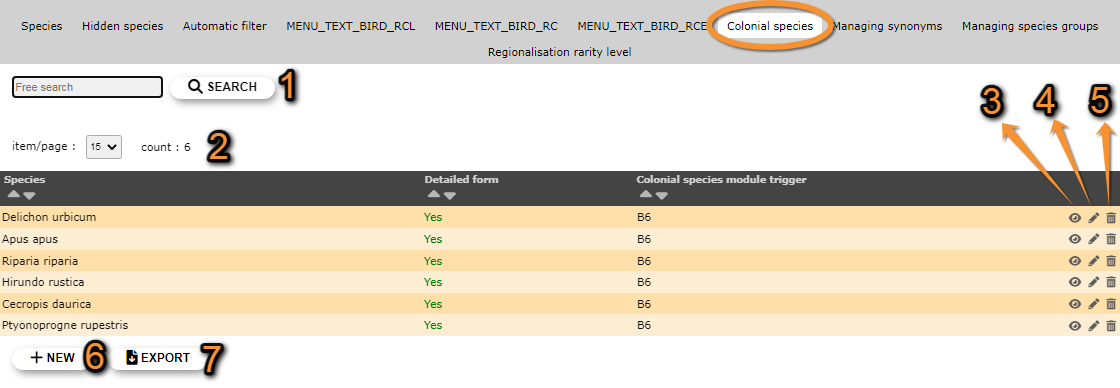
- 1. Search
Reduce list by typing the name of a site, or part of it, and click SEACH. When a filter is applied, click on
DISPLAY ALL.
- 2. Page and items
Select page number and/or number of items per page.
- 3. Details
Click to see details of selected species.

Admin colonial species details.
BACK: Go to previous screen without saving.
EDIT: Edit details. See edit subsection below.
DELETE: Remove selected species from the list.
- 4. Edit
Modify / complete any species detail.

Editing colonial species list.
8. Species: Change the species by typing its name, or part of it, in the left field (a) and select from the expandable menu in the right field (b).
9. Detailed form: Indicate if it will be necessary to open a detailed form for these species.
10. Colonial species module trigger:
BACK: Go to previous screen without saving.
MODIFY: Save changes.
- 5. Delete
Delete the selected species from the list. You will be asked to confirm.
- 6. NEW
Include a new species as a colonial breeding species.
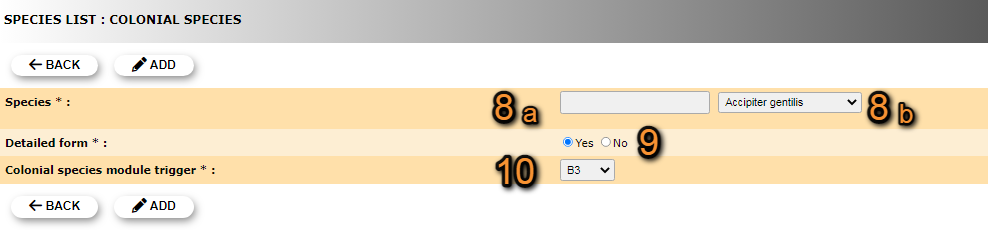
Admin New colonial species.
8. Species: Type the new species name, or part of it, in the left field (a) and select from the expandable menu in the right field (b).
9. Detailed form: Indicate if it will be necessary to open a detailed form for these species.
10. Colonial species module trigger:
BACK: Go to previous screen without saving.
ADD: Save new species to the list.
- 7. EXPORT
Download list as a .txt file.
[Top to Colonial species]
[Top to Species list]
[Back to Species administration]
Managing synonyms
[Top to Managing synonyms]
[Top to Species list]
[Back to Species administration]
Managing species groups
Indicates under which group to consider hybrids, subespecies and difficult to identify species. Use arrows under titles to alternate between ascending and descending order (see image as an example).
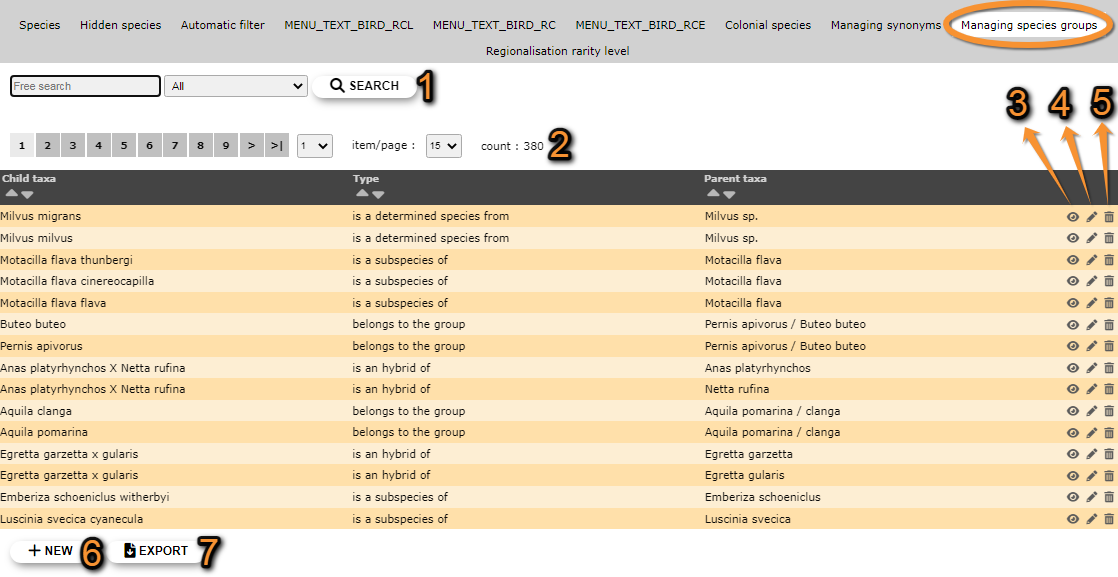


- 1. Search
Reduce list by typing the name of a site, or part of it, and click SEACH. When a filter is applied, click on
DISPLAY ALL.
- 2. Page and items
Select page number and/or number of items per page.
- 3. Details
Click to see details of selected species.

Details managing species groups.
BACK: Go to previous screen without saving.
EDIT: Edit details. See edit subsection below.
DELETE: Delete entry from the list.
- 4. Edit
Modify the species group the selected entry belongs to.
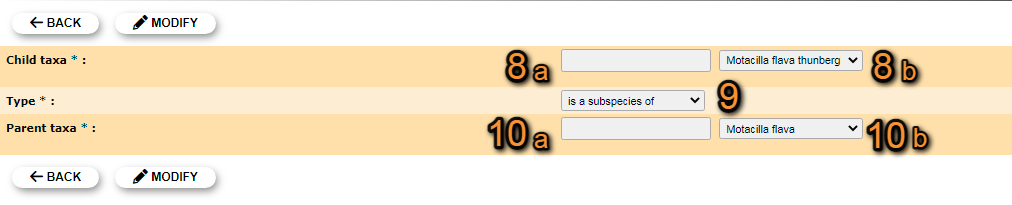
Editing managing species groups.
8. Child taxa: Type the species name, or part of it, in the left field (a) and select from the expandable menu on the right field (b).
9. Type: Select the grouping criteria from the expandable menu.
10. Parental taxa: Type the species name, or part of it, in the left field (a) and select from the expandable menu on the right field (b).
BACK: Go to previous screen without saving.
MODIFY: Save changes.
- 5. Delete
Delete entry. You will be asked to confirm.
- 6. NEW
Add a species, subspecies or genus to an existing group.

Managing species groups. Adding new species.
8. Child taxa: Type the species name, or part of it, in the left field (a) and select from the expandable menu on the right field (b).
9. Type: Select the grouping criteria from the expandable menu.
10. Parental taxa: Type the species name, or part of it, in the left field (a) and select from the expandable menu on the right field (b).
BACK: Go to previous screen without saving.
ADD: Save new species to the assigned group.
- 7. EXPORT
Download list as a .txt file.
[Top to Managing species groups]
[Top to Species list]
[Back to Species administration]
Regionalisation rarity level
[Top to Regionalisation rarity level]
[Top to Species list]
[Back to Species administration]
Admin species maps
Menu > Administration > Species administration > Admin species maps

Admin species maps.
[Top to Admin species maps]
[Back to Species administration]
Species for form
Menu > Administration > Species administration > Species for form
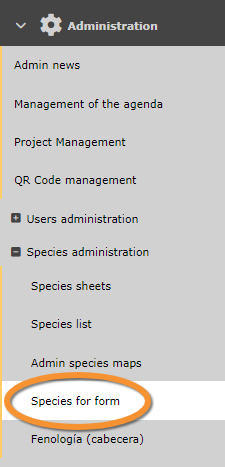
Species for form.
[Top to Species for form]
[Back to Species administration]
Fenología (cabecera)
Menu > Administration > Species administration > Fenología (Cabecera)

Fenología (cabecera)
[Top to Fenología (cabecera)]
[Back to Species administration]