Statistics: Difference between revisions
| (346 intermediate revisions by the same user not shown) | |||
| Line 1: | Line 1: | ||
<br/> | |||
See some statistics about observations submitted. <br/> | |||
Access statistics on the left hand column under '''Explore''' tab (see image [[Media:Statistics.png|Statistics]]).<br /> | |||
<br /> | <br /> | ||
NOTE: unregistered users can only access [[Statistics#General stats|'''General stats''']]. To register, see wiki section Web interface > Getting started > [[Registration|Registration]]. <br/> | |||
<br/> | |||
<center> | |||
<div class="toc" style="border-radius:5px;background-color:#ffffff;padding-left:8px;padding-right:8px;padding-bottom:8px;width:300px;"> | |||
[[File:Statistics.png|300px\link=https://help.biolovision.net/images/d/d0/Statistics.png|Click image to enlarge]] | |||
<div class="toc" style="border-radius:5px;padding-left:15px;text-align:left; font-size:12px;width:275px;"> | |||
'''Statistics.''' | |||
</div> | |||
</div> | |||
</center> | |||
<br/> | |||
<br/> | |||
=General stats= | =General stats= | ||
<br/> | |||
See <br/> | |||
<br /> | <span style="color: #000000; margin-left: 25px;"><b>· </b>[[Statistics#General stats 2|general statistics]] such number of contributions or species recorded; or <br/> | ||
<span style="color: #000000; margin-left: 25px;"><b>· </b>[[Statistics#Lists stats|list statistics]]. <br/> | |||
<br/> | |||
<div class="toc" style="border-radius:5px;background-color:#ffffff;padding-left:8px;padding-right:8px;padding-bottom:8px;width:900px; position: relative; margin: 0 auto;"> <!-- div que contindrà la imatge i els divs transparents --> | |||
[[File:Menu general stats.png|900px|link=https://help.biolovision.net/images/4/49/Menu_general_stats.png]] <!-- carrega la imatge --> | |||
<div class="toc" style="border-radius:5px;width:875px;padding-left:15px;text-align:left; font-size:12px;"> | |||
<span style="padding-left:10px;">'''General Statistics. Menu.'''</span> | |||
</div> | |||
<div style="border:0px solid green;width:435px;height:120px;position: absolute;top:63px;left:18px;" class="plainlinks"> <!-- div transparent --> | |||
[https://help.biolovision.net/Statistics#General_stats_2 <span title="Go to General stats" style="border:0px solid black;width:875px;height:120px;display:block;"> </span>] <!-- enllaç del div transparent, pot no enllaçar enlloc | |||
</div> <!-- tancar div transparent --> | |||
<div style="border:0px solid green;width:435px;height:120px;position: absolute;top:0px;left:445px;" class="plainlinks"> <!-- div transparent --> | |||
[https://help.biolovision.net/Statistics#Lists_stats <span title="Go to Lists statistics" style="border:0px solid black;width:435px;height:120px;display:block;"> </span>] <!-- enllaç del div transparent, pot no enllaçar enlloc | |||
</div> <!-- tancar div transparent --> | |||
</div> <!-- tancar div contenidor --> | |||
</div> | |||
</div> | |||
<br/> | |||
<span id="General stats 2"></span> | |||
===General stats=== | |||
<br/> | |||
<center> | |||
<div class="toc" style="border-radius:5px;background-color:#ffffff;padding-left:8px;padding-right:8px;padding-bottom:8px;width:600px;"> | |||
[[File:General stats menu.png|600px|link= https://help.biolovision.net/images/a/ad/General_stats_menu.png|Click image to enlarge]] | |||
<div class="toc" style="border-radius:5px;padding-left:15px;text-align:left; font-size:12px;width:575px;"> | |||
'''General stats.''' | |||
</div> | |||
</div> | |||
</center> | |||
<br/> | |||
<br/> | |||
Select from the tabs above which period of time you wish to see statistics for: <br/> | |||
<span style="color: #000000; margin-left: 25px;"><b>· </b> Overall, <br/> | |||
<span style="color: #000000; margin-left: 25px;"><b>· </b> This year, or <br/> | |||
<span style="color: #000000; margin-left: 25px;"><b>· </b> This month. <br/> | |||
<br/> | |||
See general numbers on the upper part. <br/> | |||
<i>Move the pointer on labels to see the description of this example.</i> <br/> | |||
<br/> | |||
<center> | |||
<table class="wikitable" style="border-collapse: separate;border-spacing: 0; border:none;padding:0;"> | |||
<tr style="vertical-align:top;"> | |||
<td style="border-radius: 5px;background-color:#ffffff;width:900px;padding-left:8px;padding-right:8px;padding-bottom:8px; position: relative;"> | |||
[[File:General data.png|900px|link=https://help.biolovision.net/images/9/9a/General_data.png]] | |||
<div class="toc" style="border-radius:5px;width:875px;padding-left:15px;text-align:left; font-size:12px;"> | |||
<span style="padding-left:10px;">'''General data. Example.'''</span> | |||
</div> | |||
<!-- Registered observers --> | |||
<div class="dropdown9" style="border:0px solid green;width:882px;height:20px;position: absolute;top:67px;left:17px;"> | |||
<div class="dropbtn9"> </div> | |||
<div class="dropdown9-content plainlinks" style="min-width:400px;border:1px solid grey;height:60px;position: absolute; top: 0px;left:250px;"> | |||
<span><b>Registered observers</b> <br />There are 239.850 observers (accounts) registered on the local portal.</span> | |||
</div> | |||
</div> | |||
</div> | |||
<!-- Timeframe --> | |||
<div class="dropdown9" style="border:0px solid green;width:160px;height:30px;position: absolute;top:118px;left:30px;"> | |||
<div class="dropbtn9"> </div> | |||
<div class="dropdown9-content plainlinks" style="min-width:400px;border:1px solid grey;height:105px;position: absolute; top: 0px;left:250px;"> | |||
<span><b>Timeframe</b><br />Select the time frame to see statistics from. <br/> The example shows statistics for all years since the creation of the local portal.</span> | |||
</div> | |||
</div> | |||
</div> | |||
<!-- Total of contributions --> | |||
<div class="dropdown9" style="border:0px solid green;width:882px;height:20px;position: absolute;top:150px;left:17px;"> | |||
<div class="dropbtn9"> </div> | |||
<div class="dropdown9-content plainlinks" style="min-width:400px;border:1px solid grey;height:60px;position: absolute; top: 0px;left:250px;"> | |||
<span><b>Total of contributions</b> <br />There has been 154.556.261 records sent to the local portal since its creation.</span> | |||
</div> | |||
</div> | |||
</div> | |||
<!-- Total number of lists--> | |||
<div class="dropdown9" style="border:0px solid red;width:882px;height:20px;position: absolute;top:173px;left:17px;"> | |||
<div class="dropbtn9"> </div> | |||
<div class="dropdown9-content plainlinks" style="min-width:300px;border:1px solid grey;height:60px;position: absolute; top: 0px;left:250px;"> | |||
<span><b>Total number of lists</b> <br /> 3.764.567 lists have been submitted to the local portal.</span> | |||
</div> | |||
</div> | |||
</div> | |||
<!-- Total number of complete lists --> | |||
<div class="dropdown9" style="border:0px solid black;width:882px;height:20px;position: absolute;top:195px;left:17px;"> | |||
<div class="dropbtn9"> </div> | |||
<div class="dropdown9-content plainlinks" style="min-width:400px;border:1px solid grey;height:60px;position: absolute; top: 0px;left:250px;"> | |||
<span><b>Total number of complete lists </b><br />Of lists submitted to the local portal, 2.082.748 were complete lists.</span> | |||
</div> | |||
</div> | |||
</div> | |||
<!-- Total contributions the most active day --> | |||
<div class="dropdown9" style="border:0px solid blue;width:882px;height:20px;position: absolute;top:217px;left:17px;"> | |||
<div class="dropbtn9"> </div> | |||
<div class="dropdown9-content plainlinks" style="min-width:400px;border:1px solid grey;height:60px;position: absolute; top: 0px;left:250px;"> | |||
<span><b>Total contributions the most active day </b><br />The record number of observations submitted in a day were 168.183.</span> | |||
</div> | |||
</div> | |||
</div> | |||
<!-- Total squares kilometres covered --> | |||
<div class="dropdown9" style="border:0px solid orange;width:882px;height:20px;position: absolute;top:238px;left:17px;"> | |||
<div class="dropbtn9"> </div> | |||
<div class="dropdown9-content plainlinks" style="min-width:400px;border:1px solid grey;height:80px;position: absolute; top: -80px;left:250px;"> | |||
<span><b>Total squares kilometres covered </b><br />Of 9.546 available squares in the local portal, records have been submitted for 6.785 squares, which represents 71.1 % of squares.</span> | |||
</div> | |||
</div> | |||
</div> | |||
<!-- Total municipalities covered --> | |||
<div class="dropdown9" style="border:0px solid orange;width:882px;height:20px;position: absolute;top:260px;left:17px;"> | |||
<div class="dropbtn9"> </div> | |||
<div class="dropdown9-content plainlinks" style="min-width:400px;border:1px solid grey;height:80px;position: absolute; top: -80px;left:250px;"> | |||
<span><b>Total municipalities covered</b> <br />Records have been submitted in 34.702 out of 34.839 municipalities covered by this local portal, which represents 99.6 % of municipalities.</span> | |||
</div> | |||
</div> | |||
</div> | |||
</td> | |||
</tr> | |||
</table> | |||
<br/> | |||
</center> | |||
<br/> | |||
<br/> | |||
See statistics by taxonomic group or species. <br/> | |||
<i>Move the pointer on labels to see the description of this example.</i> <br/> | |||
<br/> | |||
<center> | |||
<table class="wikitable" style="border-collapse: separate;border-spacing: 0; border:none;padding:0;"> | |||
<tr style="vertical-align:top;"> | |||
<td style="border-radius: 5px;background-color:#ffffff;width:900px;padding-left:8px;padding-right:8px;padding-bottom:8px; position: relative;"> | |||
[[File:Stats by taxa.png|900px|link=https://help.biolovision.net/images/e/ee/Stats_by_taxa.png]] | |||
<div class="toc" style="border-radius:5px;width:875px;padding-left:15px;text-align:left; font-size:12px;"> | |||
<span style="padding-left:10px;">'''Breakdown by taxonomic group. Example.''' </span> | |||
</div> | |||
<!-- Birds --> | |||
<div class="dropdown9" style="border:0px solid green;width:882px;height:20px;position: absolute;top:50px;left:15px;"> | |||
<div class="dropbtn9"> </div> | |||
<div class="dropdown9-content plainlinks" style="min-width:400px;border:1px solid grey;height:85px;position: absolute; top: 20px;left:250px;"> | |||
<span><b>Birds</b> <br />Of all observations submitted to the local portal, 87.5 % of them belong to bird species. <br/> | |||
Of all observations submitted to the local portal, 135.501.694 belong to bird species. </span> | |||
</div> | |||
</div> | |||
</div> | |||
<!-- Butterflies --> | |||
<div class="dropdown9" style="border:0px solid green;width:882px;height:20px;position: absolute;top:70px;left:15px;"> | |||
<div class="dropbtn9"> </div> | |||
<div class="dropdown9-content plainlinks" style="min-width:400px;border:1px solid grey;height:85px;position: absolute; top: 20px;left:250px;"> | |||
<span><b>Butterflies</b><br /> | |||
Of all observations submitted to the local portal, 4 % of them belong to butterfly species. <br/> | |||
Of all observations submitted to the local portal, 6.254.695 belong to butterfly species. </span> | |||
</div> | |||
</div> | |||
</div> | |||
<!-- Mammals --> | |||
<div class="dropdown9" style="border:0px solid green;width:882px;height:20px;position: absolute;top:90px;left:15px;"> | |||
<div class="dropbtn9"> </div> | |||
<div class="dropdown9-content plainlinks" style="min-width:400px;border:1px solid grey;height:85px;position: absolute; top: 20px;left:250px;"> | |||
<span><b>Mammals</b> <br /> Of all observations submitted to the local portal, 2.2 % of them belong to mammal species. <br/> | |||
Of all observations submitted to the local portal, 3.399.666 belong to mammal species. </span> | |||
</div> | |||
</div> | |||
</div> | |||
<!-- Dragonflies --> | |||
<div class="dropdown9" style="border:0px solid green;width:882px;height:20px;position: absolute;top:110px;left:15px;"> | |||
<div class="dropbtn9"> </div> | |||
<div class="dropdown9-content plainlinks" style="min-width:400px;border:1px solid grey;height:85px;position: absolute; top: 20px;left:250px;"> | |||
<span><b>Dragonflies</b> <br /> Of all observations submitted to the local portal, 1.4 % of them belong to dragonfly species. <br/> | |||
Of all observations submitted to the local portal, 2.117.238 belong to dragonfly species. </span> | |||
</div> | |||
</div> | |||
</div> | |||
<!-- Moths --> | |||
<div class="dropdown9" style="border:0px solid green;width:882px;height:20px;position: absolute;top:130px;left:15px;"> | |||
<div class="dropbtn9"> </div> | |||
<div class="dropdown9-content plainlinks" style="min-width:400px;border:1px solid grey;height:85px;position: absolute; top: 20px;left:250px;"> | |||
<span><b>Moths</b> <br /> Of all observations submitted to the local portal, 1.1 % of them belong to moth species. <br/> | |||
Of all observations submitted to the local portal, 1.709.956 belong to moth species. </span> | |||
</div> | |||
</div> | |||
</div> | |||
<!-- Orthoptera --> | |||
<div class="dropdown9" style="border:0px solid green;width:882px;height:20px;position: absolute;top:150px;left:15px;"> | |||
<div class="dropbtn9"> </div> | |||
<div class="dropdown9-content plainlinks" style="min-width:400px;border:1px solid grey;height:85px;position: absolute; top: 20px;left:250px;"> | |||
<span><b>Orthoptera</b> <br /> Of all observations submitted to the local portal, 1 % of them belong to orthoptera species. <br/> | |||
Of all observations submitted to the local portal, 1.519.905 belong to orthoptera species. </span> | |||
</div> | |||
</div> | |||
</div> | |||
<p style="color:black;font-size:12px;padding-left:30px;text-align:left;column-count:2;"> | |||
<b>1.</b> Relative numbers <br /> | |||
<b>2.</b> Absolute numbers <br/> | |||
</p> | |||
</td> | |||
</tr> | |||
</table> | |||
<br/> | |||
</center> | |||
<center> | |||
<table class="wikitable" style="border-collapse: separate;border-spacing: 0; border:none;padding:0;"> | |||
<tr style="vertical-align:top;"> | |||
<td style="border-radius: 5px;background-color:#ffffff;width:900px;padding-left:8px;padding-right:8px;padding-bottom:8px; position: relative;"> | |||
[[File:Stats by sp.png|900px|link=https://help.biolovision.net/images/9/96/Stats_by_sp.png]] | |||
<div class="toc" style="border-radius:5px;width:875px;padding-left:15px;text-align:left; font-size:12px;"> | |||
<span style="padding-left:10px;">'''Distribution of species by taxonomic group. Example.''' </span> | |||
</div> | |||
<!-- Moths --> | |||
<div class="dropdown9" style="border:0px solid green;width:882px;height:20px;position: absolute;top:130px;left:15px;"> | |||
<div class="dropbtn9"> </div> | |||
<div class="dropdown9-content plainlinks" style="min-width:400px;border:1px solid grey;height:85px;position: absolute; top: 20px;left:250px;"> | |||
<span><b>Moths</b> <br /> | |||
Of all species submitted to the local portal, 27.5 % of them are moths. <br/> | |||
Of all species submitted to the local portal, 4.071 are moths. </span> | |||
</div> | |||
</div> | |||
</div> | |||
<!-- Beetles --> | |||
<div class="dropdown9" style="border:0px solid green;width:882px;height:20px;position: absolute;top:70px;left:15px;"> | |||
<div class="dropbtn9"> </div> | |||
<div class="dropdown9-content plainlinks" style="min-width:400px;border:1px solid grey;height:85px;position: absolute; top: 20px;left:250px;"> | |||
<span><b>Beetles</b><br /> | |||
Of all species submitted to the local portal, 23.3 % of them are beetles. <br/> | |||
Of all species submitted to the local portal, 3.437 are beetles. </span> | |||
</div> | |||
</div> | |||
</div> | |||
<!-- Spiders --> | |||
<div class="dropdown9" style="border:0px solid green;width:882px;height:20px;position: absolute;top:90px;left:15px;"> | |||
<div class="dropbtn9"> </div> | |||
<div class="dropdown9-content plainlinks" style="min-width:400px;border:1px solid grey;height:85px;position: absolute; top: 20px;left:250px;"> | |||
<span><b>Spiders</b> <br /> | |||
Of all species submitted to the local portal, 7.7 % of them are spiders. <br/> | |||
Of all species submitted to the local portal, 1.141 are spiders. </span> | |||
</div> | |||
</div> | |||
</div> | |||
<!-- Birds --> | |||
<div class="dropdown9" style="border:0px solid green;width:882px;height:20px;position: absolute;top:50px;left:15px;"> | |||
<div class="dropbtn9"> </div> | |||
<div class="dropdown9-content plainlinks" style="min-width:400px;border:1px solid grey;height:85px;position: absolute; top: 20px;left:250px;"> | |||
<span><b>Birds</b> <br /> | |||
Of all species submitted to the local portal, 7.7 % of them are birds. <br/> | |||
Of all species submitted to the local portal, 1.140 are birds. </span> | |||
</div> | |||
</div> | |||
</div> | |||
<!-- True bugs --> | |||
<div class="dropdown9" style="border:0px solid green;width:882px;height:20px;position: absolute;top:110px;left:15px;"> | |||
<div class="dropbtn9"> </div> | |||
<div class="dropdown9-content plainlinks" style="min-width:400px;border:1px solid grey;height:85px;position: absolute; top: 20px;left:250px;"> | |||
<span><b>True bugs</b> <br /> | |||
Of all species submitted to the local portal, 6.8 % of them are true bugs. <br/> | |||
Of all species submitted to the local portal, 1.005 are true bugs. </span> | |||
</div> | |||
</div> | |||
</div> | |||
<!-- Hymenoptera --> | |||
<div class="dropdown9" style="border:0px solid green;width:882px;height:20px;position: absolute;top:150px;left:15px;"> | |||
<div class="dropbtn9"> </div> | |||
<div class="dropdown9-content plainlinks" style="min-width:400px;border:1px solid grey;height:85px;position: absolute; top: 20px;left:250px;"> | |||
<span><b>Hymenoptera</b> <br /> | |||
Of all species submitted to the local portal, 6.4 % of them are hymenoptera. <br/> | |||
Of all species submitted to the local portal, 948 are hymenoptera. | |||
</span> | |||
</div> | |||
</div> | |||
</div> | |||
<p style="color:black;font-size:12px;padding-left:30px;text-align:left;column-count:2;"> | |||
<b>1.</b> Relative numbers <br /> | |||
<b>2.</b> Absolute numbers <br/> | |||
</p> | |||
</td> | |||
</tr> | |||
</table> | |||
<br/> | |||
</center> | |||
<br/> | |||
[[Statistics#General stats 2|[Top to General stats]]] <br/> | |||
[[#top|[Back to Statistics]]] <br/> | |||
<br/> | |||
<span id="Lists stats"></span> | |||
===Lists statistics=== | |||
<br/> | |||
<center> | |||
<div class="toc" style="border-radius:5px;background-color:#ffffff;padding-left:8px;padding-right:8px;padding-bottom:8px;width:600px;"> | |||
[[File:Lists stats menu.png|600px|link=https://help.biolovision.net/images/3/39/Lists_stats_menu.png|Click image to enlarge]] | |||
<div class="toc" style="border-radius:5px;padding-left:15px;text-align:left; font-size:12px;width:575px;"> | |||
'''Lists stats.''' | |||
</div> | |||
</div> | |||
</center> | |||
<br/> | |||
<br/> | |||
Indicates which proportion of lists include the selected species. <br/> | |||
<br/> | |||
1. Select between: <br/> | |||
<span style="color: #000000; margin-left: 25px;"><b>· [[Statistics#sp presence|Species presence]]</b> to see the proportion of lists that registered the selected species on a specified geographical area. <br/> | |||
<span style="color: #000000; margin-left: 25px;"><b>· [[Statistics#sp by area|Presence comparison by area]]</b> to compare the presence of selected species between two geographical areas. <br/> | |||
<span style="color: #000000; margin-left: 25px;"><b>· [[Statistics#sp by year|Presence comparison by year]]</b> to compare the presence of selected species between two years. <br/> | |||
2. Show the graph. <br/> | |||
<br/> | |||
<br/> | |||
<span id="sp presence"></span> | |||
:::<b>Species presence</b><br/> | |||
<br/> | |||
Percentage of submitted lists at the geographical area selected that contains at least one observation of the selected species. <br/> | |||
<br/> | |||
<center> | |||
<div class="toc" style="border-radius:5px;background-color:#ffffff;padding-left:8px;padding-right:8px;width:800px;"> | |||
[[File:Lists_sp_presence.png|800px|link=https://help.biolovision.net/images/9/9c/Lists_sp_presence.png|Click image to enlarge]] | |||
<div class="toc" style="border-radius:5px;padding-left:15px;text-align:left; font-size:12px;width:775px;"> | |||
'''Species presence.''' | |||
</div> | |||
<p style="color:black;font-size:12px;padding-left:5px;text-align:left;column-count:1;padding-right:5px;"> | |||
'''1. Step:''' Select from the expandable menu to see data grouped by week or not grouped (day). <br/> | |||
'''2. Species:''' Select specie. Type name of species, or part of it, on the left hand field, and/or select from the expandable menu on the right.<br/> | |||
'''3. Area:''' Select from the expandable menu the geographical area to visualise. <br/> | |||
'''4. Show the graph:''' See results. <br/> | |||
</p> | |||
</div> | |||
</center> | |||
<br/> | |||
<br/> | |||
<i>Move the pointer on the image to see the description of this example.</i><br/> | |||
<br/> | |||
<table class="wikitable" style="border-collapse: separate;border-spacing: 0; border:none; padding:0; margin: 0 auto;"> | |||
<tr style="vertical-align:top;"> | |||
<td style="border-radius: 5px;background-color:#ffffff;width:900px;padding-left:8px;padding-right:8px;padding-bottom:8px; position: relative;"> | |||
[[File:Species_presence_results.png|900px|link=https://help.biolovision.net/images/d/d2/Species_presence_results.png|Click image to enlarge]] | |||
<div class="toc" style="border-radius:5px;width:875px;padding-left:15px;text-align:left; font-size:12px;"> | |||
<span style="padding-left:10px;">'''Species presence. Results.'''</span> | |||
</div> | |||
<p style="color:black;font-size:12px;padding-left:5px;text-align:left;column-count:1;padding-right:5px;"> | |||
'''1.''' Check/Uncheck to select times to show. <br/> | |||
'''2.''' Place pointer on current year to see the percentage of lists containing the selected species for a specific date.<br/> | |||
</p> | |||
<!-- Legend --> | |||
<div class="dropdown9" style="border:0px solid green;width:509px;height:42px;position: absolute;top:338px;left:11px;"> | |||
<div class="dropbtn9"> </div> | |||
<div class="dropdown9-content plainlinks" style="min-width:400px;border:1px solid grey;height:90px;position: absolute; top: 0px;left:450px;"> | |||
<span><b>Legend</b> <br />The data compares the current year, the previous year, and the average of ten years; but not the average of 5 years.</span> | |||
</div> | |||
</div> | |||
<!-- Date --> | |||
<div class="dropdown9" style="border:0px solid green;width:120px;height:116px;position: absolute;top:201px;left:96px;"> | |||
<div class="dropbtn9"> </div> | |||
<div class="dropdown9-content plainlinks" style="min-width:425px;border:1px solid grey;height:90px;position: absolute; top: 0px;left:180px;"> | |||
<span><b>Date</b><br />On 21th February (current year) 11.11 % of submitted lists recorded the selected species. </span> | |||
</div> | |||
</div> | |||
<!-- September --> | |||
<div class="dropdown9" style="border:0px solid green;width:75px;height:296px;position: absolute;top:22px;left:600px;"> | |||
<div class="dropbtn9"> </div> | |||
<div class="dropdown9-content plainlinks" style="width:100px;border:1px solid grey;height:90px;position: absolute; top: 40px;left:-500px;"> | |||
<span><b>September data</b> <br /> By mid September, just over 60 % of submitted lists during the last 10 years recorded the selected species, while almost 80 % of lists submitted last year contained the species. </span> | |||
</div> | |||
</div> | |||
</td> | |||
</tr> | |||
</table> | |||
<br/> | |||
<br/> | |||
<span id="sp by area"></span> | |||
:::<b>Presence comparison (by area)</b> <br/> | |||
<br/> | |||
Percentage of submitted lists in the two selected geographical areas that contain the selected species. <br/> | |||
<br/> | |||
<center> | |||
<div class="toc" style="border-radius:5px;background-color:#ffffff;padding-left:8px;padding-right:8px;width:800px;"> | |||
[[File:Lists_sp_by_area.png|800px|link=https://help.biolovision.net/images/4/40/Lists_sp_by_area.png|Click image to enlarge]] | |||
<div class="toc" style="border-radius:5px;padding-left:15px;text-align:left; font-size:12px;width:775px;"> | |||
'''Presence comparison (by area).''' | |||
</div> | |||
<p style="color:black;font-size:12px;padding-left:5px;text-align:left;column-count:1;padding-right:5px;"> | |||
'''1. Species:''' Select specie. Type name of species, or part of it, on the left hand field, and/or select from the expandable menu on the right.<br/> | |||
'''2. Area:''' Select from the expandable menu one of the geographical areas to compare. <br/> | |||
'''3. Second area:''' Select from the expandable menu the other geographical area to compare. <br/> | |||
'''4. Show the graph:''' See results. <br/> | |||
</p> | |||
</div> | |||
</center> | |||
<br/> | |||
<br/> | |||
<i>Move the pointer on the image to see the description of this example.</i> <br/> | |||
<br/> | |||
<center> | |||
<table class="wikitable" style="border-collapse: separate;border-spacing: 0; border:none;padding:0;"> | |||
<tr style="vertical-align:top;"> | |||
<td style="border-radius: 5px;background-color:#ffffff;width:900px;padding-left:8px;padding-right:8px;padding-bottom:8px; position: relative;"> | |||
[[File:Sp by area.png|900px|link=https://help.biolovision.net/images/c/c0/Sp_by_area.png|Click image to enlarge]] | |||
<div class="toc" style="border-radius:5px;width:875px;padding-left:15px;text-align:left; font-size:12px;"> | |||
<span style="padding-left:10px;">'''Presence comparison (by area). Results.'''</span> | |||
</div> | |||
<p style="color:black;font-size:12px;padding-left:5px;text-align:left;column-count:1;padding-right:5px;"> | |||
'''1.''' Check/Uncheck to select times to show. <br/> | |||
'''2.''' Place pointer on current year to see the percentage of lists containing the selected species for a specific date.<br/> | |||
</p> | |||
<!-- Legend --> | |||
<div class="dropdown9" style="border:0px solid green;width:310px;height:48px;position: absolute;top:334px;left:11px;"> | |||
<div class="dropbtn9"> </div> | |||
<div class="dropdown9-content plainlinks" style="min-width:400px;border:1px solid grey;height:90px;position: absolute; top: 0px;left:400px;"> | |||
<span><b>Legend</b> <br />The example compares data from the Western Central area and the whole country.</span> | |||
</div> | |||
</div> | |||
</div> | |||
<!-- Date --> | |||
<div class="dropdown9" style="border:0px solid green;width:140px;height:101px;position: absolute;top:136px;left:750px;"> | |||
<div class="dropbtn9"> </div> | |||
<div class="dropdown9-content plainlinks" style="min-width:100px;border:1px solid grey;height:90px;position: absolute; top: 0px;left:-480px;"> | |||
<span><b>Date</b><br />On 27th November 33.33 % of submitted lists in Western Central Alps<br/>recorded the selected species. </span> | |||
</div> | |||
</div> | |||
</div> | |||
<!-- May --> | |||
<div class="dropdown9" style="border:0px solid green;width:75px;height:263px;position: absolute;top:39px;left:325px;"> | |||
<div class="dropbtn9"> </div> | |||
<div class="dropdown9-content plainlinks" style="min-width:400px;border:1px solid grey;height:120px;position: absolute; top: 40px;left:100px;"> | |||
<span><b>May data</b> <br /> Around mid May, almost 60 % of submitted lists in Western Central Alps recorded the selected species, while about 30 % of lists submitted in the whole country contained the species. </span> | |||
</div> | |||
</div> | |||
</div> | |||
</td> | |||
</tr> | |||
</table> | |||
<br/> | |||
</center> | |||
<span id="sp by year"></span> | |||
:::<b>Presence comparison (by year)</b> <br/> | |||
<br/> | |||
Percentage of submitted lists in the selected geographical area that contain the selected species in two selected years. <br/> | |||
<br/> | |||
<center> | |||
<div class="toc" style="border-radius:5px;background-color:#ffffff;padding-left:8px;padding-right:8px;width:800px;"> | |||
[[File:Lists_sp_by_year.png|800px|link=https://help.biolovision.net/images/d/db/Lists_sp_by_year.png|Click image to enlarge]] | |||
<div class="toc" style="border-radius:5px;padding-left:15px;text-align:left; font-size:12px;width:775px;"> | |||
'''Presence comparison (by year).''' | |||
</div> | |||
<p style="color:black;font-size:12px;padding-left:5px;text-align:left;column-count:1;padding-right:5px;"> | |||
'''1. Species:''' Select specie. Type name of species, or part of it, on the left hand field, and/or select from the expandable menu on the right.<br/> | |||
'''2. Area:''' Select from the expandable menu the geographical area to visualise. <br/> | |||
'''3. Year 1:''' Select from the expandable menu one of the years to compare. <br/> | |||
'''4. Year 2:''' Select from the expandable menu the other year to compare. <br/> | |||
'''5. Show the graph:''' See results. <br/> | |||
</p> | |||
</div> | |||
</center> | |||
<br/> | |||
<br/> | |||
<i>Move the pointer on the image to see the description of this example.</i><br/> | |||
<br/> | |||
<center> | |||
<table class="wikitable" style="border-collapse: separate;border-spacing: 0; border:none;padding:0;"> | |||
<tr style="vertical-align:top;"> | |||
<td style="border-radius: 5px;background-color:#ffffff;width:900px;padding-left:8px;padding-right:8px;padding-bottom:8px; position: relative;"> | |||
[[File:Sp by year.png|900px|Click image to enlarge|link=https://help.biolovision.net/images/d/d8/Sp_by_year.png]] | |||
<div class="toc" style="border-radius:5px;width:875px;padding-left:15px;text-align:left; font-size:12px;"> | |||
<span style="padding-left:10px;">'''Presence comparison (by year). Results.'''</span> | |||
</div> | |||
<p style="color:black;font-size:12px;padding-left:5px;text-align:left;column-count:1;padding-right:5px;"> | |||
'''1.''' Check/Uncheck to select times to show. <br/> | |||
'''2.''' Place pointer on current year to see the percentage of lists containing the selected species for a specific date.<br/> | |||
</p> | |||
<!-- Legend --> | |||
<div class="dropdown9" style="border:0px solid green;width:275px;height:44px;position: absolute;top:330px;left:11px;"> | |||
<div class="dropbtn9"> </div> | |||
<div class="dropdown9-content plainlinks" style="min-width:400px;border:1px solid grey;height:90px;position: absolute; top: 0px;left:350px;"> | |||
<span><b>Legend</b> <br />The example compares data from 2026, 2020, and from the average from the last 10 years.</span> | |||
</div> | |||
</div> | |||
</div> | |||
<!-- Date --> | |||
<div class="dropdown9" style="border:0px solid green;width:129px;height:100px;position: absolute;top:188px;left:103px;"> | |||
<div class="dropbtn9"> </div> | |||
<div class="dropdown9-content plainlinks" style="min-width:425px;border:1px solid grey;height:90px;position: absolute; top: 0px;left:180px;"> | |||
<span><b>Date</b><br />On 21th February (current year) 11.11 % of submitted lists recorded the selected species. </span> | |||
</div> | |||
</div> | |||
</div> | |||
<!-- September --> | |||
<div class="dropdown9" style="border:0px solid green;width:75px;height:260px;position: absolute;top:32px;left:610px;"> | |||
<div class="dropbtn9"> </div> | |||
<div class="dropdown9-content plainlinks" style="width:100px;border:1px solid grey;height:90px;position: absolute; top: 40px;left:-500px;"> | |||
<span><b>September data</b> <br /> By mid September, just over 70 % of submitted lists during 2020 recorded the selected species, while in the last 10 years average about 50 % of lists contained the species. September 2026 has not yet arrived.</span> | |||
</div> | |||
</div> | |||
</div> | |||
</td> | |||
</tr> | |||
</table> | |||
<br/> | |||
</center> | |||
[[Statistics#Lists_stats|[Top to List statistics]]] <br/> | |||
<br /> | [[#top|[Back to Statistics]]] <br/> | ||
<br/> | |||
=Contribution statistics= | =Contribution statistics= | ||
<br/> | |||
See distribution across time nad/or geographical areas. <br/> | |||
Choose between <br/> | |||
<span style="color: #000000; margin-left: 25px;"><b>· </b>[[Statistics#Temporal_distribution|Temporal distribution]], <br/> | |||
<span style="color: #000000; margin-left: 25px;"><b>· </b>[[Statistics#Distribution_by_county 1|Distribution by county]], <br/> | |||
<span style="color: #000000; margin-left: 25px;"><b>· </b>[[Statistics#Info_about_lists_1|Info about lists]], or <br/> | |||
<span style="color: #000000; margin-left: 25px;"><b>· </b>[[Statistics#Stats_by_municipality|Stats by municipality]]. <br/> | |||
<br/> | |||
Note options are country dependant and not all options may be available in your local portal. <br/> | |||
<br/> | |||
<div class="toc" style="border-radius:5px;background-color:#ffffff;padding-left:8px;padding-right:8px;padding-bottom:8px;width:900px; position: relative; margin: 0 auto;"> <!-- div que contindrà la imatge i els divs transparents --> | |||
[[File:Contribution_stats 2.png|1300px|link=https://help.biolovision.net/images/c/ca/Contribution_stats_2.png]] <!-- carrega la imatge --> | |||
<div class="toc" style="border-radius:5px;width:1275px;padding-left:15px;text-align:left; font-size:12px;"> | |||
<span style="padding-left:10px;">'''Contribution stats. Menu.'''</span> | |||
</div> | |||
<div style="border:0px solid green;width:310px;height:126px;position: absolute;top:48px;left:18px;" class="plainlinks"> <!-- div transparent --> | |||
[https://help.biolovision.net/Statistics#Temporal_distribution <span title="Go to Temporal distribution" style="border:0px solid black;width:310px;height:126px; display:block;"> </span>] <!-- enllaç del div transparent, pot no enllaçar enlloc | |||
</div> <!-- tancar div transparent --> | |||
<div style="border:0px solid green;width:310px;height:126px;position: absolute;top:0px;left:325px;" class="plainlinks"> <!-- div transparent --> | |||
[https://help.biolovision.net/Statistics#Distribution_by_county_1<span title="Go to Distribution by county" style="border:0px solid black;width:310px;height:126px;display:block;"> </span>] <!-- enllaç del div transparent, pot no enllaçar enlloc | |||
</div> <!-- tancar div transparent --> | |||
<div style="border:0px solid green;width:310px;height:130px;position: absolute;top:0px;left:320px;" class="plainlinks"> <!-- div transparent --> | |||
[https://help.biolovision.net/Statistics#Info_about_lists_1 <span title="Go to Info about lists" style="border:0px solid black;width:310px;height:130px;display:block;"> </span>] <!-- enllaç del div transparent, pot no enllaçar enlloc | |||
</div> <!-- tancar div transparent --> | |||
<div style="border:0px solid green;width:310px;height:129px;position: absolute;top:0px;left:322px;" class="plainlinks"> <!-- div transparent --> | |||
[https://help.biolovision.net/Statistics#Stats_by_municipality <span title="Go to Stats by municipality" style="border:0px solid black;width:310px;height:130px;display:block;"> </span>] <!-- enllaç del div transparent, pot no enllaçar enlloc | |||
</div> <!-- tancar div transparent --> | |||
</div> <!-- tancar div contenidor --> | |||
</div> <!--tancar tants nombre de divs com quadradets invisibles--> | |||
</div> | |||
</div> | |||
</div> | |||
<br/> | |||
<br/> | |||
<span id="Temporal distribution"></span> | |||
==Temporal distribution== | ==Temporal distribution== | ||
<br/> | |||
<center> | |||
<div class="toc" style="border-radius:5px;background-color:#ffffff;padding-left:8px;padding-right:8px;padding-bottom:8px;width:400px;"> | |||
[[File:Temporal_distribution_menu.png|400px|link=https://help.biolovision.net/images/6/64/Temporal_distribution_menu.png|Click image to enlarge]] | |||
<div class="toc" style="border-radius:5px;padding-left:15px;text-align:left; font-size:12px;width:375px;"> | |||
'''Temporal distribution. Menu.''' | |||
</div> | |||
</div> | |||
</center> | |||
<br/> | |||
<br/> | |||
See statistics for number of records, number of observers, number of lists or number of species across time. <br/> | |||
<br/> | |||
1. Choose from the expandable menu on the top right the geographical regions to want to see. <br/> | |||
<span style="color: #000000; margin-left: 15px;">By default, all country will show. <br/> | |||
2. Choose from the tabs on top which area to visualise: <br/> | |||
<span style="color: #000000; margin-left: 25px;"><b>· </b> [[Statistics#N records|Number of records]]. <br/> | |||
<span style="color: #000000; margin-left: 25px;"><b>· </b> [[Statistics#N contributors|Number of contributors]]. <br/> | |||
<span style="color: #000000; margin-left: 25px;"><b>· </b> [[Statistics#N lists|Number of lists]]. <br /> | |||
<span style="color: #000000; margin-left: 25px;"><b>· </b> [[Statistics#N species|Number of species]]. <br /> | |||
3. Choose timeframe on tabs: <br/> | |||
<span style="color: #000000; margin-left: 25px;"><b>· </b> Daily, <br/> | |||
<span style="color: #000000; margin-left: 25px;"><b>· </b> Monthly, or <br/> | |||
<span style="color: #000000; margin-left: 25px;"><b>· </b> Yearly. <br/> | |||
<br /> | |||
<center> | |||
<div class="toc" style="border-radius:5px;background-color:#ffffff;padding-left:8px;padding-right:8px; padding-bottom:8px;width:800px;"> | |||
[[File:Temporal_distribution._Selecting_data.png|800px|link=https://help.biolovision.net/images/c/c6/Temporal_distribution._Selecting_data.png|Click image to enlarge]] | |||
<div class="toc" style="border-radius:5px;padding-left:15px;text-align:left; font-size:12px;width:775px;"> | |||
'''Temporal distribution. Selecting data.''' | |||
</div> | |||
<p style="color:black;font-size:12px;padding-left:30px;text-align:left;column-count:2;"> | |||
<b>1.</b> Geographical area <br /> | |||
<b>2.</b> Type of data <br/> | |||
<b>3.</b> Timeframe <br /> | |||
</p> | |||
</div> | |||
</center> | |||
<br/> | |||
<br/> | |||
<span id="N records"></span> | |||
<b>Number of records</b> | |||
<br/> | |||
See number of records submitted to biolovision systems during the timeframe selected. <br/> | |||
<br/> | |||
Select which taxonomic groups to visualise by checking/unchecking them below the graph. <br/> | |||
<i>Move the pointer on web graphic to see details on species in each column. </i> <br/> | |||
<i>Move the pointer on the image to see the description of this example.</i> <br/> | |||
<br/> | |||
<br/> | |||
<center> | |||
<table class="wikitable" style="border-collapse: separate;border-spacing: 0; border:none;padding:0;"> | |||
<tr style="vertical-align:top;"> | |||
<td style="border-radius: 5px;background-color:#ffffff;width:900px;padding-left:8px;padding-right:8px;padding-bottom:8px; position: relative;"> | |||
[[File:Temporal distribution details 1.png|900px|link=https://help.biolovision.net/images/6/6f/Temporal_distribution_details_1.png|Click image to enlarge]] | |||
<div class="toc" style="border-radius:5px;width:875px;padding-left:15px;text-align:left; font-size:12px;"> | |||
<span style="padding-left:10px;">'''Number of records.'''</span> | |||
</div> | |||
<p style="color:black;font-size:12px;padding-left:5px;text-align:left;column-count:1;padding-right:5px;"> | |||
'''1.''' Apply filters. <br/> | |||
'''2.''' Check/Uncheck all options. <br/> | |||
'''3.''' Place mouse to open a full relation of records for the selected period. In bold, the taxonomic group that triggered the action. | |||
</p> | |||
<!-- Filters --> | |||
<div class="dropdown9" style="border:0px solid green;width:879px;height:157px;position: absolute;top:485px;left:14px;"> | |||
<div class="dropbtn9"> </div> | |||
<div class="dropdown9-content plainlinks" style="min-width:400px;border:1px solid grey;height:60px;position: absolute; top: 0px;left:250px;"> | |||
<span><b>Filters</b> <br />The example only considers records for snail and reptile species.</span> | |||
</div> | |||
</div> | |||
</div> | |||
<!-- Results --> | |||
<div class="dropdown9" style="border:0px solid green;width:107px;height:324px;position: absolute;top:101px;left:238px;"> | |||
<div class="dropbtn9"> </div> | |||
<div class="dropdown9-content plainlinks" style="min-width:425px;border:1px solid grey;height:150px;position: absolute; top: 0px;left:180px;"> | |||
<span><b>Results</b><br />On April 2025 there were 19.683 records of snail and reptile species together, most of them were reptiles. <br/> On May 2025 there were 19.267 records of snail and reptile species together, most of them were reptiles. <br/> Place mouse on column to see full detail (number 3 in example). </span> | |||
</div> | |||
</div> | |||
</div> | |||
<!-- Details --> | |||
<div class="dropdown9" style="border:0px solid green;width:154px;height:378px;position: absolute;top:19px;left:670px;"> | |||
<div class="dropbtn9"> </div> | |||
<div class="dropdown9-content plainlinks" style="width:100px;border:1px solid grey;height:80px;position: absolute; top: 40px;left:-500px;"> | |||
<span><b>Details</b> <br />Pointer on snails: On January 2026 there were 837 records of snails, which represents 0.1 % of all records that month. </span> | |||
</div> | |||
</div> | |||
</div> | |||
</td> | |||
</tr> | |||
</table> | |||
<br/> | |||
</center> | |||
<br/> | |||
If selecting a monthly graph, see number of records submitted each month for the last few years. <br/> | |||
<br/> | |||
<i>Move the pointer on web graphic to see details on species in each column. </i> <br/> | |||
<i>Move the pointer on the image to see the description of this example.</i> <br/> | |||
<br/> | |||
<center> | |||
<table class="wikitable" style="border-collapse: separate;border-spacing: 0; border:none;padding:0;"> | |||
<tr style="vertical-align:top;"> | |||
<td style="border-radius: 5px;background-color:#ffffff;width:900px;padding-left:8px;padding-right:8px;padding-bottom:8px; position: relative;"> | |||
[[File:N records per month.png|900px|link=https://help.biolovision.net/images/9/9a/N_records_per_month.png|Click image to enlarge]] | |||
<div class="toc" style="border-radius:5px;width:875px;padding-left:15px;text-align:left; font-size:12px;"> | |||
<span style="padding-left:10px;">'''Number of records per month.'''</span> | |||
</div> | |||
<p style="color:black;font-size:12px;padding-left:5px;text-align:left;column-count:1;padding-right:5px;"> | |||
'''1.''' Move pointer on a column to see data details. <br/> | |||
</p> | |||
<!-- August --> | |||
<div class="dropdown9" style="border:0px solid green;width:145px;height:87px;position: absolute;top:187px;left:513px;"> | |||
<div class="dropbtn9"> </div> | |||
<div class="dropdown9-content plainlinks" style="min-width:400px;border:1px solid grey;height:90px; top: 140px;left:-200px;"> | |||
<span><b>August 2025</b><br />In August 2025 there were a total of 875.073 records submitted to biolovision systems. </span> | |||
</div> | |||
</div> | |||
</div> | |||
</td> | |||
</tr> | |||
</table> | |||
<br/> | |||
</center> | |||
<br/> | |||
<br/> | |||
<span id="N contributors"></span> | |||
<b>Number of contributors</b> | |||
<br/> | |||
See number of observers that submitted data to biolovision systems during the timeframe selected. <br/> | |||
<br/> | |||
<i>Move the pointer on the image to see the description of this example.</i> <br/> | |||
<br/> | |||
<center> | |||
<table class="wikitable" style="border-collapse: separate;border-spacing: 0; border:none;padding:0;"> | |||
<tr style="vertical-align:top;"> | |||
<td style="border-radius: 5px;background-color:#ffffff;width:900px;padding-left:8px;padding-right:8px;padding-bottom:8px; position: relative;"> | |||
[[File:Screenshot_2026-03-27_135813.png|900px|link=https://help.biolovision.net/images/3/3c/Screenshot_2026-03-27_135813.png|Click image to enlarge]] | |||
<div class="toc" style="border-radius:5px;width:875px;padding-left:15px;text-align:left; font-size:12px;"> | |||
<span style="padding-left:10px;">'''Number of contributors.'''</span> | |||
</div> | |||
<!-- January --> | |||
<div class="dropdown9" style="border:0px solid green;width:52px;height:312px;position: absolute;top:80px;left:70px;"> | |||
<div class="dropbtn9"> </div> | |||
<div class="dropdown9-content plainlinks" style="min-width:400px;border:1px solid grey;height:90px; top: 0px;left:100px;"> | |||
<span><b>January 2025</b><br />In January 2025 there were a total of 28.910 different observers sharing observations with biolovision systems. </span> | |||
</div> | |||
</div> | |||
</div> | |||
<!-- February --> | |||
<div class="dropdown9" style="border:0px solid red;width:52px;height:150px;position: absolute;top:240px;left:123px;"> | |||
<div class="dropbtn9"> </div> | |||
<div class="dropdown9-content plainlinks" style="min-width:400px;border:1px solid grey;height:90px; position: absolute; top: -154px;left:100px;"> | |||
<span><b>February 2025</b><br />In February 2025 there were a total of 12.138 different observers sharing observations with biolovision systems. </span> | |||
</div> | |||
</div> | |||
</div> | |||
<!-- March --> | |||
<div class="dropdown9" style="border:0px solid blue;width:52px;height:155px;position: absolute;top:235px;left:180px;"> | |||
<div class="dropbtn9"> </div> | |||
<div class="dropdown9-content plainlinks" style="min-width:400px;border:1px solid grey;height:90px; position: absolute; top: -150px;left:44px;"> | |||
<span><b>March 2025</b><br />In March 2025 there were a total of 12.845 different observers sharing observations with biolovision systems. </span> | |||
</div> | |||
</div> | |||
</div> | |||
<!-- April --> | |||
<div class="dropdown9" style="border:0px solid black;width:52px;height:155px;position: absolute;top:235px;left:235px;"> | |||
<div class="dropbtn9"> </div> | |||
<div class="dropdown9-content plainlinks" style="min-width:400px;border:1px solid grey;height:90px; position: absolute; top: -150px;left:-8px;"> | |||
<span><b>April 2025</b><br />In April 2025 there were a total of 13.022 different observers sharing observations with biolovision systems. </span> | |||
</div> | |||
</div> | |||
</div> | |||
<!-- May --> | |||
<div class="dropdown9" style="border:0px solid green;width:52px;height:190px;position: absolute;top:200px;left:290px;"> | |||
<div class="dropbtn9"> </div> | |||
<div class="dropdown9-content plainlinks" style="min-width:400px;border:1px solid grey;height:90px; position: absolute; top: -120px;left:-60px;"> | |||
<span><b>May 2025</b><br />In May 2025 there were a total of 16.236 different observers sharing observations with biolovision systems. </span> | |||
</div> | |||
</div> | |||
</div> | |||
<!-- June --> | |||
<div class="dropdown9" style="border:0px solid red;width:52px;height:140px;position: absolute;top:250px;left:345px;"> | |||
<div class="dropbtn9"> </div> | |||
<div class="dropdown9-content plainlinks" style="min-width:400px;border:1px solid grey;height:90px; position: absolute; top: -170px;left:-113px;"> | |||
<span><b>June 2025</b><br />In June 2025 there were a total of 11.315 different observers sharing observations with biolovision systems. </span> | |||
</div> | |||
</div> | |||
</div> | |||
<!-- July --> | |||
<div class="dropdown9" style="border:0px solid black;width:52px;height:140px;position: absolute;top:250px;left:400px;"> | |||
<div class="dropbtn9"> </div> | |||
<div class="dropdown9-content plainlinks" style="min-width:400px;border:1px solid grey;height:90px; position: absolute; top: -170px;left:-168px;"> | |||
<span><b>July 2025</b><br />In July 2025 there were a total of 10.129 different observers sharing observations with biolovision systems. </span> | |||
</div> | |||
</div> | |||
</div> | |||
<!-- August --> | |||
<div class="dropdown9" style="border:0px solid orange;width:52px;height:118px;position: absolute;top:272px;left:456px;"> | |||
<div class="dropbtn9"> </div> | |||
<div class="dropdown9-content plainlinks" style="min-width:400px;border:1px solid grey;height:90px; position: absolute; top: -200px;left:-222px;"> | |||
<span><b>August 2025</b><br />In August 2025 there were a total of 9.732 different observers sharing observations with biolovision systems. </span> | |||
</div> | |||
</div> | |||
</div> | |||
<!-- September --> | |||
<div class="dropdown9" style="border:0px solid blue;width:52px;height:115px;position: absolute;top:275px;left:512px;"> | |||
<div class="dropbtn9"> </div> | |||
<div class="dropdown9-content plainlinks" style="min-width:400px;border:1px solid grey;height:90px; position: absolute; top: -200px;left:-276px;"> | |||
<span><b>September 2025</b><br />In September 2025 there were a total of 8.900 different observers sharing observations with biolovision systems. </span> | |||
</div> | |||
</div> | |||
</div> | |||
<!-- October --> | |||
<div class="dropdown9" style="border:0px solid green;width:52px;height:115px;position: absolute;top:275px;left:565px;"> | |||
<div class="dropbtn9"> </div> | |||
<div class="dropdown9-content plainlinks" style="min-width:400px;border:1px solid grey;height:90px; position: absolute; top: -200px;left:-329px;"> | |||
<span><b>October 2025</b><br />In October 2025 there were a total of 9.092 different observers sharing observations with biolovision systems. </span> | |||
</div> | |||
</div> | |||
</div> | |||
<!-- November --> | |||
<div class="dropdown9" style="border:0px solid blue;width:52px;height:115px;position: absolute;top:275px;left:621px;"> | |||
<div class="dropbtn9"> </div> | |||
<div class="dropdown9-content plainlinks" style="min-width:400px;border:1px solid grey;height:90px; position: absolute; top: -200px;left:-383px;"> | |||
<span><b>November 2025</b><br />In November 2025 there were a total of 9.084 different observers sharing observations with biolovision systems.</span> | |||
</div> | |||
</div> | |||
</div> | |||
<!-- December --> | |||
<div class="dropdown9" style="border:0px solid red;width:52px;height:118px;position: absolute;top:272px;left:677px;"> | |||
<div class="dropbtn9"> </div> | |||
<div class="dropdown9-content plainlinks" style="min-width:400px;border:1px solid grey;height:90px; position: absolute; top: -200px;left:-438px;"> | |||
<span><b>December 2025</b><br />In December 2025 there were a total of 9.564 different observers sharing observations with biolovision systems. </span> | |||
</div> | |||
</div> | |||
</div> | |||
<!-- January --> | |||
<div class="dropdown9" style="border:0px solid green;width:52px;height:300px;position: absolute;top:92px;left:733px;"> | |||
<div class="dropbtn9"> </div> | |||
<div class="dropdown9-content plainlinks" style="min-width:400px;border:1px solid grey;height:90px; position: absolute; top: -20px;left:-492px;"> | |||
<span><b>January 2026</b><br />In January 2026 there were a total of 26.453 different observers sharing observations with biolovision systems. </span> | |||
</div> | |||
</div> | |||
</div> | |||
<!-- February --> | |||
<div class="dropdown9" style="border:0px solid black;width:52px;height:140px;position: absolute;top:250px;left:787px;"> | |||
<div class="dropbtn9"> </div> | |||
<div class="dropdown9-content plainlinks" style="min-width:400px;border:1px solid grey;height:90px; position: absolute; top: -170px;left:-547px;"> | |||
<span><b>February 2026</b><br />In February 2026 there were a total of 11.402 different observers sharing observations with biolovision systems. </span> | |||
</div> | |||
</div> | |||
</div> | |||
<!-- March --> | |||
<div class="dropdown9" style="border:0px solid red;width:52px;height:140px;position: absolute;top:250px;left:840px;"> | |||
<div class="dropbtn9"> </div> | |||
<div class="dropdown9-content plainlinks" style="min-width:400px;border:1px solid grey;height:90px; position: absolute; top: -170px;left:-600px;"> | |||
<span><b>March 2026</b><br />In March 2026 there were a total of 11.401 different observers sharing observations with biolovision systems. </span> | |||
</div> | |||
</div> | |||
</div> | |||
</td> | |||
</tr> | |||
</table> | |||
<br/> | |||
</center> | |||
If selecting a monthly graph, see number of contributors each month for the last few years. <br/> | |||
<br/> | |||
<i>Move the pointer on web graphic to see details on species in each column. </i> <br/> | |||
<i>Move the pointer on the image to see the description of this example.</i> <br/> | |||
<br/> | |||
<center> | |||
<table class="wikitable" style="border-collapse: separate;border-spacing: 0; border:none;padding:0;"> | |||
<tr style="vertical-align:top;"> | |||
<td style="border-radius: 5px;background-color:#ffffff;width:900px;padding-left:8px;padding-right:8px;padding-bottom:8px; position: relative;"> | |||
[[File:Contributors per month.png|900px|link=https://help.biolovision.net/images/5/56/Contributors_per_month.png|Click image to enlarge]] | |||
<div class="toc" style="border-radius:5px;width:875px;padding-left:15px;text-align:left; font-size:12px;"> | |||
<span style="padding-left:10px;">'''Number of contributors per month.'''</span> | |||
</div> | |||
<p style="color:black;font-size:12px;padding-left:5px;text-align:left;column-count:1;padding-right:5px;"> | |||
'''1.''' Move pointer on a column to see data details. <br/> | |||
</p> | |||
<!-- August --> | |||
<div class="dropdown9" style="border:0px solid green;width:132px;height:78px;position: absolute;top:250px;left:504px;"> | |||
<div class="dropbtn9"> </div> | |||
<div class="dropdown9-content plainlinks" style="min-width:400px;border:1px solid grey;height:90px; top: -150px;left:-200px;"> | |||
<span><b>August 2025</b><br />In August 2025 there were a total of 9.732 different observers sharing observations on biolovision systems. </span> | |||
</div> | |||
</div> | |||
</div> | |||
</td> | |||
</tr> | |||
</table> | |||
<br/> | |||
</center> | |||
<span id="N lists"></span> | |||
<b>Number of lists</b> | |||
<br/> | |||
See number of complete and partial lists submitted to biolovision systems. <br/> | |||
<br/> | |||
<i>Move the pointer on the image to see the description of this example.</i> <br/> | |||
<i>Move the pointer on web graphic to see details on species in each column. </i> <br/> | |||
<br/> | |||
<center> | |||
<table class="wikitable" style="border-collapse: separate;border-spacing: 0; border:none;padding:0;"> | |||
<tr style="vertical-align:top;"> | |||
<td style="border-radius: 5px;background-color:#ffffff;width:900px;padding-left:8px;padding-right:8px;padding-bottom:8px; position: relative;"> | |||
[[File:Number of lists temporal 2.png|900px|link=https://help.biolovision.net/images/c/ce/Number_of_lists_temporal_2.png|Click image to enlarge]] | |||
<div class="toc" style="border-radius:5px;width:875px;padding-left:15px;text-align:left; font-size:12px;"> | |||
<span style="padding-left:10px;">'''Number of lists.'''</span> | |||
</div> | |||
<p style="color:black;font-size:12px;padding-left:5px;text-align:left;column-count:1;padding-right:5px;"> | |||
'''1. Legend:''' See color correspondence for complete and partial lists. <br/> | |||
'''2. Details:''' Place pointer on any column to see details of lists on this column. | |||
</p> | |||
<!-- January --> | |||
<div class="dropdown9" style="border:0px solid green;width:52px;height:357px;position: absolute;top:81px;left:70px;"> | |||
<div class="dropbtn9"> </div> | |||
<div class="dropdown9-content plainlinks" style="min-width:400px;border:1px solid grey;height:110px; top: 0px;left:100px;"> | |||
<span><b>January 2025</b><br />In January 2025 there were a total of 65.359 lists submitted to biolovision systems. <br/>More than half of them were partial lists.</span> | |||
</div> | |||
</div> | |||
</div> | |||
<!-- February --> | |||
<div class="dropdown9" style="border:0px solid red;width:52px;height:200px;position: absolute;top:238px;left:125px;"> | |||
<div class="dropbtn9"> </div> | |||
<div class="dropdown9-content plainlinks" style="min-width:400px;border:1px solid grey;height:110px; position: absolute; top: -154px;left:104px;"> | |||
<span><b>February 2025</b><br />In February 2025 there were a total of 29.784 lists submitted to biolovision systems. <br/>Most of them were complete lists. </span> | |||
</div> | |||
</div> | |||
</div> | |||
<!-- March --> | |||
<div class="dropdown9" style="border:0px solid green;width:52px;height:277px;position: absolute;top:160px;left:180px;"> | |||
<div class="dropbtn9"> </div> | |||
<div class="dropdown9-content plainlinks" style="min-width:400px;border:1px solid grey;height:110px; top: 0px;left:100px;"> | |||
<span><b>March 2025</b><br />In March 2025 there were a total of 47.873 lists submitted to biolovision systems.<br/>Most of them were complete lists. </span> | |||
</div> | |||
</div> | |||
</div> | |||
<!-- April --> | |||
<div class="dropdown9" style="border:0px solid green;width:52px;height:306px;position: absolute;top:133px;left:235px;"> | |||
<div class="dropbtn9"> </div> | |||
<div class="dropdown9-content plainlinks" style="min-width:400px;border:1px solid grey;height:110px; top: 0px;left:100px;"> | |||
<span><b>April 2025</b><br />In April 2025 there were a total of 58.525 lists submitted to biolovision systems. <br/>Most of them were complete lists. </span> | |||
</div> | |||
</div> | |||
</div> | |||
<!-- May --> | |||
<div class="dropdown9" style="border:0px solid red;width:52px;height:306px;position: absolute;top:133px;left:290px;"> | |||
<div class="dropbtn9"> </div> | |||
<div class="dropdown9-content plainlinks" style="min-width:400px;border:1px solid grey;height:110px; top: 0px;left:100px;"> | |||
<span><b>May 2025</b><br />In May 2025 there were a total of 62.628 lists submitted to biolovision systems. <br/>Most of them were complete lists. </span> | |||
</div> | |||
</div> | |||
</div> | |||
<!-- June --> | |||
<div class="dropdown9" style="border:0px solid blue;width:52px;height:223px;position: absolute;top:214px;left:345px;"> | |||
<div class="dropbtn9"> </div> | |||
<div class="dropdown9-content plainlinks" style="min-width:400px;border:1px solid grey;height:110px; position: absolute; top: -154px;left:104px;"> | |||
<span><b>June 2025</b><br />In June 2025 there were a total of 35.609 lists submitted to biolovision systems. <br/>Most of them were complete lists. </span> | |||
</div> | |||
</div> | |||
</div> | |||
<!-- July --> | |||
<div class="dropdown9" style="border:0px solid orange;width:52px;height:167px;position: absolute;top:270px;left:400px;"> | |||
<div class="dropbtn9"> </div> | |||
<div class="dropdown9-content plainlinks" style="min-width:400px;border:1px solid grey;height:110px; position: absolute; top: -154px;left:50px;"> | |||
<span><b>July 2025</b><br />In July 2025 there were a total of 20.438 lists submitted to biolovision systems. <br/>Most of them were complete lists. </span> | |||
</div> | |||
</div> | |||
</div> | |||
<!-- August --> | |||
<div class="dropdown9" style="border:0px solid green;width:52px;height:167px;position: absolute;top:270px;left:455px;"> | |||
<div class="dropbtn9"> </div> | |||
<div class="dropdown9-content plainlinks" style="min-width:400px;border:1px solid grey;height:110px; position: absolute; top: -154px;left:0px;"> | |||
<span><b>August 2025</b><br />In August 2025 there were a total of 19.503 lists submitted to biolovision systems. <br/>Most of them were complete lists. </span> | |||
</div> | |||
</div> | |||
</div> | |||
<!-- September --> | |||
<div class="dropdown9" style="border:0px solid red;width:52px;height:167px;position: absolute;top:270px;left:510px;"> | |||
<div class="dropbtn9"> </div> | |||
<div class="dropdown9-content plainlinks" style="min-width:400px;border:1px solid grey;height:110px; position: absolute; top: -154px;left:-50px;"> | |||
<span><b>September 2025</b><br />In September 2025 there were a total of 18.072 lists submitted to biolovision systems. <br/>Most of them were complete lists. </span> | |||
</div> | |||
</div> | |||
</div> | |||
<!-- October --> | |||
<div class="dropdown9" style="border:0px solid blue;width:52px;height:167px;position: absolute;top:270px;left:565px;"> | |||
<div class="dropbtn9"> </div> | |||
<div class="dropdown9-content plainlinks" style="min-width:400px;border:1px solid grey;height:110px; position: absolute; top: -154px;left:-100px;"> | |||
<span><b>October 2025</b><br />In October 2025 there were a total of 20.111 lists submitted to biolovision systems. <br/>Most of them were complete lists. </span> | |||
</div> | |||
</div> | |||
</div> | |||
<!-- November --> | |||
<div class="dropdown9" style="border:0px solid orange;width:52px;height:167px;position: absolute;top:270px;left:620px;"> | |||
<div class="dropbtn9"> </div> | |||
<div class="dropdown9-content plainlinks" style="min-width:400px;border:1px solid grey;height:110px; position: absolute; top: -154px;left:-150px;"> | |||
<span><b>November 2025</b><br />In November 2025 there were a total of 20.678 lists submitted to biolovision systems.<br/>Most of them were complete lists. </span> | |||
</div> | |||
</div> | |||
</div> | |||
<!-- December --> | |||
<div class="dropdown9" style="border:0px solid green;width:52px;height:205px;position: absolute;top:233px;left:675px;"> | |||
<div class="dropbtn9"> </div> | |||
<div class="dropdown9-content plainlinks" style="min-width:400px;border:1px solid grey;height:110px; position: absolute; top: -154px;left:-210px;"> | |||
<span><b>December 2025</b><br />In December 2025 there were a total of 30.755 lists submitted to biolovision systems. <br/>Most of them were complete lists. </span> | |||
</div> | |||
</div> | |||
</div> | |||
<!-- January --> | |||
<div class="dropdown9" style="border:0px solid red;width:52px;height:345px;position: absolute;top:94px;left:730px;"> | |||
<div class="dropbtn9"> </div> | |||
<div class="dropdown9-content plainlinks" style="min-width:400px;border:1px solid grey;height:110px; position: absolute; top: 0px;left:-260px;"> | |||
<span><b>January 2026</b><br />In January 2026 there were a total of 63.929 lists submitted to biolovision systems. <br/>More than half of them were partial lists. </span> | |||
</div> | |||
</div> | |||
</div> | |||
<!-- February --> | |||
<div class="dropdown9" style="border:0px solid green;width:52px;height:205px;position: absolute;top:233px;left:785px;"> | |||
<div class="dropbtn9"> </div> | |||
<div class="dropdown9-content plainlinks" style="min-width:400px;border:1px solid grey;height:110px; position: absolute; top: -154px;left:-310px;"> | |||
<span><b>February 2026</b><br />In February 2026 there were a total of 28.325 lists submitted to biolovision systems. <br/>Most of them were complete lists. </span> | |||
</div> | |||
</div> | |||
</div> | |||
<!-- March --> | |||
<div class="dropdown9" style="border:0px solid blue;width:52px;height:265px;position: absolute;top:175px;left:840px;"> | |||
<div class="dropbtn9"> </div> | |||
<div class="dropdown9-content plainlinks" style="min-width:400px;border:1px solid grey;height:110px; position: absolute; top: -54px;left:-360px;"> | |||
<span><b>March 2026</b><br />In March 2026 there were a total of 48.602 lists submitted to biolovision systems. <br/>Most of them were complete lists. </span> | |||
</div> | |||
</div> | |||
</div> | |||
<!-- Details --> | |||
<div class="dropdown9" style="border:0px solid blue;width:185px;height:95px;position: absolute;top:38px;left:233px;"> | |||
<div class="dropbtn9"> </div> | |||
<div class="dropdown9-content plainlinks" style="min-width:400px;border:1px solid grey;height:140px; position: absolute; top: 0px;left:200px;"> | |||
<span><b>Details May 2025</b><br />During May 2025, there were 13.558 partial lists and 40.070 complete lists, which represents 22 % and 78 % of total lists respectively.<br/>The total time of recording these 62.628 lists was 31720 hours, 56 minutes and 09 seconds. </span> | |||
</div> | |||
</div> | |||
</div> | |||
</td> | |||
</tr> | |||
</table> | |||
<br/> | |||
</center> | |||
<br/> | |||
If selecting a monthly graph, see number of lists per month during the last few years. <br/> | |||
<br/> | |||
<i>Move the pointer on web graphic to see details on species in each column.</i> <br/> | |||
<i>Move the pointer on the image to see the description of this example.</i><br/> | |||
<br/> | |||
<center> | |||
<table class="wikitable" style="border-collapse: separate;border-spacing: 0; border:none;padding:0;"> | |||
<tr style="vertical-align:top;"> | |||
<td style="border-radius: 5px;background-color:#ffffff;width:900px;padding-left:8px;padding-right:8px;padding-bottom:8px; position: relative;"> | |||
[[File:N lists per month.png|900px|link=https://help.biolovision.net/images/8/85/N_lists_per_month.png|Click image to enlarge]] | |||
<div class="toc" style="border-radius:5px;width:875px;padding-left:15px;text-align:left; font-size:12px;"> | |||
<span style="padding-left:10px;">'''Number of lists per month.'''</span> | |||
</div> | |||
<p style="color:black;font-size:12px;padding-left:5px;text-align:left;column-count:1;padding-right:5px;"> | |||
'''1.''' Move pointer on a column to see data details. <br/> | |||
</p> | |||
<!-- August --> | |||
<div class="dropdown9" style="border:0px solid green;width:138px;height:87px;position: absolute;top:250px;left:500px;"> | |||
<div class="dropbtn9"> </div> | |||
<div class="dropdown9-content plainlinks" style="min-width:400px;border:1px solid grey;height:90px; top: -150px;left:-200px;"> | |||
<span><b>August 2025</b><br />In August 2025 there were a total of 19.502 lists submitted to biolovision systems. </span> | |||
</div> | |||
</div> | |||
</div> | |||
</td> | |||
</tr> | |||
</table> | |||
<br/> | |||
</center> | |||
<span id="N species"></span> | |||
<b>Number of species</b> | |||
<br/> | |||
See number of species submitted to the biolovision systems, <br/> | |||
<br/> | |||
Select which taxonomic groups to visualise by checking/unchecking them below the graph. <br/> | |||
<i>Move the pointer on web graphic to see details on species in each column. </i> <br/> | |||
<i>Move the pointer on the image to see the description of this example.</i> <br/> | |||
<br/> | |||
<center> | |||
<table class="wikitable" style="border-collapse: separate;border-spacing: 0; border:none;padding:0;"> | |||
<tr style="vertical-align:top;"> | |||
<td style="border-radius: 5px;background-color:#ffffff;width:900px;padding-left:8px;padding-right:8px;padding-bottom:8px; position: relative;"> | |||
[[File:Number of sp temporal.png|900px|link=https://help.biolovision.net/images/e/e1/Number_of_sp_temporal.png|Click image to enlarge]] | |||
<div class="toc" style="border-radius:5px;width:875px;padding-left:15px;text-align:left; font-size:12px;"> | |||
<span style="padding-left:10px;">'''Number of species.'''</span> | |||
</div> | |||
<p style="color:black;font-size:12px;padding-left:5px;text-align:left;column-count:1;padding-right:5px;"> | |||
'''1.''' Apply filters. <br/> | |||
'''2.''' Check/Uncheck all options. <br/> | |||
'''3.''' Place mouse to open a full relation of records for the selected period. In bold, the taxonomic group that triggered the action. | |||
</p> | |||
<!-- February --> | |||
<div class="dropdown9" style="border:0px solid green;width:50px;height:60px;position: absolute;top:330px;left:65px;"> | |||
<div class="dropbtn9"> </div> | |||
<div class="dropdown9-content plainlinks" style="min-width:450px;border:1px solid grey;height:130px; top: -230px;left:100px;"> | |||
<span><b>February 2025</b><br />In February 2025, there were a total of 924 different species from the selected taxonomic group submitted to biolovision systems. <br/>Roughly half of them are birds, a quarter are months and a quarter are snails. </span> | |||
</div> | |||
</div> | |||
</div> | |||
<!-- March --> | |||
<div class="dropdown9" style="border:0px solid red;width:50px;height:80px;position: absolute;top:310px;left:120px;"> | |||
<div class="dropbtn9"> </div> | |||
<div class="dropdown9-content plainlinks" style="min-width:400px;border:1px solid grey;height:110px; position: absolute; top: -200px;left:60px;"> | |||
<span><b>March 2025</b><br />In March 2025, there were a total of 1.170 different species from the selected taxonomic groups submitted to biolovision systems.<br/>Just over half of them are birds. </span> | |||
</div> | |||
</div> | |||
</div> | |||
<!-- April --> | |||
<div class="dropdown9" style="border:0px solid green;width:50px;height:111px;position: absolute;top:280px;left:176px;"> | |||
<div class="dropbtn9"> </div> | |||
<div class="dropdown9-content plainlinks" style="min-width:400px;border:1px solid grey;height:110px; top:-200px;left:0px;"> | |||
<span><b>April 2025</b><br />In April 2025, there were a total of 1.796 different species from the selected taxonomic groups submitted to biolovision systems.<br/>Around half of them are birds. </span> | |||
</div> | |||
</div> | |||
</div> | |||
<!-- May --> | |||
<div class="dropdown9" style="border:0px solid green;width:50px;height:140px;position: absolute;top:250px;left:232px;"> | |||
<div class="dropbtn9"> </div> | |||
<div class="dropdown9-content plainlinks" style="min-width:400px;border:1px solid grey;height:110px; top: -140px;left:-50px;"> | |||
<span><b>May 2025</b><br />In May 2025, there were a total of 2.391 different species from the selected taxonomic groups submitted to biolovision systems.<br/>Most of them are moths. </span> | |||
</div> | |||
</div> | |||
</div> | |||
<!-- June --> | |||
<div class="dropdown9" style="border:0px solid red;width:50px;height:150px;position: absolute;top:240px;left:288px;"> | |||
<div class="dropbtn9"> </div> | |||
<div class="dropdown9-content plainlinks" style="min-width:400px;border:1px solid grey;height:110px; top: -140px;left:-100px;"> | |||
<span><b>June 2025</b><br />In June 2025, there were a total of 2.636 different species from the selected taxonomic groups submitted to biolovision systems.<br/>Most of them are moths. </span> | |||
</div> | |||
</div> | |||
</div> | |||
<!-- July --> | |||
<div class="dropdown9" style="border:0px solid blue;width:50px;height:145px;position: absolute;top:245px;left:344px;"> | |||
<div class="dropbtn9"> </div> | |||
<div class="dropdown9-content plainlinks" style="min-width:400px;border:1px solid grey;height:110px; position: absolute; top: -154px;left:-150px;"> | |||
<span><b>July 2025</b><br />In July 2025, there were a total of 2.403 different species from the selected taxonomic groups submitted to biolovision systems.<br/>Most of them are moths. </span> | |||
</div> | |||
</div> | |||
</div> | |||
<!-- August --> | |||
<div class="dropdown9" style="border:0px solid orange;width:50px;height:131px;position: absolute;top:260px;left:400px;"> | |||
<div class="dropbtn9"> </div> | |||
<div class="dropdown9-content plainlinks" style="min-width:400px;border:1px solid grey;height:130px; position: absolute; top: -170px;left:-200px;"> | |||
<span><b>August 2025</b><br />In August 2025, there were a total of 2.278 different species from the selected taxonomic groups submitted to biolovision systems.<br/>Most of them are moths. </span> | |||
</div> | |||
</div> | |||
</div> | |||
<!-- September --> | |||
<div class="dropdown9" style="border:0px solid green;width:50px;height:120px;position: absolute;top:271px;left:456px;"> | |||
<div class="dropbtn9"> </div> | |||
<div class="dropdown9-content plainlinks" style="min-width:400px;border:1px solid grey;height:130px; position: absolute; top: -170px;left:-255px;"> | |||
<span><b>September 2025</b><br />In September 2025, there were a total of 1.861 different species from the selected taxonomic groups submitted to biolovision systems.<br/> Around half of them are moths. </span> | |||
</div> | |||
</div> | |||
</div> | |||
<!-- October--> | |||
<div class="dropdown9" style="border:0px solid red;width:50px;height:101px;position: absolute;top:290px;left:512px;"> | |||
<div class="dropbtn9"> </div> | |||
<div class="dropdown9-content plainlinks" style="min-width:450px;border:1px solid grey;height:130px; position: absolute; top: -190px;left:-370px;"> | |||
<span><b>October 2025</b><br />In October 2025, there were a total of 1.477 different species from the selected taxonomic groups submitted to biolovision systems.<br/>There are approximately the same number of species from both birds and moths. </span> | |||
</div> | |||
</div> | |||
</div> | |||
<!-- November --> | |||
<div class="dropdown9" style="border:0px solid blue;width:50px;height:75px;position: absolute;top:315px;left:568px;"> | |||
<div class="dropbtn9"> </div> | |||
<div class="dropdown9-content plainlinks" style="min-width:400px;border:1px solid grey;height:120px; position: absolute; top: -200px;left:-380px;"> | |||
<span><b>November 2025</b><br />In November 2025, there were a total of 1.078 different species from the selected taxonomic groups submitted to biolovision systems.<br/>Just over half of the species are birds. </span> | |||
</div> | |||
</div> | |||
</div> | |||
<!-- December --> | |||
<div class="dropdown9" style="border:0px solid orange;width:50px;height:36px;position: absolute;top:355px;left:624px;"> | |||
<div class="dropbtn9"> </div> | |||
<div class="dropdown9-content plainlinks" style="min-width:400px;border:1px solid grey;height:110px; position: absolute; top: -250px;left:-450px;"> | |||
<span><b>December 2025</b><br />In December 2025, there were a total of 874 different species from the selected taxonomic groups submitted to biolovision systems.<br/>Approximately half of them are birds. </span> | |||
</div> | |||
</div> | |||
</div> | |||
<!-- January --> | |||
<div class="dropdown9" style="border:0px solid green;width:50px;height:36px;position: absolute;top:355px;left:681px;"> | |||
<div class="dropbtn9"> </div> | |||
<div class="dropdown9-content plainlinks" style="min-width:400px;border:1px solid grey;height:110px; position: absolute; top: -250px;left:-500px;"> | |||
<span><b>January 2026</b><br />In January 2026, there were a total of 782 different species from the selected taxonomic groups submitted to biolovision systems.<br/>Most of them are birds. </span> | |||
</div> | |||
</div> | |||
</div> | |||
<!-- February --> | |||
<div class="dropdown9" style="border:0px solid red;width:50px;height:36px;position: absolute;top:355px;left:737px;"> | |||
<div class="dropbtn9"> </div> | |||
<div class="dropdown9-content plainlinks" style="min-width:400px;border:1px solid grey;height:110px; top: -250px;left:-550px;"> | |||
<span><b>February 2026</b><br />In Fabruary 2026, there were a total of 884 different species from the selected taxonomic groups submitted to biolovision systems.<br/>Approximately half of them are birds. </span> | |||
</div> | |||
</div> | |||
</div> | |||
<!-- March --> | |||
<div class="dropdown9" style="border:0px solid green;width:50px;height:75px;position: absolute;top:315px;left:792px;"> | |||
<div class="dropbtn9"> </div> | |||
<div class="dropdown9-content plainlinks" style="min-width:400px;border:1px solid grey;height:110px; position: absolute; top: -200px;left:-600px;"> | |||
<span><b>March 2026</b><br />In march 2026, there were a total of 1.006 different species from the selected taxonomic groups submitted to biolovision systems.<br/>Half of them are birds. </span> | |||
</div> | |||
</div> | |||
</div> | |||
<!-- April --> | |||
<div class="dropdown9" style="border:0px solid blue;width:50px;height:36px;position: absolute;top:355px;left:848px;"> | |||
<div class="dropbtn9"> </div> | |||
<div class="dropdown9-content plainlinks" style="min-width:400px;border:1px solid grey;height:110px; position: absolute; top: -230px;left:-650px;"> | |||
<span><b>April 2026</b><br />In April 2026, there were a total of 276 different species from the selected taxonomic groups submitted to biolovision systems.<br/>There are almost none other species recorded than birds. </span> | |||
</div> | |||
</div> | |||
</div> | |||
<!-- Legend --> | |||
<div class="dropdown9" style="border:0px solid green;width:880px;height:125px;position: absolute;top:438px;left:10px;"> | |||
<div class="dropbtn9"> </div> | |||
<div class="dropdown9-content plainlinks" style="min-width:400px;border:1px solid grey;height:60px; top: -100px;left:100px;"> | |||
<span><b>Legend</b><br />This example only shows number of birds, snails and moth species recorded in biolovision systems. </span> | |||
</div> | |||
</div> | |||
</div> | |||
<!-- Details --> | |||
<div class="dropdown9" style="border:0px solid green;width:152px;height:340px;position: absolute;top:15px;left:630px;"> | |||
<div class="dropbtn9"> </div> | |||
<div class="dropdown9-content plainlinks" style="min-width:400px;border:1px solid grey;height:90px; top: 100px;left:-500px;"> | |||
<span><b>January 2026</b><br />Out of the 1.419 total species recorded to biolovision systems during January 2026, 125 were moths, which represents 8.8 % of total species. </span> | |||
</div> | |||
</div> | |||
</div> | |||
</td> | |||
</tr> | |||
</table> | |||
<br/> | |||
</center> | |||
<br/> | |||
<br/> | |||
If selecting a monthly graph, see number of species submitted each month during the last few years. <br/> | |||
<br/> | |||
<i>Move the pointer on web graphic to see details on species in each column.</i> <br/> | |||
<i>Move the pointer on the image to see the description of this example.</i><br/> | |||
<br/> | |||
<center> | |||
<table class="wikitable" style="border-collapse: separate;border-spacing: 0; border:none;padding:0;"> | |||
<tr style="vertical-align:top;"> | |||
<td style="border-radius: 5px;background-color:#ffffff;width:900px;padding-left:8px;padding-right:8px;padding-bottom:8px; position: relative;"> | |||
[[File:N sp by month.png|900px|link=https://help.biolovision.net/images/e/e7/N_sp_by_month.png|Click image to enlarge]] | |||
<div class="toc" style="border-radius:5px;width:875px;padding-left:15px;text-align:left; font-size:12px;"> | |||
<span style="padding-left:10px;">'''Number of species per month.'''</span> | |||
</div> | |||
<p style="color:black;font-size:12px;padding-left:5px;text-align:left;column-count:1;padding-right:5px;"> | |||
'''1.''' Move pointer on a column to see data details. <br/> | |||
</p> | |||
<!-- August --> | |||
<div class="dropdown9" style="border:0px solid green;width:150px;height:66px;position: absolute;top:50px;left:510px;"> | |||
<div class="dropbtn9"> </div> | |||
<div class="dropdown9-content plainlinks" style="min-width:400px;border:1px solid grey;height:90px; top: 150px;left:-200px;"> | |||
<span><b>August 2025</b><br />In August 2025 there were a total of 4.995 different species submitted to biolovision systems. </span> | |||
</div> | |||
</div> | |||
</div> | |||
</td> | |||
</tr> | |||
</table> | |||
<br/> | |||
</center> | |||
<br/> | |||
[[Statistics#Temporal distribution|[Top to Temporal distribution]]] <br/> | |||
[[Statistics#Contribution statistics|[Top to Contribution statistics]]] <br/> | |||
[[#top|[Back to Statistics]]] <br/> | |||
<br/> | |||
<span id="Distribution by county 1"></span> | |||
==Distribution by county== | |||
<br/> | |||
<center> | |||
<div class="toc" style="border-radius:5px;background-color:#ffffff;padding-left:8px;padding-right:8px;padding-bottom:8px;width:400px;"> | |||
[[File:Distribution by country menu.png|400px|link=https://help.biolovision.net/images/1/18/Distribution_by_country_menu.png|Click image to enlarge]] | |||
<div class="toc" style="border-radius:5px;padding-left:15px;text-align:left; font-size:12px;width:375px;"> | |||
'''Distribution by county. Menu.''' | |||
</div> | |||
</div> | |||
</center> | |||
<br/> | |||
<br/> | |||
See data organized by area. <br/> | |||
<br/> | |||
1. Choose taxonomic group to visualise. <br/> | |||
<span style="color: #000000; margin-left: 15px;">Move pointer over icons to see meaning. <br/> | |||
2. Choose from the expandable menu type of distribution to display. <br/> | |||
<span style="color: #000000; margin-left: 15px;">Note available areas are dependent on local portal and may differ from country to country. <br/> | |||
3. Choose timeframe to visualise from the tabs on top: <br/> | |||
<span style="color: #000000; margin-left: 25px;"><b>· </b> Daily, to see the last 30 days; <br/> | |||
<span style="color: #000000; margin-left: 25px;"><b>· </b> Monthly, to see the last 15 months; <br/> | |||
<span style="color: #000000; margin-left: 25px;"><b>· </b> Yearly, to see all years since 2000. <br/> | |||
<br /> | <br /> | ||
[[File: | |||
<center> | |||
<div class="toc" style="border-radius:5px;background-color:#ffffff;padding-left:8px;padding-right:8px;padding-bottom:8px;width:600px;"> | |||
[[File:Distribution by county.png|600px|Click image to enlarge|link=https://help.biolovision.net/images/8/84/Distribution_by_county.png]] | |||
<div class="toc" style="border-radius:5px;padding-left:15px;text-align:left; font-size:12px;width:575px;"> | |||
'''Distribution by county. Selecting data.''' | |||
</div> | |||
<p style="color:black;font-size:12px;padding-left:5px;text-align:left;column-count:1;padding-right:5px;"> | |||
'''1.''' Choose taxonomic group <br/> | |||
'''2.''' Choose area <br/> | |||
'''3.''' Choose timeframe <br/> | |||
</p> | |||
</div> | |||
</center> | |||
<br/> | |||
<br/> | |||
4. See results. <br/> | |||
<span style="color: #000000; margin-left: 25px;"><b>· </b> Note darker colour represents a higher number of observations. <br/> | |||
<span style="color: #000000; margin-left: 25px;"><b>· </b> Place pointer on web map to see data for the selected area. <br /> | |||
<span style="color: #000000; margin-left: 25px;"><b>· </b> Selected are is highlighted in yellow. <br /> | |||
<br /> | <br /> | ||
<i>Move the pointer on the image to see the description of this example.</i><br /> | |||
<br /> | <br /> | ||
[[File: | |||
<center> | |||
<table class="wikitable" style="border-collapse: separate;border-spacing: 0; border:none;padding:0;"> | |||
<tr style="vertical-align:top;"> | |||
<td style="border-radius: 5px;background-color:#ffffff;width:900px;padding-left:8px;padding-right:8px;padding-bottom:8px; position: relative;"> | |||
[[File:Distribution by county results.png|900px|link=https://help.biolovision.net/images/7/76/Distribution_by_county_results.png|Click image to enlarge]] | |||
<div class="toc" style="border-radius:5px;width:875px;padding-left:15px;text-align:left; font-size:12px;"> | |||
<span style="padding-left:10px;">'''Distribution by county. Results.'''</span> | |||
</div> | |||
<p style="color:black;font-size:12px;padding-left:5px;text-align:left;column-count:1;padding-right:5px;"> | |||
'''1.''' List of areas selected <br/> | |||
'''2.''' Relative frequency: percentage of observations submitted at the area. <br/> | |||
'''3.''' Absolute frequency: total number of observations submitted in the area. <br/> | |||
'''4.''' Map. Darker areas contain higher numbers of observations. <br/> | |||
'''5.''' Place pointer over a region to see number of observations submitted in the region. Region highlighted in yellow.<br/> | |||
</p> | |||
<!-- Massif central --> | |||
<div class="dropdown9" style="border:0px solid green;width:430px;height:60px;position: absolute;top:20px;left:20px;"> | |||
<div class="dropbtn9"> </div> | |||
<div class="dropdown9-content plainlinks" style="min-width:400px;border:1px solid grey;height:90px;position: absolute; top: 50px;left:250px;"> | |||
<span><b>Massif Central</b> <br />There are 144.314 records submitted from Massif Central, which represents to 14.2 % of all records submitted to the portal.</span> | |||
</div> | |||
</div> | |||
</div> | |||
<!-- Corse --> | |||
<div class="dropdown9" style="border:0px solid red;width:430px;height:60px;position: absolute;top:120px;left:20px;"> | |||
<div class="dropbtn9"> </div> | |||
<div class="dropdown9-content plainlinks" style="min-width:400px;border:1px solid grey;height:90px;position: absolute; top: -50px;left:250px;"> | |||
<span><b>Corse</b><br />There are 846 records submitted from Corse, which represents to 0.1 % of all records submitted to the portal.</span> | |||
</div> | |||
</div> | |||
</div> | |||
</td> | |||
</tr> | |||
</table> | |||
<br/> | |||
</center> | |||
<br/> | |||
<br/> | |||
<center> | |||
<div class="toc" style="border-radius: 5px; padding: 25px; text-align: left; font-family: sans-serif; color: black; width: 600px; background-color: hsl(201, 100%, 89%)"> | |||
<!-- GREEN BOX (Tips): hsl(157, 74%, 80%) | |||
YELLOW BOX (Summaries): #ffffdb" | |||
BLUE BOX (Information): hsl(201, 100%, 89%) | |||
RED BOX (Warnings): hsl(0, 77%, 78%) --> | |||
<p> | |||
NOTE the results obtained at the [[Statistics#Distribution_by_county|<b>Distribution by county</b>]] section, at the [[Statistics#Geographical_distribution|<b>Geographical distribution</b>]] section and at the [[Statistics#4._Map|Info by species > <b>Map</b>]] may look the same. However, <br/><br/> | |||
[[Statistics#Distribution_by_county|<b>Distribution by county</b>]] represents number of records per region, <br/> | |||
[[Statistics#Geographical_distribution|<b>Geographical distribution</b>]] represents number of species per region, and <br/> | |||
[[Statistics#4._Map|Info by species > <b>Map</b>]] represents number of records of a previously selected species, per region.<br/> | |||
</p> | |||
</div> | |||
</center> | |||
<br /> | <br /> | ||
<br/> | |||
[[Statistics#Distribution by country|[Top to Distribution by county]]] <br/> | |||
[[Statistics#Contribution statistics|[Top to Contribution statistics]]] <br/> | |||
[[#top|[Back to Statisticds]]] <br/> | |||
<br/> | |||
<span id="Info about lists 1"></span> | |||
==Info about lists== | |||
<br/> | |||
<center> | |||
<div class="toc" style="border-radius:5px;background-color:#ffffff;padding-left:8px;padding-right:8px;padding-bottom:8px;width:400px;"> | |||
[[File:Info about lists menu.png|400px]] | |||
<div class="toc" style="border-radius:5px;padding-left:15px;text-align:left; font-size:12px;width:375px;"> | |||
'''Info about lists. Menu.''' | |||
</div> | |||
</div> | |||
</center> | |||
<br/> | |||
<br/> | |||
See: <br/> | |||
<span style="color: #000000; margin-left: 25px;"><b>· </b>[[Statistics#N complete lists|Number of complete lists per month/year]], <br/> | |||
<span style="color: #000000; margin-left: 25px;"><b>· </b>[[Statistics#Distribution complete lists|Distribution of complete lists by cantons]], and/or <br/> | |||
<span style="color: #000000; margin-left: 25px;"><b>· </b>[[Statistics#Observers per lists|The most active observers for lists]]. <br/> | |||
<br/> | |||
<span id="N complete lists"></span> | |||
====Number of complete lists per month/year==== | |||
<br/> | |||
See the number of complete lists per month since the beginning of Biolovision. <br/> | |||
<br/> | |||
Notice darker colour indicates a higher number of complete lists submitted. <br/> | |||
Place pointer on a cell in the web graph to see number of complete lists for that month and year. <br/> | |||
<br/> | |||
<i>Move the pointer on the image to see the description of this example.</i> <br/> | |||
<br/> | |||
<br/> | |||
<center> | |||
<table class="wikitable" style="border-collapse: separate;border-spacing: 0; border:none;padding:0;"> | |||
<tr style="vertical-align:top;"> | |||
<td style="border-radius: 5px;background-color:#ffffff;width:800px;padding-left:8px;padding-right:8px;padding-bottom:8px; position: relative;"> | |||
[[File:Number of lists.png|800px|Click image to enlarge|link=https://help.biolovision.net/images/1/15/Number_of_lists.png]] | |||
<div class="toc" style="border-radius:5px;width:775px;padding-left:15px;text-align:left; font-size:12px;"> | |||
<span style="padding-left:10px;">'''Number of complete lists.'''</span> | |||
</div> | |||
<p style="color:black;font-size:12px;padding-left:5px;text-align:left;column-count:1;padding-right:5px;"> | |||
'''1. Legend:''' the darker the colour, the higher the number of complete lists submitted. <br/> | |||
'''2.''' Move pointer on a cell to see number of complete lists. <br/> | |||
</p> | |||
<!-- July 2015 --> | |||
<div class="dropdown9" style="border:0px solid green;width:238px;height:140px;position: absolute;top:135px;left:325px;"> | |||
<div class="dropbtn9"> </div> | |||
<div class="dropdown9-content plainlinks" style="min-width:410px;border:1px solid grey;height:60px;position: absolute; top: 150px;left:-100px;"> | |||
<span><b>July 2015</b> <br />In July 2015 846 complete lists were submitted to the local portal.</span> | |||
</div> | |||
</div> | |||
</div> | |||
</td> | |||
</tr> | |||
</table> | |||
</center> | |||
<br/> | |||
<span id="Distribution complete lists"></span> | |||
====Distribution of complete lists by cantons==== | |||
<br/> | |||
See amount of complete lists submitted per area. <br/> | |||
<br/> | |||
Select timeframe: <br/> | |||
<span style="color: #000000; margin-left: 25px;"><b>· </b> This year, or <br/> | |||
<span style="color: #000000; margin-left: 25px;"><b>· </b> overall. <br/> | |||
<br/> | |||
Note the darker the colour, the more records were submitted for this area. <br/> | |||
<br/> | |||
<br/> | |||
<center> | |||
<div class="toc" style="border-radius:5px;background-color:#ffffff;padding-left:8px;padding-right:8px;padding-bottom:8px;width:800px;"> | |||
[[File:Lists distribution by county.png|800px|Click image to enlarge|link=https://help.biolovision.net/images/c/cd/Lists_distribution_by_county.png]] | |||
<div class="toc" style="border-radius:5px;padding-left:15px;text-align:left; font-size:12px;width:775px;"> | |||
'''Distribution of complete lists by county.''' | |||
</div> | |||
</div> | |||
</center> | |||
<br/> | |||
<br/> | |||
<span id="Observers per lists"></span> | |||
====The most active observers for lists==== | |||
<br/> | |||
See number of lists submitted for the most active observers during the selected period of time; and the time of the last contribution. <br/> | |||
<br/> | |||
Select timeframe: <br/> | |||
<span style="color: #000000; margin-left: 25px;"><b>· </b> Overall, <br/> | |||
<span style="color: #000000; margin-left: 25px;"><b>· </b> this year, or <br/> | |||
<span style="color: #000000; margin-left: 25px;"><b>· </b> this month. <br/> | |||
<br/> | |||
<i>Move the pointer on the image to see the description of this example.</i> <br/> | |||
<br/> | |||
<br/> | |||
<center> | |||
<table class="wikitable" style="border-collapse: separate;border-spacing: 0; border:none;padding:0;"> | |||
<tr style="vertical-align:top;"> | |||
<td style="border-radius: 5px;background-color:#ffffff;width:900px;padding-left:8px;padding-right:8px;padding-bottom:8px; position: relative;"> | |||
[[File:Active observers.png|900px|link=https://help.biolovision.net/images/6/61/Active_observers.png|Click image to enlarge]] | |||
<div class="toc" style="border-radius:5px;width:875px;padding-left:15px;text-align:left; font-size:12px;"> | |||
<span style="padding-left:10px;">'''The most active observers for lists.'''</span> | |||
</div> | |||
<!-- 1 --> | |||
<div class="dropdown9" style="border:0px solid green;width:875px;height:15px;position: absolute;top:82px;left:26px;"> | |||
<div class="dropbtn9"> </div> | |||
<div class="dropdown9-content plainlinks" style="min-width:400px;border:1px solid grey;height:90px;position: absolute; top: 15px;left:250px;"> | |||
<span><b>Observer 1</b> <br />Observer 1 submitted 211 complete lists during the current year, and their last contribution took place 6 hours ago.</span> | |||
</div> | |||
</div> | |||
</div> | |||
<!-- 2 --> | |||
<div class="dropdown9" style="border:0px solid red;width:875px;height:15px;position: absolute;top:100px;left:26px;"> | |||
<div class="dropbtn9"> </div> | |||
<div class="dropdown9-content plainlinks" style="min-width:400px;border:1px solid grey;height:90px;position: absolute; top: 15px;left:250px;"> | |||
<span><b>Observer 2</b><br />Observer 2 submitted 194 complete lists during the current year, and their last contribution took place 46 minutes ago.</span> | |||
</div> | |||
</div> | |||
</div> | |||
<!-- 3 --> | |||
<div class="dropdown9" style="border:0px solid blue;width:875px;height:15px;position: absolute;top:118px;left:26px;"> | |||
<div class="dropbtn9"> </div> | |||
<div class="dropdown9-content plainlinks" style="min-width:400px;border:1px solid grey;height:90px;position: absolute; top: 15px;left:250px;"> | |||
<span><b>Observer 3</b> <br />Observer 3 submitted 131 complete lists during the current year, and their last contribution took place 7 hours ago.</span> | |||
</div> | |||
</div> | |||
</div> | |||
<!-- 4 --> | |||
<div class="dropdown9" style="border:0px solid red;width:875px;height:15px;position: absolute;top:136px;left:26px;"> | |||
<div class="dropbtn9"> </div> | |||
<div class="dropdown9-content plainlinks" style="min-width:400px;border:1px solid grey;height:90px;position: absolute; top: 15px;left:250px;"> | |||
<span><b>Observer 4</b> <br />Observer 4 submitted 116 complete lists during the current year, and their last contribution took place 20 minutes ago.</span> | |||
</div> | |||
</div> | |||
</div> | |||
<!-- 5 --> | |||
<div class="dropdown9" style="border:0px solid black;width:875px;height:15px;position: absolute;top:152px;left:26px;"> | |||
<div class="dropbtn9"> </div> | |||
<div class="dropdown9-content plainlinks" style="min-width:400px;border:1px solid grey;height:90px;position: absolute; top: 15px;left:250px;"> | |||
<span><b>Observer 5</b><br />Observer 5 submitted 108 complete lists during the current year, and their last contribution took place 8 hours ago.</span> | |||
</div> | |||
</div> | |||
</div> | |||
<!-- 6 --> | |||
<div class="dropdown9" style="border:0px solid blue;width:875px;height:15px;position: absolute;top:170px;left:26px;"> | |||
<div class="dropbtn9"> </div> | |||
<div class="dropdown9-content plainlinks" style="min-width:400px;border:1px solid grey;height:90px;position: absolute; top: 15px;left:250px;"> | |||
<span><b>Observer 6</b><br />Observer 6 submitted 106 complete lists during the current year, and their last contribution took place 3 hours ago.</span> | |||
</div> | |||
</div> | |||
</div> | |||
<!-- 7 --> | |||
<div class="dropdown9" style="border:0px solid orange;width:875px;height:15px;position: absolute;top:187px;left:26px;"> | |||
<div class="dropbtn9"> </div> | |||
<div class="dropdown9-content plainlinks" style="min-width:400px;border:1px solid grey;height:90px;position: absolute; top: 15px;left:250px;"> | |||
<span><b>Observer 7</b><br />Observer 7 submitted 103 complete lists during the current year, and their last contribution took place 3 hours ago. </span> | |||
</div> | |||
</div> | |||
</div> | |||
<!-- 8 --> | |||
<div class="dropdown9" style="border:0px solid blue;width:875px;height:15px;position: absolute;top:205px;left:26px;"> | |||
<div class="dropbtn9"> </div> | |||
<div class="dropdown9-content plainlinks" style="min-width:400px;border:1px solid grey;height:90px;position: absolute; top: 15px;left:250px;"> | |||
<span><b>Observer 8</b><br />Observer 8 submitted 100 complete lists during the current year, and their last contribution took place 7 hours ago. </span> | |||
</div> | |||
</div> | |||
</div> | |||
<!-- 9 --> | |||
<div class="dropdown9" style="border:0px solid red;width:875px;height:15px;position: absolute;top:222px;left:26px;"> | |||
<div class="dropbtn9"> </div> | |||
<div class="dropdown9-content plainlinks" style="min-width:400px;border:1px solid grey;height:90px;position: absolute; top: 15px;left:250px;"> | |||
<span><b>Observer 9</b><br />Observer 9 submitted 98 complete lists during the current year, and their last contribution took place 1 hours ago. </span> | |||
</div> | |||
</div> | |||
</div> | |||
<!-- 10 --> | |||
<div class="dropdown9" style="border:0px solid green;width:875px;height:15px;position: absolute;top:240px;left:26px;"> | |||
<div class="dropbtn9"> </div> | |||
<div class="dropdown9-content plainlinks" style="min-width:400px;border:1px solid grey;height:90px;position: absolute; top: 15px;left:250px;"> | |||
<span><b>Observer 10</b><br />Observer 10 submitted 77 complete lists during the current year, and their last contribution took place yesterday.</span> | |||
</div> | |||
</div> | |||
</div> | |||
</td> | |||
</tr> | |||
</table> | |||
<br/> | |||
</center> | |||
[[Statistics#Info about lists|[Top to Info about lists]]] <br/> | |||
[[Statistics#Contribution statistics|[Top to Contribution statistics]]] <br/> | |||
[[#top|[Back to Statistics]]] <br/> | |||
<br/> | |||
<span id="Stats by municipality"></span> | |||
==Stats by municipality== | ==Stats by municipality== | ||
<br/> | |||
<center> | |||
<div class="toc" style="border-radius:5px;background-color:#ffffff;padding-left:8px;padding-right:8px;padding-bottom:8px;width:400px;"> | |||
[[File:Stats by municipality menu.png|400px|link=https://help.biolovision.net/images/f/f3/Stats_by_municipality_menu.png|Click image to enlarge]] | |||
<div class="toc" style="border-radius:5px;padding-left:15px;text-align:left; font-size:12px;width:375px;"> | |||
'''Stats by municipality. Menu.''' | |||
</div> | |||
</div> | |||
</center> | |||
<br/> | |||
<br/> | |||
See data submitted grouped by municipality. <br/> | |||
<br/> | |||
1. Choose taxonomic group on top, <br/> | |||
2. choose year to visualise, and <br/> | |||
3. choose geographical region. <br/> | |||
Place the pointer on a region or a taxonomic group to see its correspondence. <br/> | |||
<br/> | |||
<br/> | |||
<center> | |||
<div class="toc" style="border-radius:5px;background-color:#ffffff;padding-left:8px;padding-right:8px;width:900px;"> | |||
[[File:Stats by municipality.png|900px|link=https://help.biolovision.net/images/b/bf/Stats_by_municipality.png|Click image to enlarge]] | |||
<div class="toc" style="border-radius:5px;padding-left:15px;text-align:left; font-size:12px;width:875px;"> | |||
'''Stats by municipality.''' | |||
</div> | |||
<p style="color:black;font-size:12px;padding-left:5px;text-align:left;column-count:1;padding-right:5px;"> | |||
'''1.''' Choose taxonomic group <br/> | |||
'''2.''' Choose year <br/> | |||
'''3.''' Choose geographical area <br/> | |||
</p> | |||
</div> | |||
</center> | |||
<br/> | |||
<br/> | |||
See a list of municipalities within the geographical area selected with number of records for the selected year and taxonomic group. <br/> | |||
Use [[File:Alphabetical order.png|frameless|50px|link=]] to alternate between ascending and descending order. <br/> | |||
<br/> | |||
<i>Move the pointer on the image to see the description of this example.</i> <br/> | |||
<br /> | <br/> | ||
< | |||
<center> | |||
<table class="wikitable" style="border-collapse: separate;border-spacing: 0; border:none;padding:0;"> | |||
<tr style="vertical-align:top;"> | |||
<td style="border-radius: 5px;background-color:#ffffff;width:900px;padding-left:8px;padding-right:8px;padding-bottom:8px; position: relative;"> | |||
[[File:Municipality mammals fr.png|900px|link=https://help.biolovision.net/images/5/50/Municipality_mammals_fr.png]] | |||
<div class="toc" style="border-radius:5px;width:875px;padding-left:15px;text-align:left; font-size:12px;"> | |||
<span style="padding-left:10px;">'''Municipality stats. Results.'''</span> | |||
</div> | |||
<p style="color:black;font-size:12px;padding-left:5px;text-align:left;column-count:1;padding-right:5px;"> | |||
'''1.''' Change order <br/> | |||
'''2. Data:''' Total number of observations submitted to the local portal since the beginning of our systems. <br/> | |||
'''3. Species:''' Total number of species submitted to the local portal since the beginning of our systems. <br/> | |||
'''4. Data 'year':''' Total number of observations submitted to the local portal during the year indicated. <br/> | |||
'''5. Species 'year':''' Total number of species submitted to the loal portal in the year indicated. <br/> | |||
</p> | |||
<!-- Alénya --> | |||
<div class="dropdown9" style="border:0px solid green;width:882px;height:18px;position: absolute;top:68px;left:16px;"> | |||
<div class="dropbtn9"> </div> | |||
<div class="dropdown9-content plainlinks" style="min-width:400px;border:1px solid grey;height:90px;position: absolute; top: 0px;left:250px;"> | |||
<span><b>Alénya</b> <br />In the municipality of Alénya there are 42 observations belonging to 10 different species across time. In 2025 there were 2 observations of a single species.</span> | |||
</div> | |||
</div> | |||
</div> | |||
<!-- Amélie-les-Bains-Palalda --> | |||
<div class="dropdown9" style="border:0px solid red;width:882px;height:18px;position: absolute;top:88px;left:16px;"> | |||
<div class="dropbtn9"> </div> | |||
<div class="dropdown9-content plainlinks" style="min-width:400px;border:1px solid grey;height:90px;position: absolute; top: 0px;left:250px;"> | |||
<span><b>Amélie-les-Bains-Palalda</b><br />In the municipality of Amélie-les-Bains-Palalda there are 30 observations belonging to 15 different species across time. In 2025 there were 2 observations of 2 species.</span> | |||
</div> | |||
</div> | |||
</div> | |||
<!-- Angoustrine-Villeneuve-des-Escaldes --> | |||
<div class="dropdown9" style="border:0px solid blue;width:882px;height:18px;position: absolute;top:108px;left:16px;"> | |||
<div class="dropbtn9"> </div> | |||
<div class="dropdown9-content plainlinks" style="min-width:400px;border:1px solid grey;height:110px;position: absolute; top: 0px;left:250px;"> | |||
<span><b>Angoustrine-Villeneuve-des-Escaldes</b> <br />In the municipality of Angoustrine-Villeneuve-des-Escaldes there are 5356 observations belonging to 62 different species across time. In 2025 there were 632 observations of 27 species.</span> | |||
</div> | |||
</div> | |||
</div> | |||
<!-- Asignan--> | |||
<div class="dropdown9" style="border:0px solid red;width:882px;height:18px;position: absolute;top:128px;left:16px;"> | |||
<div class="dropbtn9"> </div> | |||
<div class="dropdown9-content plainlinks" style="min-width:400px;border:1px solid grey;height:90px;position: absolute; top: 0px;left:250px;"> | |||
<span><b>Asignan</b> <br /> In the municipality of Asignan there are 22 observations of 11 different species recorded across time. In 2025 there were 3 observations of 3 species.</span> | |||
</div> | |||
</div> | |||
</div> | |||
<!-- Arboussols --> | |||
<div class="dropdown9" style="border:0px solid black;width:882px;height:18px;position: absolute;top:148px;left:16px;"> | |||
<div class="dropbtn9"> </div> | |||
<div class="dropdown9-content plainlinks" style="min-width:400px;border:1px solid grey;height:90px;position: absolute; top: 0px;left:250px;"> | |||
<span><b>Arboussols</b><br />In the municipality of Arboussols there are 17 observations belonging to 10 different species across time. There were no records in 2025.</span> | |||
</div> | |||
</div> | |||
</div> | |||
<!-- Argèlers-sur-Mer --> | |||
<div class="dropdown9" style="border:0px solid blue;width:882px;height:18px;position: absolute;top:168px;left:16px;"> | |||
<div class="dropbtn9"> </div> | |||
<div class="dropdown9-content plainlinks" style="min-width:400px;border:1px solid grey;height:90px;position: absolute; top: 0px;left:250px;"> | |||
<span><b>Argèlers-sur-Mer</b><br />In the municipality of Argèlers-sur-Mer there are 460 observations belonging to 26 different species. In 2025 there were 29 observations of 12 different species.</span> | |||
</div> | |||
</div> | |||
</div> | |||
<!-- Arles-sur-Tech --> | |||
<div class="dropdown9" style="border:0px solid orange;width:882px;height:18px;position: absolute;top:188px;left:16px;"> | |||
<div class="dropbtn9"> </div> | |||
<div class="dropdown9-content plainlinks" style="min-width:400px;border:1px solid grey;height:90px;position: absolute; top: 0px;left:250px;"> | |||
<span><b>Arles-sur-Tech</b><br />In the municipality of Arles-sur-Tech there are 58 observations of 18 different species across time. In 2025 there were 15 observations of 9 different species.</span> | |||
</div> | |||
</div> | |||
</div> | |||
</td> | |||
</tr> | |||
</table> | |||
<br/> | |||
</center> | |||
[[Statistics#Stats by municipality|[Top to Stats by municipality]]] <br/> | |||
<br /> | [[Statistics#Contribution statistics|[Top to Contribution statistics]]] <br/> | ||
[[ | [[#top|[Back to Statistics]]] <br/> | ||
<br /> | <br/> | ||
=Observer stats= | =Observer stats= | ||
<br/> | |||
See statistics about observers. <br/> | |||
Choose between <br/> | |||
<span style="color: #000000; margin-left: 25px;"><b>· </b>[[Statistics#General_info|General info]], <br/> | |||
<span style="color: #000000; margin-left: 25px;"><b>· </b>[[Statistics#Info_about_lists_2|Info about lists]], or <br/> | |||
<span style="color: #000000; margin-left: 25px;"><b>· </b>[[Statistics#Distribution_by_county_2|Distribution by country]]. <br/> | |||
<br/> | |||
<div class="toc" style="border-radius:5px;background-color:#ffffff;padding-left:8px;padding-right:8px;padding-bottom:8px;width:900px; position: relative; margin: 0 auto;"> <!-- div que contindrà la imatge i els divs transparents --> | |||
[[File:Menu observer stats.png|900px|link=https://help.biolovision.net/images/b/bb/Menu_observer_stats.png]] <!-- carrega la imatge --> | |||
<div class="toc" style="border-radius:5px;width:875px;padding-left:15px;text-align:left; font-size:12px;"> | |||
<span style="padding-left:10px;">'''Observer Statistics. Menu.'''</span> | |||
</div> | |||
<div style="border:0px solid green;width:285px;height:134px;position: absolute;top:54px;left:18px;" class="plainlinks"> <!-- div transparent --> | |||
[https://help.biolovision.net/Statistics#General_info <span title="Go to General info" style="border:0px solid black;width:385px;height:134px;display:block;"> </span>] <!-- enllaç del div transparent, pot no enllaçar enlloc | |||
</div> <!-- tancar div transparent --> | |||
<div style="border:0px solid green;width:285px;height:134px;position: absolute;top:0px;left:295px;" class="plainlinks"> <!-- div transparent --> | |||
[https://help.biolovision.net/Statistics#Info_about_lists_2 <span title="Go to info about lists" style="border:0px solid black;width:385px;height:134px;display:block;"> </span>] <!-- enllaç del div transparent, pot no enllaçar enlloc | |||
</div> <!-- tancar div transparent --> | |||
<div style="border:0px solid green;width:285px;height:134px;position: absolute;top:0px;left:300px;" class="plainlinks"> <!-- div transparent --> | |||
[https://help.biolovision.net/Statistics#Distribution_by_county_2 <span title="Go to Distribution by country" style="border:0px solid black;width:385px;height:134px;display:block;"> </span>] <!-- enllaç del div transparent, pot no enllaçar enlloc | |||
</div> <!-- tancar div transparent --> | |||
</div> <!-- tancar div contenidor --> | |||
</div> | |||
</div> | |||
</div> | |||
<br/> | |||
==General info== | ==General info== | ||
<br/> | |||
<center> | |||
<div class="toc" style="border-radius:5px;background-color:#ffffff;padding-left:8px;padding-right:8px;padding-bottom:8px;width:400px;"> | |||
[[File:General_info_menu.png|link=https://help.biolovision.net/images/5/51/General_info_menu.png|400px|Click image to enlarge]] | |||
<div class="toc" style="border-radius:5px;padding-left:15px;text-align:left; font-size:12px;width:375px;"> | |||
'''General info. Menu.''' | |||
</div> | |||
</div> | |||
</center> | |||
<br/> | |||
<br/> | |||
See <br/> | |||
<span style="color: #000000; margin-left: 25px;"><b>· </b>[[Statistics#your stats|your contribution]] in relation to others' to the local portal, <br/> | |||
<span style="color: #000000; margin-left: 25px;"><b>· </b>the ten most [[Statistics#active observers 2|active observers]] to the local portal and your position. <br/> | |||
<br/> | |||
1. Choose [[Media:Select taxa.png|taxonomic group]] to visualise. <br/> | |||
2. Choose timeframe to visualise. <br/> | |||
<br/> | |||
<span id="your stats"></span> | |||
====Your statistics of use of local portal==== | |||
<br/> | |||
See <br/> | |||
<span style="color: #000000; margin-left: 25px;"><b>· </b>your contributions in yellow and, <br/> | |||
<span style="color: #000000; margin-left: 25px;"><b>· </b>others' contributions in grey. <br/> | |||
<br/> | |||
Note sections available depend on the taxonomic group selected. Not all taxonomic groups will show the same statistics.<br/> | |||
See [[Media:Your contributions.png|this image]] as an example. <br/> | |||
<br/> | |||
<i>Move the pointer on the image to see a description of this example. </i> <br/> | |||
<br/> | |||
<br/> | |||
<center> | |||
<table class="wikitable" style="border-collapse: separate;border-spacing: 0; border:none;padding:0;"> | |||
<tr style="vertical-align:top;"> | |||
<td style="border-radius: 5px;background-color:#ffffff;width:900px;padding-left:8px;padding-right:8px;padding-bottom:8px; position: relative;"> | |||
[[File:Your contributions birds.png|900px|link=https://help.biolovision.net/images/9/9a/General_data.png]] | |||
<div class="toc" style="border-radius:5px;width:875px;padding-left:15px;text-align:left; font-size:12px;"> | |||
<span style="padding-left:10px;">'''Your contributions.'''</span> | |||
</div> | |||
<!-- Total of sightings --> | |||
<div class="dropdown9" style="border:0px solid green;width:860px;height:38px;position: absolute;top:68px;left:30px;"> | |||
<div class="dropbtn9"> </div> | |||
<div class="dropdown9-content plainlinks" style="min-width:600px;border:1px solid grey;height:130px;position: absolute; top: 38px;left:230px;"> | |||
<span><b>Total of sightings </b> <br />There are a total of 136.073.361 observations belonging to the selected taxonomic group and submitted to the local portal since its opening.<br/>The user submitted 6 records of this taxa, which represents nearly 0 per mille of total submissions.</span> | |||
</div> | |||
</div> | |||
</div> | |||
<!-- Species count --> | |||
<div class="dropdown9" style="border:0px solid blue;width:860px;height:38px;position: absolute;top:120px;left:30px;"> | |||
<div class="dropbtn9"> </div> | |||
<div class="dropdown9-content plainlinks" style="min-width:620px;border:1px solid grey;height:110px;position: absolute; top: 38px;left:210px;"> | |||
<span><b>Species count</b><br />There are 1.134 different species of the selected taxonomic group submitted to the local portal since the opening of the portal.<br/>The user submitted 6 different species of this taxa, which represents 0.5 % of all submitted species.</span> | |||
</div> | |||
</div> | |||
</div> | |||
<!-- Total municipalities covered --> | |||
<div class="dropdown9" style="border:0px solid red;width:860px;height:38px;position: absolute;top:171px;left:30px;"> | |||
<div class="dropbtn9"> </div> | |||
<div class="dropdown9-content plainlinks" style="min-width:710px;border:1px solid grey;height:130px;position: absolute; top: -134px;left:120px;"> | |||
<span><b>Total municipalities covered</b> <br />Observations of the selected taxonomic group were submitted from 34.680 different municipalities since the opening of the portal. <br/>The user submitted observations of the selected taxa from 12 different municipalities, which represent 0.3 ‰ of total municipalities.</span> | |||
</div> | |||
</div> | |||
</div> | |||
<!-- Number of counties visited --> | |||
<div class="dropdown9" style="border:0px solid blue;width:860px;height:38px;position: absolute;top:212px;left:30px;"> | |||
<div class="dropbtn9"> </div> | |||
<div class="dropdown9-content plainlinks" style="min-width:620px;border:1px solid grey;height:130px;position: absolute; top: -95px;left:210px;"> | |||
<span><b>Number of counties visited</b> <br />Observations of the selected taxonomic group were submitted from 96 different counties since the opening of the portal.<br/>The user submitted records of this taxa from 6 different counties, which represents 6.2 % of total counties.</span> | |||
</div> | |||
</div> | |||
</div> | |||
</td> | |||
</tr> | |||
</table> | |||
<br/> | |||
</center> | |||
<br/> | |||
<br/> | |||
<span id="active observers 2"></span> | |||
====The most active observers==== | |||
<br/> | |||
See <br/> | |||
<span style="color: #000000; margin-left: 25px;"><b>· </b>the ten most active observers for the timeframe selected, and <br/> | |||
<span style="color: #000000; margin-left: 25px;"><b>· </b>if you contributed during this period, see your position in relation to other observers. <br/> | |||
<br/> | |||
<i>Move the pointer on the image to see a description of this example. </i> <br/> | |||
<br/> | |||
<br/> | |||
<center> | |||
<table class="wikitable" style="border-collapse: separate;border-spacing: 0; border:none;padding:0;"> | |||
<tr style="vertical-align:top;"> | |||
<td style="border-radius: 5px;background-color:#ffffff;width:900px;padding-left:8px;padding-right:8px;padding-bottom:8px; position: relative;"> | |||
[[File:Active observers 3.png|900px]] | |||
<div class="toc" style="border-radius:5px;width:875px;padding-left:15px;text-align:left; font-size:12px;"> | |||
<span style="padding-left:10px;">'''The most active observers.'''</span> | |||
</div> | |||
<p style="color:black;font-size:12px;padding-left:5px;text-align:left;column-count:1;padding-right:5px;"> | |||
'''1.''' Your position in relation to other observers. <br/> | |||
</p> | |||
<!-- 1 --> | |||
<div class="dropdown9" style="border:0px solid yellow;width:885px;height:13px;position: absolute;top:67px;left:15px;"> | |||
<div class="dropbtn9"> </div> | |||
<div class="dropdown9-content plainlinks" style="min-width:400px;border:1px solid grey;height:90px;position: absolute; top: 15px;left:250px;"> | |||
<span><b>Observer 1</b> <br />Observer 1 submitted a total of 1.497.752 records since the opening of the local portal, and their last contribution took place yesterday.</span> | |||
</div> | |||
</div> | |||
</div> | |||
<!-- 2 --> | |||
<div class="dropdown9" style="border:0px solid green;width:885px;height:13px;position: absolute;top:82px;left:15px;"> | |||
<div class="dropbtn9"> </div> | |||
<div class="dropdown9-content plainlinks" style="min-width:400px;border:1px solid grey;height:90px;position: absolute; top: 15px;left:250px;"> | |||
<span><b>Observer 2</b> <br />Observer 2 submitted a total of 762.859 records since the opening of the local portal, and their last contribution took place 13 hours ago.</span> | |||
</div> | |||
</div> | |||
</div> | |||
<!-- 3 --> | |||
<div class="dropdown9" style="border:0px solid red;width:885px;height:13px;position: absolute;top:97px;left:15px;"> | |||
<div class="dropbtn9"> </div> | |||
<div class="dropdown9-content plainlinks" style="min-width:400px;border:1px solid grey;height:90px;position: absolute; top: 15px;left:250px;"> | |||
<span><b>Observer 3</b><br />Observer 3 submitted a total of 759.617 records since the opening of the local portal, and their last contribution took place yesterday.</span> | |||
</div> | |||
</div> | |||
</div> | |||
<!-- 4 --> | |||
<div class="dropdown9" style="border:0px solid blue;width:885px;height:13px;position: absolute;top:112px;left:15px;"> | |||
<div class="dropbtn9"> </div> | |||
<div class="dropdown9-content plainlinks" style="min-width:400px;border:1px solid grey;height:90px;position: absolute; top: 15px;left:250px;"> | |||
<span><b>Observer 4</b> <br />Observer 4 submitted a total of 726.137 records since the opening of the local portal, and their last contribution took place yesterday.</span> | |||
</div> | |||
</div> | |||
</div> | |||
<!-- 5 --> | |||
<div class="dropdown9" style="border:0px solid red;width:885px;height:12px;position: absolute;top:125px;left:15px;"> | |||
<div class="dropbtn9"> </div> | |||
<div class="dropdown9-content plainlinks" style="min-width:400px;border:1px solid grey;height:90px;position: absolute; top: 15px;left:250px;"> | |||
<span><b>Observer 5</b> <br />Observer 5 submitted a total of 696.462 records since the opening of the local portal, and their last contribution took place 52 minutes ago.</span> | |||
</div> | |||
</div> | |||
</div> | |||
<!-- 6 --> | |||
<div class="dropdown9" style="border:0px solid black;width:885px;height:13px;position: absolute;top:139px;left:15px;"> | |||
<div class="dropbtn9"> </div> | |||
<div class="dropdown9-content plainlinks" style="min-width:400px;border:1px solid grey;height:90px;position: absolute; top: 15px;left:250px;"> | |||
<span><b>Observer 6</b><br />Observer 6 submitted a total of 591.239 records since the opening of the local portal, and their last contribution took place 20 minutes ago.</span> | |||
</div> | |||
</div> | |||
</div> | |||
<!-- 7 --> | |||
<div class="dropdown9" style="border:0px solid blue;width:885px;height:13px;position: absolute;top:154px;left:15px;"> | |||
<div class="dropbtn9"> </div> | |||
<div class="dropdown9-content plainlinks" style="min-width:400px;border:1px solid grey;height:90px;position: absolute; top: 15px;left:250px;"> | |||
<span><b>Observer 7</b><br />Observer 7 submitted a total of 575.190 records since the opening of the local portal, and their last contribution took place yesterday.</span> | |||
</div> | |||
</div> | |||
</div> | |||
<!-- 8 --> | |||
<div class="dropdown9" style="border:0px solid orange;width:885px;height:13px;position: absolute;top:169px;left:15px;"> | |||
<div class="dropbtn9"> </div> | |||
<div class="dropdown9-content plainlinks" style="min-width:400px;border:1px solid grey;height:90px;position: absolute; top: 15px;left:250px;"> | |||
<span><b>Observer 8</b><br />Observer 8 submitted a total of 516.587 records since the opening of the local portal, and their last contribution took place 7 hours ago. </span> | |||
</div> | |||
</div> | |||
</div> | |||
<!-- 9 --> | |||
<div class="dropdown9" style="border:0px solid blue;width:885px;height:13px;position: absolute;top:184px;left:15px;"> | |||
<div class="dropbtn9"> </div> | |||
<div class="dropdown9-content plainlinks" style="min-width:400px;border:1px solid grey;height:90px;position: absolute; top: 15px;left:250px;"> | |||
<span><b>Observer 9</b><br />Observer 9 submitted a total of 506.818 records since the opening of the local portal, and their last contribution took place 7 hours ago. </span> | |||
</div> | |||
</div> | |||
</div> | |||
<!-- 10 --> | |||
<div class="dropdown9" style="border:0px solid red;width:885px;height:13px;position: absolute;top:198px;left:15px;"> | |||
<div class="dropbtn9"> </div> | |||
<div class="dropdown9-content plainlinks" style="min-width:400px;border:1px solid grey;height:90px;position: absolute; top: 15px;left:250px;"> | |||
<span><b>Observer 10</b><br />Observer 10 submitted a total of 492.085 records since the opening of the local portal, and their last contribution took place 19 minutes ago. </span> | |||
</div> | |||
</div> | |||
</div> | |||
<!-- 11 --> | |||
<div class="dropdown9" style="border:0px solid green;width:885px;height:60px;position: absolute;top:220px;left:15px;"> | |||
<div class="dropbtn9"> </div> | |||
<div class="dropdown9-content plainlinks" style="min-width:400px;border:1px solid grey;height:110px;position: absolute; top: -115px;left:250px;"> | |||
<span><b>Your position</b><br />The registered user (highlighted in yellow) has submitted 6 records, and the last record was submitted 131 days ago. This places the user in the 134.000 position in the ranking regarding number of submissions. </span> | |||
</div> | |||
</div> | |||
</div> | |||
</td> | |||
</tr> | |||
</table> | |||
<br/> | |||
</center> | |||
[[Statistics#General info|[Top to General info]]] <br/> | |||
[[Statistics#Observer stats|[Top to Observer stats]]] <br/> | |||
[[#top|[Back to Statistics]]] <br/> | |||
<br/> | |||
<span id="Info_about_lists_2"></span> | |||
==Info about lists== | |||
<br/> | |||
<center> | |||
<div class="toc" style="border-radius:5px;background-color:#ffffff;padding-left:8px;padding-right:8px;padding-bottom:8px;width:400px;"> | |||
[[File:Info_about_lists_menu.png|400px|link=https://help.biolovision.net/images/e/ef/Info_about_lists_menu.png|Click image to enlarge]] | |||
<div class="toc" style="border-radius:5px;padding-left:15px;text-align:left; font-size:12px;width:375px;"> | |||
'''Info about lists. menu.''' | |||
</div> | |||
</div> | |||
</center> | |||
<br/> | |||
<br/> | |||
See <br/> | |||
<span style="color: #000000; margin-left: 25px;"><b>· </b>[[Statistics#Complete lists 2|Number of complete lists per month/year]], <br/> | |||
<span style="color: #000000; margin-left: 25px;"><b>· </b>[[Statistics#Distribution by county 3|Distribution of complete lists by county]], and/or <br/> | |||
<span style="color: #000000; margin-left: 25px;"><b>· </b>[[Statistics#Active observers 3|The most active observers for lists]]. <br/> | |||
<br/> | |||
<span id="Complete lists 2"></span> | |||
====Number of complete lists per month/year==== | |||
<br/> | |||
See the number of complete lists per month since the beginning of the local portal. <br/> | |||
<br/> | |||
Notice darker colour indicates a higher number of complete lists submitted. <br/> | |||
Place pointer on a cell in the web graph to see number of complete lists for that month and year. <br/> | |||
<br/> | |||
<i>Move the pointer on the image to see the description of this example.</i> <br/> | |||
<br/> | |||
<center> | |||
<table class="wikitable" style="border-collapse: separate;border-spacing: 0; border:none;padding:0;"> | |||
<tr style="vertical-align:top;"> | |||
<td style="border-radius: 5px;background-color:#ffffff;width:800px;padding-left:8px;padding-right:8px;padding-bottom:8px; position: relative;"> | |||
[[File:Number of lists.png|800px|Click image to enlarge|link=https://help.biolovision.net/images/1/15/Number_of_lists.png]] | |||
<div class="toc" style="border-radius:5px;width:775px;padding-left:15px;text-align:left; font-size:12px;"> | |||
<span style="padding-left:10px;">'''Number of complete lists.'''</span> | |||
</div> | |||
<p style="color:black;font-size:12px;padding-left:5px;text-align:left;column-count:1;padding-right:5px;"> | |||
'''1. Legend:''' the darker the colour, the higher the number of complete lists submitted. <br/> | |||
'''2.''' Move pointer on a cell to see number of complete lists. | |||
</p> | |||
<!-- July 2015 --> | |||
<div class="dropdown9" style="border:0px solid green;width:238px;height:140px;position: absolute;top:135px;left:325px;"> | |||
<div class="dropbtn9"> </div> | |||
<div class="dropdown9-content plainlinks" style="min-width:410px;border:1px solid grey;height:60px;position: absolute; top: 150px;left:-100px;"> | |||
<span><b>July 2015</b> <br />In July 2015 846 complete lists were submitted to the local portal.</span> | |||
</div> | |||
</div> | |||
</div> | |||
</td> | |||
</tr> | |||
</table> | |||
</center> | |||
<br/> | |||
<span id="Distribution by county 3"></span> | |||
====Distribution of complete lists by county==== | |||
<br/> | |||
See amount of complete lists submitted per area. <br/> | |||
<br/> | |||
Select timeframe: <br/> | |||
<span style="color: #000000; margin-left: 25px;"><b>· </b>This year, or <br/> | |||
<span style="color: #000000; margin-left: 25px;"><b>· </b>overall. <br/> | |||
<br/> | |||
<i>Note the darker the colour, the more records were submitted for this area.</i> <br/> | |||
<br/> | |||
<center> | |||
<div class="toc" style="border-radius:5px;background-color:#ffffff;padding-left:8px;padding-right:8px;padding-bottom:8px;width:800px;"> | |||
[[File:Distribution by canton.png|800px|Click image to enlarge|link=https://help.biolovision.net/images/8/84/Distribution_by_canton.png]] | |||
<div class="toc" style="border-radius:5px;padding-left:15px;text-align:left; font-size:12px;width:775px;"> | |||
'''Distribution of complete lists by cantons.''' | |||
</div> | |||
</div> | |||
</center> | |||
<br/> | |||
<br/> | |||
<span id="Active observers 3"></span> | |||
====The most active observers for lists==== | |||
<br/> | |||
See <br/> | |||
<span style="color: #000000; margin-left: 25px;"><b>· </b>the ten most active observers for the timeframe selected, and <br/> | |||
<span style="color: #000000; margin-left: 25px;"><b>· </b>if you contributed during this period, see your position in relation to other observers. <br/> | |||
<br/> | |||
Select timeframe: <br/> | |||
<span style="color: #000000; margin-left: 25px;"><b>· </b>Overall, <br/> | |||
<span style="color: #000000; margin-left: 25px;"><b>· </b>this year, or <br/> | |||
<span style="color: #000000; margin-left: 25px;"><b>· </b>this month. <br/> | |||
<br/> | |||
<i>Move the pointer on the image to see a description of this example.</i> <br/> | |||
<br/> | |||
<center> | |||
<table class="wikitable" style="border-collapse: separate;border-spacing: 0; border:none;padding:0;"> | |||
<tr style="vertical-align:top;"> | |||
<td style="border-radius: 5px;background-color:#ffffff;width:900px;padding-left:8px;padding-right:8px;padding-bottom:8px; position: relative;"> | |||
[[File:Active observers.png|900px|link=https://help.biolovision.net/images/6/61/Active_observers.png|Click image to enlarge]] | |||
<div class="toc" style="border-radius:5px;width:875px;padding-left:15px;text-align:left; font-size:12px;"> | |||
<span style="padding-left:10px;">'''The most active observers for lists.'''</span> | |||
</div> | |||
<!-- 1 --> | |||
<div class="dropdown9" style="border:0px solid green;width:875px;height:15px;position: absolute;top:82px;left:26px;"> | |||
<div class="dropbtn9"> </div> | |||
<div class="dropdown9-content plainlinks" style="min-width:400px;border:1px solid grey;height:90px;position: absolute; top: 15px;left:250px;"> | |||
<span><b>Observer 1</b> <br />Observer 1 submitted 211 complete lists during the current year, and their last contribution took place 6 hours ago.</span> | |||
</div> | |||
</div> | |||
</div> | |||
<!-- 2 --> | |||
<div class="dropdown9" style="border:0px solid red;width:875px;height:15px;position: absolute;top:100px;left:26px;"> | |||
<div class="dropbtn9"> </div> | |||
<div class="dropdown9-content plainlinks" style="min-width:400px;border:1px solid grey;height:90px;position: absolute; top: 15px;left:250px;"> | |||
<span><b>Observer 2</b><br />Observer 2 submitted 194 complete lists during the current year, and their last contribution took place 46 minutes ago.</span> | |||
</div> | |||
</div> | |||
</div> | |||
<!-- 3 --> | |||
<div class="dropdown9" style="border:0px solid blue;width:875px;height:15px;position: absolute;top:118px;left:26px;"> | |||
<div class="dropbtn9"> </div> | |||
<div class="dropdown9-content plainlinks" style="min-width:400px;border:1px solid grey;height:90px;position: absolute; top: 15px;left:250px;"> | |||
<span><b>Observer 3</b> <br />Observer 3 submitted 131 complete lists during the current year, and their last contribution took place 7 hours ago.</span> | |||
</div> | |||
</div> | |||
</div> | |||
<!-- 4 --> | |||
<div class="dropdown9" style="border:0px solid red;width:875px;height:15px;position: absolute;top:136px;left:26px;"> | |||
<div class="dropbtn9"> </div> | |||
<div class="dropdown9-content plainlinks" style="min-width:400px;border:1px solid grey;height:90px;position: absolute; top: 15px;left:250px;"> | |||
<span><b>Observer 4</b> <br />Observer 4 submitted 116 complete lists during the current year, and their last contribution took place 20 minutes ago.</span> | |||
</div> | |||
</div> | |||
</div> | |||
<!-- 5 --> | |||
<div class="dropdown9" style="border:0px solid black;width:875px;height:15px;position: absolute;top:152px;left:26px;"> | |||
<div class="dropbtn9"> </div> | |||
<div class="dropdown9-content plainlinks" style="min-width:400px;border:1px solid grey;height:90px;position: absolute; top: 15px;left:250px;"> | |||
<span><b>Observer 5</b><br />Observer 5 submitted 108 complete lists during the current year, and their last contribution took place 8 hours ago.</span> | |||
</div> | |||
</div> | |||
</div> | |||
<!-- 6 --> | |||
<div class="dropdown9" style="border:0px solid blue;width:875px;height:15px;position: absolute;top:170px;left:26px;"> | |||
<div class="dropbtn9"> </div> | |||
<div class="dropdown9-content plainlinks" style="min-width:400px;border:1px solid grey;height:90px;position: absolute; top: 15px;left:250px;"> | |||
<span><b>Observer 6</b><br />Observer 6 submitted 106 complete lists during the current year, and their last contribution took place 3 hours ago.</span> | |||
</div> | |||
</div> | |||
</div> | |||
<!-- 7 --> | |||
<div class="dropdown9" style="border:0px solid orange;width:875px;height:15px;position: absolute;top:187px;left:26px;"> | |||
<div class="dropbtn9"> </div> | |||
<div class="dropdown9-content plainlinks" style="min-width:400px;border:1px solid grey;height:90px;position: absolute; top: 15px;left:250px;"> | |||
<span><b>Observer 7</b><br />Observer 7 submitted 103 complete lists during the current year, and their last contribution took place 3 hours ago. </span> | |||
</div> | |||
</div> | |||
</div> | |||
<!-- 8 --> | |||
<div class="dropdown9" style="border:0px solid blue;width:875px;height:15px;position: absolute;top:205px;left:26px;"> | |||
<div class="dropbtn9"> </div> | |||
<div class="dropdown9-content plainlinks" style="min-width:400px;border:1px solid grey;height:90px;position: absolute; top: 15px;left:250px;"> | |||
<span><b>Observer 8</b><br />Observer 8 submitted 100 complete lists during the current year, and their last contribution took place 7 hours ago. </span> | |||
</div> | |||
</div> | |||
</div> | |||
<!-- 9 --> | |||
<div class="dropdown9" style="border:0px solid red;width:875px;height:15px;position: absolute;top:222px;left:26px;"> | |||
<div class="dropbtn9"> </div> | |||
<div class="dropdown9-content plainlinks" style="min-width:400px;border:1px solid grey;height:90px;position: absolute; top: 15px;left:250px;"> | |||
<span><b>Observer 9</b><br />Observer 9 submitted 98 complete lists during the current year, and their last contribution took place 1 hours ago. </span> | |||
</div> | |||
</div> | |||
</div> | |||
<!-- 10 --> | |||
<div class="dropdown9" style="border:0px solid green;width:875px;height:15px;position: absolute;top:240px;left:26px;"> | |||
<div class="dropbtn9"> </div> | |||
<div class="dropdown9-content plainlinks" style="min-width:400px;border:1px solid grey;height:90px;position: absolute; top: 15px;left:250px;"> | |||
<span><b>Observer 10</b><br />Observer 10 submitted 77 complete lists during the current year, and their last contribution took place yesterday.</span> | |||
</div> | |||
</div> | |||
</div> | |||
</td> | |||
</tr> | |||
</table> | |||
<br/> | |||
</center> | |||
[[Statistics#Info about lists 2|[Top to Info about lists]]] <br/> | |||
[[Statistics#Observer stats|[Top to Observer stats]]] <br/> | |||
[[#top|[Back to Statistics]]] <br/> | |||
<br/> | |||
<span id="Distribution by county 2"></span> | |||
==Distribution by county== | |||
<br/> | |||
<center> | |||
<div class="toc" style="border-radius:5px;background-color:#ffffff;padding-left:8px;padding-right:8px;padding-bottom:8px;width:400px;"> | |||
[[File:Distribution_by_country_menu.png|400px|link=https://help.biolovision.net/images/1/18/Distribution_by_country_menu.png|Click image to enlarge]] | |||
<div class="toc" style="border-radius:5px;padding-left:15px;text-align:left; font-size:12px;width:375px;"> | |||
'''Distribution by country. Menu.''' | |||
</div> | |||
</div> | |||
</center> | |||
<br/> | |||
<br/> | |||
See <br/> | |||
<span style="color: #000000; margin-left: 25px;"><b>· </b>The number of [[Statistics#Breakdown by country|observers in different participating countries]], and/or <br/> | |||
<span style="color: #000000; margin-left: 25px;"><b>· </b>the [[Statistics#Distribution 2|distribution of observers by biogeographic area, region or county]]. <br/> | |||
<br/> | |||
<span id="Breakdown by country"></span> | |||
====Breakdown by country==== | |||
<br/> | |||
See relative number of total contributions for each country. <br/> | |||
<br/> | |||
<i>Move the pointer on labels to see the description of this example.</i> <br/> | |||
<br/> | |||
<center> | |||
<table class="wikitable" style="border-collapse: separate;border-spacing: 0; border:none;padding:0;"> | |||
<tr style="vertical-align:top;"> | |||
<td style="border-radius: 5px;background-color:#ffffff;width:600px;padding-left:8px;padding-right:8px;padding-bottom:8px; position: relative;"> | |||
[[File:Breakdown by country 2.png|600px|Click image to enlarge|link=https://help.biolovision.net/images/8/87/Breakdown_by_country_2.png]] | |||
<div class="toc" style="border-radius:5px;width:575px;padding-left:15px;text-align:left; font-size:12px;"> | |||
<span style="padding-left:10px;">'''Breakdown by country.'''</span> | |||
</div> | |||
<p style="color:black;font-size:12px;padding-left:5px;text-align:left;column-count:1;padding-right:5px;"> | |||
'''1. Legend:''' colour correspondence, total number of contributions for each country and its relative importance. | |||
</p> | |||
<!-- France --> | |||
<div class="dropdown9" style="border:0px solid green;width:350px;height:350px;position: absolute;top:30px;left:70px;"> | |||
<div class="dropbtn9"> </div> | |||
<div class="dropdown9-content plainlinks" style="min-width:560px;border:1px solid grey;height:110px;position: absolute; top: 250px;left:-60px;"> | |||
<span><b>France </b> <br />France is the country with greater number of contributions and is represented in blue. <br/>There has been a total of 221.847 observations submitted to the portal, which represents 92.05 % of all submissions.</span> | |||
</div> | |||
</div> | |||
</div> | |||
</td> | |||
</tr> | |||
</table> | |||
<br/> | |||
</center> | |||
<br/> | |||
<br/> | |||
<span id="Distribution 2"></span> | |||
====Distribution==== | |||
<br/> | |||
1. Choose from the expandable menu type of distribution to display. <br/> | |||
<span style="color: #000000; margin-left: 15px;">Note available areas are dependent on local portal and may differ from country to country. <br/> | |||
2. Choose timeframe to visualise from the tabs on top. <br/> | |||
<br /> | <br /> | ||
[[File: | <center> | ||
<div class="toc" style="border-radius:5px;background-color:#ffffff;padding-left:8px;padding-right:8px;padding-bottom:8px;width:400px;"> | |||
[[File:Distribution.png|400px|Click image to enlarge|link=https://help.biolovision.net/images/1/1e/Distribution.png]] | |||
<div class="toc" style="border-radius:5px;padding-left:15px;text-align:left; font-size:12px;width:375px;"> | |||
'''Distribution.''' | |||
</div> | |||
<p style="color:black;font-size:12px;padding-left:5px;text-align:left;column-count:1;padding-right:5px;"> | |||
'''1.''' Choose area <br/> | |||
'''2.''' Choose timeframe <br/> | |||
</p> | |||
</div> | |||
</center> | |||
<br/> | |||
<br/> | |||
3. See results. <br/> | |||
<span style="color: #000000; margin-left: 25px;"><b>· </b> Note darker colour represents a higher number of observations. <br/> | |||
<span style="color: #000000; margin-left: 25px;"><b>· </b> Place pointer on web map to see data for the selected area. <br /> | |||
<span style="color: #000000; margin-left: 25px;"><b>· </b> Selected are is highlighted in yellow. <br /> | |||
<br /> | <br /> | ||
<i>Move the pointer on the image to see the description of this example.</i><br /> | |||
<br /> | <br /> | ||
== | <center> | ||
<table class="wikitable" style="border-collapse: separate;border-spacing: 0; border:none;padding:0;"> | |||
<tr style="vertical-align:top;"> | |||
<td style="border-radius: 5px;background-color:#ffffff;width:900px;padding-left:8px;padding-right:8px;padding-bottom:8px; position: relative;"> | |||
[[File:Distribution by county results.png|900px|link=https://help.biolovision.net/images/7/76/Distribution_by_county_results.png|Click image to enlarge]] | |||
<div class="toc" style="border-radius:5px;width:875px;padding-left:15px;text-align:left; font-size:12px;"> | |||
<span style="padding-left:10px;">'''Distribution by county. Results.'''</span> | |||
</div> | |||
<p style="color:black;font-size:12px;padding-left:5px;text-align:left;column-count:1;padding-right:5px;"> | |||
'''1.''' List of areas selected <br/> | |||
'''2.''' Relative frequency: percentage of observations submitted at the area. <br/> | |||
'''3.''' Absolute frequency: total number of observations submitted in the area. <br/> | |||
'''4.''' Map. Darker areas contain higher numbers of observations. <br/> | |||
'''5.''' Place pointer over a region to see number of observations submitted in the region. Region highlighted in yellow.<br/> | |||
</p> | |||
<!-- Massif central --> | |||
<div class="dropdown9" style="border:0px solid green;width:430px;height:60px;position: absolute;top:20px;left:20px;"> | |||
<div class="dropbtn9"> </div> | |||
<div class="dropdown9-content plainlinks" style="min-width:400px;border:1px solid grey;height:90px;position: absolute; top: 50px;left:250px;"> | |||
<span><b>Massif Central</b> <br />There are 144.314 records submitted from Massif Central, which represents to 14.2 % of all records submitted to the portal.</span> | |||
</div> | |||
</div> | |||
</div> | |||
<!-- Corse --> | |||
<div class="dropdown9" style="border:0px solid red;width:430px;height:60px;position: absolute;top:120px;left:20px;"> | |||
<div class="dropbtn9"> </div> | |||
<div class="dropdown9-content plainlinks" style="min-width:400px;border:1px solid grey;height:90px;position: absolute; top: -50px;left:250px;"> | |||
<span><b>Corse</b><br />There are 846 records submitted from Corse, which represents to 0.1 % of all records submitted to the portal.</span> | |||
</div> | |||
</div> | |||
</div> | |||
</td> | |||
</tr> | |||
</table> | |||
<br/> | |||
</center> | |||
<br/> | |||
<br/> | |||
<center> | |||
<div class="toc" style="border-radius: 5px; padding: 25px; text-align: left; font-family: sans-serif; color: black; width: 600px; background-color: hsl(201, 100%, 89%)"> | |||
<!-- GREEN BOX (Tips): hsl(157, 74%, 80%) | |||
YELLOW BOX (Summaries): #ffffdb" | |||
BLUE BOX (Information): hsl(201, 100%, 89%) | |||
RED BOX (Warnings): hsl(0, 77%, 78%) --> | |||
<p> | |||
NOTE the results obtained at the [[Statistics#Distribution_by_county|<b>Distribution by county</b>]] section, at the [[Statistics#Geographical_distribution|<b>Geographical distribution</b>]] section and at the [[Statistics#4._Map|Info by species > <b>Map</b>]] may look the same. However, <br/><br/> | |||
[[Statistics#Distribution_by_county|<b>Distribution by county</b>]] represents number of records per region, <br/> | |||
[[Statistics#Geographical_distribution|<b>Geographical distribution</b>]] represents number of species per region, and <br/> | |||
[[Statistics#4._Map|Info by species > <b>Map</b> represents number of records of a previously selected species, per region.<br/> | |||
</p> | |||
</div> | |||
< | </center> | ||
<br /> | <br /> | ||
<br/> | |||
[[Statistics#Distribution by county 2|[Top to Distribution by county]]] <br/> | |||
<br /> | [[Statistics#Observer stats|[Top to Observer stats]]] <br/> | ||
[[#top|[Back to Statistics]]] <br/> | |||
<br/> | |||
=Species stats= | =Species stats= | ||
<br/> | <br/> | ||
Statistics referring to species, for example, numbers and distribution. <br/. | Statistics referring to species, for example, numbers and distribution. <br/> | ||
<br/> | |||
<div class="toc" style="border-radius:5px;background-color:#ffffff;padding-left:8px;padding-right:8px;padding-bottom:8px;width:900px; position: relative; margin: 0 auto;"> <!-- div que contindrà la imatge i els divs transparents --> | |||
[[File:Species stats menu.png|900px|link=https://help.biolovision.net/images/d/d8/Species_stats_menu.png]] <!-- carrega la imatge --> | |||
<div class="toc" style="border-radius:5px;width:875px;padding-left:15px;text-align:left; font-size:12px;"> | |||
<span style="padding-left:10px;">'''Species stats. Menu.'''</span> | |||
</div> | |||
<div style="border:0px solid green;width:285px;height:134px;position: absolute;top:54px;left:18px;" class="plainlinks"> <!-- div transparent --> | |||
[https://help.biolovision.net/Statistics#Global_info <span title="Go to Global info" style="border:0px solid black;width:385px;height:134px;display:block;"> </span>] <!-- enllaç del div transparent, pot no enllaçar enlloc | |||
</div> <!-- tancar div transparent --> | |||
<div style="border:0px solid green;width:285px;height:134px;position: absolute;top:0px;left:295px;" class="plainlinks"> <!-- div transparent --> | |||
[https://help.biolovision.net/Statistics#Info_by_species <span title="Go to Info by species" style="border:0px solid black;width:385px;height:134px;display:block;"> </span>] <!-- enllaç del div transparent, pot no enllaçar enlloc | |||
</div> <!-- tancar div transparent --> | |||
<div style="border:0px solid green;width:285px;height:134px;position: absolute;top:0px;left:300px;" class="plainlinks"> <!-- div transparent --> | |||
[https://help.biolovision.net/Statistics#Geographical_distribution <span title="Go to Distribution by country" style="border:0px solid black;width:385px;height:134px;display:block;"> </span>] <!-- enllaç del div transparent, pot no enllaçar enlloc | |||
</div> <!-- tancar div transparent --> | |||
</div> <!-- tancar div contenidor --> | |||
</div> | |||
</div> | |||
</div> | |||
<br/> | <br/> | ||
<span id="Global info"></span> | |||
==Global info== | ==Global info== | ||
<br/> | |||
<center> | |||
<div class="toc" style="border-radius:5px;background-color:#ffffff;padding-left:8px;padding-right:8px;padding-bottom:8px;width:400px;"> | |||
[[File:Global info menu.png|400px|link=https://help.biolovision.net/images/f/f6/Global_info_menu.png|Click image to enlarge]] | |||
<div class="toc" style="border-radius:5px;padding-left:15px;text-align:left; font-size:12px;width:375px;"> | |||
'''Global info. Menu.''' | |||
</div> | |||
</div> | |||
</center> | |||
<br/> | |||
<br/> | <br/> | ||
| Line 82: | Line 2,666: | ||
1. Choose the taxonomic group from the horizontal bar on top. Place mouse pointer on silhouettes to see which group they represent. Use arrows if necessary to see all options.<br/> | 1. Choose the taxonomic group from the horizontal bar on top. Place mouse pointer on silhouettes to see which group they represent. Use arrows if necessary to see all options.<br/> | ||
2. Choose time frame from tabs: <br/> | 2. Choose time frame from tabs: <br/> | ||
:: | <span style="color: #000000; margin-left: 25px;"><b>· </b>'''All data:''' all data hold in the system, <br/> | ||
:: | <span style="color: #000000; margin-left: 25px;"><b>· </b>'''this year:''' only data from the current year, or <br/> | ||
:: | <span style="color: #000000; margin-left: 25px;"><b>· </b>'''this month:''' only data from the current month. <br/> | ||
<br/> | |||
<center> | |||
<div class="toc" style="border-radius:5px;background-color:#ffffff;padding-left:8px;padding-right:8px; padding-bottom:8px;width:400px;"> | |||
[[File:Most observed species.png|400px|link=https://help.biolovision.net/images/9/98/Most_observed_species.png]] | |||
<div class="toc" style="border-radius:5px;padding-left:15px;text-align:left; font-size:12px;width:375px;"> | |||
'''Global info. Selecting data..''' | |||
</div> | |||
<p style="color:black;font-size:12px;padding-left:30px;text-align:left;column-count:2;"> | |||
<b>1.</b> Taxonomic group <br /> | |||
<b>2.</b> Timeframe <br/> | |||
</p> | |||
</div> | |||
</center> | |||
<br/> | |||
<br/> | <br/> | ||
See a list of the 50 most recorded species and their abundancies.<br> | |||
<br /> | <br /> | ||
<i>Move the pointer on the image to see the description of this example.</i> <br/> | |||
<br/> | |||
<center> | <center> | ||
< | <table class="wikitable" style="border-collapse: separate;border-spacing: 0; border:none;padding:0;"> | ||
[[File: | <tr style="vertical-align:top;"> | ||
<div class="toc" style="border-radius:5px;width: | <td style="border-radius: 5px;background-color:#ffffff;width:900px;padding-left:8px;padding-right:8px;padding-bottom:8px; position: relative;"> | ||
''' | [[File:Most abundant sp.png|900px|link=https://help.biolovision.net/images/e/e1/Most_abundant_sp.png|Click image to enlarge]] | ||
<div class="toc" style="border-radius:5px;width:875px;padding-left:15px;text-align:left; font-size:12px;"> | |||
<span style="padding-left:10px;">'''Most abundant species.''' </span> | |||
</div> | |||
<!-- Erithacus rubecula --> | |||
<div class="dropdown9" style="border:0px solid green;width:880px;height:20px;position: absolute;top:75px;left:25px;"> | |||
<div class="dropbtn9"> </div> | |||
<div class="dropdown9-content plainlinks" style="min-width:400px;border:1px solid grey;height:85px;position: absolute; top: 20px;left:250px;"> | |||
<span><b>Erithacus rubecula</b> <br /> | |||
There are 24.534 records of <i>Erithacus rubecula</i> submitted to the local portal during the timeframe selected. It represents 5 % of all records. </span> | |||
</div> | |||
</div> | |||
</div> | |||
<!-- Fringilla coelebs --> | |||
<div class="dropdown9" style="border:0px solid blue;width:880px;height:20px;position: absolute;top:97px;left:25px;"> | |||
<div class="dropbtn9"> </div> | |||
<div class="dropdown9-content plainlinks" style="min-width:400px;border:1px solid grey;height:85px;position: absolute; top: 20px;left:250px;"> | |||
<span><b>Fringilla coelebs</b><br /> | |||
There are 23.503 records of <i>Fringilla coelebs</i> submitted to the local portal during the timeframe selected. It represents 4.8 % of all records.</span> | |||
</div> | |||
</div> | |||
</div> | |||
<!-- Phylloscopus collybita --> | |||
<div class="dropdown9" style="border:0px solid red;width:880px;height:20px;position: absolute;top:120px;left:25px;"> | |||
<div class="dropbtn9"> </div> | |||
<div class="dropdown9-content plainlinks" style="min-width:400px;border:1px solid grey;height:85px;position: absolute; top: 20px;left:250px;"> | |||
<span><b>Phylloscopus collybita</b> <br /> | |||
There are 19.702 records of <i>Phylloscopus collybita</i> submitted to the local portal during the timeframe selected. It represents 4 % of all records.</span> | |||
</div> | |||
</div> | |||
</div> | |||
<!-- Parus major --> | |||
<div class="dropdown9" style="border:0px solid green;width:880px;height:20px;position: absolute;top:143px;left:25px;"> | |||
<div class="dropbtn9"> </div> | |||
<div class="dropdown9-content plainlinks" style="min-width:400px;border:1px solid grey;height:85px;position: absolute; top: 20px;left:250px;"> | |||
<span><b>Parus major</b> <br /> | |||
There are 19.525 records of <i>Parus major</i> submitted to the local portal during the timeframe selected. It represents 4 % of all records. </span> | |||
</div> | |||
</div> | |||
</div> | |||
<!-- Columba palumbus --> | |||
<div class="dropdown9" style="border:0px solid blue;width:880px;height:20px;position: absolute;top:167px;left:25px;"> | |||
<div class="dropbtn9"> </div> | |||
<div class="dropdown9-content plainlinks" style="min-width:400px;border:1px solid grey;height:85px;position: absolute; top: 20px;left:250px;"> | |||
<span><b>Columba palumbus</b> <br /> | |||
There are 19.402 records of <i>Columba palumbus</i> submitted to the local portal during the timeframe selected. It represents 4 % of all records. </span> | |||
</div> | |||
</div> | |||
</div> | </div> | ||
<p style="color:black;font-size:12px;padding-left:30px;text-align:left;column-count:2;"> | <p style="color:black;font-size:12px;padding-left:30px;text-align:left;column-count:2;"> | ||
<b>1.</b> | <b>1.</b> Relative numbers <br /> | ||
<b>2 | <b>2.</b> Absolute numbers <br/> | ||
</p> | </p> | ||
</ | |||
</td> | |||
</tr> | |||
</table> | |||
<br/> | |||
</center> | </center> | ||
<br/> | |||
[[Statistics#Global info|[Top to Global info]]] <br/> | |||
[[Statistics#Species stats|[Top to Species stats]]] <br/> | |||
[[#top|[Back to Statistics]]] <br/> | |||
<br/> | <br/> | ||
<span id="Info by species"></span> | |||
==Info by species== | ==Info by species== | ||
<br/> | <br/> | ||
<center> | |||
<div class="toc" style="border-radius:5px;background-color:#ffffff;padding-left:8px;padding-right:8px;padding-bottom:8px;width:400px;"> | |||
[[File:Info by species menu.png|400px|link=https://help.biolovision.net/images/4/40/Info_by_species_menu.png|Click image to enlarge]] | |||
<div class="toc" style="border-radius:5px;padding-left:15px;text-align:left; font-size:12px;width:375px;"> | |||
'''Info by species. Menu.''' | |||
</div> | |||
</div> | |||
</center> | |||
<br/> | |||
<br/> | |||
See information relative to the selected species. <br/> | |||
<br/> | <br/> | ||
1. Select from the expandable menu the geographical area | 1. Select from the expandable menu the geographical area to see the data about.<br/> | ||
2. Choose the taxonomic group you are interested in. Use arrows if necessary to see all options. Place mouse pointer on silhouettes to see which taxonomic group they represent. <br/> | 2. Choose the taxonomic group you are interested in. Use arrows if necessary to see all options. Place mouse pointer on silhouettes to see which taxonomic group they represent. <br/> | ||
3. Type a species. Type | 3. Type a species. Type the species name, or part of it, on the left and choose from the expandable menu on the right. <br> | ||
4. Click '''Display''' when done. <br /> | |||
<br /> | <br /> | ||
<center> | <center> | ||
<div class="toc" style="border-radius:5px;background-color:#ffffff;width:700px;padding-left:8px;padding-right:8px;"> | <div class="toc" style="border-radius:5px;background-color:#ffffff;width:700px;padding-left:8px;padding-right:8px;"> | ||
[[File: | [[File:Select sp.png|700px|center|link=https://help.biolovision.net/images/3/33/Select_sp.png|Click image to enlarge]] | ||
<div class="toc" style="border-radius:5px;width:685px;padding-left:15px;text-align:left; font-size:12px;"> | <div class="toc" style="border-radius:5px;width:685px;padding-left:15px;text-align:left; font-size:12px;"> | ||
'''Selecting geographical area and taxonomic group.''' | '''Selecting geographical area and taxonomic group.''' | ||
</div> | </div> | ||
<p style="color:black;font-size:12px;padding-left: | <p style="color:black;font-size:12px;padding-left:30px;text-align:left;column-count:2;"> | ||
'''1. Area considered:''' Select the geographical. <br/> | |||
'''2. Taxonomic group:''' Select the taxonomic group. <br/> | |||
'''1. Area considered:''' Select | '''3. Species:''' Select the species. <br/> | ||
'''2. Taxonomic group:''' Select the taxonomic group | '''4. Display:''' See statistics. <br/> | ||
'''3. Species:''' Select the species | |||
</p> | </p> | ||
</div> | </div> | ||
| Line 136: | Line 2,812: | ||
<br/> | <br/> | ||
5. Use tabs to select which type of information to see for the selected species.<br/> | |||
<br/> | <br/> | ||
<center> | <center> | ||
<div class="toc" style="border-radius:5px;background-color:#ffffff;width:400px;padding-left:8px;padding-right:8px;"> | <div class="toc" style="border-radius:5px;background-color:#ffffff;width:400px;padding-left:8px;padding-right:8px;"> | ||
[[File: | [[File:Options_in_info_by_sp.png|400px|link=https://help.biolovision.net/images/a/a5/Options_in_info_by_sp.png|Click image to enlarge]] | ||
<div class="toc" style="border-radius:5px;width:385px;padding-left:15px;text-align:left; font-size:12px;"> | <div class="toc" style="border-radius:5px;width:385px;padding-left:15px;text-align:left; font-size:12px;"> | ||
'''Species available information.''' | '''Species available information.''' | ||
</div> | </div> | ||
<p style="color:black;font-size:12px;padding-left:30px;text-align:left;column-count:2;"> | <p style="color:black;font-size:12px;padding-left:30px;text-align:left;column-count:2;"> | ||
<b>1.</b> General information<br /> | <b>1.</b> [[Statistics#Info|General information]]<br /> | ||
<b>2.</b> Observations <br/> | <b>2.</b> [[Statistics#Observations|Observations]] <br/> | ||
<b>3.</b> Group size and altitude<br /> | <b>3.</b> [[Statistics#Group size|Group size and altitude]]<br /> | ||
<b>4.</b> Distribution <br/> | <b>4.</b> [[Statistics#Map|Distribution]] <br/> | ||
</p> | </p> | ||
</div> | </div> | ||
| Line 157: | Line 2,833: | ||
<br/> | <br/> | ||
<span id="Info"></span> | |||
===1. Info=== | ===1. Info=== | ||
See general information about the species, like names in different languages, conservation status or picture. <br /> | |||
<br /> | <br /> | ||
<center> | <center> | ||
<div class="toc" style="border-radius:5px;background-color:#ffffff;width:600px;padding-left:8px;padding-right:8px;padding-bottom:8px;"> | <div class="toc" style="border-radius:5px;background-color:#ffffff;width:600px;padding-left:8px;padding-right:8px;padding-bottom:8px;"> | ||
[[File:Info by sp. Info.png|600px]] | [[File:Info by sp. Info.png|600px|link=https://help.biolovision.net/images/f/fc/Info_by_sp._Info.png|Click image to enlarge]] | ||
<div class="toc" style="border-radius:5px;width:585px;padding-left:15px;text-align:left; font-size:12px"> | <div class="toc" style="border-radius:5px;width:585px;padding-left:15px;text-align:left; font-size:12px"> | ||
'''Info by species. Info tab.''' | '''Info by species. Info tab. Example.''' | ||
</div> | </div> | ||
</div> | </div> | ||
| Line 173: | Line 2,850: | ||
<br/> | <br/> | ||
<span id="Observations"></span> | |||
===2. Stats=== | ===2. Stats=== | ||
See <br/> | |||
<span style="color: #000000; margin-left: 25px;"><b>· </b>[[Statistics#Summary|Summary of records]] <br/> | |||
<span style="color: #000000; margin-left: 25px;"><b>· </b>[[Statistics#Weekly frequency|Relative weekly frequency of the species]] <br/> | |||
<span style="color: #000000; margin-left: 25px;"><b>· </b>[[Statistics#Annual frequency|Annual relative frequency of the species]] <br/> | |||
<span style="color: #000000; margin-left: 25px;"><b>· </b>[[Statistics#Week|Records grouped by week]] <br/> | |||
<br /> | <br/> | ||
<div class="toc" style="border:0px solid green;width:90%; background-color:white; margin:0 auto;"> | |||
<span id="Summary"></span> | |||
<b>Summary</b> | |||
<br/> | |||
1. Choose time frame from the tabs: <br/> | |||
<span style="color: #000000; margin-left: 25px;"><b>· </b>'''All data:''' all data hold in the system, <br/> | |||
<span style="color: #000000; margin-left: 25px;"><b>· </b>'''this year:''' only data from the current year, or <br/> | |||
<span style="color: #000000; margin-left: 25px;"><b>· </b>'''this month:''' only data from the current month. <br/> | |||
<br/> | |||
See a summary of statistics for the selected timeframe and species. <br/> | |||
Note number of records in a complete list gives you the records in a complete list relative to the total number of records.<br/> | |||
<br/> | |||
<i>Move the pointer on the image to see the description of this example. </i><br/> | |||
<br/> | |||
<center> | |||
<div class="toc" style="border-radius:5px;background-color:#ffffff;width:700px;padding-left:8px;padding-right:8px; padding-bottom:8px;"> | |||
[[File:Summary_sp_stats.png|700px|link=https://help.biolovision.net/images/4/4a/Summary_sp_stats.png]] | |||
<div class="toc" style="border-radius:5px;width:685px;padding-left:15px;text-align:left; font-size:12px;"> | |||
'''Info by species. Stats.''' | |||
</div> | |||
</div> | |||
</center> | |||
<br/> | |||
<br/> | |||
<span id="Weekly frequency"></span> | |||
<b>Relative weekly frequency of the species</b> | |||
<br/> | |||
See percentage of complete lists containing the species, by week, with comparison with the previous years.<br/> | |||
<br/> | |||
<span style="color: #000000; margin-left: 25px;"><b>· </b>Click on '''Show more''' for further details. <br/> | |||
<span style="color: #000000; margin-left: 25px;"><b>· </b>Check/uncheck cells to select which set of years to compare.<br/> | |||
<span style="color: #000000; margin-left: 25px;"><b>· </b>Place pointer on current year line to see detailed data for a specific date.<br/> | |||
<br/> | |||
<i>Move the pointer on the image to see the description of this example.</i><br/> | |||
<br/> | |||
<table class="wikitable" style="border-collapse: separate;border-spacing: 0; border:none; padding:0; margin: 0 auto;"> | |||
<tr style="vertical-align:top;"> | |||
<td style="border-radius: 5px;background-color:#ffffff;width:900px;padding-left:8px;padding-right:8px;padding-bottom:8px; position: relative;"> | |||
[[File:Species_presence_results.png|900px|link=https://help.biolovision.net/images/d/d2/Species_presence_results.png|Click image to enlarge]] | |||
<div class="toc" style="border-radius:5px;width:875px;padding-left:15px;text-align:left; font-size:12px;"> | |||
<span style="padding-left:10px;">'''Relative weekly frequency of the species'''</span> | |||
</div> | |||
<p style="color:black;font-size:12px;padding-left:5px;text-align:left;column-count:1;padding-right:5px;"> | |||
'''1.''' Check/Uncheck to select times to show. <br/> | |||
'''2.''' Place pointer on current year to see the percentage of lists containing the selected species for a specific date.<br/> | |||
</p> | |||
<!-- Legend --> | |||
<div class="dropdown9" style="border:0px solid green;width:509px;height:42px;position: absolute;top:338px;left:11px;"> | |||
<div class="dropbtn9"> </div> | |||
<div class="dropdown9-content plainlinks" style="min-width:400px;border:1px solid grey;height:90px;position: absolute; top: 0px;left:450px;"> | |||
<span><b>Legend</b> <br />The data compares the current year, the previous year, and the average of ten years; but not the average of 5 years.</span> | |||
</div> | |||
</div> | |||
<!-- Date --> | |||
<div class="dropdown9" style="border:0px solid green;width:120px;height:116px;position: absolute;top:201px;left:96px;"> | |||
<div class="dropbtn9"> </div> | |||
<div class="dropdown9-content plainlinks" style="min-width:425px;border:1px solid grey;height:90px;position: absolute; top: 0px;left:180px;"> | |||
<span><b>Date</b><br />On 21th February (current year) 11.11 % of submitted lists recorded the selected species. </span> | |||
</div> | |||
</div> | |||
<!-- September --> | |||
<div class="dropdown9" style="border:0px solid green;width:75px;height:296px;position: absolute;top:22px;left:600px;"> | |||
<div class="dropbtn9"> </div> | |||
<div class="dropdown9-content plainlinks" style="width:100px;border:1px solid grey;height:90px;position: absolute; top: 40px;left:-500px;"> | |||
<span><b>September data</b> <br /> By mid September, just over 60 % of submitted lists during the last 10 years recorded the selected species, while almost 80 % of lists submitted last year contained the species. </span> | |||
</div> | |||
</div> | |||
</td> | |||
</tr> | |||
</table> | |||
<br/> | |||
<br/> | |||
<span id="Annual frequency"></span> | |||
<b>Annual relative frequency of the species</b> | |||
<br/> | |||
See percentage of complete lists containing the species, by week, since the year following the launch of the online database<br/> | |||
<br/> | |||
<span style="color: #000000; margin-left: 25px;"><b>· </b>Click on '''Show more''' for more information.<br /> | |||
<span style="color: #000000; margin-left: 25px;"><b>· </b>Darker colour indicates a higher presence of the selected species recorded.<br/> | |||
<span style="color: #000000; margin-left: 25px;"><b>· </b>Place pointer on a cell in the web graph to see number of complete lists containing the selected species for that month and year.<br/> | |||
<br/> | |||
<i>Move the pointer on the image to see the description of this example.</i><br/> | |||
<br/> | |||
<center> | |||
<table class="wikitable" style="border-collapse: separate;border-spacing: 0; border:none;padding:0;"> | |||
<tr style="vertical-align:top;"> | |||
<td style="border-radius: 5px;background-color:#ffffff;width:800px;padding-left:8px;padding-right:8px;padding-bottom:8px; position: relative;"> | |||
[[File:Info sp stats.png|900px|Click image to enlarge|link=https://help.biolovision.net/images/1/13/Info_sp_stats.png]] | |||
<div class="toc" style="border-radius:5px;width:875px;padding-left:15px;text-align:left; font-size:12px;"> | |||
<span style="padding-left:10px;">'''Annual relative frequency of the species.'''</span> | |||
</div> | |||
<p style="color:black;font-size:12px;padding-left:5px;text-align:left;column-count:1;padding-right:5px;"> | |||
'''1. Legend:''' the darker the colour, the higher the number of complete lists submitted. <br/> | |||
'''2.''' Move pointer on a cell to see number of complete lists. <br/> | |||
</p> | |||
<!-- 2017 --> | |||
<div class="dropdown9" style="border:0px solid green;width:305px;height:145px;position: absolute;top:55px;left:45px;"> | |||
<div class="dropbtn9"> </div> | |||
<div class="dropdown9-content plainlinks" style="min-width:600px;border:1px solid grey;height:90px;position: absolute; top: 140px;left:-20px;"> | |||
<span><b>2017: 26th february -> 4th March</b> <br />In the week from 26th February to 4th March 2017, there were 620 complete lists submitted to the local portal, of which 244 of lists contained the selected species. This represent 39.4 % of lists.</span> | |||
</div> | |||
</div> | |||
</div> | |||
</td> | |||
</tr> | |||
</table> | |||
<br/> | |||
</center> | |||
<span id="Week"></span> | |||
<b>Records grouped by week</b></span> | |||
<br/> | |||
See number of data grouped per week. <br/> | |||
<br/> | |||
<span style="color: #000000; margin-left: 25px;"><b>· </b>Click on '''Show more''' for more information.<br /> | |||
<span style="color: #000000; margin-left: 25px;"><b>· </b>Check/uncheck cells to select which set of years to compare.<br/> | |||
<span style="color: #000000; margin-left: 25px;"><b>· </b>Use <b> Select all/unselect all</b> option to check/uncheck all cells at once.<br/> | |||
<span style="color: #000000; margin-left: 25px;"><b>· </b>A vertical line marks the current date. <br /> | |||
<span style="color: #000000; margin-left: 25px;"><b>· </b>Place pointer on any column section on the web graph to see the number of records for the selected species for the similar week all years selected. Note the week marked by the pointer is highlighted in bold. <br/> | |||
<br /> | <br /> | ||
<i>Move the pointer on the image to see the description of this example.</i><br/> | |||
<br/> | |||
<center> | |||
<table class="wikitable" style="border-collapse: separate;border-spacing: 0; border:none;padding:0;"> | |||
<tr style="vertical-align:top;"> | |||
<td style="border-radius: 5px;background-color:#ffffff;width:900px;padding-left:8px;padding-right:8px;padding-bottom:8px; position: relative;"> | |||
[[File:Info sp per week.png|900px|link=https://help.biolovision.net/images/a/a0/Info_sp_per_week.png|Click image to enlarge]] | |||
<div class="toc" style="border-radius:5px;width:875px;padding-left:15px;text-align:left; font-size:12px;"> | |||
<span style="padding-left:10px;">'''Records grouped by week.'''</span> | |||
</div> | |||
<!-- Filters --> | |||
<div class="dropdown9" style="border:0px solid green;width:885px;height:85px;position: absolute;top:430px;left:16px;"> | |||
<div class="dropbtn9"> </div> | |||
<div class="dropdown9-content plainlinks" style="min-width:300px;border:1px solid grey;height:58px;position: absolute; top: -70px;left:250px;"> | |||
<span><b>Filters</b> <br />The example considers all available years.</span> | |||
</div> | |||
</div> | |||
</div> | |||
<!-- Details --> | |||
<div class="dropdown9" style="border:0px solid green;width:255px;height:200px;position: absolute;top:155px;left:425px;"> | |||
<div class="dropbtn9"> </div> | |||
<div class="dropdown9-content plainlinks" style="width:100px;border:1px solid grey;height:110px;position: absolute; top: -110px;left:-300px;"> | |||
<span><b>Details</b> <br />Pointer on 2020, week 31: During the week 31 of 2020 (from 29th July to 4th August), there were 1521 records of the selected species submitted to the local portal. this represents 13.3 % of all records of the selected species ever submitted to the local portal during week 31 (11.453). </span> | |||
</div> | |||
</div> | |||
</div> | |||
</td> | |||
</tr> | |||
</table> | |||
<br/> | |||
<center/> | |||
</div> | |||
<br/> | |||
[[Statistics#Observations|[Top to Stats]]] <br/> | |||
[[Statistics#Info by species|[Top to Info by species]]] <br/> | |||
<br/> | |||
<span id="Group size"></span> | |||
===3. Ecology=== | ===3. Ecology=== | ||
See <br/> | |||
<br /> | <span style="color: #000000; margin-left: 25px;"><b>· </b>[[Statistics#Group size|Group size distribution]] <br/> | ||
<span style="color: #000000; margin-left: 25px;"><b>· </b>[[Statistics#Altitude|Altitude distribution]] <br/> | |||
<br/> | |||
<div class="toc" style="background-color:white; border:0px solid black; width: 90%; margin:0 auto;"> | |||
<b>Group size distribution</b> | |||
See frequency in which each group size is reported. <br/> | |||
<span style="color: #000000; margin-left: 25px;"><b>· </b>Click on '''Show more''' for more information. <br/> | |||
<br/> | |||
<i>Move the pointer on the image to see the description of this example.</i><br/> | |||
<br/> | |||
<br/> | |||
<center> | |||
<table class="wikitable" style="border-collapse: separate;border-spacing: 0; border:none;padding:0;"> | |||
<tr style="vertical-align:top;"> | |||
<td style="border-radius: 5px;background-color:#ffffff;width:700px;padding-left:8px;padding-right:8px;padding-bottom:8px; position: relative;"> | |||
[[File:Group size.png|700px|link=https://help.biolovision.net/images/6/62/Group_size.png|Click image to enlarge]] | |||
<div class="toc" style="border-radius:5px;width:675px;padding-left:15px;text-align:left; font-size:12px;"> | |||
<span style="padding-left:10px;">'''Group size distribution.'''</span> | |||
</div> | |||
<!-- Group size --> | |||
<div class="dropdown9" style="border:0px solid green;width:96px;height:300px;position: absolute;top:35px;left:72px;"> | |||
<div class="dropbtn9"> </div> | |||
<div class="dropdown9-content plainlinks" style="min-width:400px;border:1px solid grey;height:150px;position: absolute; top: 0px;left:150px;"> | |||
<span><b>Group size</b> <br />Nearly 80 records recorded a group size of a single individuals of selected species. This represents 78 % of all records of the species.<br/>2 % of records recorded the selected species in groups of 8 individuals.</span> | |||
</div> | |||
</div> | |||
</div> | |||
</td> | |||
</tr> | |||
</table> | |||
<br/> | |||
</center> | |||
<br/> | |||
<br/> | |||
<b>Altitude distribution</b> | |||
See percentage of observations a different altitudes. <br/> | |||
<span style="color: #000000; margin-left: 25px;"><b>· </b>Click on '''Show more''' for more information. <br/> | |||
<br/> | |||
<i>Move the pointer on the image to see the description of this example.</i><br/> | |||
<br/> | |||
<center> | |||
<table class="wikitable" style="border-collapse: separate;border-spacing: 0; border:none;padding:0;"> | |||
<tr style="vertical-align:top;"> | |||
<td style="border-radius: 5px;background-color:#ffffff;width:700px;padding-left:8px;padding-right:8px;padding-bottom:8px; position: relative;"> | |||
[[File:Altitude.png|700px|link=https://help.biolovision.net/images/0/05/Altitude.png|Click image to enlarge]] | |||
<div class="toc" style="border-radius:5px;width:675px;padding-left:15px;text-align:left; font-size:12px;"> | |||
<span style="padding-left:10px;">'''Altitude distribution.'''</span> | |||
</div> | |||
<!-- Altitude --> | |||
<div class="dropdown9" style="border:0px solid green;width:596px;height:90px;position: absolute;top:245px;left:92px;"> | |||
<div class="dropbtn9"> </div> | |||
<div class="dropdown9-content plainlinks" style="min-width:500px;border:1px solid grey;height:110px;position: absolute; top: -180px;left:50px;"> | |||
<span><b>Altitude distribution</b> <br />4 % of all records submitted containing the selected species were taken at 600 m above sea level. Only 1 % of records were taken at 1.200 m above sea level. <br/>Most observations of the selected species were taken at 0 m.</span> | |||
</div> | |||
</div> | |||
</div> | |||
</td> | |||
</tr> | |||
</table> | |||
<br/> | |||
<center/> | |||
</div> | |||
<br/> | |||
<br/> | |||
[[Statistics#Group size|[Top to Ecology]]] <br/> | |||
[[Statistics#Info by species|[Top to Info by species]]] <br/> | |||
<br/> | |||
<span id="Map"></span> | |||
===4. Map=== | ===4. Map=== | ||
See the geographical distribution of the selected species.<br/> | |||
<br/> | |||
1. Select from the expandable menu type of distribution to display. <br/> | |||
<span style="color: #000000; margin-left: 15px;">Note available areas are dependent on local portal and may differ from country to country. <br/> | |||
<span style="color: #000000; margin-left: 15px;">Visit Web interface > Local portal > Various > [[Glossary|Glossary]] for definitions of all possible areas. <br/> | |||
<br/> | |||
2. Select time frame from tabs: <br/> | |||
<span style="color: #000000; margin-left: 25px;"><b>· </b>'''All data:''' all data hold in the system, <br/> | |||
<span style="color: #000000; margin-left: 25px;"><b>· </b>'''this year:''' only data from the current year, or <br/> | |||
<span style="color: #000000; margin-left: 25px;"><b>· </b>'''this month:''' only data from the current month. <br/> | |||
<br/> | |||
<center> | |||
<div class="toc" style="border-radius:5px;background-color:#ffffff;padding-left:8px;padding-right:8px;padding-bottom:8px;width:400px;"> | |||
[[File:Distribution.png|400px|Click image to enlarge|link=https://help.biolovision.net/images/1/1e/Distribution.png]] | |||
<div class="toc" style="border-radius:5px;padding-left:15px;text-align:left; font-size:12px;width:375px;"> | |||
'''Distribution.''' | |||
</div> | |||
<p style="color:black;font-size:12px;padding-left:5px;text-align:left;column-count:1;padding-right:5px;"> | |||
'''1.''' Choose area <br/> | |||
'''2.''' Choose timeframe <br/> | |||
</p> | |||
</div> | |||
</center> | |||
<br/> | |||
<br/> | |||
3. See results. <br/> | |||
<span style="color: #000000; margin-left: 25px;"><b>· </b> Note darker colour represents a higher number of observations. <br/> | |||
<span style="color: #000000; margin-left: 25px;"><b>· </b> Place pointer on web map to see data for the selected area. <br /> | |||
<span style="color: #000000; margin-left: 25px;"><b>· </b> Selected are is highlighted in yellow. <br /> | |||
<br /> | |||
<i>Move the pointer on the image to see the description of this example.</i><br /> | |||
<br /> | <br /> | ||
[[File: | <center> | ||
<table class="wikitable" style="border-collapse: separate;border-spacing: 0; border:none;padding:0;"> | |||
<tr style="vertical-align:top;"> | |||
<td style="border-radius: 5px;background-color:#ffffff;width:900px;padding-left:8px;padding-right:8px;padding-bottom:8px; position: relative;"> | |||
[[File:Distribution by county results.png|900px|link=https://help.biolovision.net/images/7/76/Distribution_by_county_results.png|Click image to enlarge]] | |||
<div class="toc" style="border-radius:5px;width:875px;padding-left:15px;text-align:left; font-size:12px;"> | |||
<span style="padding-left:10px;">'''Distribution by county. Results.'''</span> | |||
</div> | |||
<p style="color:black;font-size:12px;padding-left:5px;text-align:left;column-count:1;padding-right:5px;"> | |||
'''1.''' List of areas selected <br/> | |||
'''2.''' Relative frequency: percentage of observations of the selected species submitted at the area. <br/> | |||
'''3.''' Absolute frequency: total number of observations of the selected species submitted in the area. <br/> | |||
'''4.''' Map. Darker areas contain higher numbers of observations. <br/> | |||
'''5.''' Place pointer over a region to see number of observations of the selected species submitted in the region. Region highlighted in yellow.<br/> | |||
</p> | |||
<!-- Massif central --> | |||
<div class="dropdown9" style="border:0px solid green;width:430px;height:60px;position: absolute;top:20px;left:20px;"> | |||
<div class="dropbtn9"> </div> | |||
<div class="dropdown9-content plainlinks" style="min-width:400px;border:1px solid grey;height:110px;position: absolute; top: 30px;left:250px;"> | |||
<span><b>Massif Central</b> <br />There are 144.314 records of the selected species submitted from Massif Central, which represents to 14.2 % of all records submitted to the portal for the species.</span> | |||
</div> | |||
</div> | |||
</div> | |||
<!-- Corse --> | |||
<div class="dropdown9" style="border:0px solid red;width:430px;height:60px;position: absolute;top:120px;left:20px;"> | |||
<div class="dropbtn9"> </div> | |||
<div class="dropdown9-content plainlinks" style="min-width:400px;border:1px solid grey;height:110px;position: absolute; top: -70px;left:250px;"> | |||
<span><b>Corse</b><br />There are 846 records of the selected species submitted from Corse, which represents to 0.1 % of all records submitted to the portal for the species.</span> | |||
</div> | |||
</div> | |||
</div> | |||
</td> | |||
</tr> | |||
</table> | |||
<br/> | |||
</center> | |||
<br/> | |||
<br/> | |||
<center> | |||
<div class="toc" style="border-radius: 5px; padding: 25px; text-align: left; font-family: sans-serif; color: black; width: 600px; background-color: hsl(201, 100%, 89%)"> | |||
<!-- GREEN BOX (Tips): hsl(157, 74%, 80%) | |||
YELLOW BOX (Summaries): #ffffdb" | |||
BLUE BOX (Information): hsl(201, 100%, 89%) | |||
RED BOX (Warnings): hsl(0, 77%, 78%) --> | |||
<p> | |||
NOTE the results obtained at the [[Statistics#Distribution_by_county|<b>Distribution by county</b>]] section, at the [[Statistics#Geographical_distribution|<b>Geographical distribution</b>]] section and at the [[Statistics#4._Map|Info by species > <b>Map</b>]] may look the same. However, <br/><br/> | |||
[[Statistics#Distribution_by_county|<b>Distribution by county</b>]] represents number of records per region, <br/> | |||
[[Statistics#Geographical_distribution|<b>Geographical distribution</b>]] represents number of species per region, and <br/> | |||
[[Statistics#4._Map|Info by species > <b>Map</b>]] represents number of records of a previously selected species, per region.<br/> | |||
</p> | |||
</div> | |||
</center> | |||
<br /> | <br /> | ||
<br/> | |||
<br/> | |||
[[Statistics#Map|[Top to Map]]] <br/> | |||
[[Statistics#Info by species|[Top to Info by species]]] <br/> | |||
[[Statistics#Species stats|[Top to Species stats]]] <br/> | |||
[[#top|[Back to Statistics]]] <br/> | |||
<br/> | |||
<span id="Geographical distribution"></span> | |||
==Geographical distribution== | ==Geographical distribution== | ||
<br/> | |||
<center> | |||
<div class="toc" style="border-radius:5px;background-color:#ffffff;padding-left:8px;padding-right:8px;padding-bottom:8px;width:400px;"> | |||
[[File:Geographical_distribution_menu.png|400px|link=https://help.biolovision.net/images/6/63/Geographical_distribution_menu.png|Click image to enlarge]] | |||
<div class="toc" style="border-radius:5px;padding-left:15px;text-align:left; font-size:12px;width:375px;"> | |||
'''Geographical distribution. Menu.''' | |||
</div> | |||
</div> | |||
</center> | |||
<br/> | |||
<br/> | |||
Number of species per geographical area. <br/> | |||
<br/> | |||
1. Select from the expandable menu type of distribution to display. <br/> | |||
<span style="color: #000000; margin-left: 15px;">Note available areas are dependent on local portal and may differ from country to country. <br/> | |||
<span style="color: #000000; margin-left: 15px;">Visit Web interface > Local portal > Various > [[Glossary|Glossary]] for definitions of all possible areas. <br/> | |||
<br/> | |||
2. Select time frame from tabs: <br/> | |||
<span style="color: #000000; margin-left: 25px;"><b>· </b>'''All data:''' all data hold in the system, <br/> | |||
<span style="color: #000000; margin-left: 25px;"><b>· </b>'''this year:''' only data from the current year, or <br/> | |||
<span style="color: #000000; margin-left: 25px;"><b>· </b>'''this month:''' only data from the current month. <br/> | |||
<br/> | |||
<center> | |||
<div class="toc" style="border-radius:5px;background-color:#ffffff;padding-left:8px;padding-right:8px;padding-bottom:8px;width:400px;"> | |||
[[File:Distribution.png|400px|Click image to enlarge|link=https://help.biolovision.net/images/1/1e/Distribution.png]] | |||
<div class="toc" style="border-radius:5px;padding-left:15px;text-align:left; font-size:12px;width:375px;"> | |||
'''Distribution.''' | |||
</div> | |||
<p style="color:black;font-size:12px;padding-left:5px;text-align:left;column-count:1;padding-right:5px;"> | |||
'''1.''' Choose area <br/> | |||
'''2.''' Choose timeframe <br/> | |||
</p> | |||
</div> | |||
</center> | |||
<br/> | |||
<br/> | |||
3. See results. <br/> | |||
<span style="color: #000000; margin-left: 25px;"><b>· </b> Note darker colour represents a higher number of observations. <br/> | |||
<span style="color: #000000; margin-left: 25px;"><b>· </b> Place pointer on web map to see data for the selected area. <br /> | |||
<span style="color: #000000; margin-left: 25px;"><b>· </b> Selected are is highlighted in yellow. <br /> | |||
<br /> | |||
<i>Move the pointer on the image to see the description of this example.</i><br /> | |||
<br /> | |||
<center> | |||
<table class="wikitable" style="border-collapse: separate;border-spacing: 0; border:none;padding:0;"> | |||
<tr style="vertical-align:top;"> | |||
<td style="border-radius: 5px;background-color:#ffffff;width:900px;padding-left:8px;padding-right:8px;padding-bottom:8px; position: relative;"> | |||
[[File:Distribution by county results.png|900px|link=https://help.biolovision.net/images/7/76/Distribution_by_county_results.png|Click image to enlarge]] | |||
<div class="toc" style="border-radius:5px;width:875px;padding-left:15px;text-align:left; font-size:12px;"> | |||
<span style="padding-left:10px;">'''Distribution by county. Results.'''</span> | |||
</div> | |||
<p style="color:black;font-size:12px;padding-left:5px;text-align:left;column-count:1;padding-right:5px;"> | |||
'''1.''' List of areas selected <br/> | |||
'''2.''' Relative frequency: percentage of observations of the selected species submitted at the area. <br/> | |||
'''3.''' Absolute frequency: total number of observations of the selected species submitted in the area. <br/> | |||
'''4.''' Map. Darker areas contain higher numbers of observations. <br/> | |||
'''5.''' Place pointer over a region to see number of observations of the selected species submitted in the region. Region highlighted in yellow.<br/> | |||
</p> | |||
<!-- Massif central --> | |||
<div class="dropdown9" style="border:0px solid green;width:430px;height:60px;position: absolute;top:20px;left:20px;"> | |||
<div class="dropbtn9"> </div> | |||
<div class="dropdown9-content plainlinks" style="min-width:400px;border:1px solid grey;height:130px;position: absolute; top: 30px;left:250px;"> | |||
<span><b>Massif Central</b> <br />There are 144.314 species recorded at Massif Central during the timeframe selected, which represents to 14.2 % of all recorded species in the local portal during the timeframe selected.</span> | |||
</div> | |||
</div> | |||
</div> | |||
<!-- Corse --> | |||
<div class="dropdown9" style="border:0px solid red;width:430px;height:60px;position: absolute;top:120px;left:20px;"> | |||
<div class="dropbtn9"> </div> | |||
<div class="dropdown9-content plainlinks" style="min-width:400px;border:1px solid grey;height:110px;position: absolute; top: -70px;left:250px;"> | |||
<span><b>Corse</b><br />There are 846 recorded species in Corse during the timeframe selectedd, which represents to 0.1 % of all recorded species in the portal during the timeframe selected.</span> | |||
</div> | |||
</div> | |||
</div> | |||
</td> | |||
</tr> | |||
</table> | |||
<br/> | |||
</center> | |||
<br/> | |||
<br/> | |||
<center> | |||
<div class="toc" style="border-radius: 5px; padding: 25px; text-align: left; font-family: sans-serif; color: black; width: 600px; background-color: hsl(201, 100%, 89%)"> | |||
<!-- GREEN BOX (Tips): hsl(157, 74%, 80%) | |||
YELLOW BOX (Summaries): #ffffdb" | |||
BLUE BOX (Information): hsl(201, 100%, 89%) | |||
RED BOX (Warnings): hsl(0, 77%, 78%) --> | |||
<p> | |||
NOTE the results obtained at the [[Statistics#Distribution_by_county|<b>Distribution by county</b>]] section, at the [[Statistics#Geographical_distribution|<b>Geographical distribution</b>]] section and at the [[Statistics#4._Map|Info by species > <b>Map</b>]] may look the same. However, <br/><br/> | |||
[[Statistics#Distribution_by_county|<b>Distribution by county</b>]] represents number of records per region, <br/> | |||
[[Statistics#Geographical_distribution|<b>Geographical distribution</b>]] represents number of species per region, and <br/> | |||
[[Statistics#4._Map|Info by species > <b>Map</b>]] represents number of records of a previously selected species, per region.<br/> | |||
</p> | |||
</div> | |||
</center> | |||
<br /> | |||
<br/> | |||
<br/> | |||
[[Statistics#Geographical distribution|[Top to Geographical distribution]]] <br/> | |||
[[Statistics#Species stats|[Top to Species stats]]] <br/> | |||
[[#top|[Back to Statistics]]] <br/> | |||
<br/> | |||
=Confinement statistics= | =Confinement statistics= | ||
<br/> | |||
See observations done from home during the confinement of 2020. <br/> | |||
<br/> | |||
Data goes from 14th March to 15th May and compiles all ornitho portals. <br/> | |||
Choose the portal from the tabs on top (see image [[Media:Confinement stats. Generales 1.png|Confinement stats: '''Generales''', summary]]).<br /> | |||
<br /> | <br /> | ||
===Generales=== | ===Generales=== | ||
Tap on '''Generales''' tab to see general statistics for the | Tap on '''Generales''' tab to see general statistics for the chosen portal. <br/> | ||
<br /> | <br/> | ||
See <br/> | |||
<span style="color: #000000; margin-left: 25px;"><b>· </b>number of contributions, area covered and number of observers, at the top; and <br/> | |||
<span style="color: #000000; margin-left: 25px;"><b>· </b>number of contributions per taxonomic group, both in relative and absolute values, at the bottom. <br/> | |||
<br/> | |||
[[File:Confinement stats. Generales 1.png| | <center> | ||
<div class="toc" style="border-radius:5px;background-color:#ffffff;padding-left:8px;padding-right:8px;padding-bottom:8px;width:600px;"> | |||
[[File:Confinement stats. Generales 1.png|600px|link=]] | |||
<div class="toc" style="border-radius:5px;padding-left:15px;text-align:left; font-size:12px;width:575px;"> | |||
'''Confinement stats: '''Generales''', summary.''' | |||
</div> | |||
</div> | |||
</center> | |||
<br/> | |||
<br/> | <br/> | ||
| Line 221: | Line 3,421: | ||
<br/> | <br/> | ||
[[File:Confinement stats. map (1).png| | <center> | ||
<div class="toc" style="border-radius:5px;background-color:#ffffff;padding-left:8px;padding-right:8px;padding-bottom:8px;width:600px;"> | |||
[[File:Confinement stats. map (1).png|600px|link=]] | |||
<div class="toc" style="border-radius:5px;padding-left:15px;text-align:left; font-size:12px;width:575px;"> | |||
'''Confinement stats: Map.''' | |||
</div> | |||
</div> | |||
</center> | |||
<br/> | |||
<br/> | <br/> | ||
| Line 229: | Line 3,437: | ||
<br/> | <br/> | ||
[[File:Confinement stats Species.png| | <center> | ||
<div class="toc" style="border-radius:5px;background-color:#ffffff;padding-left:8px;padding-right:8px;padding-bottom:8px;width:600px;"> | |||
[[File:Confinement stats Species.png|600px|link=]] | |||
<div class="toc" style="border-radius:5px;padding-left:15px;text-align:left; font-size:12px;width:575px;"> | |||
'''Confinement stats: Species.''' | |||
</div> | |||
</div> | |||
</center> | |||
<br/> | |||
<br/> | <br/> | ||
| Line 237: | Line 3,453: | ||
<br/> | <br/> | ||
[[File:Confinement stats observers (1).png| | <center> | ||
<div class="toc" style="border-radius:5px;background-color:#ffffff;padding-left:8px;padding-right:8px;padding-bottom:8px;width:600px;"> | |||
[[File:Confinement stats observers (1).png|600px]] | |||
<div class="toc" style="border-radius:5px;padding-left:15px;text-align:left; font-size:12px;width:575px;"> | |||
'''Confinement stats: Observers.''' | |||
</div> | |||
</div> | |||
</center> | |||
<br/> | |||
<br/> | |||
[[Statistics#Confinement statistics|[Top to Confinement statistics]]] <br/> | |||
[[#top|[Back to Statistics]]] <br/> | |||
<br/> | <br/> | ||
{{Examples from Faune-France}} | {{Examples from Faune-France}} | ||
Latest revision as of 16:05, 1 April 2026
See some statistics about observations submitted.
Access statistics on the left hand column under Explore tab (see image Statistics).
NOTE: unregistered users can only access General stats. To register, see wiki section Web interface > Getting started > Registration.

Statistics.
General stats
See
· general statistics such number of contributions or species recorded; or
· list statistics.

General stats
General stats.
Select from the tabs above which period of time you wish to see statistics for:
· Overall,
· This year, or
· This month.
See general numbers on the upper part.
Move the pointer on labels to see the description of this example.
|
General data. Example. Registered observers Timeframe Total of contributions Total number of lists Total number of complete lists Total contributions the most active day Total squares kilometres covered Total municipalities covered |
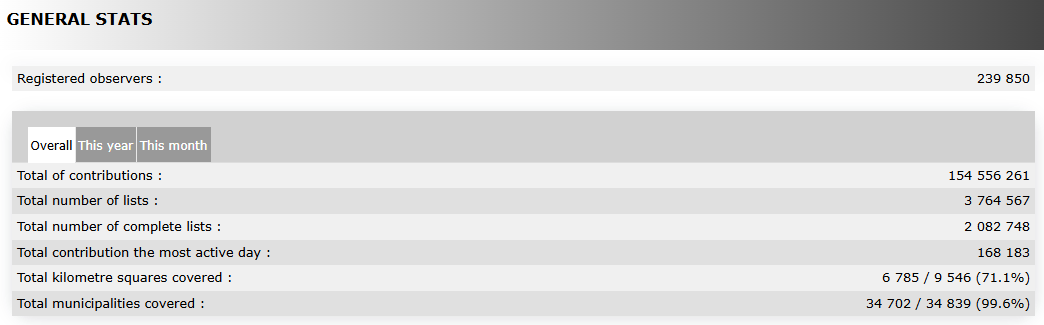
See statistics by taxonomic group or species.
Move the pointer on labels to see the description of this example.
|
Breakdown by taxonomic group. Example. Birds Butterflies Mammals Dragonflies Moths Orthoptera
1. Relative numbers |

|
Distribution of species by taxonomic group. Example. Moths Beetles Spiders Birds True bugs Hymenoptera
1. Relative numbers |

[Top to General stats]
[Back to Statistics]
Lists statistics

Lists stats.
Indicates which proportion of lists include the selected species.
1. Select between:
· Species presence to see the proportion of lists that registered the selected species on a specified geographical area.
· Presence comparison by area to compare the presence of selected species between two geographical areas.
· Presence comparison by year to compare the presence of selected species between two years.
2. Show the graph.
- Species presence
- Species presence
Percentage of submitted lists at the geographical area selected that contains at least one observation of the selected species.
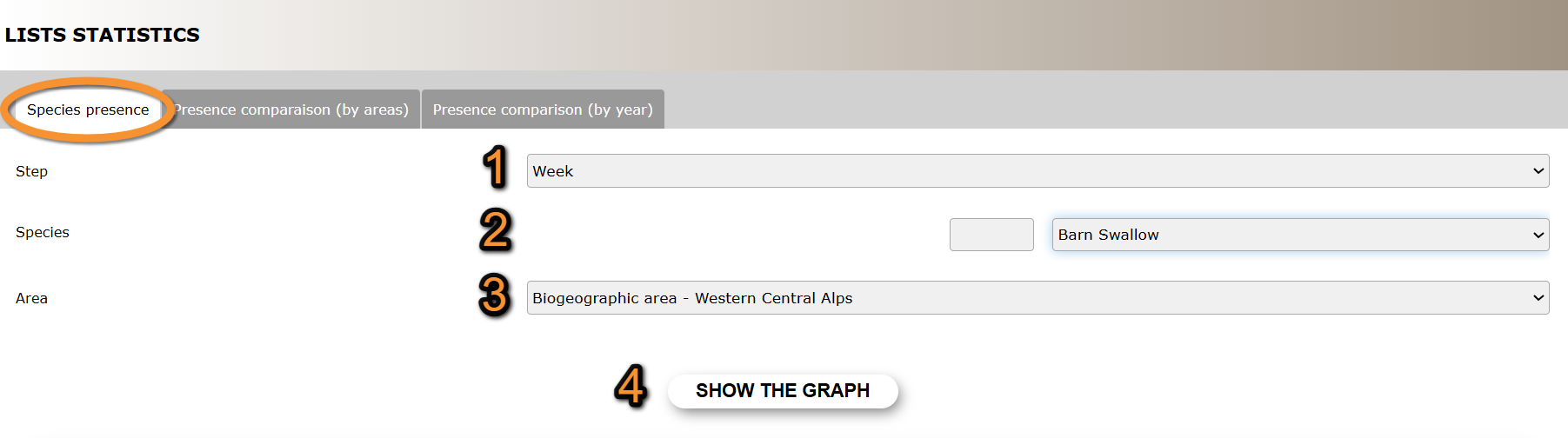
Species presence.
1. Step: Select from the expandable menu to see data grouped by week or not grouped (day).
2. Species: Select specie. Type name of species, or part of it, on the left hand field, and/or select from the expandable menu on the right.
3. Area: Select from the expandable menu the geographical area to visualise.
4. Show the graph: See results.
Move the pointer on the image to see the description of this example.
|
Species presence. Results.
1. Check/Uncheck to select times to show. Legend Date September data |
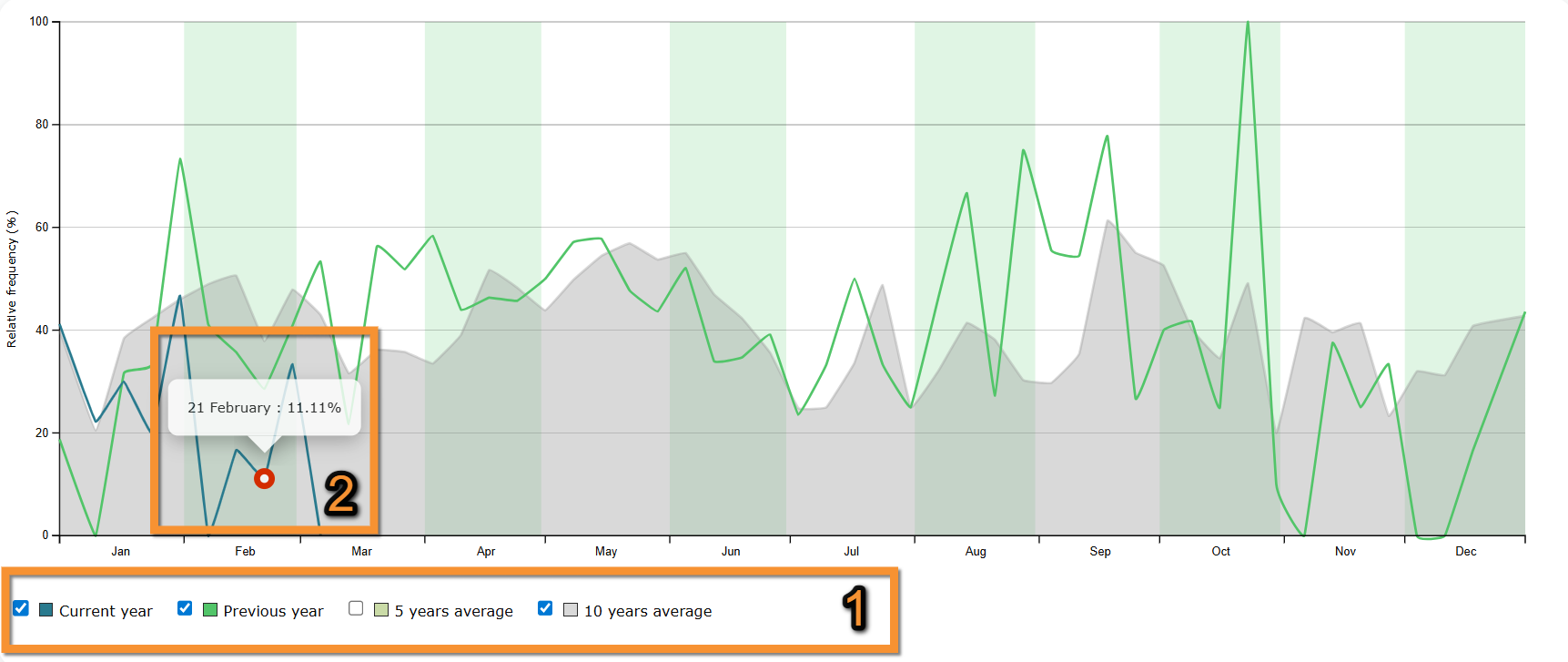
- Presence comparison (by area)
- Presence comparison (by area)
Percentage of submitted lists in the two selected geographical areas that contain the selected species.
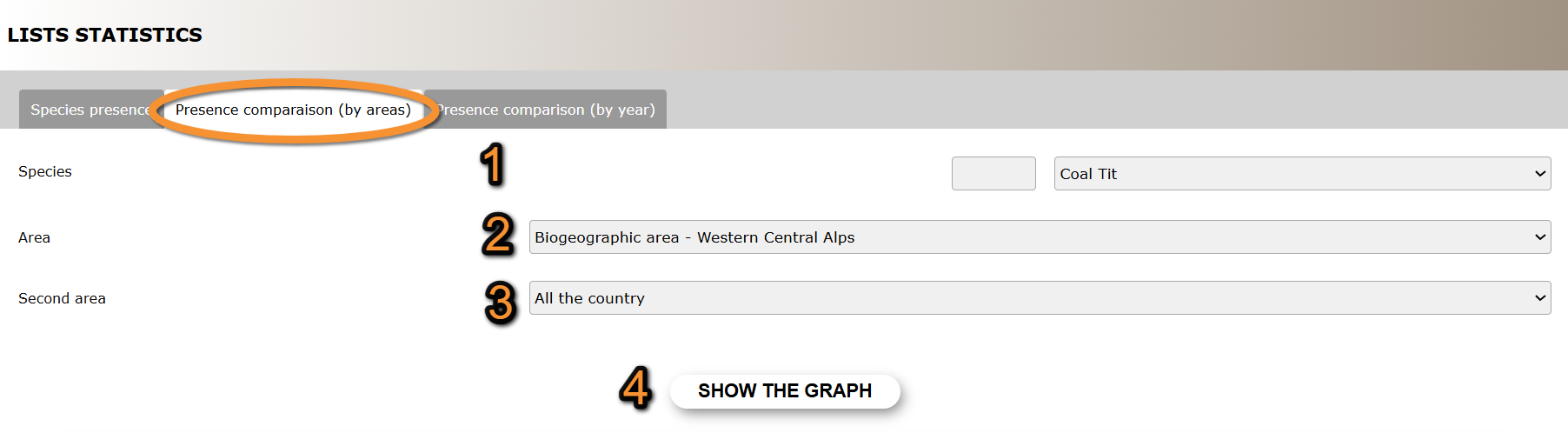
Presence comparison (by area).
1. Species: Select specie. Type name of species, or part of it, on the left hand field, and/or select from the expandable menu on the right.
2. Area: Select from the expandable menu one of the geographical areas to compare.
3. Second area: Select from the expandable menu the other geographical area to compare.
4. Show the graph: See results.
Move the pointer on the image to see the description of this example.
|
Presence comparison (by area). Results.
1. Check/Uncheck to select times to show. Legend Date May data |
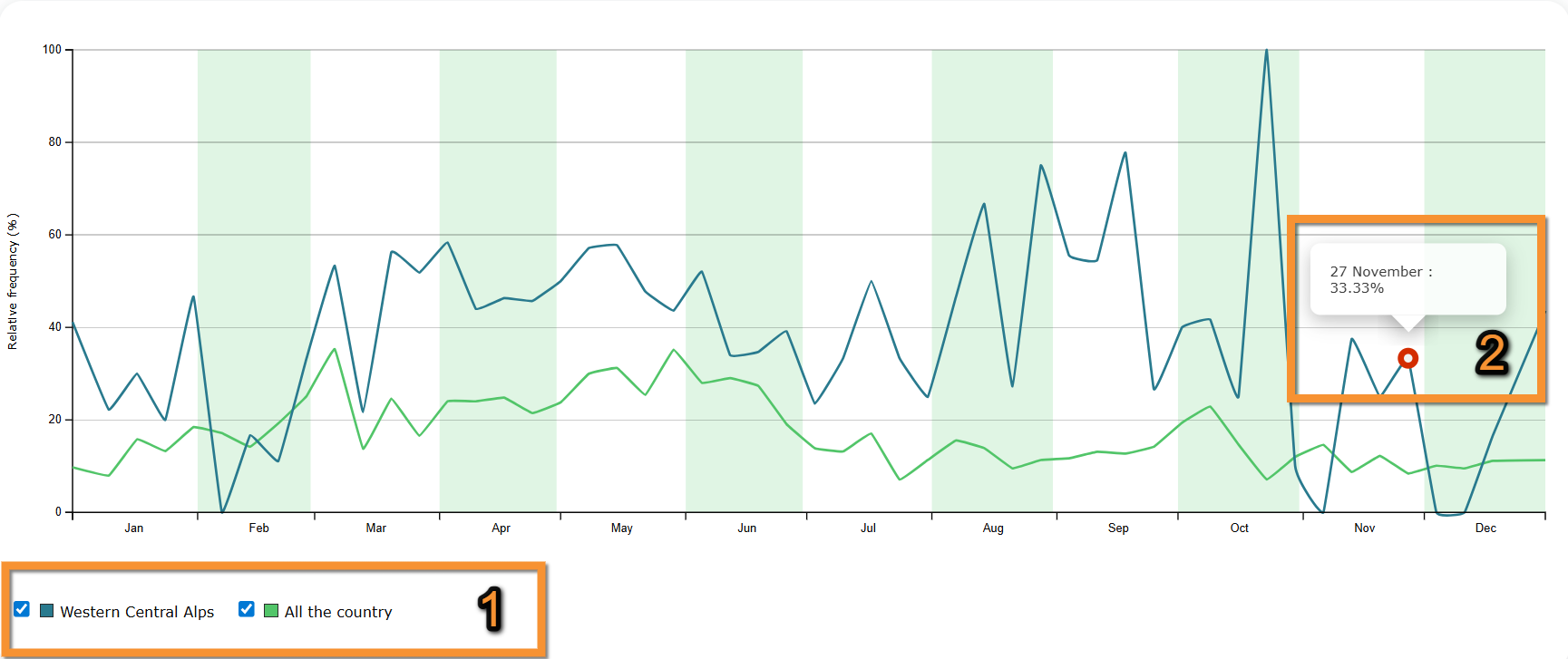
- Presence comparison (by year)
- Presence comparison (by year)
Percentage of submitted lists in the selected geographical area that contain the selected species in two selected years.
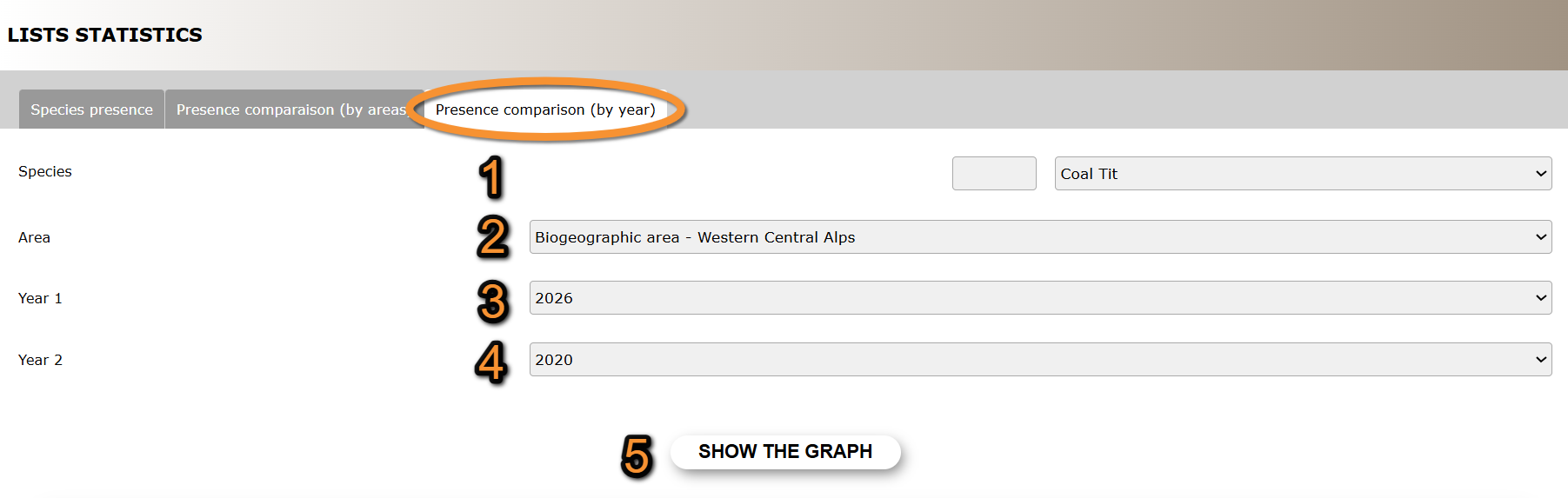
Presence comparison (by year).
1. Species: Select specie. Type name of species, or part of it, on the left hand field, and/or select from the expandable menu on the right.
2. Area: Select from the expandable menu the geographical area to visualise.
3. Year 1: Select from the expandable menu one of the years to compare.
4. Year 2: Select from the expandable menu the other year to compare.
5. Show the graph: See results.
Move the pointer on the image to see the description of this example.
|
Presence comparison (by year). Results.
1. Check/Uncheck to select times to show. Legend Date September data |
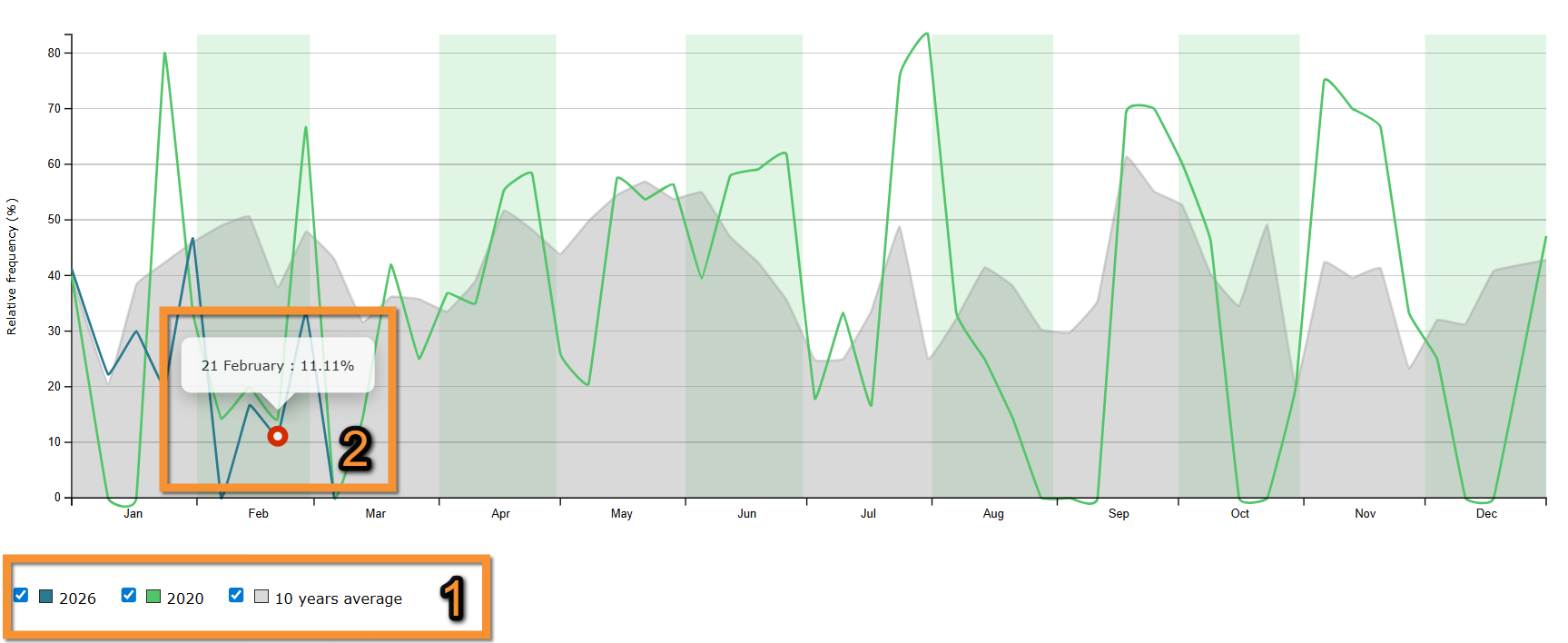
[Top to List statistics]
[Back to Statistics]
Contribution statistics
See distribution across time nad/or geographical areas.
Choose between
· Temporal distribution,
· Distribution by county,
· Info about lists, or
· Stats by municipality.
Note options are country dependant and not all options may be available in your local portal.

Temporal distribution
Temporal distribution. Menu.
See statistics for number of records, number of observers, number of lists or number of species across time.
1. Choose from the expandable menu on the top right the geographical regions to want to see.
By default, all country will show.
2. Choose from the tabs on top which area to visualise:
· Number of records.
· Number of contributors.
· Number of lists.
· Number of species.
3. Choose timeframe on tabs:
· Daily,
· Monthly, or
· Yearly.
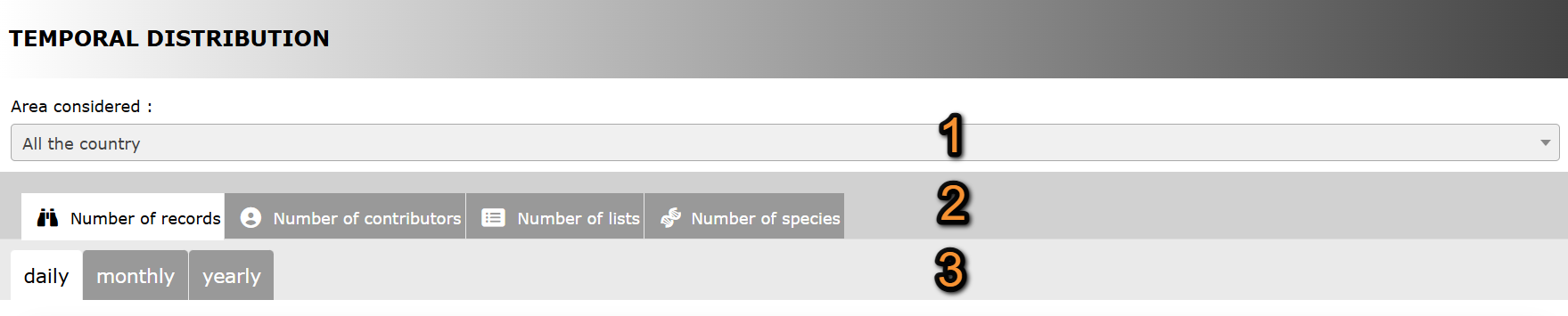
Temporal distribution. Selecting data.
1. Geographical area
2. Type of data
3. Timeframe
Number of records
See number of records submitted to biolovision systems during the timeframe selected.
Select which taxonomic groups to visualise by checking/unchecking them below the graph.
Move the pointer on web graphic to see details on species in each column.
Move the pointer on the image to see the description of this example.
|
Number of records.
1. Apply filters. Filters Results Details |
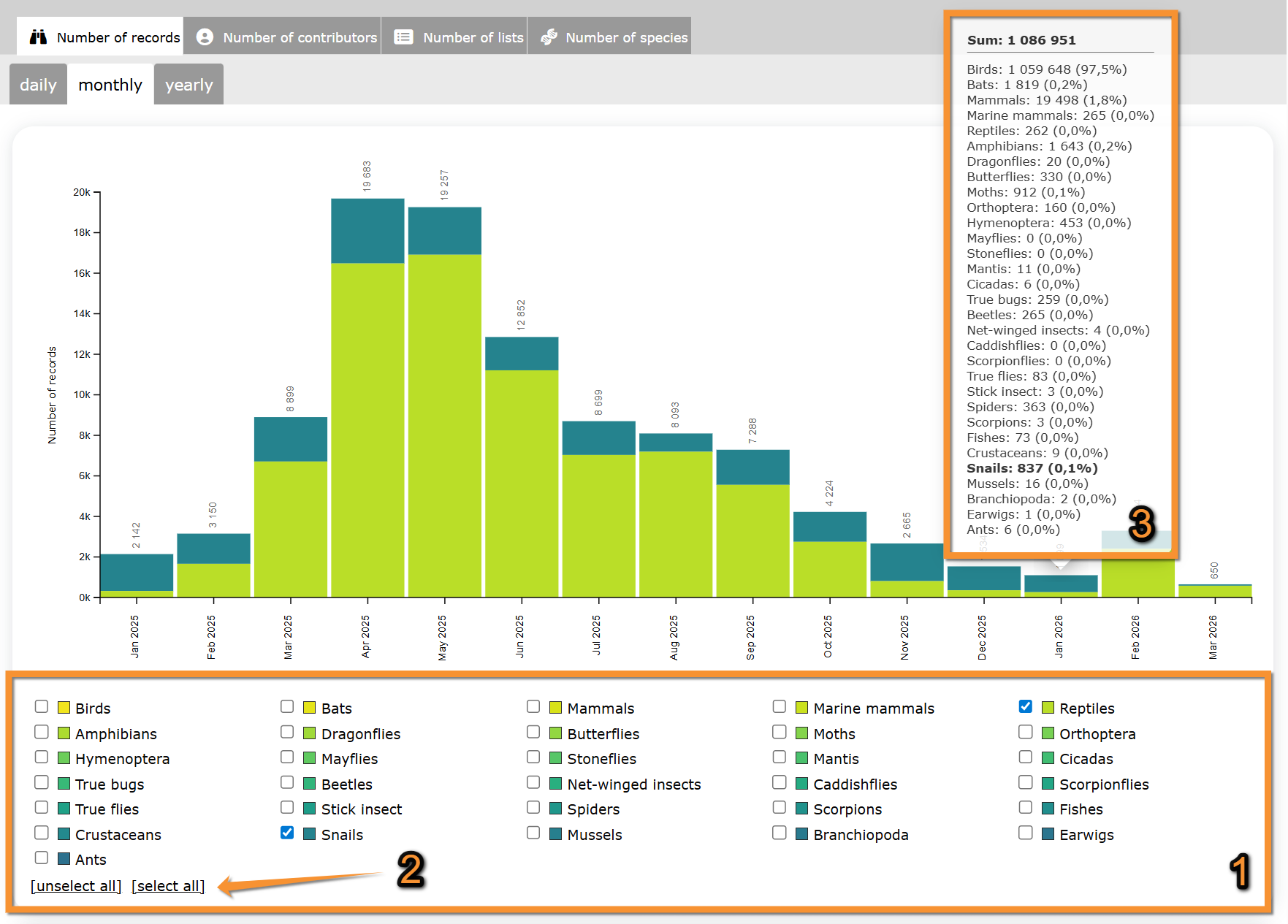
If selecting a monthly graph, see number of records submitted each month for the last few years.
Move the pointer on web graphic to see details on species in each column.
Move the pointer on the image to see the description of this example.
|
Number of records per month.
1. Move pointer on a column to see data details. August 2025 |
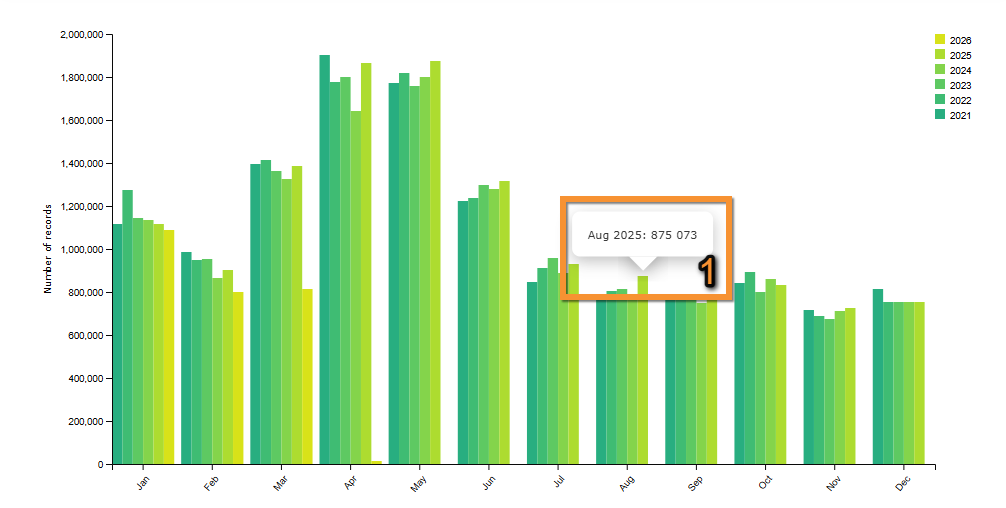
Number of contributors
See number of observers that submitted data to biolovision systems during the timeframe selected.
Move the pointer on the image to see the description of this example.
|
Number of contributors. January 2025 February 2025 March 2025 April 2025 May 2025 June 2025 July 2025 August 2025 September 2025 October 2025 November 2025 December 2025 January 2026 February 2026 March 2026 |
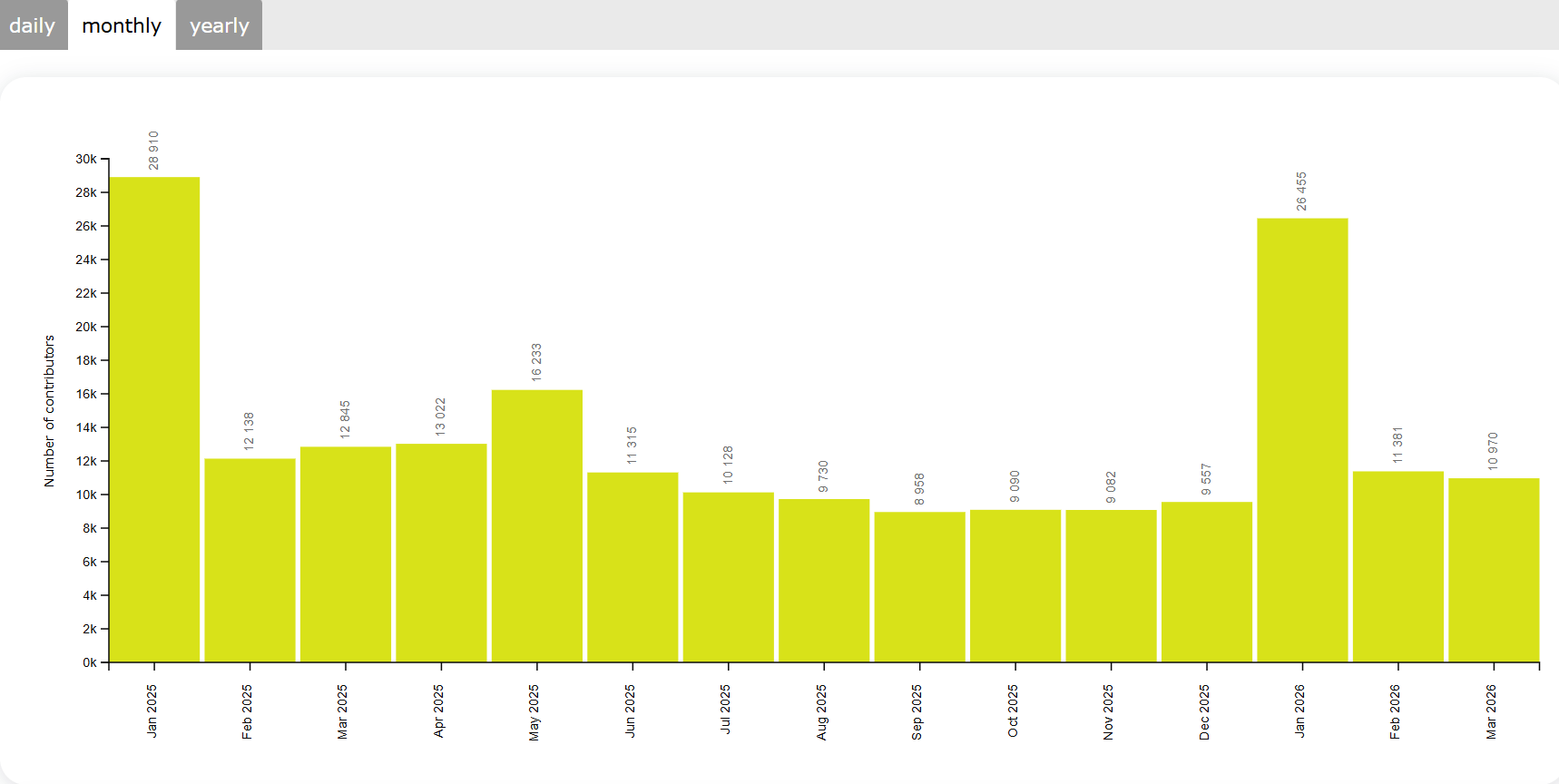
If selecting a monthly graph, see number of contributors each month for the last few years.
Move the pointer on web graphic to see details on species in each column.
Move the pointer on the image to see the description of this example.
|
Number of contributors per month.
1. Move pointer on a column to see data details. August 2025 |
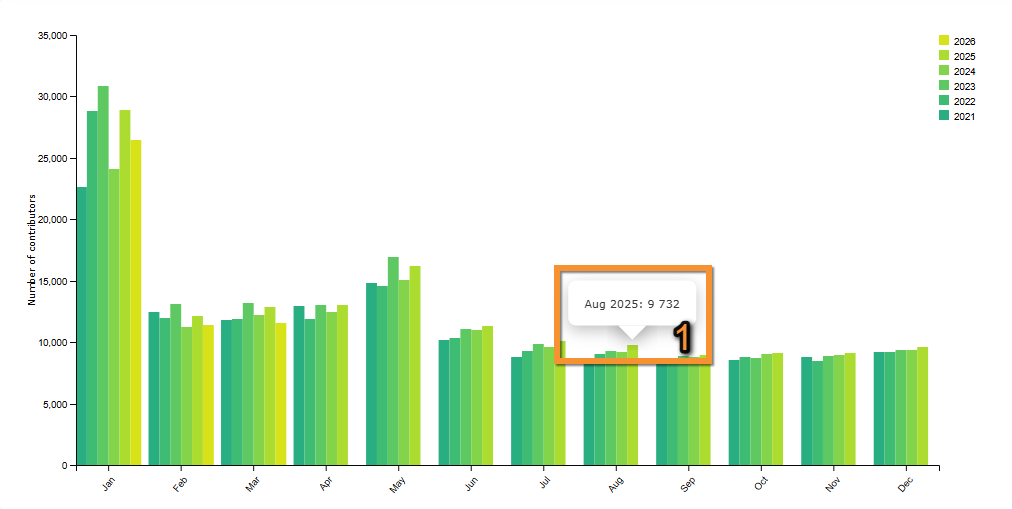
Number of lists
See number of complete and partial lists submitted to biolovision systems.
Move the pointer on the image to see the description of this example.
Move the pointer on web graphic to see details on species in each column.
|
Number of lists.
1. Legend: See color correspondence for complete and partial lists. January 2025 February 2025 March 2025 April 2025 May 2025 June 2025 July 2025 August 2025 September 2025 October 2025 November 2025 December 2025 January 2026 February 2026 March 2026 Details May 2025 |
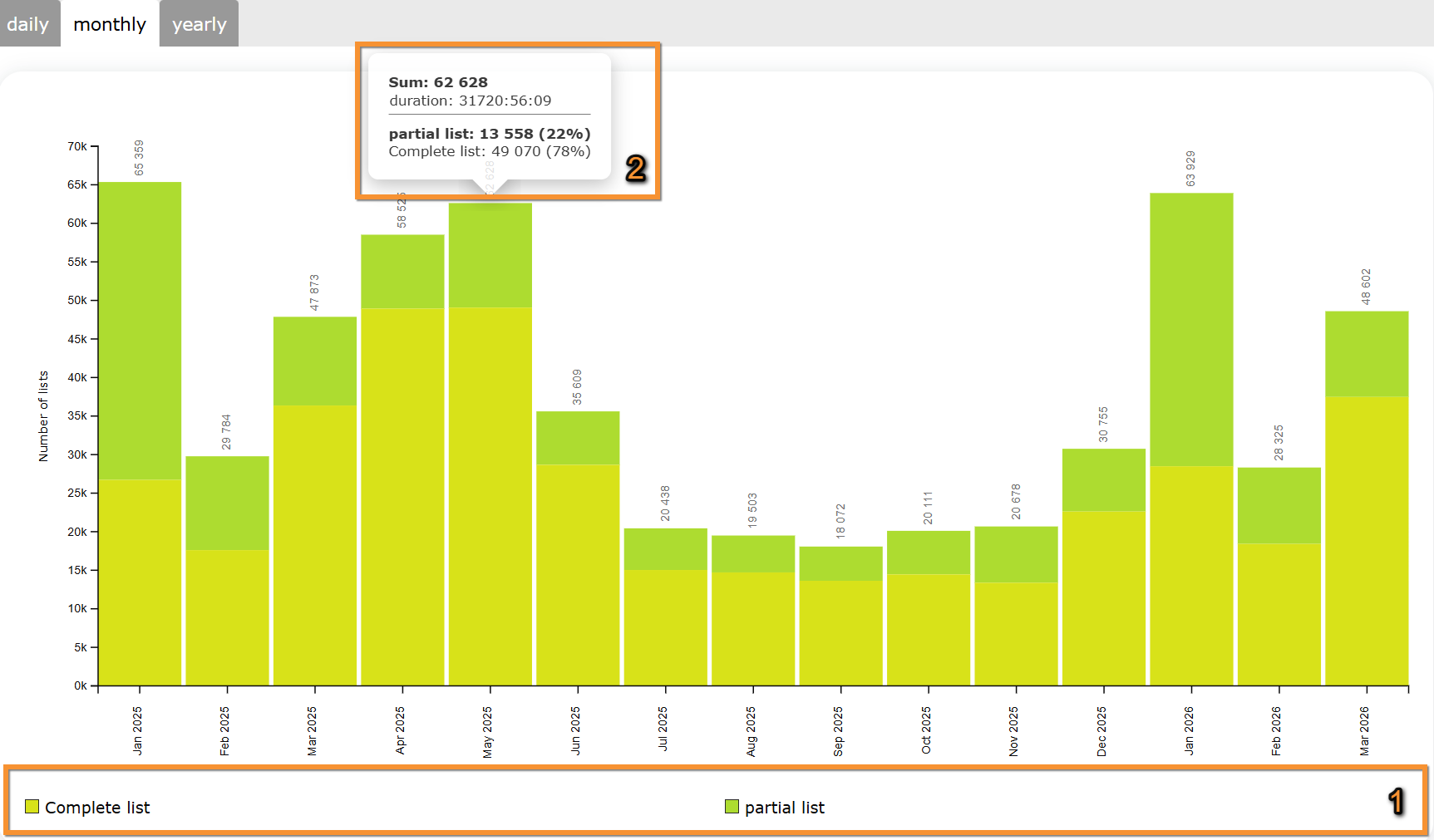
If selecting a monthly graph, see number of lists per month during the last few years.
Move the pointer on web graphic to see details on species in each column.
Move the pointer on the image to see the description of this example.
|
Number of lists per month.
1. Move pointer on a column to see data details. August 2025 |

Number of species
See number of species submitted to the biolovision systems,
Select which taxonomic groups to visualise by checking/unchecking them below the graph.
Move the pointer on web graphic to see details on species in each column.
Move the pointer on the image to see the description of this example.
|
Number of species.
1. Apply filters. February 2025 March 2025 April 2025 May 2025 June 2025 July 2025 August 2025 September 2025 October 2025 November 2025 December 2025 January 2026 February 2026 March 2026 April 2026 Legend January 2026 |
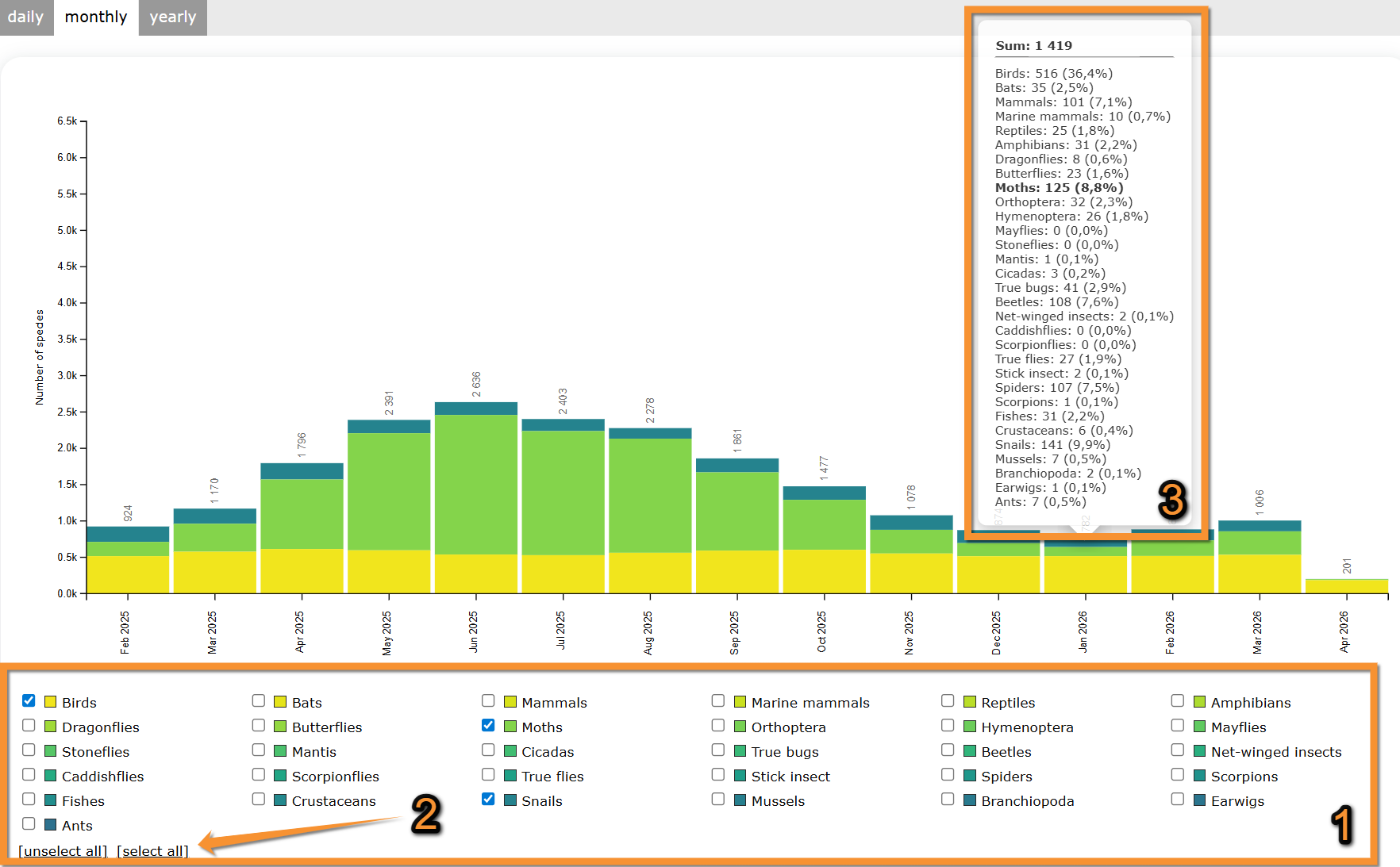
If selecting a monthly graph, see number of species submitted each month during the last few years.
Move the pointer on web graphic to see details on species in each column.
Move the pointer on the image to see the description of this example.
|
Number of species per month.
1. Move pointer on a column to see data details. August 2025 |
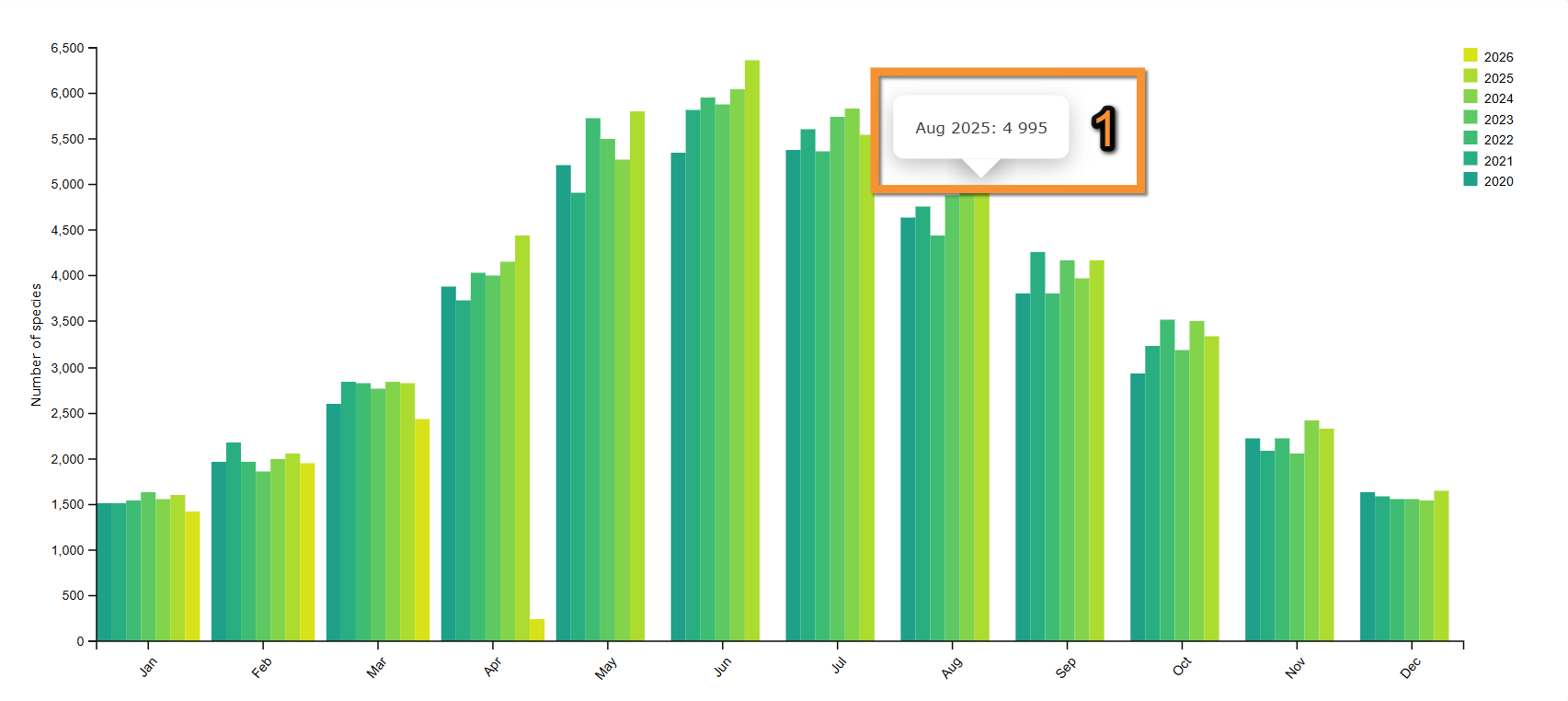
[Top to Temporal distribution]
[Top to Contribution statistics]
[Back to Statistics]
Distribution by county
Distribution by county. Menu.
See data organized by area.
1. Choose taxonomic group to visualise.
Move pointer over icons to see meaning.
2. Choose from the expandable menu type of distribution to display.
Note available areas are dependent on local portal and may differ from country to country.
3. Choose timeframe to visualise from the tabs on top:
· Daily, to see the last 30 days;
· Monthly, to see the last 15 months;
· Yearly, to see all years since 2000.
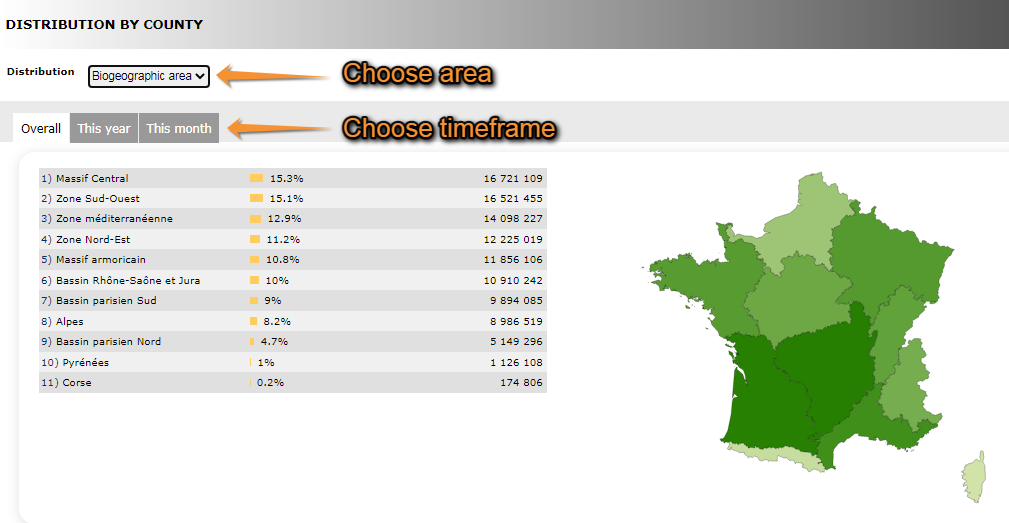
Distribution by county. Selecting data.
1. Choose taxonomic group
2. Choose area
3. Choose timeframe
4. See results.
· Note darker colour represents a higher number of observations.
· Place pointer on web map to see data for the selected area.
· Selected are is highlighted in yellow.
Move the pointer on the image to see the description of this example.
|
Distribution by county. Results.
1. List of areas selected Massif Central Corse |
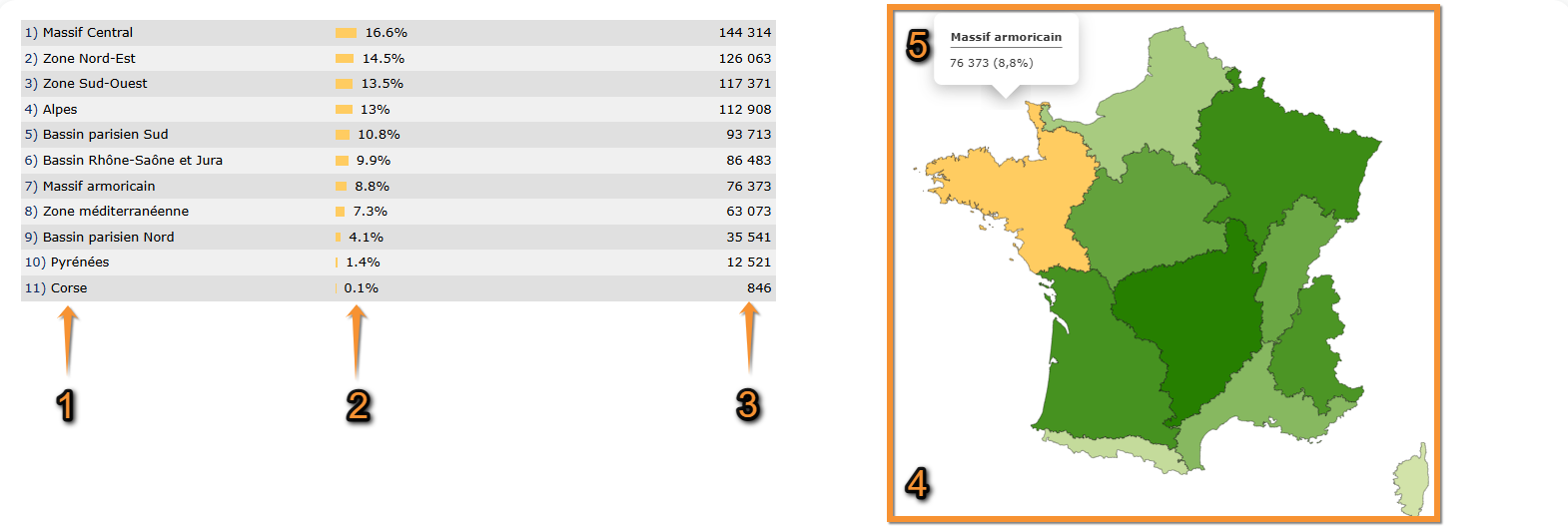
NOTE the results obtained at the Distribution by county section, at the Geographical distribution section and at the Info by species > Map may look the same. However,
Distribution by county represents number of records per region,
Geographical distribution represents number of species per region, and
Info by species > Map represents number of records of a previously selected species, per region.
[Top to Distribution by county]
[Top to Contribution statistics]
[Back to Statisticds]
Info about lists

Info about lists. Menu.
See:
· Number of complete lists per month/year,
· Distribution of complete lists by cantons, and/or
· The most active observers for lists.
Number of complete lists per month/year
See the number of complete lists per month since the beginning of Biolovision.
Notice darker colour indicates a higher number of complete lists submitted.
Place pointer on a cell in the web graph to see number of complete lists for that month and year.
Move the pointer on the image to see the description of this example.
|
Number of complete lists.
1. Legend: the darker the colour, the higher the number of complete lists submitted. July 2015
|

Distribution of complete lists by cantons
See amount of complete lists submitted per area.
Select timeframe:
· This year, or
· overall.
Note the darker the colour, the more records were submitted for this area.
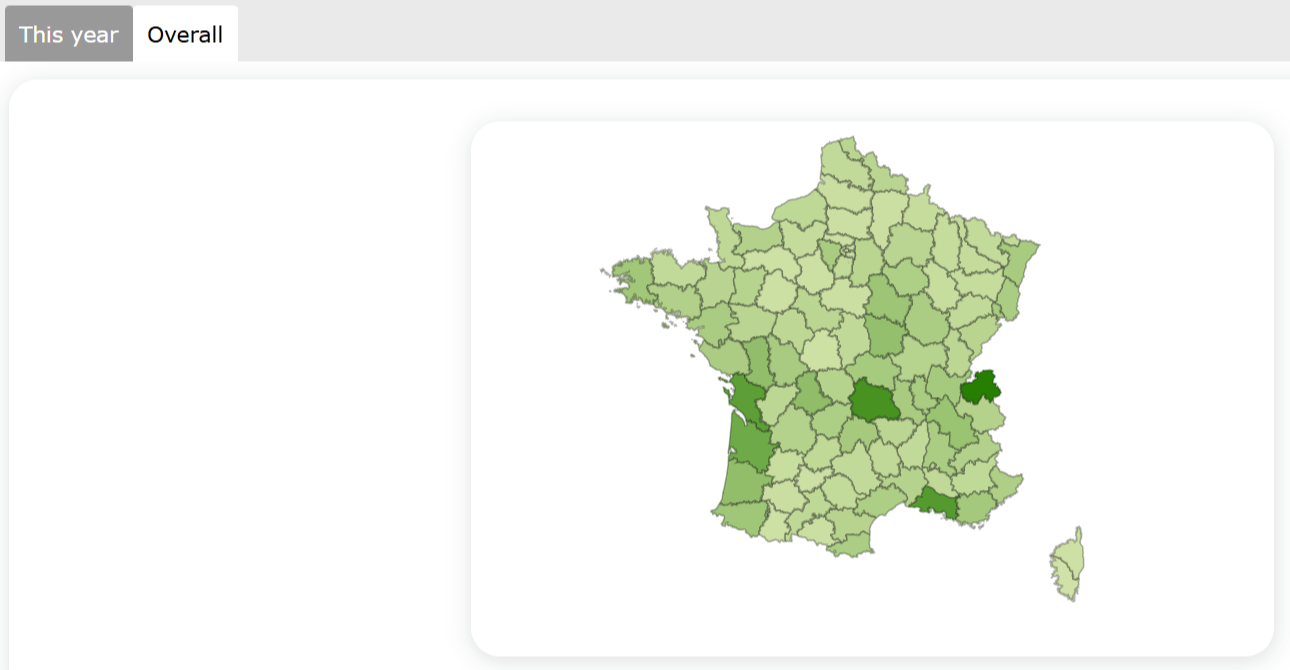
Distribution of complete lists by county.
The most active observers for lists
See number of lists submitted for the most active observers during the selected period of time; and the time of the last contribution.
Select timeframe:
· Overall,
· this year, or
· this month.
Move the pointer on the image to see the description of this example.
|
The most active observers for lists. Observer 1 Observer 2 Observer 3 Observer 4 Observer 5 Observer 6 Observer 7 Observer 8 Observer 9 Observer 10 |
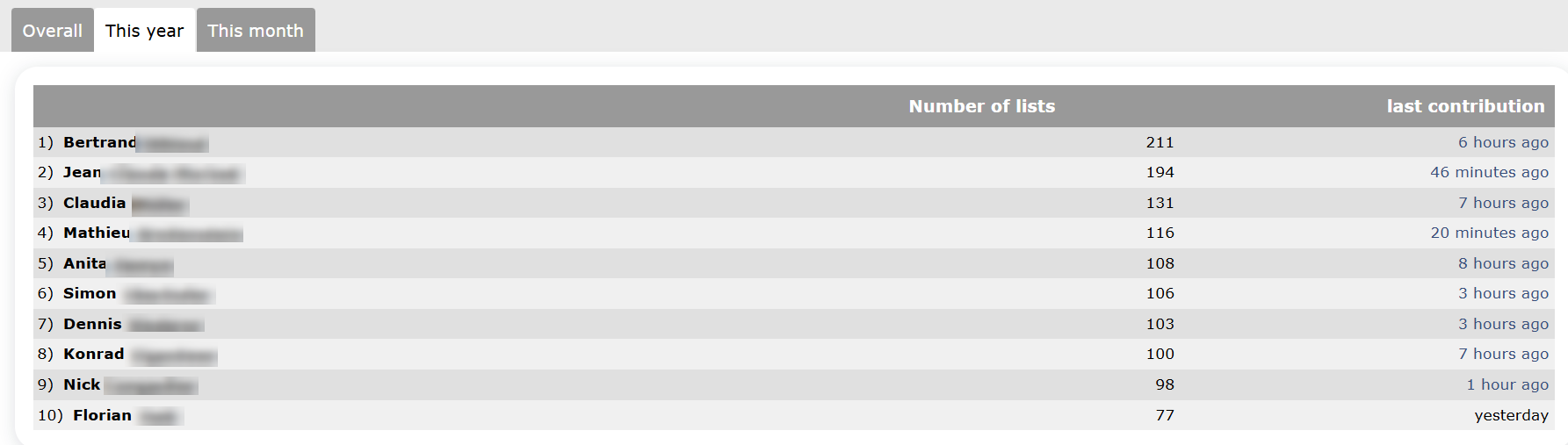
[Top to Info about lists]
[Top to Contribution statistics]
[Back to Statistics]
Stats by municipality
Stats by municipality. Menu.
See data submitted grouped by municipality.
1. Choose taxonomic group on top,
2. choose year to visualise, and
3. choose geographical region.
Place the pointer on a region or a taxonomic group to see its correspondence.
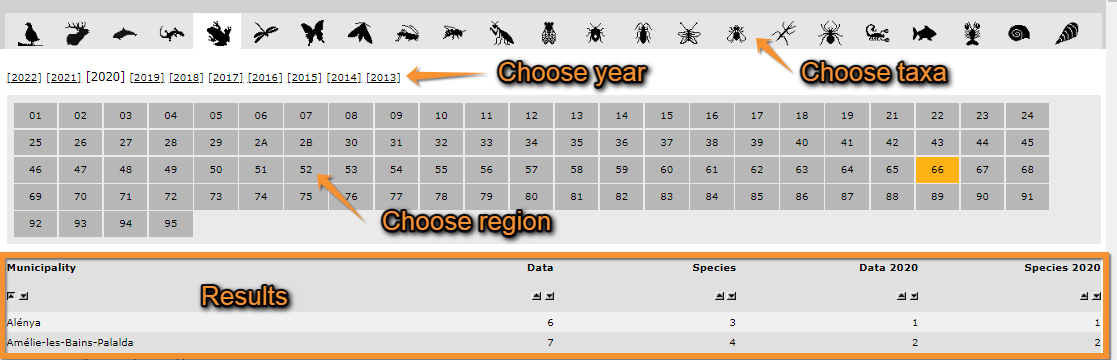
Stats by municipality.
1. Choose taxonomic group
2. Choose year
3. Choose geographical area
See a list of municipalities within the geographical area selected with number of records for the selected year and taxonomic group.
Use  to alternate between ascending and descending order.
Move the pointer on the image to see the description of this example.
|
Municipality stats. Results.
1. Change order Alénya Amélie-les-Bains-Palalda Angoustrine-Villeneuve-des-Escaldes Asignan Arboussols Argèlers-sur-Mer Arles-sur-Tech |
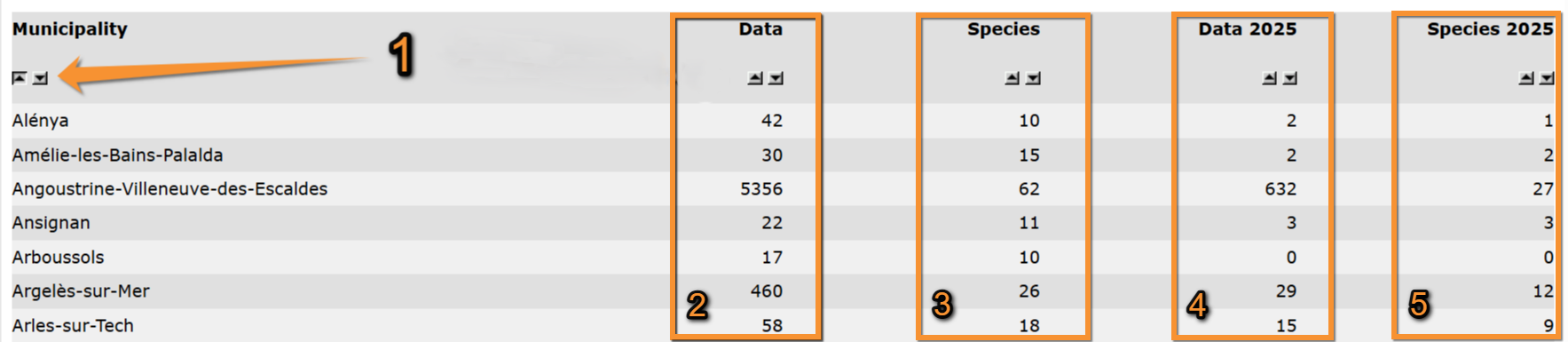
[Top to Stats by municipality]
[Top to Contribution statistics]
[Back to Statistics]
Observer stats
See statistics about observers.
Choose between
· General info,
· Info about lists, or
· Distribution by country.

General info

General info. Menu.
See
· your contribution in relation to others' to the local portal,
· the ten most active observers to the local portal and your position.
1. Choose taxonomic group to visualise.
2. Choose timeframe to visualise.
Your statistics of use of local portal
See
· your contributions in yellow and,
· others' contributions in grey.
Note sections available depend on the taxonomic group selected. Not all taxonomic groups will show the same statistics.
See this image as an example.
Move the pointer on the image to see a description of this example.
|
Your contributions. Total of sightings Species count Total municipalities covered Number of counties visited |
The most active observers
See
· the ten most active observers for the timeframe selected, and
· if you contributed during this period, see your position in relation to other observers.
Move the pointer on the image to see a description of this example.
|
The most active observers.
1. Your position in relation to other observers. Observer 1 Observer 2 Observer 3 Observer 4 Observer 5 Observer 6 Observer 7 Observer 8 Observer 9 Observer 10 Your position |

[Top to General info]
[Top to Observer stats]
[Back to Statistics]
Info about lists
Info about lists. menu.
See
· Number of complete lists per month/year,
· Distribution of complete lists by county, and/or
· The most active observers for lists.
Number of complete lists per month/year
See the number of complete lists per month since the beginning of the local portal.
Notice darker colour indicates a higher number of complete lists submitted.
Place pointer on a cell in the web graph to see number of complete lists for that month and year.
Move the pointer on the image to see the description of this example.
|
Number of complete lists.
1. Legend: the darker the colour, the higher the number of complete lists submitted. July 2015 |
Distribution of complete lists by county
See amount of complete lists submitted per area.
Select timeframe:
· This year, or
· overall.
Note the darker the colour, the more records were submitted for this area.

Distribution of complete lists by cantons.
The most active observers for lists
See
· the ten most active observers for the timeframe selected, and
· if you contributed during this period, see your position in relation to other observers.
Select timeframe:
· Overall,
· this year, or
· this month.
Move the pointer on the image to see a description of this example.
|
The most active observers for lists. Observer 1 Observer 2 Observer 3 Observer 4 Observer 5 Observer 6 Observer 7 Observer 8 Observer 9 Observer 10 |
[Top to Info about lists]
[Top to Observer stats]
[Back to Statistics]
Distribution by county
Distribution by country. Menu.
See
· The number of observers in different participating countries, and/or
· the distribution of observers by biogeographic area, region or county.
Breakdown by country
See relative number of total contributions for each country.
Move the pointer on labels to see the description of this example.
|
Breakdown by country. 1. Legend: colour correspondence, total number of contributions for each country and its relative importance. France |
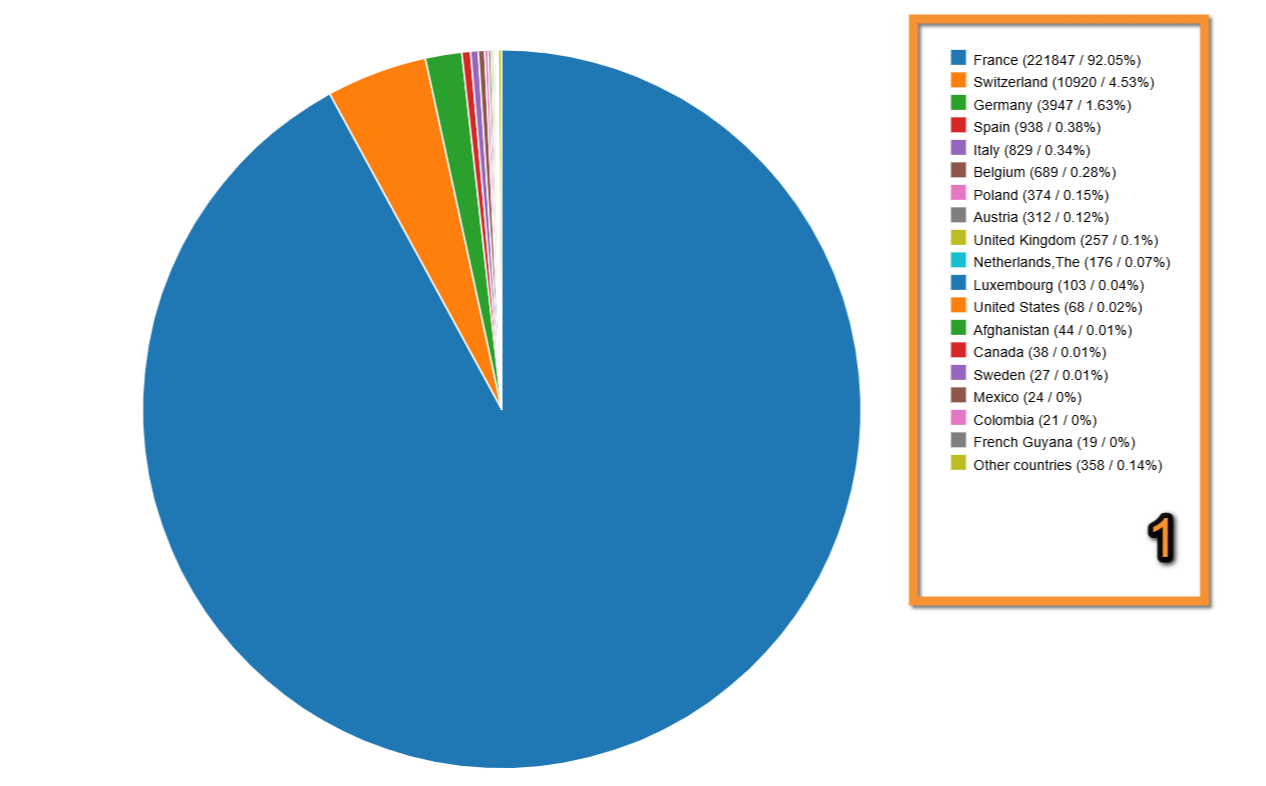
Distribution
1. Choose from the expandable menu type of distribution to display.
Note available areas are dependent on local portal and may differ from country to country.
2. Choose timeframe to visualise from the tabs on top.

Distribution.
1. Choose area
2. Choose timeframe
3. See results.
· Note darker colour represents a higher number of observations.
· Place pointer on web map to see data for the selected area.
· Selected are is highlighted in yellow.
Move the pointer on the image to see the description of this example.
|
Distribution by county. Results.
1. List of areas selected Massif Central Corse |
NOTE the results obtained at the Distribution by county section, at the Geographical distribution section and at the Info by species > Map may look the same. However,
Distribution by county represents number of records per region,
Geographical distribution represents number of species per region, and
[[Statistics#4._Map|Info by species > Map represents number of records of a previously selected species, per region.
[Top to Distribution by county]
[Top to Observer stats]
[Back to Statistics]
Species stats
Statistics referring to species, for example, numbers and distribution.

Global info

Global info. Menu.
List of the 50 most observed species per taxa.
1. Choose the taxonomic group from the horizontal bar on top. Place mouse pointer on silhouettes to see which group they represent. Use arrows if necessary to see all options.
2. Choose time frame from tabs:
· All data: all data hold in the system,
· this year: only data from the current year, or
· this month: only data from the current month.

Global info. Selecting data..
1. Taxonomic group
2. Timeframe
See a list of the 50 most recorded species and their abundancies.
Move the pointer on the image to see the description of this example.
|
Most abundant species. Erithacus rubecula Fringilla coelebs Phylloscopus collybita Parus major Columba palumbus
1. Relative numbers |
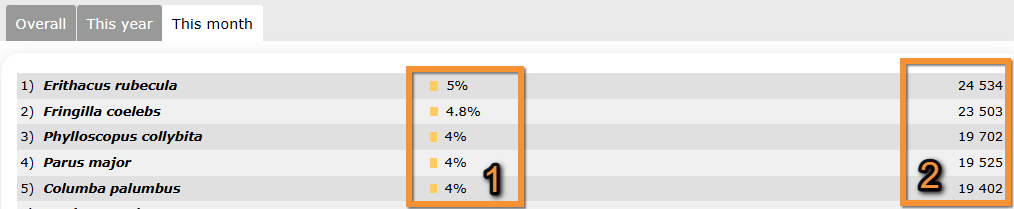
[Top to Global info]
[Top to Species stats]
[Back to Statistics]
Info by species
Info by species. Menu.
See information relative to the selected species.
1. Select from the expandable menu the geographical area to see the data about.
2. Choose the taxonomic group you are interested in. Use arrows if necessary to see all options. Place mouse pointer on silhouettes to see which taxonomic group they represent.
3. Type a species. Type the species name, or part of it, on the left and choose from the expandable menu on the right.
4. Click Display when done.
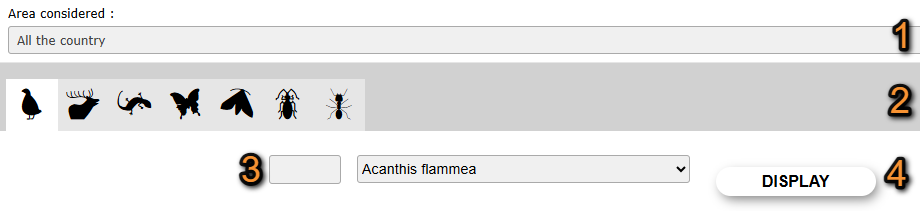
Selecting geographical area and taxonomic group.
1. Area considered: Select the geographical.
2. Taxonomic group: Select the taxonomic group.
3. Species: Select the species.
4. Display: See statistics.
5. Use tabs to select which type of information to see for the selected species.
Species available information.
1. General information
2. Observations
3. Group size and altitude
4. Distribution
1. Info
See general information about the species, like names in different languages, conservation status or picture.
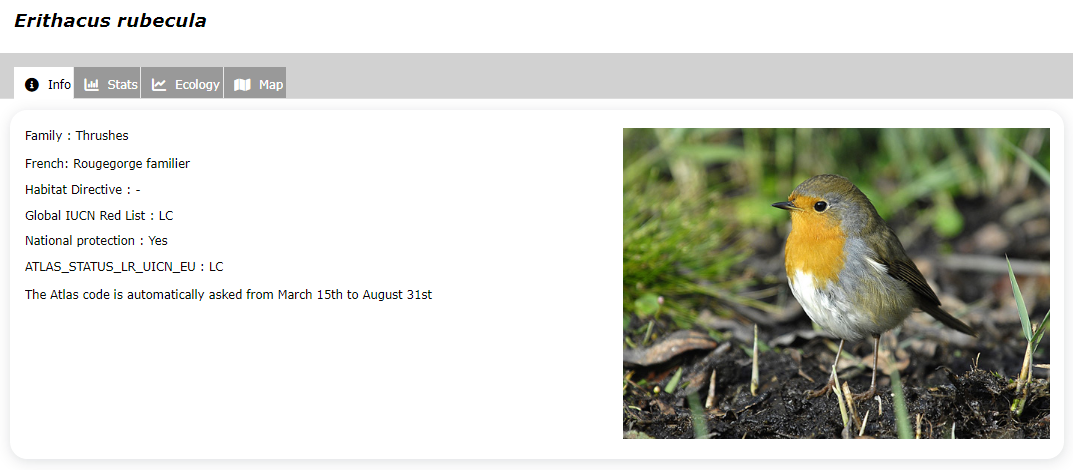
Info by species. Info tab. Example.
2. Stats
See
· Summary of records
· Relative weekly frequency of the species
· Annual relative frequency of the species
· Records grouped by week
Summary
1. Choose time frame from the tabs:
· All data: all data hold in the system,
· this year: only data from the current year, or
· this month: only data from the current month.
See a summary of statistics for the selected timeframe and species.
Note number of records in a complete list gives you the records in a complete list relative to the total number of records.
Move the pointer on the image to see the description of this example.
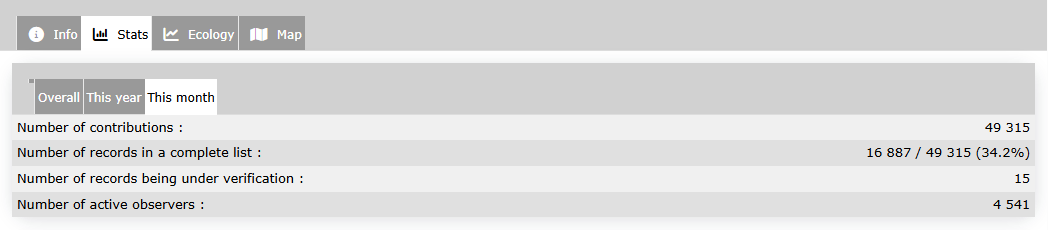
Info by species. Stats.
Relative weekly frequency of the species
See percentage of complete lists containing the species, by week, with comparison with the previous years.
· Click on Show more for further details.
· Check/uncheck cells to select which set of years to compare.
· Place pointer on current year line to see detailed data for a specific date.
Move the pointer on the image to see the description of this example.
|
Relative weekly frequency of the species
1. Check/Uncheck to select times to show. Legend Date September data |
Annual relative frequency of the species
See percentage of complete lists containing the species, by week, since the year following the launch of the online database
· Click on Show more for more information.
· Darker colour indicates a higher presence of the selected species recorded.
· Place pointer on a cell in the web graph to see number of complete lists containing the selected species for that month and year.
Move the pointer on the image to see the description of this example.
|
Annual relative frequency of the species.
1. Legend: the darker the colour, the higher the number of complete lists submitted. 2017: 26th february -> 4th March
|
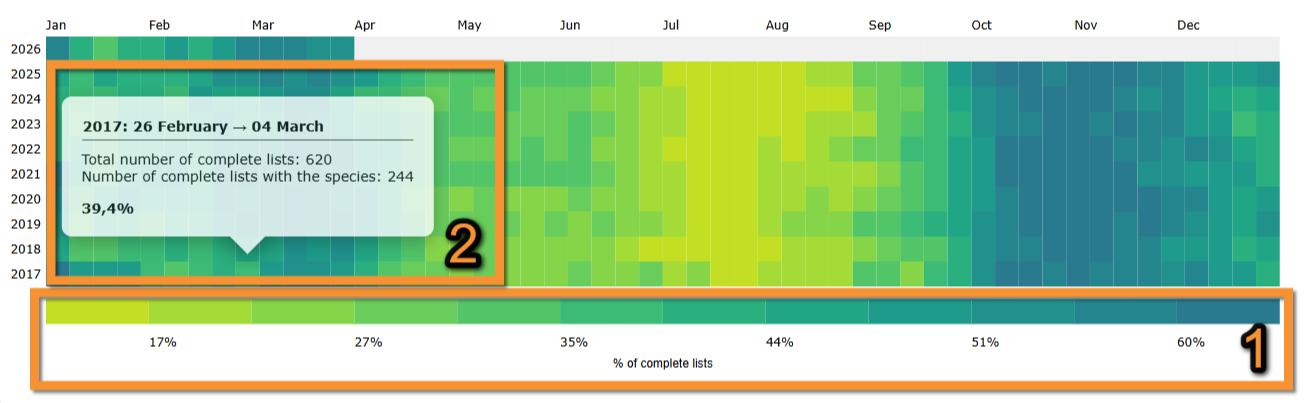
Records grouped by week
See number of data grouped per week.
· Click on Show more for more information.
· Check/uncheck cells to select which set of years to compare.
· Use Select all/unselect all option to check/uncheck all cells at once.
· A vertical line marks the current date.
· Place pointer on any column section on the web graph to see the number of records for the selected species for the similar week all years selected. Note the week marked by the pointer is highlighted in bold.
Move the pointer on the image to see the description of this example.
|
Records grouped by week. Filters Details |
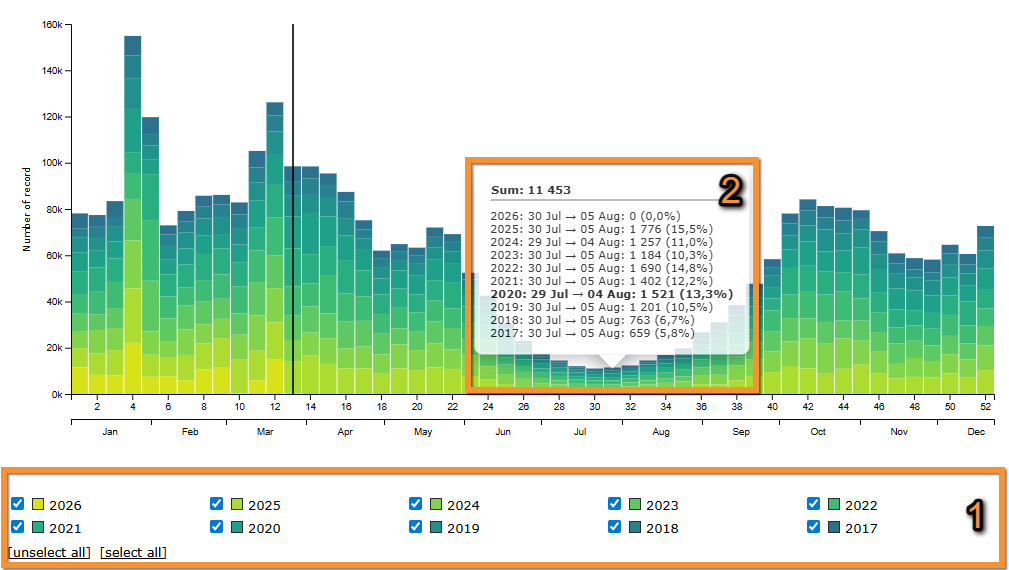
[Top to Stats]
[Top to Info by species]
3. Ecology
See
· Group size distribution
· Altitude distribution
Group size distribution
See frequency in which each group size is reported.
· Click on Show more for more information.
Move the pointer on the image to see the description of this example.
|
Group size distribution. Group size |
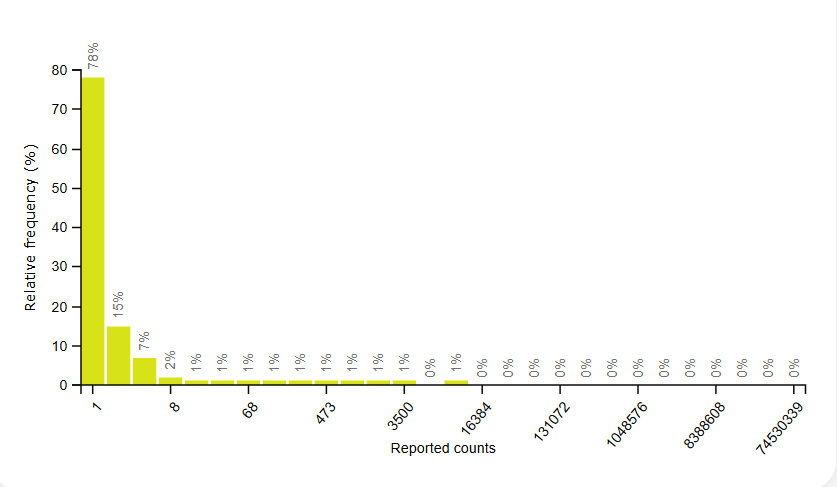
Altitude distribution
See percentage of observations a different altitudes.
· Click on Show more for more information.
Move the pointer on the image to see the description of this example.
|
Altitude distribution. Altitude distribution |
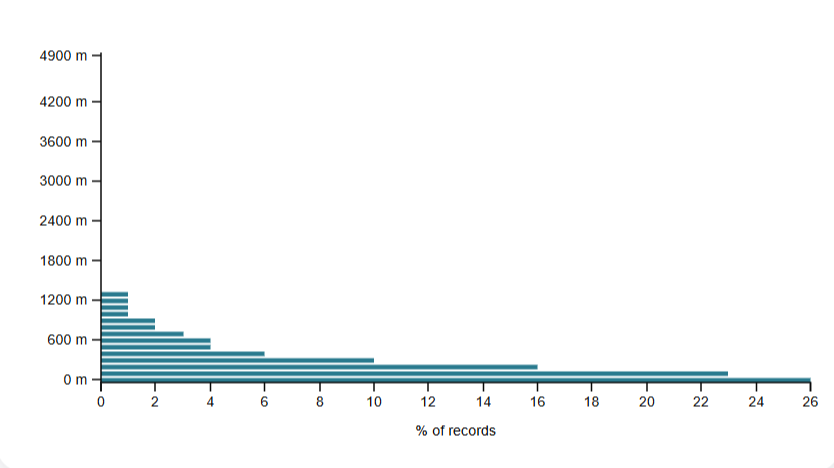
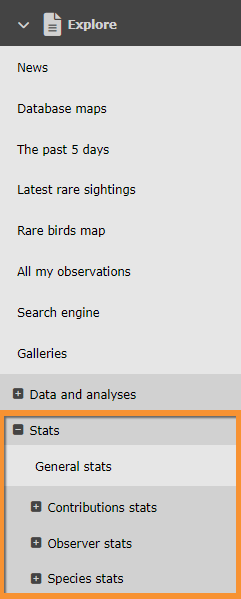

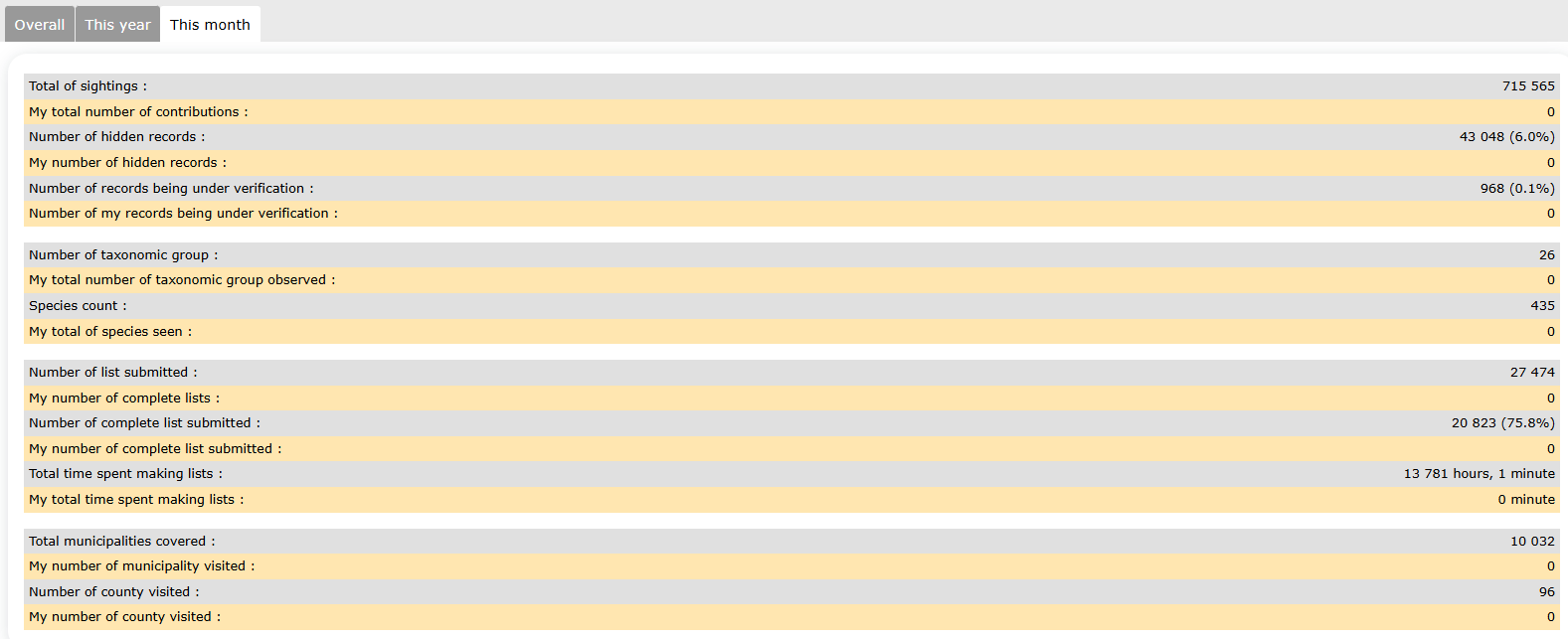
[Top to Ecology]
[Top to Info by species]
4. Map
See the geographical distribution of the selected species.
1. Select from the expandable menu type of distribution to display.
Note available areas are dependent on local portal and may differ from country to country.
Visit Web interface > Local portal > Various > Glossary for definitions of all possible areas.
2. Select time frame from tabs:
· All data: all data hold in the system,
· this year: only data from the current year, or
· this month: only data from the current month.
Distribution.
1. Choose area
2. Choose timeframe
3. See results.
· Note darker colour represents a higher number of observations.
· Place pointer on web map to see data for the selected area.
· Selected are is highlighted in yellow.
Move the pointer on the image to see the description of this example.
|
Distribution by county. Results.
1. List of areas selected Massif Central Corse |
NOTE the results obtained at the Distribution by county section, at the Geographical distribution section and at the Info by species > Map may look the same. However,
Distribution by county represents number of records per region,
Geographical distribution represents number of species per region, and
Info by species > Map represents number of records of a previously selected species, per region.
[Top to Map]
[Top to Info by species]
[Top to Species stats]
[Back to Statistics]
Geographical distribution

Geographical distribution. Menu.
Number of species per geographical area.
1. Select from the expandable menu type of distribution to display.
Note available areas are dependent on local portal and may differ from country to country.
Visit Web interface > Local portal > Various > Glossary for definitions of all possible areas.
2. Select time frame from tabs:
· All data: all data hold in the system,
· this year: only data from the current year, or
· this month: only data from the current month.
Distribution.
1. Choose area
2. Choose timeframe
3. See results.
· Note darker colour represents a higher number of observations.
· Place pointer on web map to see data for the selected area.
· Selected are is highlighted in yellow.
Move the pointer on the image to see the description of this example.
|
Distribution by county. Results.
1. List of areas selected Massif Central Corse |
NOTE the results obtained at the Distribution by county section, at the Geographical distribution section and at the Info by species > Map may look the same. However,
Distribution by county represents number of records per region,
Geographical distribution represents number of species per region, and
Info by species > Map represents number of records of a previously selected species, per region.
[Top to Geographical distribution]
[Top to Species stats]
[Back to Statistics]
Confinement statistics
See observations done from home during the confinement of 2020.
Data goes from 14th March to 15th May and compiles all ornitho portals.
Choose the portal from the tabs on top (see image Confinement stats: Generales, summary).
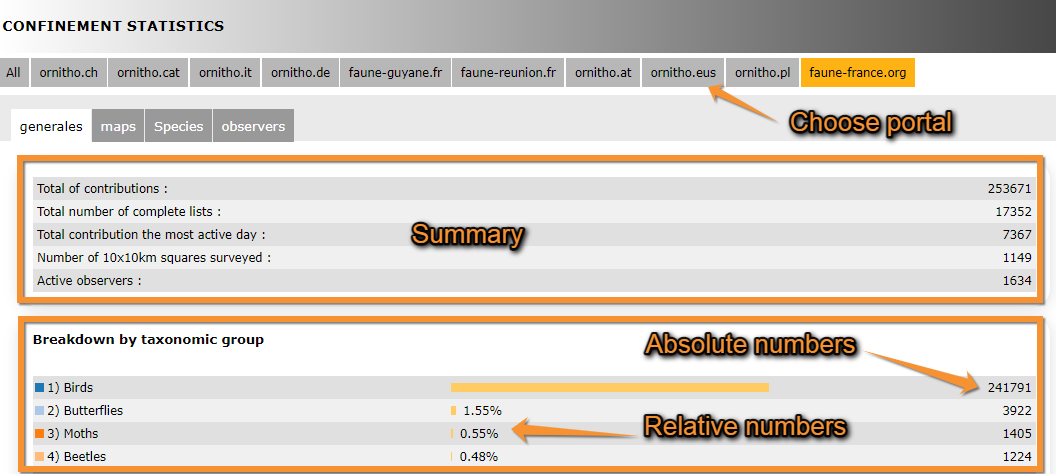
Generales
Tap on Generales tab to see general statistics for the chosen portal.
See
· number of contributions, area covered and number of observers, at the top; and
· number of contributions per taxonomic group, both in relative and absolute values, at the bottom.
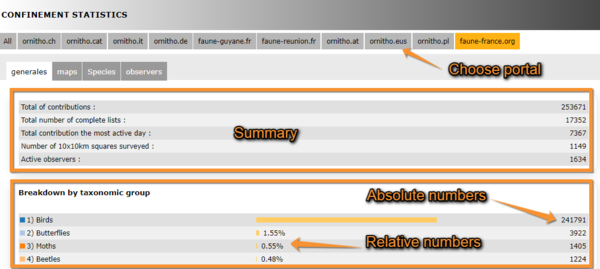
Confinement stats: Generales, summary.
Underneath, observations are represented on a graph.
Map
It shows a map with the observations for the selected species. Choose the species to visualise from the expandable menu on top (see image Confinement stats: Map). Size of point on map represents the number of observations. To navigate the map, see wiki section Web interface > Navigating the map.
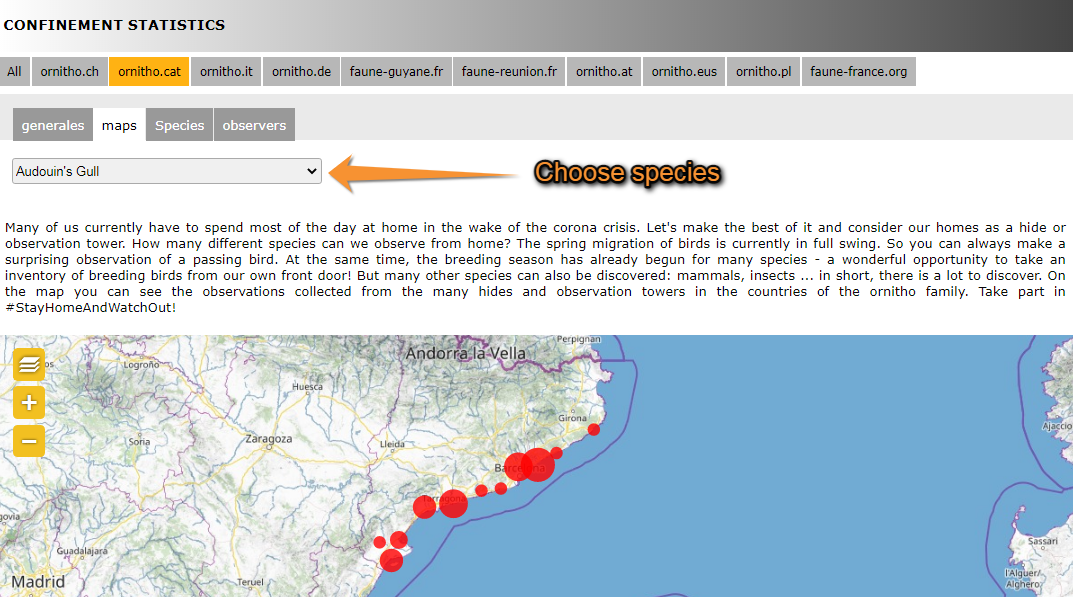
Confinement stats: Map.
Species
Returns a list of all species recorded and its numbers in descending order (see image Confinement stats: Species). Choose the taxonomic group you want to visualise from the expandable menu. The returning list indicates the number of records for each species, and the number of lists including the species both in aboslute and relative numbers. In the given example (see image Confinement stats: Species), House Sparrows were recorded a total of 4698 times in tht ornitho.cat portal, 3845 of these records were part of one of the 4629 total lists recorded. Therefore, House Sparrows were recorded in 83 % of lists submitted. Go to wiki section Web interface > Codes and symbols to see correspondence of colour codes to rarity level (image Symbols for rarity level in Fauna-France). See your own observations by clicking on the button above the list (see image Confinement stats: Species).
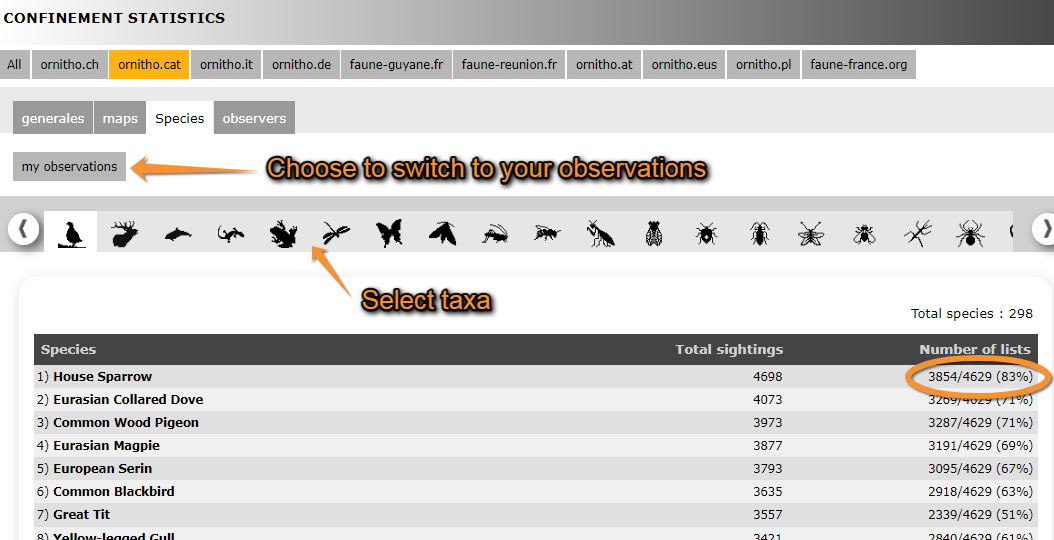


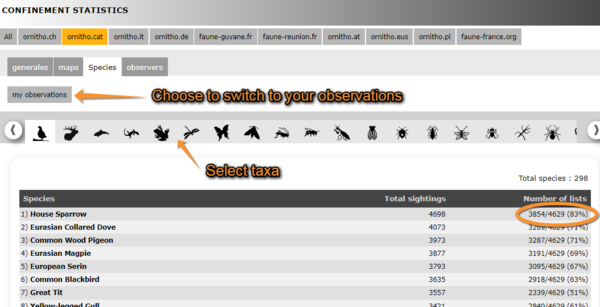
Confinement stats: Species.
Observers
A graph on top represents the number of active observers during each day of confinement. Underneath, observers are listed along with their corresponding number of records, lists and hours of observation. Those contributing higher number of lists are on top. On the example below (see image Confinement stats: Observers), the observer contributing the most lists, their name hidden, recorded a total of 3975 observations of 65 different species belonging to 348 lists during over 6h of observation.
.png)
Confinement stats: Observers.
[Top to Confinement statistics]
[Back to Statistics]
Note: images and examples are drawn from the French portal Faune-France. The design and position of some tools may vary slightly from portal to portal. To see a list of portals go to wiki section Local portals and partners. |