Translations:Submitting records/148/en: Difference between revisions

From Biolovision Help
Jump to navigation Jump to search
(Importing a new version from external source)
 
(No difference)

Latest revision as of 18:03, 23 February 2023

Message definition (Submitting records)
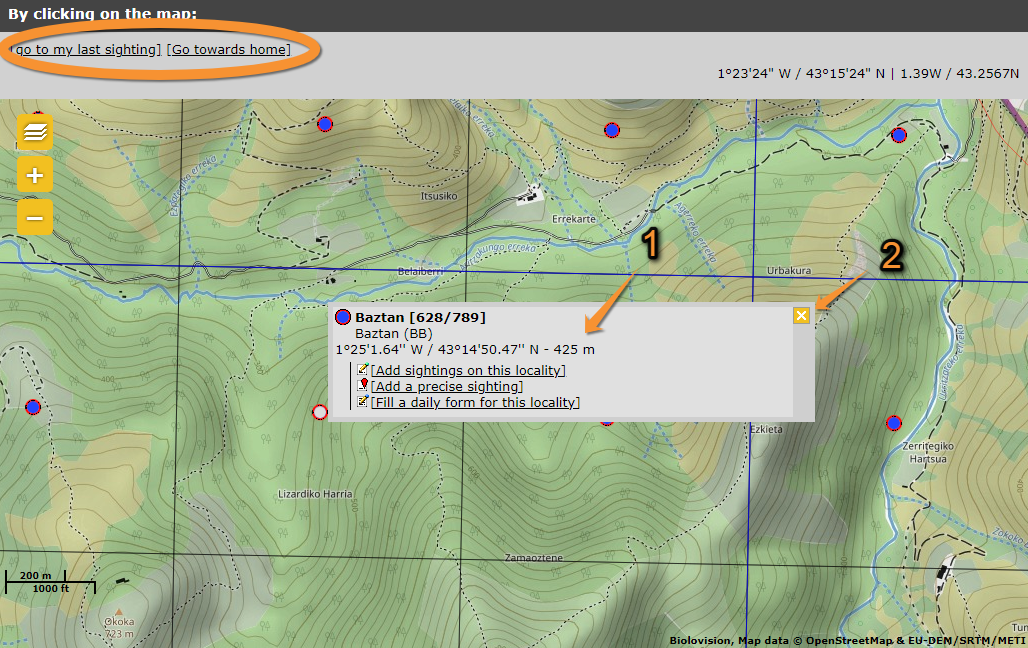
One can also select from the map below. Locations are represented with a dot, visible when you zoom in enough. See wiki section [[Navigating_the_map| Web interface > Navigating the map]] to know more about the map, and wiki section [[Symbols_cheatsheet|Various > Symbols cheatsheet]] to know what different dots mean. You can centre on your last location by clicking on '''go to my last sighting''' at the top left corner; or centre at your location by going to '''go towards home''' (see image [[Media:Choosing by clickig on the map complete.png|Choose location by clicking on the map]] encircled). You can change your location at '''My account''' > '''Personal data''' > '''Address''' (see wiki section Web interface > My account > Personal data > Non-mandatory fields > [[My_account_/_Changing_personal_data,_password_or_email#Address|Address]]).<br />
<br/>

One can also select from the map below. Locations are represented with a dot, visible when you zoom in enough. See wiki section Web interface > Navigating the map to know more about the map, and wiki section Various > Symbols cheatsheet to know what different dots mean. You can centre on your last location by clicking on go to my last sighting at the top left corner; or centre at your location by going to go towards home (see image Choose location by clicking on the map encircled). You can change your location at My account > Personal data > Address (see wiki section Web interface > My account > Personal data > Non-mandatory fields > Address).