Protocol management: Difference between revisions
No edit summary |
|||
| Line 4: | Line 4: | ||
=Waterbird census= | =Waterbird census= | ||
To access the adminstration of a protocol you need the '''[[Rights management|Protocol administrator right]]'''. Only an Admin of the Local portal can provide you such access, under | To access the adminstration of a protocol you need the '''[[Rights management|Protocol administrator right]]'''. Only an Admin of the Local portal can provide you such access, under certain conditions.<br/> | ||
If you are an administrator, go to the administration section on the left hand column (see image [[Media:Administration.png|Administration]]), and scroll down to '''Protocol administration'''. Open panel and select '''Protocol administration''' (see image [[Media:Protocol administration.png|Protocol administration]]). <br /> | |||
<br /> | |||
[[File:Administration.png|700px|thumb|center|Administration.]]<br/> | |||
<br/> | <br/> | ||
[[File: | [[File:Protocol administration.png|700px|thumb|center|Protocol administration.]]<br/> | ||
<br/> | <br/> | ||
==Creating a study site== | |||
<br/> | <br/> | ||
<center> | <center> | ||
| Line 24: | Line 24: | ||
<p><b> CREATE A NEW SITE:</b><br /> | <p><b> CREATE A NEW SITE:</b><br /> | ||
<ul> | <ul> | ||
1. Menu > Administration > Protocol administration > Waterbird | 1. Menu > Administration > Protocol administration > Waterbird census > [[Media:Admin WBC Sites.png|Sites]] <br /> | ||
2. Select new site as if [[Submitting_records|Submitting records]]<br/> | 2. Select new site as if [[Submitting_records|Submitting records]]<br/> | ||
3. Choose [[ |'''Create a protocoled census -Waterbird census''']]<br/> | 3. Choose [[ |'''Create a protocoled census -Waterbird census''']]<br/> | ||
| Line 37: | Line 37: | ||
<br/> | <br/> | ||
To create a new site, click '''+ NEW''' under the list (see image). Select the site as if entering an observation (see wiki section Web interface > [[Submitting_records|Submitting records]] if necessary) and choose the new option: '''Create a protocoled census - Waterbird | [[File:Admin WBC Sites.png|700px|thumb|center|Waterbird census. Site administration.]]<br/> | ||
<br/> | |||
From the Waterbird census menu, select '''Sites''' to see a list with all existing sites. On top, type the name of a site, or part of it, and click '''SEARCH''' to facilitate teh search, and '''DISPLAY ALL'' to see the full list. Select the page number and the number of items per page to ease the search.<br/> | |||
<br/> | |||
<!--IMAGE--> | |||
To create a new site, click '''+ NEW''' under the list (see image). Select the site as if entering an observation (see wiki section Web interface > [[Submitting_records|Submitting records]] if necessary) and choose the new option: '''Create a protocoled census - Waterbird census''' (see image below). <br/> | |||
<br/> | <br/> | ||
| Line 62: | Line 72: | ||
<br /> | <br /> | ||
To stablish the starting paremeters of a Waterbird census, | To stablish the starting paremeters of a Waterbird census, choose the protocol you need to work on, in this case, Waterbird census, and select '''Settings''' (see image [[Media:Waterbird census. Menu.png|Waterbird census. Menu]]). Go to parameters | ||
[[File:Waterbird census. Menu.png|700px|thumb|center|Waterbird census. Menu.]] <br/> | [[File:Waterbird census. Menu.png|700px|thumb|center|Waterbird census. Menu.]] <br/> | ||
Revision as of 14:16, 17 March 2023
Territory mapping
Waterbird census
To access the adminstration of a protocol you need the Protocol administrator right. Only an Admin of the Local portal can provide you such access, under certain conditions.
If you are an administrator, go to the administration section on the left hand column (see image Administration), and scroll down to Protocol administration. Open panel and select Protocol administration (see image Protocol administration).


Creating a study site
|
CREATE A NEW SITE:
2. Select new site as if Submitting records 3. Choose [[ |Create a protocoled census -Waterbird census]] 4. Name the site 5. Draw polygon or import shapefile 6. SAVE |

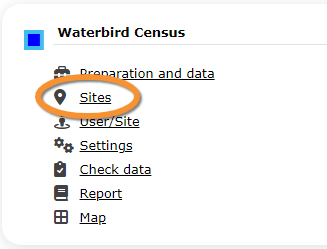
From the Waterbird census menu, select Sites' to see a list with all existing sites. On top, type the name of a site, or part of it, and click SEARCH to facilitate teh search, and DISPLAY ALL to see the full list. Select the page number and the number of items per page to ease the search.
To create a new site, click + NEW under the list (see image). Select the site as if entering an observation (see wiki section Web interface > Submitting records if necessary) and choose the new option: Create a protocoled census - Waterbird census (see image below).
Enter a name for the new site.
Either:
- Draw polygon as explained in ... or,
- Export shapefile
SAVE AND STAY or SAVE AND ADD A RECORD
Setting protocol parameters
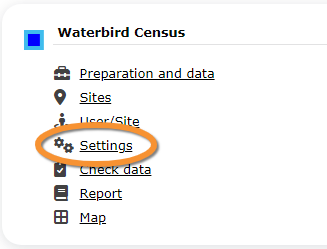
To stablish the starting paremeters of a Waterbird census, choose the protocol you need to work on, in this case, Waterbird census, and select Settings (see image Waterbird census. Menu). Go to parameters