Sound recorder: Difference between revisions
No edit summary |
No edit summary |
||
| (6 intermediate revisions by the same user not shown) | |||
| Line 44: | Line 44: | ||
<br /> | <br /> | ||
3. Once in the recording module, press [[File: | 3. Once in the recording module, press [[File:Yellow micro.png|20px|frameless|link=https://help.biolovision.net/images/0/02/Yellow_micro.png]] to start recording. <br/> | ||
4. Stop the record at any point with the stop button [[File:Stop icon.png|20px|frameless|link=https://help.biolovision.net/images/1/18/Stop_icon.png]]. <br/> | 4. Stop the record at any point with the stop button [[File:Stop icon.png|20px|frameless|link=https://help.biolovision.net/images/1/18/Stop_icon.png]]. <br/> | ||
5. Adjust the part of the recording to keep with [[File:Adjust icon.png|20px|frameless|link=https://help.biolovision.net/images/9/95/Adjust_icon.png]], minimum size for recording is 3 seconds. It is only possible to listen the recording at this stage. <br/> | 5. Adjust the part of the recording to keep with [[File:Adjust icon.png|20px|frameless|link=https://help.biolovision.net/images/9/95/Adjust_icon.png]], minimum size for recording is 3 seconds. It is only possible to listen the recording at this stage. <br/> | ||
| Line 87: | Line 87: | ||
<tr style="padding: 25px; text-align: center; font-size: 16px; font-family: sans serif; "> | <tr style="padding: 25px; text-align: center; font-size: 16px; font-family: sans serif; "> | ||
<td style="text-align: left">'''1. Close:'''</td> | <td style="text-align: left">'''1. Close:'''</td> | ||
<td style="text-align: center"> [[File: Close icon.png]] | <td style="text-align: center"> [[File: Close icon.png|25px|link=https://help.biolovision.net/images/d/d1/Close_icon.png]] | ||
<td style="text-align:left">Click to exit the sound recorder tool. No sound is recorded, return to home screen.</td> | <td style="text-align:left">Click to exit the sound recorder tool. No sound is recorded, return to home screen.</td> | ||
</tr> | </tr> | ||
| Line 94: | Line 94: | ||
<tr style="padding: 25px; text-align: center; font-size: 16px; font-family: sans serif; "> | <tr style="padding: 25px; text-align: center; font-size: 16px; font-family: sans serif; "> | ||
<td style="text-align: left">'''2. Start:'''</td> | <td style="text-align: left">'''2. Start:'''</td> | ||
<td style="text-align: center"> [[File: | <td style="text-align: center"> [[File: Yellow micro.png|25px|link=https://help.biolovision.net/images/0/02/Yellow_micro.png]] | ||
<td style="text-align:left">Click to start recording. A live spectrogram is shown while the recorder is working.</td> | <td style="text-align:left">Click to start recording. A live spectrogram is shown while the recorder is working.</td> | ||
</tr> | </tr> | ||
| Line 101: | Line 101: | ||
<tr style="padding: 25px; text-align: center; font-size: 16px; font-family: sans serif; "> | <tr style="padding: 25px; text-align: center; font-size: 16px; font-family: sans serif; "> | ||
<td style="text-align: left">'''3. Stop:'''</td> | <td style="text-align: left">'''3. Stop:'''</td> | ||
<td style="text-align: center"> [[File: | <td style="text-align: center"> [[File: Stop icon.png|25px|link=https://help.biolovision.net/images/1/18/Stop_icon.png]] | ||
<td style="text-align:left">Click to stop recording. The minimum time of recording is 3 seconds.</td> | <td style="text-align:left">Click to stop recording. The minimum time of recording is 3 seconds.</td> | ||
</tr> | </tr> | ||
| Line 108: | Line 108: | ||
<tr style="padding: 25px; text-align: center; font-size: 16px; font-family: sans serif; "> | <tr style="padding: 25px; text-align: center; font-size: 16px; font-family: sans serif; "> | ||
<td style="text-align: left">'''4. Time:'''</td> | <td style="text-align: left">'''4. Time:'''</td> | ||
<td style="text-align: center"> | <td style="text-align: center"> | ||
<td style="text-align:left">Indicates the time of the recording in progress.</td> | <td style="text-align:left">Indicates the time of the recording in progress.</td> | ||
</tr> | </tr> | ||
| Line 115: | Line 115: | ||
<tr style="padding: 25px; text-align: center; font-size: 16px; font-family: sans serif; "> | <tr style="padding: 25px; text-align: center; font-size: 16px; font-family: sans serif; "> | ||
<td style="text-align: left">'''5. Live spectrogram:'''</td> | <td style="text-align: left">'''5. Live spectrogram:'''</td> | ||
<td style="text-align: center"> | <td style="text-align: center"> | ||
<td style="text-align:left">Spectrogram being recorded in real time.</td> | <td style="text-align:left">Spectrogram being recorded in real time.</td> | ||
</tr> | </tr> | ||
| Line 122: | Line 122: | ||
<tr style="padding: 25px; text-align: center; font-size: 16px; font-family: sans serif; "> | <tr style="padding: 25px; text-align: center; font-size: 16px; font-family: sans serif; "> | ||
<td style="text-align: left">'''6. Play:'''</td> | <td style="text-align: left">'''6. Play:'''</td> | ||
<td style="text-align: center"> [[File: | <td style="text-align: center"> [[File: Play icon.png|25px|link=https://help.biolovision.net/images/6/67/Play_icon.png]] | ||
<td style="text-align:left">Click to hear the recording. </td> | <td style="text-align:left">Click to hear the recording. </td> | ||
</tr> | </tr> | ||
| Line 129: | Line 129: | ||
<tr style="padding: 25px; text-align: center; font-size: 16px; font-family: sans serif; "> | <tr style="padding: 25px; text-align: center; font-size: 16px; font-family: sans serif; "> | ||
<td style="text-align: left">'''7. Adjust:''' </td> | <td style="text-align: left">'''7. Adjust:''' </td> | ||
<td style="text-align: center"> [[File: | <td style="text-align: center"> [[File: Adjust icon.png|25px|link=https://help.biolovision.net/images/9/95/Adjust_icon.png]] | ||
<td style="text-align:left">Resize the recording (minimum size required is 3 seconds). </td> | <td style="text-align:left">Resize the recording (minimum size required is 3 seconds). </td> | ||
</tr> | </tr> | ||
| Line 136: | Line 136: | ||
<tr style="padding: 25px; text-align: center; font-size: 16px; font-family: sans serif; "> | <tr style="padding: 25px; text-align: center; font-size: 16px; font-family: sans serif; "> | ||
<td style="text-align: left">'''8. Full spectrogram:''' </td> | <td style="text-align: left">'''8. Full spectrogram:''' </td> | ||
<td style="text-align: center"> | <td style="text-align: center"> | ||
<td style="text-align:left">Spectrogram of the full recording. </td> | <td style="text-align:left">Spectrogram of the full recording. </td> | ||
</tr> | </tr> | ||
| Line 143: | Line 143: | ||
<tr style="padding: 25px; text-align: center; font-size: 16px; font-family: sans serif; "> | <tr style="padding: 25px; text-align: center; font-size: 16px; font-family: sans serif; "> | ||
<td style="text-align: left">'''9. Move:''' </td> | <td style="text-align: left">'''9. Move:''' </td> | ||
<td style="text-align: center"> | <td style="text-align: center"> | ||
<td style="text-align:left"> Navigate through the recording to be at the right time where the interesting part is. </td> | <td style="text-align:left"> Navigate through the recording to be at the right time where the interesting part is. </td> | ||
</tr> | </tr> | ||
| Line 150: | Line 150: | ||
</div> | </div> | ||
</center> | </center> | ||
</center> | </center> | ||
<br/> | <br/> | ||
<br/> | <br/> | ||
<!--T:13--> | <!--T:13--> | ||
| Line 165: | Line 161: | ||
<center> | <center> | ||
<div class="toc" style="border-radius:5px;background-color:#ffffff;padding-left:8px;padding-right:8px;padding-bottom:8px;width:200px;"> | <div class="toc" style="border-radius:5px;background-color:#ffffff;padding-left:8px;padding-right:8px;padding-bottom:8px;width:200px;"> | ||
[[File:Validate.png|200px]] | [[File:Validate.png|200px|link=https://help.biolovision.net/images/f/fd/Validate.png]] | ||
<div class="toc" style="border-radius:5px;padding-left:15px;text-align:left; font-size:12px;width:185px;"> | <div class="toc" style="border-radius:5px;padding-left:15px;text-align:left; font-size:12px;width:185px;"> | ||
'''Validate.''' | '''Validate.''' | ||
Latest revision as of 15:39, 16 January 2026
Record sound directly in the field with your NaturaList application. As it happens with images, the sound will be linked to an observation and its details.
As a call and/or song may be unpredictable, there is a quick access to camera and microphone that allows you to record sound before entering place and species. It is still possible to do it the standard way as you enter the observation.
Sound can be recorded at two different stages:
· as additional information after entering the observation (see wiki section Mobile interface > Enter independent observations > Plus > Media for details.
· before entering the observation (see below for details).
Except for some protocols (requires special rights to access them), it is currently not possible to do playback from NaturaList.
To record sound before entering your observation:
1. Open NaturaList as usual.
2. Use quick key  to open the sound recorder.
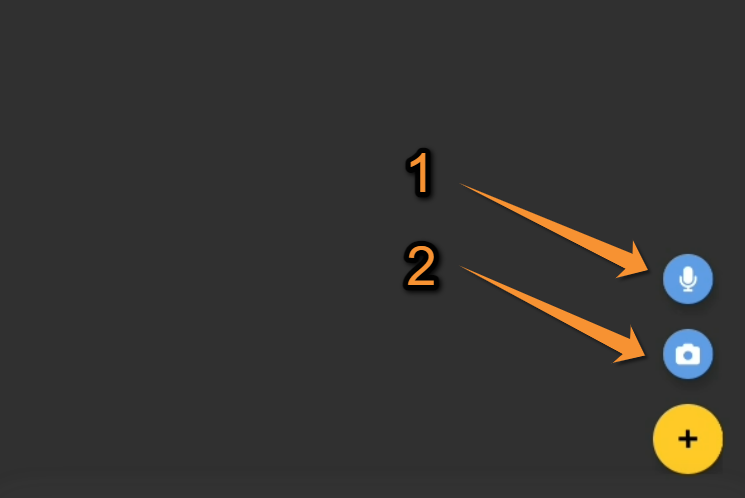
Media. Quick access.
1. Record a sound: Click to open the sound recorder.
2. Add a photo: Click to open the camera.
It is not possible to upload a file from your document: please add it to an observation with the detail panel "Media".
3. Once in the recording module, press  to start recording.
4. Stop the record at any point with the stop button  .
.
5. Adjust the part of the recording to keep with  , minimum size for recording is 3 seconds. It is only possible to listen the recording at this stage.
|
Sound recorder. Step 1. |
Sound recorder. Step 2: Recording in progress. |
Sound recorder. Step 3: Recording adjustement. |

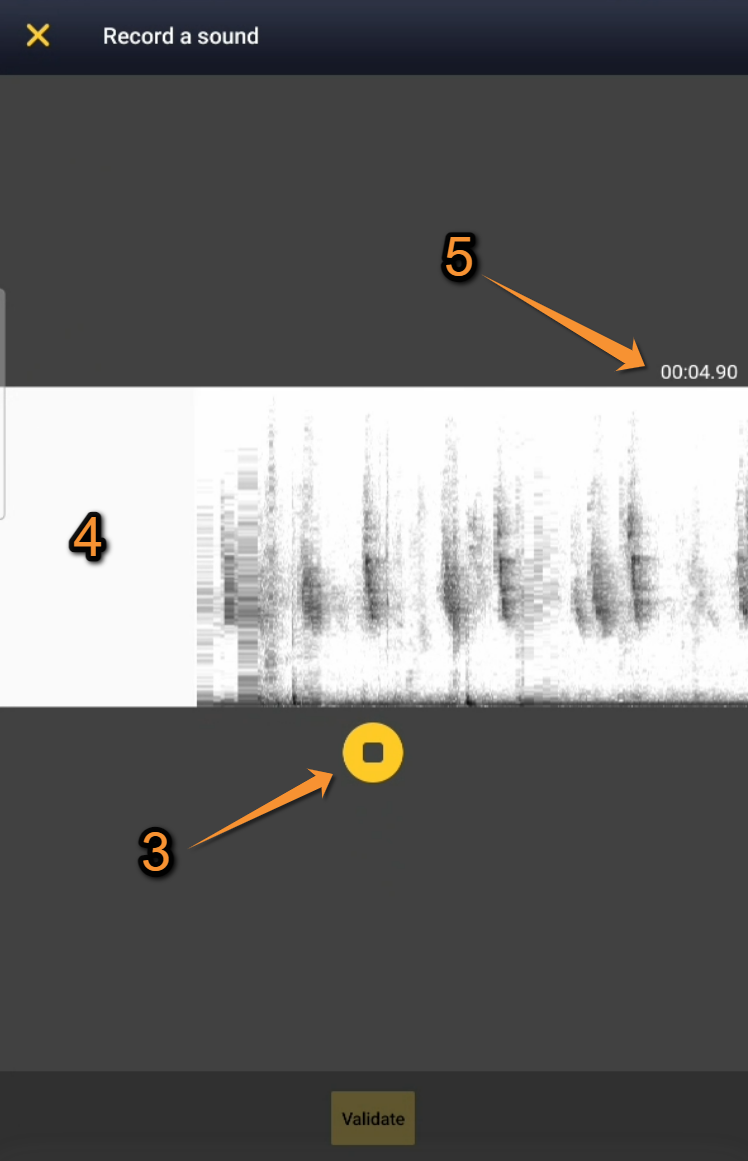
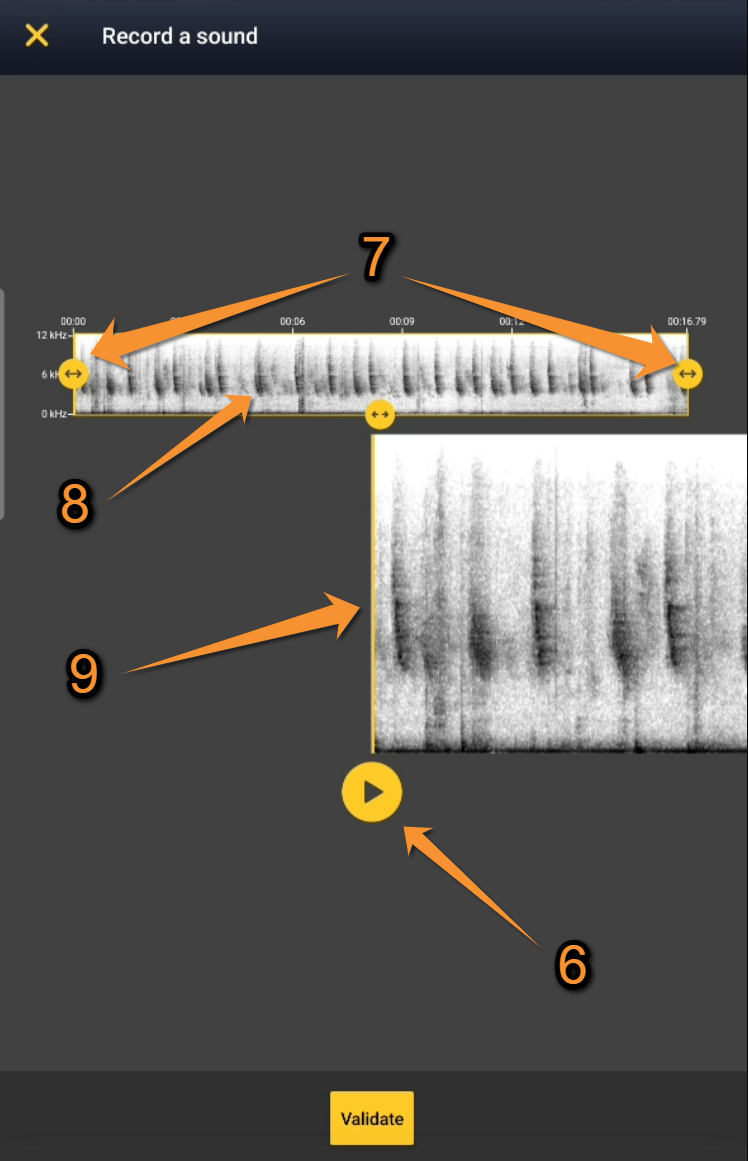

| 1. Close: | 
| Click to exit the sound recorder tool. No sound is recorded, return to home screen. |
| 2. Start: |
| Click to start recording. A live spectrogram is shown while the recorder is working. |
| 3. Stop: |
| Click to stop recording. The minimum time of recording is 3 seconds. |
| 4. Time: | Indicates the time of the recording in progress. | |
| 5. Live spectrogram: | Spectrogram being recorded in real time. | |
| 6. Play: | 
| Click to hear the recording. |
| 7. Adjust: |
| Resize the recording (minimum size required is 3 seconds). |
| 8. Full spectrogram: | Spectrogram of the full recording. | |
| 9. Move: | Navigate through the recording to be at the right time where the interesting part is. |
6. Validate. Confirms the sound selection and open the map to enter the data linked to that sound. Do not forget now step 7 to enter your observation as usual (Place, Species, Details...), otherwise your sound is not saved and you will loose it!

Validate.
7. Enter the observation as usual (you are taken directly to the "Place" screen described in wiki section Mobile interface > Submitting records > Enter independent observations > Place.
NOTE
The sound recording always needs to be associated to an observation. Otherwise, the recording will be automatically deleted.