Administration access: Difference between revisions
Jump to navigation
Jump to search
No edit summary |
No edit summary |
||
| Line 5: | Line 5: | ||
<center> | <center> | ||
<div class="toc" style="border-radius:5px | <div class="toc" style="border-radius:5px;padding-left:8px;padding-right:8px;width:700px;background-color: white"> | ||
[[File:Access colour code.png|700px|link=https://help.biolovision.net/images/9/9d/Access_colour_code.png|Click image to enlarge]] | [[File:Access colour code.png|700px|link=https://help.biolovision.net/images/9/9d/Access_colour_code.png|Click image to enlarge]] | ||
<div class="toc" style="border-radius:5px;padding-left:15px;text-align:left; font-size:12px;width:675px;"> | <div class="toc" style="border-radius:5px;padding-left:15px;text-align:left; font-size:12px;width:675px;"> | ||
| Line 14: | Line 14: | ||
'''2.''' Colour code on vertical menus.<br/> | '''2.''' Colour code on vertical menus.<br/> | ||
<br/> | <br/> | ||
</div> | |||
</center> | |||
<br/> | |||
<br/> | |||
<span style="color: #000000; margin-left: 25px;"><b>· </b> <span style="color:red;"><b> Red </b></span>: The page is created but not public. Only users with the right to manage pages can see it. Administrators grant this right to certain users. <br/> | <span style="color: #000000; margin-left: 25px;"><b>· </b> <span style="color:red;"><b> Red </b></span>: The page is created but not public. Only users with the right to manage pages can see it. Administrators grant this right to certain users. <br/> | ||
<span style="color: #000000; margin-left: 25px;"><b>· </b> <span style="color:orange;"><b> Orange </b></span>: The page is only available to all administrators. <br/> | <span style="color: #000000; margin-left: 25px;"><b>· </b> <span style="color:orange;"><b> Orange </b></span>: The page is only available to all administrators. <br/> | ||
<span style="color: #000000; margin-left: 25px;"><b>· </b> <span style="color:purple;"><b> Purple </b></span>: The page needs a special right, but not necessarily an administration right (ie. translation or protocols). <br/> | <span style="color: #000000; margin-left: 25px;"><b>· </b> <span style="color:purple;"><b> Purple </b></span>: The page needs a special right, but not necessarily an administration right (ie. translation or protocols). <br/> | ||
<span style="color: #000000; margin-left: 25px;"><b>· </b> <span style="color:green;"><b> Green </b></span>: Pages under construction. Only available to Biolovision. <br/> | <span style="color: #000000; margin-left: 25px;"><b>· </b> <span style="color:green;"><b> Green </b></span>: Pages under construction. Only available to Biolovision. <br/> | ||
<br/> | <br/> | ||
[[#top|[Top to Administration access]]] <br/> | |||
<br/> | <br/> | ||
Latest revision as of 21:45, 28 January 2026
Not all users have access to all functions. A system of colour codes indicates with sections are available and to whom. It is shown as a colour line on top of the horizontal menu or on the left on vertical menus (see image below).
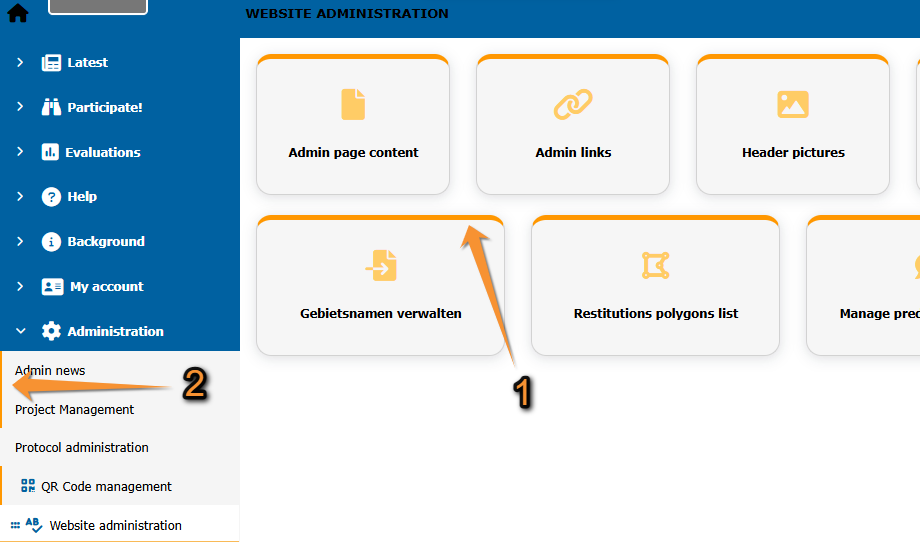
Colour code for accessibility.
1. Colour code on horizontal menus.
2. Colour code on vertical menus.
· Red : The page is created but not public. Only users with the right to manage pages can see it. Administrators grant this right to certain users.
· Orange : The page is only available to all administrators.
· Purple : The page needs a special right, but not necessarily an administration right (ie. translation or protocols).
· Green : Pages under construction. Only available to Biolovision.