Exporting your data: Difference between revisions
No edit summary |
No edit summary |
||
| Line 13: | Line 13: | ||
<b>TO EXPORT</b> | <b>TO EXPORT</b> | ||
* [[Browsing records|Browse your data]] <br/> | * [[Browsing records|Browse your data]] <br/> | ||
* Select a [[Exporting_your_data#Templates|template]] (or create a new one) <br/> | * Select a [[Exporting_your_data#Templates|template]] (or [[Exporting_your_data#Create_a_new_template|create a new one]]) <br/> | ||
* Choose a [[Exporting_your_data#Available_formats|format]] <br/> | * Choose a [[Exporting_your_data#Available_formats|format]] <br/> | ||
* Wait until the file is ready ([[Media:2023-08-31 files to export.png|Green]]) <br/> | * Wait until the file is ready ([[Media:2023-08-31 files to export.png|Green]]) <br/> | ||
Revision as of 15:44, 31 August 2023
|
|

From different places of the Local Website you can browse your data, and/or export your own in different formats:
| Name | Description | |
|---|---|---|
 |
Tab separated plain text(.txt) | Data stored as a text, with columns separated by spaces. It can be opened with Microsoft Notepad, WordPad and TextEdit. |
 |
MS Excel file (.xlsx) | Spreadsheets. It can be opened with Microsoft Excel. |
 |
MS Excel file 97-2003(.xls) | Spreadsheets. It can be opened with any version of Microsoft Excel. |
 |
Google Earth (.KML) | Geo-referenced information that can be displayed in maps. It can be opened with GoogleEarth, but also with other GIS software. |
 |
eXtensible Markup Language (.XML) | Data encrypted to be transferred between two computers through the web. It is used for the API. |
 |
JavaScript Object Notation (.JSON) | Data encrypted to be transferred between two computers through the web. It is used for the API. |
We take the example below from Explore> All my observations, the past 30 days (see image Exporting your data). Select a template (for example, BASIC) and click on the format (for example, Excel). Place the mouse pointer on the format icons to see which extension corresponds to each icon. Once you click on the format, the file is automatically generated in the format you selected. Create your own templates using the wheel next to the template expandable list. See your exports in All my exports (see image Exporting your data, creating files).

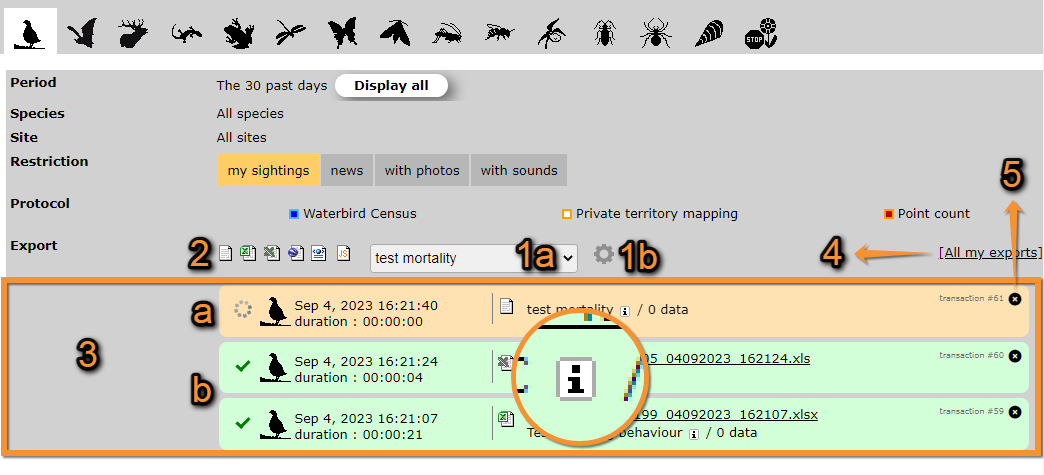

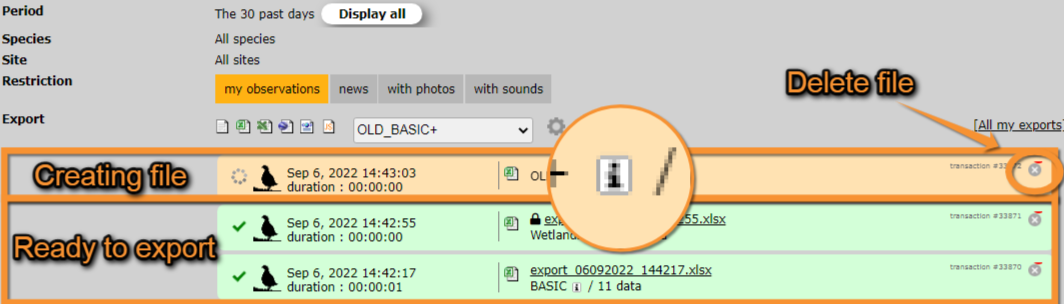
The file shows in orange while being created and turns green when it is ready to be downloaded. To download, click on the file name. Place the mouse pointer on the "i" icon when the file is ready in order to see the characteristics for each format type. To delete any file click on the X on the top right corner of the file area (see image Exporting your data, files ready to export).

Available formats
| Name | Description | |
|---|---|---|
|
|
Tab separated plain text(.txt) | Data stored as a text, with columns separated by spaces. It can be opened with Microsoft Notepad, WordPad and TextEdit. |
|
|
MS Excel file (.xlsx) | Spreadsheets. It can be opened with Microsoft Excel. |
|
|
MS Excel file 97-2003(.xls) | Spreadsheets. It can be opened with any version of Microsoft Excel. |
|
|
Google Earth (.KML) | Geo-referenced information that can be displayed in maps. It can be opened with GoogleEarth, but also with other GIS software. |
|
|
eXtensible Markup Language (.XML) | Data encrypted to be transferred between two computers through the web. It is used for the API. |
|
|
JavaScript Object Notation (.JSON) | Data encrypted to be transferred between two computers through the web. It is used for the API. |
Templates
Clicking on the expandable menu, choose an already made template or create a new one.
Available templates differ from country to country, are created by local administrators and can be modified by users with rights. The following templates exist in all sites. Note some templates are only available for certain users, like administrators, and registered users without special rights will not see them in their menus.
| Name | Distribution | Description | Example |
|---|---|---|---|
| BASIC | Public | ||
| BASIC+ | Administrators | ||
| OLD_BASIC+ | Public | Template on the old website. | |
| Wetlands+ | Private | ||
Create a new template
Note: images and examples are drawn from the French portal Faune-France. The design and position of some tools may vary slightly from portal to portal. To see a list of portals go to wiki section Local portals and partners. |