User administration: Difference between revisions
| Line 366: | Line 366: | ||
<span id="List of rights"></span> | <span id="List of rights"></span> | ||
====List of rights==== | ====List of rights==== | ||
<br/> | |||
<center> | |||
<div style="border-radius:5px; border:1px solid grey; width:95%; background-color:white;"> | |||
<div class="mw-collapsible mw-collapsed" data-expandtext="Show" data-collapsetext="Hide" style="width:95%; margin-bottom:0px; margin-top:0px;font-size:16px;"> | |||
<b>Summary table users' rights</b> | |||
<div class="mw-collapsible-content" style="width:95%;background-color:white;"> | |||
<br/> | |||
<table class="wikitable sortable" style="border:1px solid black;" width="100%" align="center";}> | |||
<tr style="padding: 25px; text-align: center; font-size: 16px; font-family: sans serif; "> | |||
<th width="10%">Theme</th> | |||
<th width="35%">Code</th> | |||
<th width="35%">Name</th> | |||
<th width="10%">Restriction</th> | |||
</tr> | |||
<tr style="padding: 25px; text-align: center; font-size: 16px; font-family: sans serif; "> | |||
<td style="text-align:left">Backoffice</td> | |||
<td style="text-align: center">ADMIN</td> | |||
<td style="text-align:center">[[User administration#Admin|Admin rights]]</td> | |||
<td style="text-align:left"><span style="color: #000000;"><b>· </b>Mirror site<br/> | |||
<span style="color: #000000;"><b>· </b>Taxa</td> | |||
</tr> | |||
<tr style="padding: 25px; text-align: center; font-size: 16px; font-family: sans serif; "> | |||
<td style="text-align:left"></td> | |||
<td style="text-align: center">ADMIN_BIRDS</td> | |||
<td style="text-align:center">[[User administration#Admin birds|]]</td> | |||
<td style="text-align:left"><span style="color: #000000;"><b>· </b>Taxa</td> | |||
</tr> | |||
<tr style="padding: 25px; text-align: center; font-size: 16px; font-family: sans serif; "> | |||
<td style="text-align:left">Backoffice</td> | |||
<td style="text-align: center">ADMIN_CONTENT</td> | |||
<td style="text-align:center">[[User administartion#Admin content|Content page admin rights]]</td> | |||
<td style="text-align:left"><span style="color: #000000;"><b>· </b>Mirror site</td> | |||
</tr> | |||
<tr style="padding: 25px; text-align: center; font-size: 16px; font-family: sans serif; "> | |||
<td style="text-align:left">Sightings</td> | |||
<td style="text-align: center">ADMIN_HIDDEN</td> | |||
<td style="text-align:center">[[User administration#Admin hidden|Rights to request verification of a sighting]]</td> | |||
<td style="text-align:left"><span style="color: #000000;"><b>· </b>Taxa</td> | |||
</tr> | |||
<tr style="padding: 25px; text-align: center; font-size: 16px; font-family: sans serif; "> | |||
<td style="text-align:left">Places</td> | |||
<td style="text-align: center">ADMIN_HIDDEN_PLACE</td> | |||
<td style="text-align:center">[[User administration#Admin hidden place|Visualisation / Admin of hidden localities]]</td> | |||
<td style="text-align:center; font-size:14px;">n/a</td> | |||
</tr> | |||
<tr style="padding: 25px; text-align: center; font-size: 16px; font-family: sans serif; "> | |||
<td style="text-align:left">Backoffice</td> | |||
<td style="text-align: center">ADMIN_LANGU</td> | |||
<td style="text-align:center">[[User administration#Admin langu|Admin languages]]</td> | |||
<td style="text-align:center; font-size:14px">n/a</td> | |||
</tr> | |||
<tr style="padding: 25px; text-align: center; font-size: 16px; font-family: sans serif; "> | |||
<td style="text-align:left">Backoffice</td> | |||
<td style="text-align: center">ADMIN_LINKS</td> | |||
<td style="text-align:center">[[User administration#Admin links|Links admin rights]]</td> | |||
<td style="text-align:left"><span style="color: #000000;"><b>· </b>Mirror site</td> | |||
</tr> | |||
<tr style="padding: 25px; text-align: center; font-size: 16px; font-family: sans serif; "> | |||
<td style="text-align:left">Backoffice</td> | |||
<td style="text-align: center">ADMIN_NEWS</td> | |||
<td style="text-align:center">[[User administration#Admin news|News admin rights]]</td> | |||
<td style="text-align:left"><span style="color: #000000;"><b>· </b>Mirror site<br/> | |||
<span style="color: #000000;"><b>· </b>Taxa<br/> | |||
<span style="color: #000000;"><b>· </b>Protocol</td> | |||
</tr> | |||
<tr style="padding: 25px; text-align: center; font-size: 16px; font-family: sans serif; "> | |||
<td style="text-align:left">Sightings</td> | |||
<td style="text-align: center">ADMIN_OBS</td> | |||
<td style="text-align:center">[[User administration#Admin obs|Sightings management rights]]</td> | |||
<td style="text-align:left"><span style="color: #000000;"><b>· </b>Location<sup>1</sup><br/> | |||
<span style="color: #000000;"><b>· </b>Taxa<sup>2</sup><br/> | |||
<span style="color: #000000;"><b>· </b>Protocol<br/> | |||
<span style="color: #000000;"><b>· </b>Project<br/> | |||
<span style="color: #000000;"><b>· </b>Committee<sup>3</sup></td> | |||
</tr> | |||
<tr style="padding: 25px; text-align: center; font-size: 16px; font-family: sans serif; "> | |||
<td style="text-align:left">Sightings</td> | |||
<td style="text-align: center">ADMIN_OBS_HIDDEN</td> | |||
<td style="text-align:center">[[User administration#Admin obs hidden|Right to see hidden records]]</td> | |||
<td style="text-align:left"><span style="color: #000000;"><b>· </b>Location<sup>1</sup><br/> | |||
<span style="color: #000000;"><b>· </b>Taxa<sup>2</sup><br/> | |||
<span style="color: #000000;"><b>· </b>Protocol<br/> | |||
<span style="color: #000000;"><b>· </b>Project<br/> | |||
<span style="color: #000000;"><b>· </b>Committee<sup>3</sup></td> | |||
</tr> | |||
<tr style="padding: 25px; text-align: center; font-size: 16px; font-family: sans serif; "> | |||
<td style="text-align:left">Sightings</td> | |||
<td style="text-align: center">ADMIN_OBS_HIDDEN_COMMENT</td> | |||
<td style="text-align:center">[[User administration#Admin obs hidden comment|Right to see hidden comments]]</td> | |||
<td style="text-align:center; font-size:14px;">n/a</td> | |||
</tr> | |||
<tr style="padding: 25px; text-align: center; font-size: 16px; font-family: sans serif; "> | |||
<td style="text-align:left"></td> | |||
<td style="text-align: center">ADMIN_OBS_HIDDEN_PLACE</td> | |||
<td style="text-align:center">[[User administration#Admin obs hidden place|]]</td> | |||
<td style="text-align:left"></td> | |||
</tr> | |||
<tr style="padding: 25px; text-align: center; font-size: 16px; font-family: sans serif; "> | |||
<td style="text-align:left">Backoffice</td> | |||
<td style="text-align: center">ADMIN_SCHEDULE</td> | |||
<td style="text-align:center">[[User administration#Admin schedule|Schedule news admin right]]</td> | |||
<td style="text-align:left"><span style="color: #000000;"><b>· </b>Mirror site</td> | |||
</tr> | |||
<tr style="padding: 25px; text-align: center; font-size: 16px; font-family: sans serif; "> | |||
<td style="text-align:left">Places</td> | |||
<td style="text-align: center">ADMIN_SITE</td> | |||
<td style="text-align:center">[[User administration#Admin site|Places management rights]]</td> | |||
<td style="text-align:center; font-size:14px;">n/a</td> | |||
</tr> | |||
<tr style="padding: 25px; text-align: center; font-size: 16px; font-family: sans serif; "> | |||
<td rowspan="" scope="colgroup" style="text-align:left">Backoffice</td> | |||
<td style="text-align: center">ADMIN_USER_RIGHT_ADMIN_USER</td> | |||
<td style="text-align:center">[[User administration#Admin user right admin user|]]</td> | |||
<td style="text-align:left"><span style="color: #000000;"><b>· </b>Taxa</td> | |||
</tr> | |||
<tr style="padding: 25px; text-align: center; font-size: 16px; font-family: sans serif; "> | |||
<td style="text-align:left">Sightings</td> | |||
<td style="text-align: center">ADVANCED</td> | |||
<td style="text-align:center">[[User administration#Advanced|Access for data entry for restricted species]]</td> | |||
<td style="text-align:left"><span style="color: #000000;"><b>· </b>Taxa<sup>2</sup></td> | |||
</tr> | |||
<tr style="padding: 25px; text-align: center; font-size: 16px; font-family: sans serif; "> | |||
<td style="text-align:left">Tools</td> | |||
<td style="text-align: center">API_ACCESS_OTHER_USER</td> | |||
<td style="text-align:center">[[User administration#Api access other user|Right to access all user account using the API]]</td> | |||
<td style="text-align:center;font-size:14px;">n/a</td> | |||
</tr> | |||
<tr style="padding: 25px; text-align: center; font-size: 16px; font-family: sans serif; "> | |||
<td style="text-align:left"></td> | |||
<td style="text-align: center">ATLAS</td> | |||
<td style="text-align:center">[[User administration#Atlas|]]</td> | |||
<td style="text-align:left"></td> | |||
</tr> | |||
<tr style="padding: 25px; text-align: center; font-size: 16px; font-family: sans serif; "> | |||
<td style="text-align:left">Tools</td> | |||
<td style="text-align: center">ATLAS_ADMIN</td> | |||
<td style="text-align:center">[[User adminstration#Atlas admin|Atlas administrator]]</td> | |||
<td style="text-align:center;font-size:14px;">n/a</td> | |||
</tr> | |||
<tr style="padding: 25px; text-align: center; font-size: 16px; font-family: sans serif; "> | |||
<td style="text-align:left">Tools</td> | |||
<td style="text-align: center">ATLAS_API_FILE_UPLOAD</td> | |||
<td style="text-align:center">[[User administration#Atlas api file upload|Upload atlas documents with API]]</td> | |||
<td style="text-align:center;font-size:14px;">n/a</td> | |||
</tr> | |||
<tr style="padding: 25px; text-align: center; font-size: 16px; font-family: sans serif; "> | |||
<td style="text-align:left">Sightings</td> | |||
<td style="text-align: center">CONFIRM_OBS</td> | |||
<td style="text-align:center">[[User administration#Confirm obs|Confirmation rights]]</td> | |||
<td style="text-align:left"><span style="color: #000000;"><b>· </b>Taxa</td> | |||
</tr> | |||
<tr style="padding: 25px; text-align: center; font-size: 16px; font-family: sans serif; "> | |||
<td style="text-align:left">Tests</td> | |||
<td style="text-align: center">DELETE_PUBLIC_VALIDATION</td> | |||
<td style="text-align:center">[[User administration#Delete public validation|Remove the right to community validation]]</td> | |||
<td style="text-align:center,font-size:14px;">n/a</td> | |||
</tr> | |||
<tr style="padding: 25px; text-align: center; font-size: 16px; font-family: sans serif; "> | |||
<td style="text-align:left">Tests</td> | |||
<td style="text-align: center">DISPLAY_LAST_STOC_FORM<S/td> | |||
<td style="text-align:center">[[User administration#Display list stoc forms|Access to protocol features under development]]</td> | |||
<td style="text-align:center;font-size:14px;">n/a</td> | |||
</tr> | |||
<tr style="padding: 25px; text-align: center; font-size: 16px; font-family: sans serif; "> | |||
<td style="text-align:left">Sightings</td> | |||
<td style="text-align: center">EXPORT</td> | |||
<td style="text-align:center">[[User administration#Export|Export rights]]</td> | |||
<td style="text-align:left"><span style="color: #000000;"><b>· </b>Location<sup>1</sup><br/> | |||
<span style="color: #000000;"><b>· </b>Taxa<sup>2</sup><br/> | |||
<span style="color: #000000;"><b>· </b>Protocol<br/> | |||
<span style="color: #000000;"><b>· </b>Project<br/> | |||
<span style="color: #000000;"><b>· </b>Committee<sup>3</sup></td> | |||
</tr> | |||
<tr style="padding: 25px; text-align: center; font-size: 16px; font-family: sans serif; "> | |||
<td style="text-align:left">Sightings</td> | |||
<td style="text-align: center">EXPORT_ENTITY</td> | |||
<td style="text-align:center">[[User administration#Export entity|Right to export for entity]]</td> | |||
<td style="text-align:center;font-size:14px;">n/a</td> | |||
</tr> | |||
<tr style="padding: 25px; text-align: center; font-size: 16px; font-family: sans serif; "> | |||
<td style="text-align:left">Tools</td> | |||
<td style="text-align: center">FREE_AREAS</td> | |||
<td style="text-align:center">[[User administration#Free areas|Access to the free site management tool]]</td> | |||
<td style="text-align:center;font-size:14px;">n/a</td> | |||
</tr> | |||
<tr style="padding: 25px; text-align: center; font-size: 16px; font-family: sans serif; "> | |||
<td style="text-align:left">Sightings</td> | |||
<td style="text-align: center">FULL_SEARCH</td> | |||
<td style="text-align:center">[[User administration#Full search|Right to use the search engine, despite the quota]]</td> | |||
<td style="text-align:center;font-size:14px;">n/a</td> | |||
</tr> | |||
<tr style="padding: 25px; text-align: center; font-size: 16px; font-family: sans serif; "> | |||
<td style="text-align:left">Tests</td> | |||
<td style="text-align: center">FULL_STAT</td> | |||
<td style="text-align:center">[[User administration#Full stat|Access to the complete stats]]</td> | |||
<td style="text-align:center;font-size:14px;">n/a</td> | |||
</tr> | |||
<tr style="padding: 25px; text-align: center; font-size: 16px; font-family: sans serif; "> | |||
<td style="text-align:left">Places</td> | |||
<td style="text-align: center">FUSION_SITE</td> | |||
<td style="text-align:center">[[User administration#Fusion site|Right to lump several localities]]</td> | |||
<td style="text-align:center;font-size:14px;">n/a</td> | |||
</tr> | |||
<tr style="padding: 25px; text-align: center; font-size: 16px; font-family: sans serif; "> | |||
<td style="text-align:left">Sightings</td> | |||
<td style="text-align: center">IMPORT</td> | |||
<td style="text-align:center">[[User administration#Import|Import rights]]</td> | |||
<td style="text-align:center; font-size:14px;">n/a</td> | |||
</tr> | |||
<tr style="padding: 25px; text-align: center; font-size: 16px; font-family: sans serif; "> | |||
<td style="text-align:left">Tools</td> | |||
<td style="text-align: center">MERGE_LIST</td> | |||
<td style="text-align:center">[[User administartion#Merge list|Access to the list merge tool]]</td> | |||
<td style="text-align:center; font-size:14px;">n/a</td> | |||
</tr> | |||
<tr style="padding: 25px; text-align: center; font-size: 16px; font-family: sans serif; "> | |||
<td style="text-align:left">Sightings</td> | |||
<td style="text-align: center">OBSERVATION_SELECTION</td> | |||
<td style="text-align:center">[[User administration#Obs selection|Access to the “Like” module for observations]]</td> | |||
<td style="text-align:center;font-size:14px;">n/a</td> | |||
</tr> | |||
<tr style="padding: 25px; text-align: center; font-size: 16px; font-family: sans serif; "> | |||
<td style="text-align:left"></td> | |||
<td style="text-align: center">OBSERVER</td> | |||
<td style="text-align:center">[[User administration#Observer|ADMIN_USER_RIGHT_OBSERVER]]</td> | |||
<td style="text-align:left"></td> | |||
</tr> | |||
<tr style="padding: 25px; text-align: center; font-size: 16px; font-family: sans serif; "> | |||
<td style="text-align:left">Sightings</td> | |||
<td style="text-align: center">OBSERVER_IMPORT</td> | |||
<td style="text-align:center">[[User administration#Observer import|Right to import self records (Excel)]]</td> | |||
<td style="text-align:center;font-size:14px;">n/a</td> | |||
</tr> | |||
<tr style="padding: 25px; text-align: center; font-size: 16px; font-family: sans serif; "> | |||
<td style="text-align:left">Sightings</td> | |||
<td style="text-align: center">PEOPLE_SEARCH</td> | |||
<td style="text-align:center">[[User administration#People search|Right to filter by user]]</td> | |||
<td style="text-align:center;font-size:14px;">n/a</td> | |||
</tr> | |||
<tr style="padding: 25px; text-align: center; font-size: 16px; font-family: sans serif; "> | |||
<td style="text-align:left"></td> | |||
<td style="text-align: center">POLYGON_DATA_DRAW</td> | |||
<td style="text-align:center">[[User administration#Polygon data draw|]]</td> | |||
<td style="text-align:left"></td> | |||
</tr> | |||
<tr style="padding: 25px; text-align: center; font-size: 16px; font-family: sans serif; "> | |||
<td style="text-align:left"></td> | |||
<td style="text-align: center">POLYGON_DISPLAY_EXCLUDED_SPECIES</td> | |||
<td style="text-align:center">[[User administration#Polygon display ex sp|]]</td> | |||
<td style="text-align:left"></td> | |||
</tr> | |||
<tr style="padding: 25px; text-align: center; font-size: 16px; font-family: sans serif; "> | |||
<td style="text-align:left"></td> | |||
<td style="text-align: center">PRECISE</td> | |||
<td style="text-align:center">[[User administration#Precise|]]</td> | |||
<td style="text-align:left"></td> | |||
</tr> | |||
<tr style="padding: 25px; text-align: center; font-size: 16px; font-family: sans serif; "> | |||
<td style="text-align:left">Places</td> | |||
<td style="text-align: center">PRIVATE PLACE</td> | |||
<td style="text-align:center">[[User administration#Private place|Right to see private places]]</td> | |||
<td style="text-align:center;font-size:14px;">n/a</td> | |||
</tr> | |||
<tr style="padding: 25px; text-align: center; font-size: 16px; font-family: sans serif; "> | |||
<td style="text-align:left; font-size:12px;">Protocol/Project/Rarities committee</td> | |||
<td style="text-align: center">PROJECT</td> | |||
<td style="text-align:center">[[User administration#Project|Access to projects]]</td> | |||
<td style="text-align:left"><span style="color: #000000;"><b>· </b>Project</td> | |||
</tr> | |||
<tr style="padding: 25px; text-align: center; font-size: 16px; font-family: sans serif; "> | |||
<td style="text-align:left; font-size:12px;">Protocol/Project/Rarities committee</td> | |||
<td style="text-align: center">PROJECT_ADMIN</td> | |||
<td style="text-align:center">[[User administration#Project admin|Project administrators]]</td> | |||
<td style="text-align:left"><span style="color: #000000;"><b>· </b>Project</td> | |||
</tr> | |||
<tr style="padding: 25px; text-align: center; font-size: 16px; font-family: sans serif; "> | |||
<td style="text-align:left; font-size:12px;">Protocol/Project/Rarities committee</td> | |||
<td style="text-align: center">PROTO</td> | |||
<td style="text-align:center">[[User administration#Proto|Access to protocols]]</td> | |||
<td style="text-align:left"><span style="color: #000000;"><b>· </b>Protocol <br/> | |||
</td> | |||
</tr> | |||
<tr style="padding: 25px; text-align: center; font-size: 16px; font-family: sans serif; "> | |||
<td style="text-align:left; font-size:12px;">Protocol/Project/Rarities committee</td> | |||
<td style="text-align: center">PROTO_ADMIN</td> | |||
<td style="text-align:center">[[User administration#Proto admin|Protocol administrator]]</td> | |||
<td style="text-align:left"><span style="color: #000000;"><b>· </b>Location<sup>1</sup> <br/> | |||
<span style="color: #000000;"><b>· </b>Taxa <br/> | |||
<span style="color: #000000;"><b>· </b>Protocol <br/> | |||
</td> | |||
</tr> | |||
<tr style="padding: 25px; text-align: center; font-size: 16px; font-family: sans serif; "> | |||
<td style="text-align:left; font-size:12px;">Protocol/Project/Rarities committee</td> | |||
<td style="text-align: center">PROTO_MANAGE</td> | |||
<td style="text-align:center">[[User administration#Proto manage|Protocol manager]]</td> | |||
<td style="text-align:left"><span style="color: #000000;"><b>· </b>Location<sup>1</sup><br/> | |||
<span style="color: #000000;"><b>· </b>Protocol</td> | |||
</tr> | |||
<tr style="padding: 25px; text-align: center; font-size: 16px; font-family: sans serif; "> | |||
<td style="text-align:left">Tools</td> | |||
<td style="text-align: center">QRCODE</td> | |||
<td style="text-align:center">[[User administration#Qrcode|QR code administrator]]</td> | |||
<td style="text-align:center;font-size:14px;">n/a</td> | |||
</tr> | |||
<tr style="padding: 25px; text-align: center; font-size: 16px; font-family: sans serif; "> | |||
<td style="text-align:left; font-size:12px;">Protocol/Project/Rarities committee</td> | |||
<td style="text-align: center">RARITIES_COMMITTEE</td> | |||
<td style="text-align:center">[[User administration#Rarities committee|Rarity committee member]]</td> | |||
<td style="text-align:left"><span style="color: #000000;"><b>· </b>Committee<sup>3</sup></td> | |||
</tr> | |||
<tr style="padding: 25px; text-align: center; font-size: 16px; font-family: sans serif; "> | |||
<td style="text-align:left; font-size:12px;">Protocol/Project/Rarities committee</td> | |||
<td style="text-align: center">RARITIES_COMMITTEE_ADMIN</td> | |||
<td style="text-align:center">[[User administration#Rarities committee admin|Rarity committee secretary]]</td> | |||
<td style="text-align:left"><span style="color: #000000;"><b>· </b>Committee<sup>3</sup></td> | |||
</tr> | |||
<tr style="padding: 25px; text-align: center; font-size: 16px; font-family: sans serif; "> | |||
<td style="text-align:left; font-size:12px;">Protocol/Project/Rarities committee</td> | |||
<td style="text-align: center">SKIP_RANDOM_SELECTION</td> | |||
<td style="text-align:center">[[User adminnistration#Skip random selection|Allow to skip random square selection]]</td> | |||
<td style="text-align:center;font-size:14px;">n/a</td> | |||
</tr> | |||
<tr style="padding: 25px; text-align: center; font-size: 16px; font-family: sans serif; "> | |||
<td style="text-align:left">Tools</td> | |||
<td style="text-align: center">TELEMETRIC_OBS</td> | |||
<td style="text-align:center">[[User administration#Telemetric obs|Access to telemetry data entry]]</td> | |||
<td style="text-align:center;font-size:14px;">n/a</td> | |||
</tr> | |||
<tr style="padding: 25px; text-align: center; font-size: 16px; font-family: sans serif; "> | |||
<td style="text-align:left">Tests</td> | |||
<td style="text-align: center">TEMP_PAGES</td> | |||
<td style="text-align:center">[[User administration#Temp pages|Access to pages in construction]]</td> | |||
<td style="text-align:center,font-size:14px;">n/a</td> | |||
</tr> | |||
<tr style="padding: 25px; text-align: center; font-size: 16px; font-family: sans serif; "> | |||
<td style="text-align:left">Sightings</td> | |||
<td style="text-align: center">USER_WITH</td> | |||
<td style="text-align:center">[[User administration#User with|Access for data entry for restricted taxonomic groups]]</td> | |||
<td style="text-align:left"><span style="color: #000000;"><b>· </b>Taxa<sup>2</sup></td> | |||
</tr> | |||
<tr style="padding: 25px; text-align: center; font-size: 16px; font-family: sans serif; "> | |||
<td style="text-align:left">Places</td> | |||
<td style="text-align: center">USER_WITH_ADD_SITE</td> | |||
<td style="text-align:center">[[User administration#User with add site|Right to add new places]]</td> | |||
<td style="text-align:center;font-size:14px;">n/a</td> | |||
</tr> | |||
<tr style="padding: 25px; text-align: center; font-size: 16px; font-family: sans serif; "> | |||
<td style="text-align:left">Places</td> | |||
<td style="text-align: center">USER_WITH_ADD_SITE_OBJECT</td> | |||
<td style="text-align:center">[[User administration#User with add site object|Create a new object]]</td> | |||
<td style="text-align:center;font-size:14px;">n/a</td> | |||
</tr> | |||
<tr style="padding: 25px; text-align: center; font-size: 16px; font-family: sans serif; "> | |||
<td style="text-align:left">Tests</td> | |||
<td style="text-align: center">USER_WITH_CAN_TRY_RESPONSIVE</td> | |||
<td style="text-align:center">[[User administration#User with can try responsive|Right to access the responsive interface]]</td> | |||
<td style="text-align:center;font-size:14px;">n/a</td> | |||
</tr> | |||
<tr style="padding: 25px; text-align: center; font-size: 16px; font-family: sans serif; "> | |||
<td style="text-align:left">Sightings</td> | |||
<td style="text-align: center">USER_WITH_CHANGE_SPECIE_OTHER_TAXO</td> | |||
<td style="text-align:center; font-size:10px;">[[User administration#User with change sp other taxo|ADMIN_USER_RIGHT_USER_WITH_CHANGE_SPECIE_OTHER_TAXO]]</td> | |||
<td style="text-align:center;font-size:14px;">n/a</td> | |||
</tr> | |||
<tr style="padding: 25px; text-align: center; font-size: 16px; font-family: sans serif; "> | |||
<td style="text-align:left">Other</td> | |||
<td style="text-align: center">USER_WITH_GOOGLE_MAP</td> | |||
<td style="text-align:center">[[User administration#User with google map|Allow the use of GoogleMap layers]]</td> | |||
<td style="text-align:center;font-size:14px;">n/a</td> | |||
</tr> | |||
<tr style="padding: 25px; text-align: center; font-size: 16px; font-family: sans serif; "> | |||
<td style="text-align:left">Tests</td> | |||
<td style="text-align: center">USER_WITH_RARITIES_COMMITTEE_REPORT</td> | |||
<td style="text-align:center">[[User administration#User withrarities committee report|Test user for rarity committee]]</td> | |||
<td style="text-align:center;font-size:14px;">n/a</td> | |||
</tr> | |||
<tr style="padding: 25px; text-align: center; font-size: 16px; font-family: sans serif; "> | |||
<td style="text-align:left">Sightings</td> | |||
<td style="text-align: center">ADMIN_USER_RIGHT_POLYGON_DISPLAY_EXCLUDED_SPECIES</td> | |||
<td style="text-align:center">[[User administration#Excluded species on maps|Right to see excluded species from summary maps]]</td> | |||
<td style="text-align:center;font-size:14px;">n/a</td> | |||
</tr> | |||
<tr style="padding: 25px; text-align: center; font-size: 16px; font-family: sans serif; "> | |||
<td style="text-align:left">Tools</td> | |||
<td style="text-align: center">ADMIN_USER_RIGHT_POLYGON_DATA_DRAW</td> | |||
<td style="text-align:center">[[User administration#Polygon data draw|Right to draw polygons for the asynchron cache]]</td> | |||
<td style="text-align:center;font-size:14px;">n/a</td> | |||
</tr> | |||
<tr style="padding: 25px; text-align: center; font-size: 16px; font-family: sans serif; "> | |||
<td style="text-align:left">Tools</td> | |||
<td style="text-align: center">ADMIN_USER_RIGHT_GUID</td> | |||
<td style="text-align:center">[[User administration#GUID|Access to GUID/UUID]]</td> | |||
<td style="text-align:center;font-size:14px;">n/a</td> | |||
</tr> | |||
<tr style="padding: 25px; text-align: center; font-size: 16px; font-family: sans serif; "> | |||
<td style="text-align:left">Tools</td> | |||
<td style="text-align: center">ADMIN_USER_RIGHT_ATLAS</td> | |||
<td style="text-align:center">[[User administration#Advanced atlas|Access to advanced atlas functions]]</td> | |||
<td style="text-align:center;font-size:14px;">n/a</td> | |||
</tr> | |||
</table> | |||
<p style="font-size:14px; text-align:left;"> | |||
<sup>1</sup>Includes country, county, department, canton, province, municipality, place, etc. <br/> | |||
<sup>2</sup>Includes species. <br/> | |||
<sup>3</sup>Homologation committee. <br/> | |||
<sup>4</sup>This right interacts with other rights. See detailed description below. <br/> | |||
</p> | |||
</div> | |||
</div> | |||
</div> | |||
</center> | |||
<br/> | |||
<br/> | <br/> | ||
Revision as of 14:45, 30 July 2025
See all personal information about users registered in the system and modify it if necessary.
Grant or revoque rights to specific users.
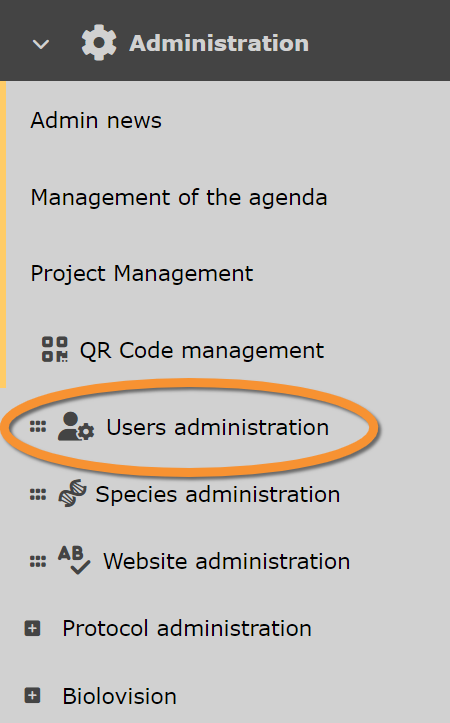
Users administration.
Admin users
Main Menu > Administration > Users administration > Admin users.

Admin users.
Observers
List of all users ever registered in that web site and/or logged in. Use arrows under titles to alternate between ascending and descending order (see image as an example).
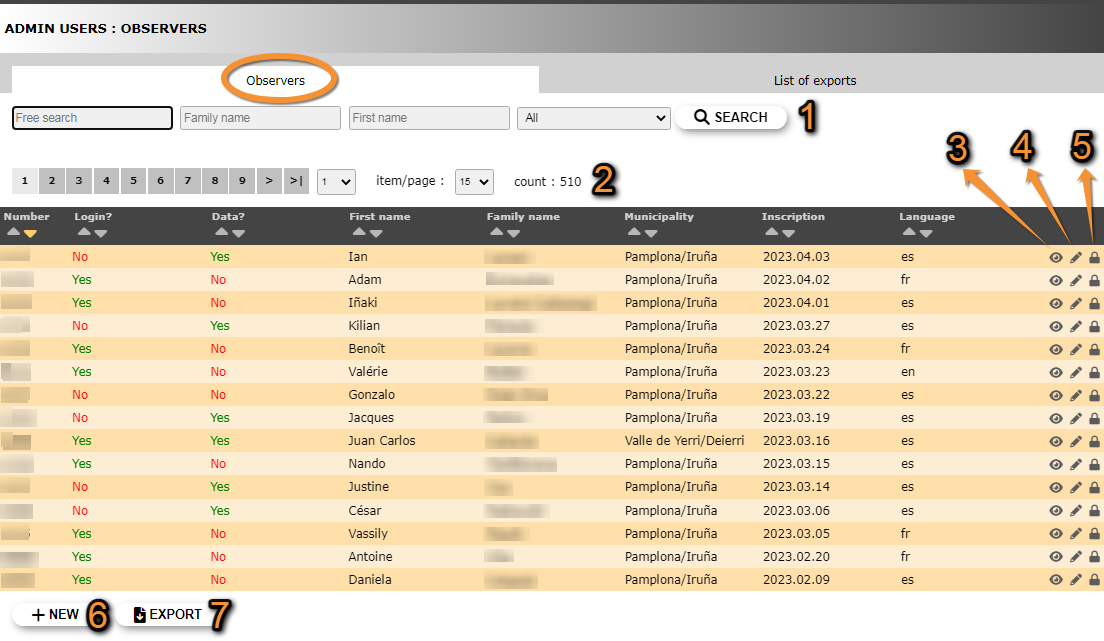
Users admin. Observers.
1. Search
2. Page and items
3. Details
4. Edit
5. Admin user rights
6. NEW
7. EXPORT
Number: register number.
Log in: has the member ever logged in?.
Data: has the member ever transmitted observations? Can send observations via NaturaList and never log into the web.
First name: observer's given name/s.
Family name: observer's family name/s.
Municipality: the observer will receive maps and news around this location.
Inscription: date the observer registered or first logged in.
Language: observer's default language of the site.
- 1. Search
Reduce list by typing one of the selecting criteri, or part of it, and click SEACH. NOTE it is possible to apply more than one filter (ie. Select all observers registerred as Mary that have submitted at least one record). When any filter is applied, click on DISPLAY ALL to see the whole list. Use arrows on columns to alternate between ascending and descending order (see image as an example).

Searching observers.
1a. Type any word, or part of it, to conduct a free search.
1b. Type a family name, or part of it, to select observers registered with this family name.
1c. Type a firt name, or part of it, to select observers registered with this name.
1d. Select from the expandable menu one of the available criteria:
with any right: observers that have been granted at least one right.
with access to archives: observers that have been granted access to archives.
without access to archives: observers that are not granted access to archives.
with records: observers that have submitted at least one observation.
without records: observers that have never submitted observations.
- 2. Page and items
Select page number and/or number of items per page.
- 3. Details
See data associated to this user. Access the same details by clicking on the observer's name. Details include personal information as entered in the registration form, as well as data on registration data and last log in. See image below as an example.

Admin users. Observer details.
BACK: Go back to previous screen.
4. EDIT: Edit details.
5. ADMIN USER RIGHT: Rights granted to this user.
Addtional information:

Additional information.
8.
9. Some portals require users to submit a minimum number of observations before they can access certain functions.
- 4. Edit
Modify user's personal data, including email address and password. When done, click MODIFY to save changes.

Modifying user's personal data.
BACK: Go to previous screen without saving.
MODIFY: Click to save changes.
- 5. Admin user rights
Invisible users
Some registered users are not visible and administrators cannot grant them rights.
This happens when:
1. The administrator have rights on a local mirror site and the user's address is not within the territory covered by this site, or
2. The user has not submitted any data yet.
Solve it by:
1. asking the user to submit any data on this mirror website, or
2. changing the municipality the user is registered at in the mirror website
List of rights granted to this user, and any possible restrictions to the right:
· Restrictions related to geography: The right applies only at one, or few, geographical places like sites, municipalities, or cantons. In the image below, the user can only export data of the species Paratettix meridionalis in the municipality of Pamplona/Iruña. It is represented by a blue line.
Users with no geographical restriction is marked with a globe icon  .
.
· Restrictions related to taxonomic groups: The right applies only for one, or few taxonomic groups or species. In the image below, the user can only export data of the species Paratettix meridionalis, and can ask for verification details only for birds. It is represented by a green line.
· Restrictions related to protocols: The right applies only to one or few protocols, projects or to the rarity committee. In the image below, the user has administration rights only for the Waterbird census protocol, and no other protocol. It is represented by an orange line.
· Unrestricted right: Some users may not have any restriction to a right. It is marked by a warning symbol  .
.

- 10. Edit
- 10. Edit
- Change restrictions for this user to this right.

Finish editing.
1. BACK: Go to previous screen without saving.
2. MODIFY: Click to save changes.
- 12. NEW
- 12. NEW
- Grant a new right to this user. Choose right from the expandable menu. If the selected right accepts restrictions, they will open underneath. Select specific options to which the user will have rights to (see examples in the image below). Do not select anythig to grant unrstricted rights. This will be indicated by a warning mark on the main list (see image Admin users rights and restrictions.
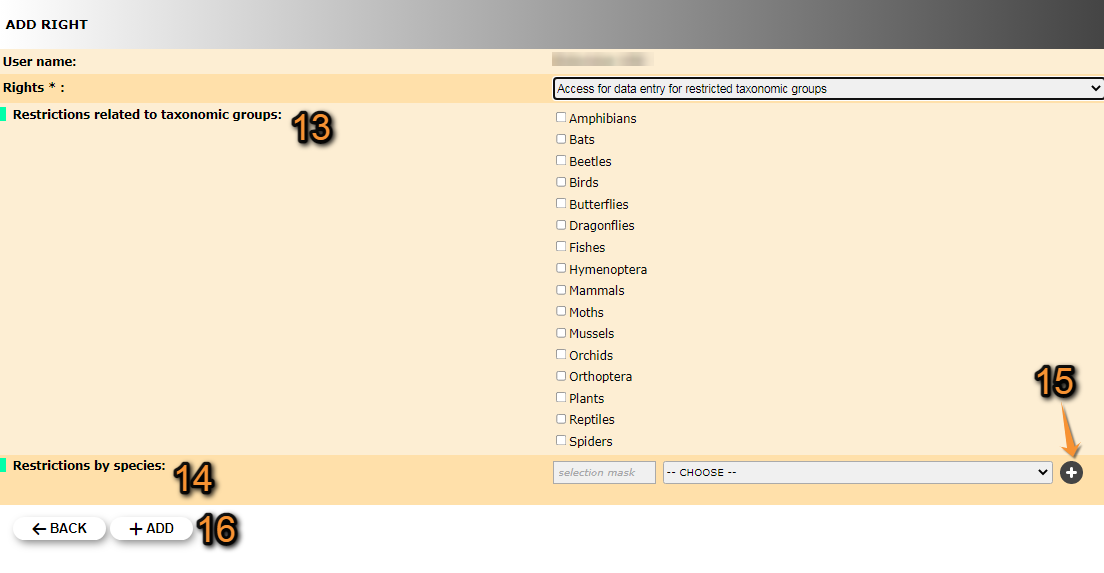
Granting rights to users. Example.
13. Tick those taxonomic groups the user will have right to.
14. Start typing the name on the left field, and select from the expandable panel on the right. The user will have rights only on the selected species. When done, click + (number 15), and repeat the process to add other species.
15. Adds a restriction.
16. +ADD: Click Add to save, or BACK to go to previous screen without saving.
Underneath the list of users, some statistics are displayed.
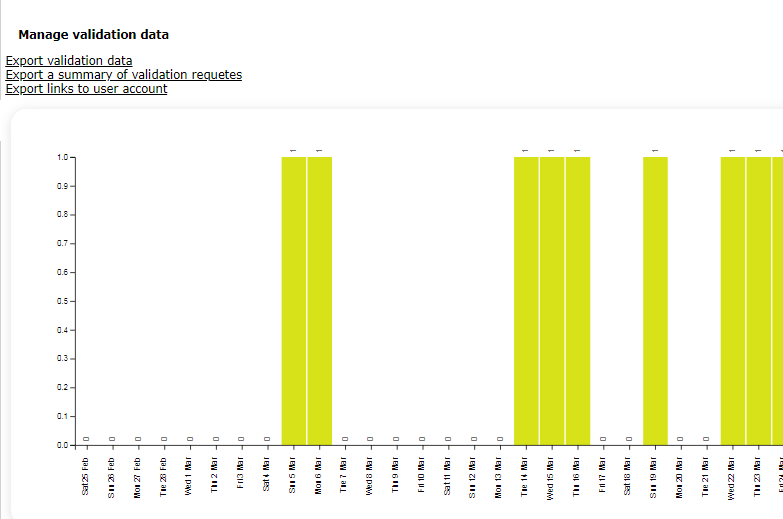
Statistics.
List of exports
Admin users rights
Main Menu > Administration > Users administration > Admin users rights.

Admin users rights.
List of all possible rights. Use arrows under titles to alternate between ascending and descending order (see image as an example).
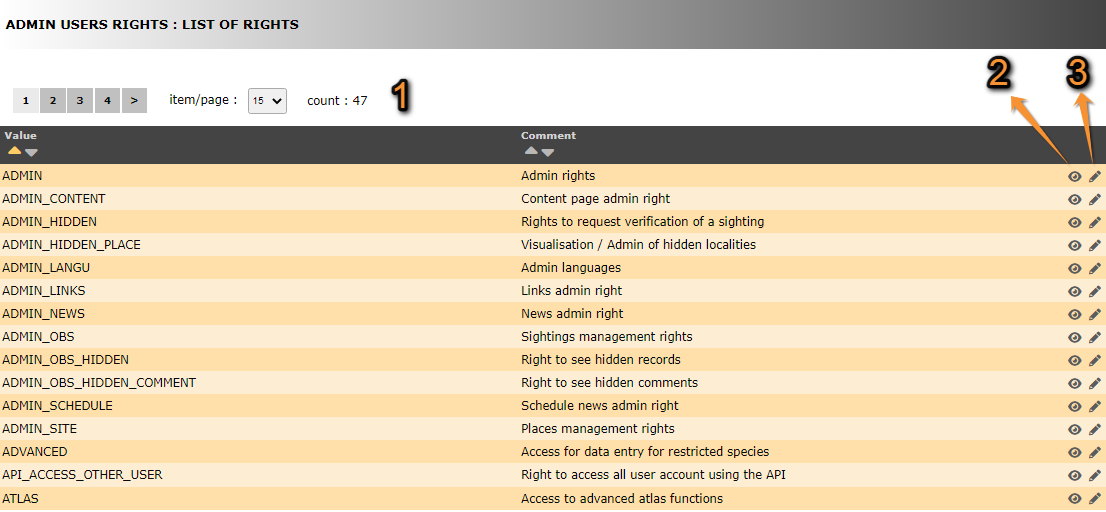
- 1. Search
Select page number and/or number of items per page.
- 2. Details
Click to see details of selected right.
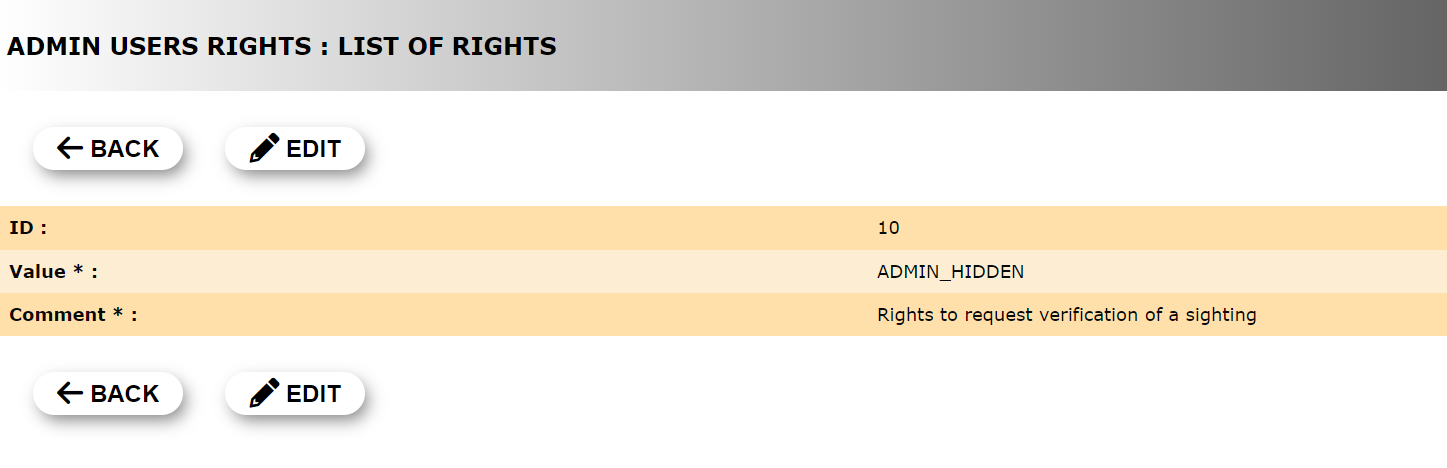
User's rights. Details.
1. BACK: Go to previous page without saving.
2. EDIT: Modify details. See next sub section Edit for more information.
- 3. Edit
Click to modify user's rights.

User's rights. Edit.
1. BACK: Go to previous page without saving.
2. MODIFY: Save changes.
List of rights
Summary table users' rights
| Theme | Code | Name | Restriction |
|---|---|---|---|
| Backoffice | ADMIN | Admin rights | · Mirror site · Taxa |
| ADMIN_BIRDS | [[User administration#Admin birds|]] | · Taxa | |
| Backoffice | ADMIN_CONTENT | Content page admin rights | · Mirror site |
| Sightings | ADMIN_HIDDEN | Rights to request verification of a sighting | · Taxa |
| Places | ADMIN_HIDDEN_PLACE | Visualisation / Admin of hidden localities | n/a |
| Backoffice | ADMIN_LANGU | Admin languages | n/a |
| Backoffice | ADMIN_LINKS | Links admin rights | · Mirror site |
| Backoffice | ADMIN_NEWS | News admin rights | · Mirror site · Taxa |
| Sightings | ADMIN_OBS | Sightings management rights | · Location1 · Taxa2 |
| Sightings | ADMIN_OBS_HIDDEN | Right to see hidden records | · Location1 · Taxa2 |
| Sightings | ADMIN_OBS_HIDDEN_COMMENT | Right to see hidden comments | n/a |
| ADMIN_OBS_HIDDEN_PLACE | [[User administration#Admin obs hidden place|]] | ||
| Backoffice | ADMIN_SCHEDULE | Schedule news admin right | · Mirror site |
| Places | ADMIN_SITE | Places management rights | n/a |
| Backoffice | ADMIN_USER_RIGHT_ADMIN_USER | [[User administration#Admin user right admin user|]] | · Taxa |
| Sightings | ADVANCED | Access for data entry for restricted species | · Taxa2 |
| Tools | API_ACCESS_OTHER_USER | Right to access all user account using the API | n/a |
| ATLAS | [[User administration#Atlas|]] | ||
| Tools | ATLAS_ADMIN | Atlas administrator | n/a |
| Tools | ATLAS_API_FILE_UPLOAD | Upload atlas documents with API | n/a |
| Sightings | CONFIRM_OBS | Confirmation rights | · Taxa |
| Tests | DELETE_PUBLIC_VALIDATION | Remove the right to community validation | n/a |
| Tests | DISPLAY_LAST_STOC_FORM | Access to protocol features under development | n/a |
| Sightings | EXPORT | Export rights | · Location1 · Taxa2 |
| Sightings | EXPORT_ENTITY | Right to export for entity | n/a |
| Tools | FREE_AREAS | Access to the free site management tool | n/a |
| Sightings | FULL_SEARCH | Right to use the search engine, despite the quota | n/a |
| Tests | FULL_STAT | Access to the complete stats | n/a |
| Places | FUSION_SITE | Right to lump several localities | n/a |
| Sightings | IMPORT | Import rights | n/a |
| Tools | MERGE_LIST | Access to the list merge tool | n/a |
| Sightings | OBSERVATION_SELECTION | Access to the “Like” module for observations | n/a |
| OBSERVER | ADMIN_USER_RIGHT_OBSERVER | ||
| Sightings | OBSERVER_IMPORT | Right to import self records (Excel) | n/a |
| Sightings | PEOPLE_SEARCH | Right to filter by user | n/a |
| POLYGON_DATA_DRAW | [[User administration#Polygon data draw|]] | ||
| POLYGON_DISPLAY_EXCLUDED_SPECIES | [[User administration#Polygon display ex sp|]] | ||
| PRECISE | [[User administration#Precise|]] | ||
| Places | PRIVATE PLACE | Right to see private places | n/a |
| Protocol/Project/Rarities committee | PROJECT | Access to projects | · Project |
| Protocol/Project/Rarities committee | PROJECT_ADMIN | Project administrators | · Project |
| Protocol/Project/Rarities committee | PROTO | Access to protocols | · Protocol |
| Protocol/Project/Rarities committee | PROTO_ADMIN | Protocol administrator | · Location1 · Taxa |
| Protocol/Project/Rarities committee | PROTO_MANAGE | Protocol manager | · Location1 · Protocol |
| Tools | QRCODE | QR code administrator | n/a |
| Protocol/Project/Rarities committee | RARITIES_COMMITTEE | Rarity committee member | · Committee3 |
| Protocol/Project/Rarities committee | RARITIES_COMMITTEE_ADMIN | Rarity committee secretary | · Committee3 |
| Protocol/Project/Rarities committee | SKIP_RANDOM_SELECTION | Allow to skip random square selection | n/a |
| Tools | TELEMETRIC_OBS | Access to telemetry data entry | n/a |
| Tests | TEMP_PAGES | Access to pages in construction | n/a |
| Sightings | USER_WITH | Access for data entry for restricted taxonomic groups | · Taxa2 |
| Places | USER_WITH_ADD_SITE | Right to add new places | n/a |
| Places | USER_WITH_ADD_SITE_OBJECT | Create a new object | n/a |
| Tests | USER_WITH_CAN_TRY_RESPONSIVE | Right to access the responsive interface | n/a |
| Sightings | USER_WITH_CHANGE_SPECIE_OTHER_TAXO | ADMIN_USER_RIGHT_USER_WITH_CHANGE_SPECIE_OTHER_TAXO | n/a |
| Other | USER_WITH_GOOGLE_MAP | Allow the use of GoogleMap layers | n/a |
| Tests | USER_WITH_RARITIES_COMMITTEE_REPORT | Test user for rarity committee | n/a |
| Sightings | ADMIN_USER_RIGHT_POLYGON_DISPLAY_EXCLUDED_SPECIES | Right to see excluded species from summary maps | n/a |
| Tools | ADMIN_USER_RIGHT_POLYGON_DATA_DRAW | Right to draw polygons for the asynchron cache | n/a |
| Tools | ADMIN_USER_RIGHT_GUID | Access to GUID/UUID | n/a |
| Tools | ADMIN_USER_RIGHT_ATLAS | Access to advanced atlas functions | n/a |
1Includes country, county, department, canton, province, municipality, place, etc.
2Includes species.
3Homologation committee.
4This right interacts with other rights. See detailed description below.
Who's online?
Main Menu > Administration > Users administration > Who's online?.

Who's online?
List of all opened sessions. Gives information on users and conection details.

- 1. User's details
User name and prefered language.

Information on online users.
3. Click on icon to access observer details. See image Admin users. Observer details as an example. Edit if necessay as explained in wiki section Administration > User's administration > Admin users > Observers > 3. Details.
4. Access the list of observations submitted by the user.
- 2. Connection details
Numbers under the name (blured in the image), indicate the internet provider and IP address for the current session.
Admin of committees
Main Menu > Administration > Users administration > Admin of committees.

Admin of committees.
Committees list
List of existing committees associated to this local portal. Use arrows under titles to alternate between ascending and descending order (see image as an example).

List of committees.
1. Page and items
2. Page and items
3. Edit
4. Delete
5. NEW
Committee name: Name given to the committee in the selected language.
Position: In which position the committee will show on the list.
Visible: Indicates if the committee will be visible or not.
- 1. Page and items
Select page number and/or number of items per page.
- 2. Details
Click to see details of the selected committee, including its name the different languages.

Committee details.
BACK: Go to previous screen.
EDIT: See edit subsection below.
DELETE: Delete the selected committee. You will be asked to confirm.
- 3. Edit
Modify details of committee, or add name in a new language.
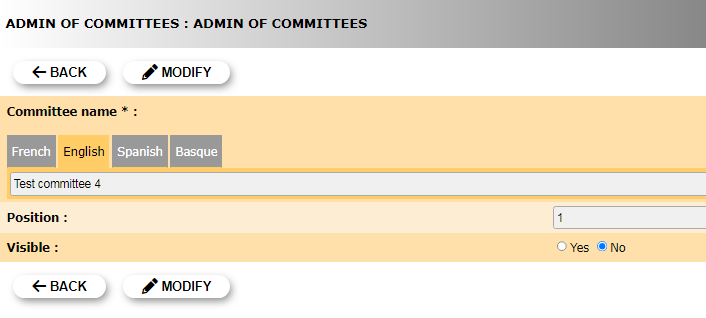
Edit committee.
Committee name: Select the tab language and add / modify committee name in the selected language.
Position: Type the position in which this committee will appear in the public list.
Visible: Indicate if the committee will be visible or not.
BACK: Go to previous screen without saving.
MODIFY: Save changes.
- 4. Delete
Delete the selected committee. You will be asked to confirm.
- 5. NEW
Create a new committee.

Creating a new committee.
6. Language: Select language in which you want to name the committee. You may choose more than one language.
7. Name: Type a name for the new committee in the selected language. If you need to add a new languege repeat step 6.
8. Position: Type the position in which the new committee will show in the list.
9. Visible?: Indicate if the committee will be visible to users.
BACK: Go back without saving.
ADD: Save the new committee.
Members list
List of all members belong to any committee. Use arrows under titles to alternate between ascending and descending order (see image as an example).
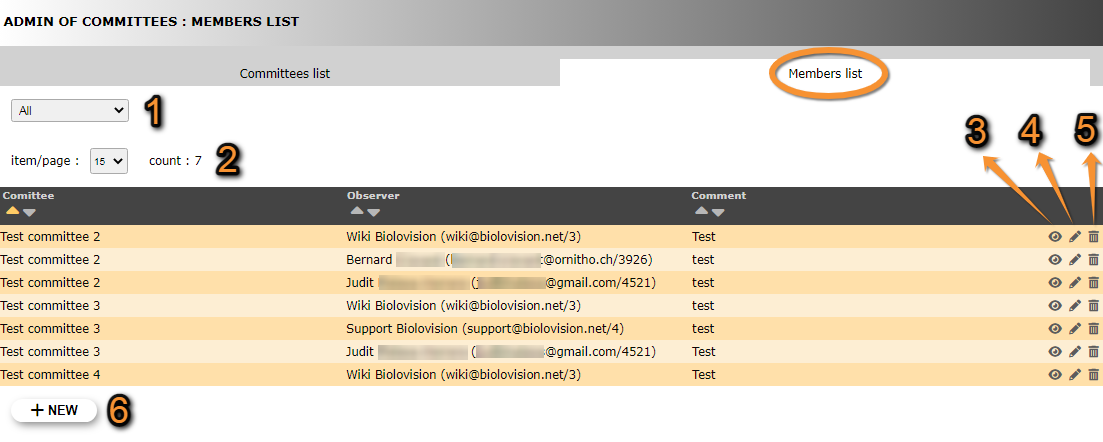


- 1. Search
Reduce list by selecting a committee from the expandable menu, and clicking SEACH. When a filter is applied, click on DISPLAY ALL to see the full list.
- 2. Page and items
Select page number and/or number of items per page.
- 3. Details
See details of observers and their assigned committee, as well as some comment if available.
- 4. Edit
Modify the user assigned to a committee, or the committee a ser belongs to. Add or edit a comment if necessary.
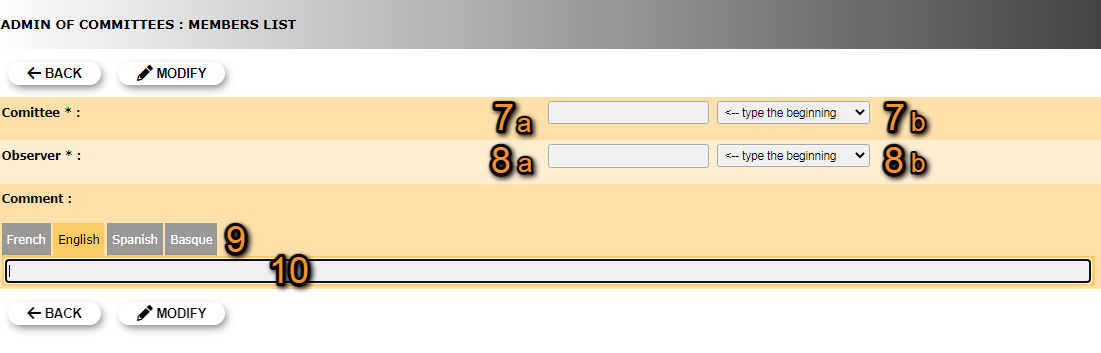
Editing Committee's members list.
7. Modify committee: Start typing the name of the committee (a) and select from the expandable menu (b).
8. Modify observer: Start typing the name of the obsever (a) and select from the expandable menu (b).
9. Select language: Select a language to leave a comment. The comment will only be visible if the page language is that of the comment. You can leave a comment in different languages.
10. Leave comment: Type comment if necessary. If needed, repeat from 9 to leave a comment in multiple languages.
BACK: Go to previous screen without saving changes.
MODIFY: Save changes.
- 5. Delete
Delete the user assigned to a committee. You will be asked to confirm.
- 6. NEW
Assign a new user to an existing committee.
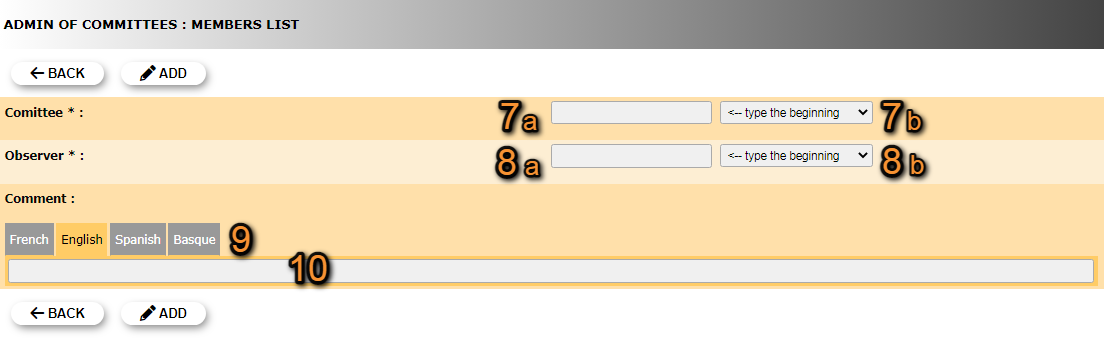
Committee's members list. New.
7. Select committee: Start typing the name of an existing committee (a) and select from the expandable menu (b).
8. Select observer: Start typing the name of the obsever (a) and select from the expandable menu (b).
9. Select language: Select a language to leave a comment. The comment will only be visible if the page language is that of the comment. You can leave a comment in different languages.
10. Leave comment: Type comment if necessary. If needed, repeat from 9 to leave a comment in multiple languages.
BACK: Go to previous screen without saving.
MODIFY: Save changes.