Administration access
All administrative functions work separately and not all administrators have access to all functions. For example, an administrator may be able to modify dessign and content on the home screen but may not be able to see hidden data or to grant users rights to protocols; whereas another administrator may have rights to parameter a specific protocol, create study sites on this protocol and assign sites to users, but may not be able to do the same for a different protocol; etc.
To become an administrator or have specific rights, contact the already existing administrator of your local portal stating which specific area you wish to have access to and your reasons to do so. Administration rights remain at the discretion of those already running the local portal.
To see all administrators of your local portal, and to contact them, go to Home screen on your local portal and follow Menu > Useful information > Help > Users access rights. Note: you need to be a registered user to access this information. Once you become an administrator or get special rights, your name will automatically appear in the list.
Not all users have access to all functions. A system of colour codes indicates with sections are available and to whom. It is shown as a colour line on top of the horizontal menu or on the left on vertical menus (see image below).
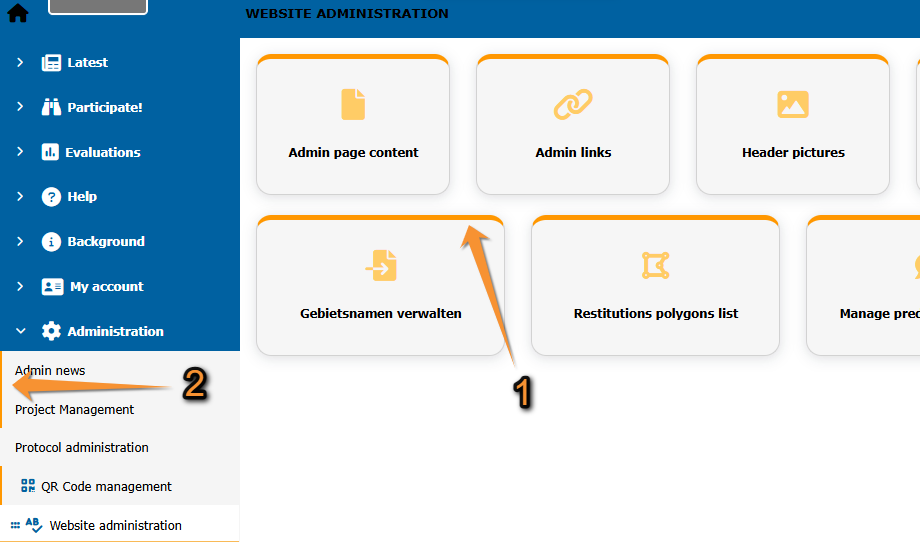
Colour code for accessibility.
1. Colour code on horizontal menus.
2. Colour code on vertical menus.
· Red : The page is created but not public. Only users with the right to manage pages can see it. Administrators grant this right to certain users.
· Orange : The page is only available to all administrators.
· Purple : The page needs a special right, but not necessarily an administration right (ie. translation or protocols).
· Green : Pages under construction. Only available to Biolovision.