MHB & BDM (Admin): Difference between revisions
| Line 60: | Line 60: | ||
<center> | <center> | ||
< | <div class="toc" style="border-radius: 5px; padding: 25px; text-align: left; font-family: sans-serif; color: black; width: 600px; background-color: #ffffdb"> | ||
<!-- GREEN BOX (Tips): hsl(157, 74%, 80%) | |||
YELLOW BOX (Summaries): #ffffdb" | |||
BLUE BOX (Information): hsl(201, 100%, 89%) | |||
RED BOX (Warnings): hsl(0, 77%, 78%) --> | |||
<p><b> CREATE A NEW SITE:</b><br /> | <p><b> CREATE A NEW SITE:</b><br /> | ||
1. Directly by <b>Transmit my sightings</b> map <br/>or <br/>through Menu > Administration > Protocol administration > MHB & BDM (Monitoring of common breeding birds & Monitoring of biodiversity in Switzerland)> [[Media:MHB_BDM sites.png|Sites]]> +NEW button <br /> | 1. Directly by <b>Transmit my sightings</b> map <br/>or <br/>through Menu > Administration > Protocol administration > MHB & BDM (Monitoring of common breeding birds & Monitoring of biodiversity in Switzerland)> [[Media:MHB_BDM sites.png|Sites]]> +NEW button <br /> | ||
2. Select new site as if [[Submitting_records|Submitting records]]<br/> | 2. Select new site as if [[Submitting_records|Submitting records]]<br/> | ||
| Line 72: | Line 73: | ||
5. [[Geometry_editor#Drawing_a_polygon|Draw a polygon]] or [[Protocol_management#Import_a_shapefile_settings|import shapefile]]<br/> | 5. [[Geometry_editor#Drawing_a_polygon|Draw a polygon]] or [[Protocol_management#Import_a_shapefile_settings|import shapefile]]<br/> | ||
6. '''SAVE''' | 6. '''SAVE''' | ||
</p> | </p> | ||
</ | </div> | ||
</center> | </center> | ||
<br/> | <br/> | ||
Revision as of 14:26, 10 September 2024
MHB_BDM

MHB & BDM. Admin menu.
22 MHB & BDM
(Monitoring of common breeding birds
Monitoring of biodiversity in Switzerland)
-
22.1 Preparation and data
22.2 Sites
22.3 User/Site
22.4 Settings
22.5 Import a shapefile
22.6 Check Data
22.7 Report
22.8 Map
MHB_BDM Preparation and data

MHB & BDM. Preparation and data.
Identical section to the one available to registered users with rights to MHB & BDM protocols. See wiki section Web interface > Protocols > MHB & BDM (Monitoring of common breeding birds & Monitoring of biodiversity in Switzerland)> Preparation and data for more information.
[Top to Preparation and data]
[Back to MHB & BDM protocols]
MHB_BDM Sites
CREATE A NEW SITE:
1. Directly by Transmit my sightings map
or
through Menu > Administration > Protocol administration > MHB & BDM (Monitoring of common breeding birds & Monitoring of biodiversity in Switzerland)> Sites> +NEW button
2. Select new site as if Submitting records
3. Choose Create a protocoled census -MHB & BDM (Monitoring of common breeding birds
Monitoring of biodiversity in Switzerland)
4. Name the new site
5. Draw a polygon or import shapefile
6. SAVE
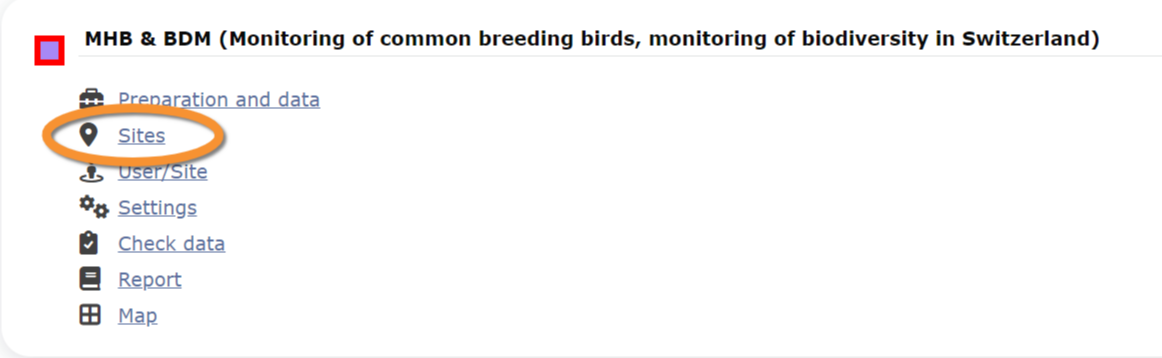
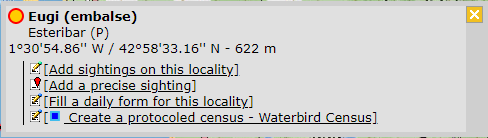


MHB & BDM. Sites.
List of all existing sites allowing MHB & BDM protocols.
Visit wiki section Administration > Protocol management > Sites for more information.
[Top to Sites]
[Back to MHB & BDM protocols]
MHB_BDM User/Site

MHB & BDM. User/Site.
From the menu, select User / Site to assign users to study sites.
Visit wiki section Administration > Protocol management > User/Site for more information.
[Top to User/Site]
[Back to MHB & BDM protocols]
MHB_BDM Settings

MHB & BDM. Settings.
Set protocol parameters.
Visit wiki section Administration > Protocol management > Settings for details.
Parameters describing the protocol
There are no special parameters describing the protocol available for MHB & BDM protocols (Monitoring of common breeding birds and monitoring of biodiversity in Switzerland).
[Top to Settings]
[Back to MHB & BDM protocols]
MHB_BDM Import a shapefile

MHB & BDM. Import a shapefile.
Import a shapefile with the study site and/or see all imports.
Visit wiki section Administration > Protocol management > Settings > Import a shapefile.
[Top to Import a shapefile]
[Back to MHB & BDM protocols]
MHB_BDM Check data

MHB & BDM. Check data.
Visualise a summary of survey data.
Visit wiki section Administration > Protocol management > Check data for more information.
[Top to Check data]
[Back to MHB & BDM protocols]
MHB_BDM Report

MHB & BDM. Report.
Visualise pooled results from surveys.
Visit wiki section Administration > Protocol management > Report for more information.
[Top to Report]
[Back to MHB & BDM protocols]
MHB_BDM Map

MHB & BDM. Map.
Display the area map by polygon, and see its statistics.
Visit wiki section Administration > Protocol management > Map for more information.
[Top to Map]
[Top to MHB & BDM protocols]
[Back to Protocols management]