MF (Admin): Difference between revisions
| Line 73: | Line 73: | ||
<hr class="contenesummarylinia"> | <hr class="contenesummarylinia"> | ||
<b> CREATE A NEW SITE:</b><br /> | <b> CREATE A NEW SITE:</b><br /> | ||
1. Directly by <b>Transmit my sightings</b> map > Protocols > MF (Monitoring of breeding birds in wetlands)<br/>or <br/>through Menu > Administration > Protocol administration > Breeding birds in wetlands > [[Media:MF sites.png|Sites]]> +NEW button <br /> | 1. Directly by <b>Transmit my sightings</b> map > Protocols > MF (Monitoring of breeding birds in wetlands)<br/>or <br/>through Menu > Administration > Protocol administration > Breeding birds in wetlands > [[Media:MF sites.png|Sites]] > +NEW button <br /> | ||
2. Select new site as if [[Submitting_records|Submitting records]]<br/> | 2. Select new site as if [[Submitting_records|Submitting records]]<br/> | ||
3. Choose [[Media:Draw waterbird polygon.png|'''Create a protocoled census -Breeding birds in wetlands''']]<br/> | 3. Choose [[Media:Draw waterbird polygon.png|'''Create a protocoled census -Breeding birds in wetlands''']]<br/> | ||
Latest revision as of 20:10, 28 August 2026
MF
Data can only be entered through NaturaList.
Access your protocol from Menu > Take part > All my protocol > MF (Monitoring of breeding birds in wetlands).
For other options, visit wiki section Administrators > Protocols > Accessing protocols.

Breeding birds in wetlands. Admin menu.
MF
(Monitoring of breeding birds in wetlands)
-
1 Preparation and data
2 Sites
3 User/Site
4 Settings
5 Import a shapefile
6 Check Data
7 Report
8 Map
MF Preparation and data

Breeding birds in wetlands. Preparation and data.
Identical section to the one available to registered users with rights to the Monitoring of breeding birds in wetlands. See wiki section Web interface > Protocols > Monitoring of breeding birds in wetlands > Preparation and data for more information.
[Top to Preparation and data]
[Back to MF protocol]
MF Sites
CREATE A NEW SITE:
1. Directly by Transmit my sightings map > Protocols > MF (Monitoring of breeding birds in wetlands)
or
through Menu > Administration > Protocol administration > Breeding birds in wetlands > Sites > +NEW button
2. Select new site as if Submitting records
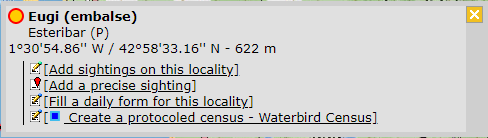
3. Choose Create a protocoled census -Breeding birds in wetlands
4. Name the new site
5. Draw a polygon or import shapefile
6. SAVE



Breeding birds in wetlands. Sites.
List of all existing sites allowing a MF (Breeding birds in wetlands) census.
Visit wiki section Administration > Protocol management > Sites for more information.
[Top to Sites]
[Back to MF protocol]
MF User/Site

Breeding birds in wetlands. User/Site.
From the menu, select User / Site to assign users to study sites.
Visit wiki section Administration > Protocol management > User/Site for more information.
[Top to User/Site]
[Back to MF protocol]
MF Settings

Breeding birds in wetlands. Settings.
Set protocol parameters.
Visit wiki section Administration > Protocol management > Settings for details.
Parameters describing the protocol
There are no special parameters describing the protocol available for protocol Breeding birds in wetlands.
[Top to Settings]
[Back to MF protocol]
MF Import a shapefile

MF. Import a shapefile.
Import a shapefile with the study site and/or see all imports.
Visit wiki section Administration > Protocol management > Settings > Import a shapefile.
[Top to Import a shapefile]
[Back to MF protocol]
MF Check data

Breeding birds in wetlands. Check data.
Visualise a summary of survey data.
Visit wiki section Administration > Protocol management > Check data for more information.
[Top to Check data]
[Back to MF protocol]
MF Report

Breeding birds in wetlands. Report.
Visualise pooled results from surveys.
Visit wiki section Administration > Protocol management > Report for more information.
[Top to Report]
[Back to MF protocol]
MF Map

Breeding birds in wetlands. Map.
Display the area map by polygon, and see its statistics.
Visit wiki section Administration > Protocol management > Map for more information.
[Top to Map]
[Top to Monitoring of breeding birds in wetlands]
[Back to Protocols management]