MHB & BDM (Admin): Difference between revisions
No edit summary |
|||
| Line 66: | Line 66: | ||
<br/> | <br/> | ||
< | <br/> | ||
<div class=" | <div class="contenesummary" style="width:700px"> <!-- ajustar la mida --> | ||
<!-- | <div class="contenesummaryima" style="min-width: 43px;max-width: 43px;"> <!-- no canviar les mides --> | ||
</div> | |||
<div class="contenesummarytext"> | |||
<hr class="contenesummarylinia"> | |||
<b> CREATE A NEW SITE:</b><br /> | |||
< | |||
1. Directly by <b>Transmit my sightings</b> map <br/>or <br/>through Menu > Administration > Protocol administration > MHB & BDM (Monitoring of common breeding birds & Monitoring of biodiversity in Switzerland)> [[Media:MHB_BDM sites.png|Sites]]> +NEW button <br /> | 1. Directly by <b>Transmit my sightings</b> map <br/>or <br/>through Menu > Administration > Protocol administration > MHB & BDM (Monitoring of common breeding birds & Monitoring of biodiversity in Switzerland)> [[Media:MHB_BDM sites.png|Sites]]> +NEW button <br /> | ||
2. Select new site as if [[Submitting_records|Submitting records]]<br/> | 2. Select new site as if [[Submitting_records|Submitting records]]<br/> | ||
| Line 80: | Line 79: | ||
5. [[Geometry_editor#Drawing_a_polygon|Draw a polygon]] or [[Media:2023-03-14 Importing a plygon shapefile.png|import shapefile]]<br/> | 5. [[Geometry_editor#Drawing_a_polygon|Draw a polygon]] or [[Media:2023-03-14 Importing a plygon shapefile.png|import shapefile]]<br/> | ||
6. '''SAVE''' | 6. '''SAVE''' | ||
</div> | </div> | ||
</ | </div> | ||
<br/> | <br /> | ||
<br/> | <br/> | ||
Revision as of 14:01, 28 August 2026
MHB_BDM
Data can only be entered through NaturaList.
Access your protocol from Menu > Take part > All my protocol > MHB & BDM (Monitoring of common breeding birds Monitoring of biodiversity in Switzerland).
For other options, visit wiki section Administrators > Protocols > Accessing protocols.

MHB & BDM. Admin menu.
MHB & BDM
(Monitoring of common breeding birds
Monitoring of biodiversity in Switzerland)
-
1 Preparation and data
2 Sites
3 User/Site
4 Settings
5 Import a shapefile
6 Check Data
7 Report
8 Map
MHB_BDM Preparation and data

MHB & BDM. Preparation and data.
Identical section to the one available to registered users with rights to MHB & BDM protocols. See wiki section Web interface > Protocols > MHB & BDM (Monitoring of common breeding birds & Monitoring of biodiversity in Switzerland)> Preparation and data for more information.
[Top to Preparation and data]
[Back to MHB & BDM protocols]
MHB_BDM Sites
CREATE A NEW SITE:
1. Directly by Transmit my sightings map
or
through Menu > Administration > Protocol administration > MHB & BDM (Monitoring of common breeding birds & Monitoring of biodiversity in Switzerland)> Sites> +NEW button
2. Select new site as if Submitting records
3. Choose Create a protocoled census -MHB & BDM (Monitoring of common breeding birds
Monitoring of biodiversity in Switzerland)
4. Name the new site
5. Draw a polygon or import shapefile
6. SAVE
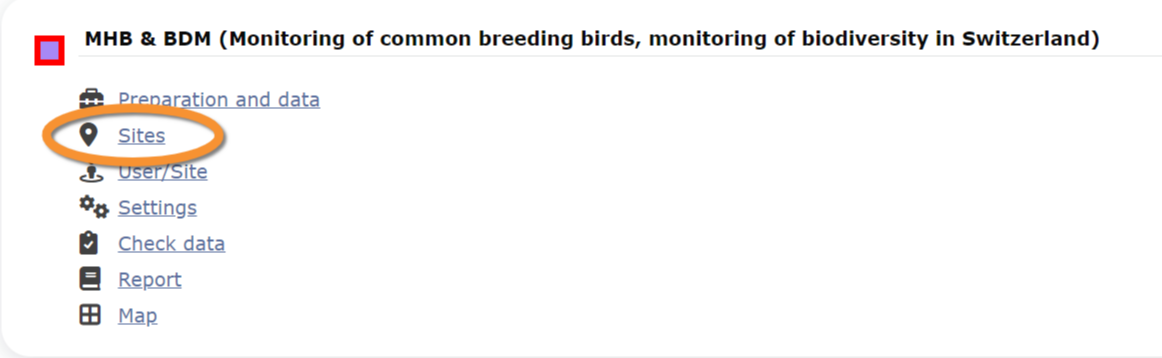
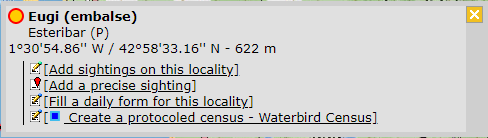


MHB & BDM. Sites.
List of all existing sites allowing MHB & BDM protocols.
Visit wiki section Administration > Protocol management > Sites for more information.
[Top to Sites]
[Back to MHB & BDM protocols]
MHB_BDM User/Site

MHB & BDM. User/Site.
From the menu, select User / Site to assign users to study sites.
Visit wiki section Administration > Protocol management > User/Site for more information.
[Top to User/Site]
[Back to MHB & BDM protocols]
MHB_BDM Settings

MHB & BDM. Settings.
Set protocol parameters.
Visit wiki section Administration > Protocol management > Settings for details.
Parameters describing the protocol
There are no special parameters describing the protocol available for MHB & BDM protocols (Monitoring of common breeding birds and monitoring of biodiversity in Switzerland).
[Top to Settings]
[Back to MHB & BDM protocols]
MHB_BDM Import a shapefile

MHB & BDM. Import a shapefile.
Import a shapefile with the study site and/or see all imports.
Visit wiki section Administration > Protocol management > Settings > Import a shapefile.
[Top to Import a shapefile]
[Back to MHB & BDM protocols]
MHB_BDM Check data

MHB & BDM. Check data.
Visualise a summary of survey data.
Visit wiki section Administration > Protocol management > Check data for more information.
[Top to Check data]
[Back to MHB & BDM protocols]
MHB_BDM Report

MHB & BDM. Report.
Visualise pooled results from surveys.
Visit wiki section Administration > Protocol management > Report for more information.
[Top to Report]
[Back to MHB & BDM protocols]
MHB_BDM Map

MHB & BDM. Map.
Display the area map by polygon, and see its statistics.
Visit wiki section Administration > Protocol management > Map for more information.
[Top to Map]
[Top to MHB & BDM protocols]
[Back to Protocols management]