Submitting records: Difference between revisions
| (89 intermediate revisions by the same user not shown) | |||
| Line 4: | Line 4: | ||
<br/> | <br/> | ||
<!-- | <br/> | ||
<div class="contenesummary" style="width:850px"> <!-- ajustar la mida --> | |||
<div class=" | <div class="contenesummaryima" style="min-width: 43px;max-width: 43px;"> <!-- no canviar les mides --> | ||
</div> | |||
<!-- | <div class="contenesummarytext"> | ||
< | <hr class="contenesummarylinia"> | ||
< | <b> TO SUBMIT RECORDS:</b><br /> | ||
<span style="color: #000000; margin-left: 15px;"><b>· </b>[[Logging in|<b>Loggin</b> ]]to a local portal. <br /> | |||
<span style="color: #000000; margin-left: 15px;"><b>· </b>Select [[Media:Sending observations 1.png|<b>SUBMIT</b>]] button on top or [[Media:Sending observations 2.png|<b>Transmit my sightings</b>]] in left column. <br /> | |||
<span style="color: #000000; margin-left: 15px;"><b>· </b>[[Submitting_records#Step_1/3:_Approximate_choice_of_a_site|Select the place of your observation]] by [[Submitting_records#By_clicking_on_the_map|'''clicking on the map''']] and selecting [[Submitting_records#Add_sightings_on_this_locality|'''add sightings on this locality''']] or [[Submitting_records#Add_a_precise_sighting|'''add a precise sighting''']].<br /> | |||
<span style="color: #000000; margin-left: 15px;"><b>· </b>[[Submitting_records#Step_3/3:_Transmit_my_sighting|Select taxonomic group, species and number of individuals]], and fill or skip non mandatroy fields. <br /> | |||
<span style="color: #000000; margin-left: 15px;"><b>· </b>Click <b>SAVE</b> button. | |||
</ | </div> | ||
</ | </div> | ||
<br /> | |||
<!--T:35--> | <!--T:35--> | ||
| Line 38: | Line 39: | ||
|style="padding: 10px"| | |style="padding: 10px"| | ||
<div class="toc" style="border-radius:5px;background-color:#ffffff;padding-left:8px;padding-right:8px;padding-bottom:8px;width:500px;"> | <div class="toc" style="border-radius:5px;background-color:#ffffff;padding-left:8px;padding-right:8px;padding-bottom:8px;width:500px;"> | ||
[[File:Sending observations 2.png|500px]] | [[File:Sending observations 2.png|500px|link=https://help.biolovision.net/images/0/08/Sending_observations_2.png]] | ||
<div class="toc" style="border-radius:5px;padding-left:15px;text-align:left; font-size:12px;width:475px;"> | <div class="toc" style="border-radius:5px;padding-left:15px;text-align:left; font-size:12px;width:475px;"> | ||
'''Send records from left column''' | '''Send records from left column''' | ||
| Line 52: | Line 53: | ||
=Step 1/3: Approximate choice of a site= | =Step 1/3: Approximate choice of a site= | ||
<br /> | <br /> | ||
<!-- | <br/> | ||
< | <div class="conteneinfo" style="width:500px"> <!-- ajustar la mida --> | ||
< | <div class="conteneinfoima" style="min-width: 43px;max-width: 43px;"> <!-- no canviar les mides --> | ||
</div> | |||
<div class="conteneinfotext"> | |||
<hr class="conteneinfolinia"> | |||
<b>Good to know:</b><br /> | <b>Good to know:</b><br /> | ||
We recommend to select a place [[Submitting_records#By_clicking_on_the_map|<b>By clicking on the map</b>]]. All other options remains for your convenience. | We recommend to select a place [[Submitting_records#By_clicking_on_the_map|<b>By clicking on the map</b>]]. All other options remains for your convenience. | ||
</div> | </div> | ||
</ | </div> | ||
<br /> | <br /> | ||
<br /> | <br /> | ||
| Line 117: | Line 116: | ||
<center> | <center> | ||
<div class="toc" style="border-radius:5px;background-color:#ffffff;padding-left:8px;padding-right:8px;padding-bottom:8px;width:600px;"> | <div class="toc" style="border-radius:5px;background-color:#ffffff;padding-left:8px;padding-right:8px;padding-bottom:8px;width:600px;"> | ||
[[File:Municipality.png|600px]] | [[File:Municipality.png|600px|link=https://help.biolovision.net/images/3/30/Municipality.png]] | ||
<div class="toc" style="border-radius:5px;padding-left:15px;text-align:left; font-size:12px;width:575px;"> | <div class="toc" style="border-radius:5px;padding-left:15px;text-align:left; font-size:12px;width:575px;"> | ||
'''Approximate choice of a site by choosing a municipality.''' | '''Approximate choice of a site by choosing a municipality.''' | ||
| Line 137: | Line 136: | ||
<!--T:141--> | <!--T:141--> | ||
<span id="Choosing"></span> | <span id="Choosing"></span> | ||
===Choosing from=== | ===Choosing from=== | ||
| Line 146: | Line 146: | ||
<center> | <center> | ||
<div class="toc" style="border-radius:5px;background-color:#ffffff;padding-left:8px;padding-right:8px;padding-bottom:8px;width:600px;"> | <div class="toc" style="border-radius:5px;background-color:#ffffff;padding-left:8px;padding-right:8px;padding-bottom:8px;width:600px;"> | ||
[[File:Choosing.png|600px]] | [[File:Choosing.png|600px|link=https://help.biolovision.net/images/d/da/Choosing.png]] | ||
<div class="toc" style="border-radius:5px;padding-left:15px;text-align:left; font-size:12px;width:575px;"> | <div class="toc" style="border-radius:5px;padding-left:15px;text-align:left; font-size:12px;width:575px;"> | ||
'''Approximate choice of a site choosing from.''' | '''Approximate choice of a site by choosing from.''' | ||
</div> | </div> | ||
</div> | </div> | ||
| Line 163: | Line 163: | ||
<!--T:143--> | <!--T:143--> | ||
<span id="Map"></span> | <span id="Map"></span> | ||
===By clicking on the map=== | ===By clicking on the map=== | ||
<br/> | <br/> | ||
<!-- | <br/> | ||
<div class="contenesummary" style="width:550px"> <!-- ajustar la mida --> | |||
<div class=" | <div class="contenesummaryima" style="min-width: 43px;max-width: 43px;"> <!-- no canviar les mides --> | ||
</div> | |||
<!-- | <div class="contenesummarytext"> | ||
< | <hr class="contenesummarylinia"> | ||
< | <b> SELECT A SITE BY CLICKING ON THE MAP:</b><br /> | ||
<span style="color: #000000; margin-left: 15px;"><b>· </b>Zoom in<br /> | |||
<span style="color: #000000; margin-left: 15px;"><b>· </b>Select a location (dot)<br /> | |||
<span style="color: #000000; margin-left: 15px;"><b>· </b>Select an option: | |||
::[[Submitting records#This locality 2|'''Add sighting on this locality:''']] Observations are associated to this location.<br /> | ::[[Submitting records#This locality 2|'''Add sighting on this locality:''']] Observations are associated to this location. <br /> | ||
::[[Submitting records#Precise 2|'''Add a precise sighting:''']] Enter exact position of the observation.<br/> | ::[[Submitting records#Precise 2|'''Add a precise sighting:''']] Enter exact position of the observation. <br/> | ||
::[[Submitting records#Daily form 2|'''Fill a daily form for this locality:''']] Start a list at this location. | ::[[Submitting records#Daily form 2|'''Fill a daily form for this locality:''']] Start a list at this location. <br/> | ||
::( | ::(<b>Projects or Protocols:</b> only for observers with corresponding rights.). | ||
</ | </div> | ||
</div> | </div> | ||
<br /> | |||
<br /> | |||
<br/> | |||
<br/> | |||
<!--T:148--> | <!--T:148--> | ||
| Line 219: | Line 214: | ||
<br/> | <br/> | ||
<!-- | <br/> | ||
<div class="contenesummary" style="width:675px"> <!-- ajustar la mida --> | |||
<div class=" | <div class="contenesummaryima" style="min-width: 43px;max-width: 43px;"> <!-- no canviar les mides --> | ||
</div> | |||
<!-- | <div class="contenesummarytext"> | ||
< | <hr class="contenesummarylinia"> | ||
<b>See how to navigate the map:</b> Web interface > [[Navigating_the_map|Navigating the map]]<br/> | <b>See how to navigate the map:</b> Web interface > [[Navigating_the_map|Navigating the map]]<br/> | ||
<b>See meaning of different dots:</b> Various > [[Symbols_cheatsheet|Symbols cheatsheet]]<br/> | <b>See meaning of different dots:</b> Various > [[Symbols_cheatsheet|Symbols cheatsheet]]<br/> | ||
<b>Change your location at:</b> Web interface > My account > Personal data > Non-mandatory fields > [[My_account_/_Changing_personal_data,_password_or_email#Address|Address]] | <b>Change your location at:</b> Web interface > My account > Personal data > Non-mandatory fields > [[My_account_/_Changing_personal_data,_password_or_email#Address|Address]] | ||
</div> | |||
</ | |||
</div> | </div> | ||
<br /> | |||
<br/> | |||
<br/> | <br/> | ||
| Line 242: | Line 233: | ||
<span style="color: #000000; margin-left: 25px;"><b>· </b>Visit wiki section Web interface > Local portal > Submitting records > [[Submitting_records#Step_2/3:_Precise_site_choice|Step 2/3: Precise site choice]] to see details of the options. <br/> | <span style="color: #000000; margin-left: 25px;"><b>· </b>Visit wiki section Web interface > Local portal > Submitting records > [[Submitting_records#Step_2/3:_Precise_site_choice|Step 2/3: Precise site choice]] to see details of the options. <br/> | ||
<span style="color: #000000; margin-left: 25px;"><b>· </b>If clicking outside of a dot, only [[Submitting_records#Add_a_precise_sighting|Add a precise sighting]] is possible. <br/> | <span style="color: #000000; margin-left: 25px;"><b>· </b>If clicking outside of a dot, only [[Submitting_records#Add_a_precise_sighting|Add a precise sighting]] is possible. <br/> | ||
<span style="color: #000000; margin-left: 25px;"><b>· </b>Users with special rights will be given additional options | <span style="color: #000000; margin-left: 25px;"><b>· </b>Users with special rights will be given additional options like [[Projects web|projects]] or [[Protocols web|protocols]]. <br/> | ||
<br/> | <br/> | ||
| Line 255: | Line 246: | ||
| <b>· </b>|| <b>[[File:This locality.png|frameless|center|30px]]</b>|| [[Submitting records#This locality 1|Add sightings on this locality]]. <br/> | | <b>· </b>|| <b>[[File:This locality.png|frameless|center|30px]]</b>|| [[Submitting records#This locality 1|Add sightings on this locality]]. <br/> | ||
|- | |- | ||
| <b>· </b>|| <b>[[File:Precise sighting.png|frameless|center|30px|link=https://help.biolovision.net/images/f/fd/Precise 1.png]]</b>|| [[Submitting records#Precise | | <b>· </b>|| <b>[[File:Precise sighting.png|frameless|center|30px|link=https://help.biolovision.net/images/f/fd/Precise 1.png]]</b>|| [[Submitting records#Precise 1|Add a precise sighting]]. <br/> | ||
|- | |- | ||
| <b>. </b>|| <b>[[File:Project.png|frameless|center|30px|link=https://help.biolovision.net/images/9/92/Project.png]]</b>|| Add records to a [[Projects|Project]]. <br/> | | <b>. </b>|| <b>[[File:Daily form.png|frameless|center|30px|link=https://help.biolovision.net/images/1/1e/Daily_form 1.png]]</b>|| [[Submitting records#Daily form 1|Fill in a daily form for this locality]]. <br/> | ||
<!--|- | |||
| <b>. </b>|| <b>[[File:Project.png|frameless|center|30px|link=https://help.biolovision.net/images/9/92/Project.png]]</b>|| Add records to a [[Projects|Project]]. <br/>--> | |||
|} | |} | ||
</div> | </div> | ||
| Line 297: | Line 288: | ||
<!--T:158--> | <!--T:158--> | ||
<center> | <center> | ||
<div class="toc" style="border-radius:5px;background-color:#ffffff;padding-left:8px;padding-right:8px;padding-bottom:8px;width: | <div class="toc" style="border-radius:5px;background-color:#ffffff;padding-left:8px;padding-right:8px;padding-bottom:8px;width:700px;"> | ||
[[File:Precise location.png| | [[File:Precise location.png|700px|link=https://help.biolovision.net/images/3/3e/Precise_location.png]] | ||
<div class="toc" style="border-radius:5px;padding-left:15px;text-align:left; font-size:12px;width: | <div class="toc" style="border-radius:5px;padding-left:15px;text-align:left; font-size:12px;width:675px;"> | ||
'''Red marker for precise data''' | '''Red marker for precise data''' | ||
</div> | </div> | ||
| Line 351: | Line 342: | ||
<center> | <center> | ||
<div class="toc" style="border-radius:5px;background-color:#ffffff;padding-left:8px;padding-right:8px;padding-bottom:8px;width: | <div class="toc" style="border-radius:5px;background-color:#ffffff;padding-left:8px;padding-right:8px;padding-bottom:8px;width:700px;"> | ||
[[File:Text options.png| | [[File:Text options.png|700px|link=https://help.biolovision.net/images/1/10/Text_options.png]] | ||
<div class="toc" style="border-radius:5px;padding-left:15px;text-align:left; font-size:12px;width: | <div class="toc" style="border-radius:5px;padding-left:15px;text-align:left; font-size:12px;width:675px;"> | ||
'''Approximate choice of a site by typing text. Options.''' | '''Approximate choice of a site by typing text. Options.''' | ||
</div> | </div> | ||
| Line 370: | Line 361: | ||
<!--T:137--> | <!--T:137--> | ||
<span id="Coordinates"></span> | <span id="Coordinates"></span> | ||
===By geographic coordinates=== | ===By geographic coordinates=== | ||
| Line 403: | Line 395: | ||
<center> | <center> | ||
<div class="toc" style="border-radius:5px;background-color:#ffffff;padding-left:8px;padding-right:8px;padding-bottom:8px;width: | <div class="toc" style="border-radius:5px;background-color:#ffffff;padding-left:8px;padding-right:8px;padding-bottom:8px;width:700px;"> | ||
[[File:Near location.png| | [[File:Near location.png|700px|link=https://help.biolovision.net/images/d/d1/Near_location.png]] | ||
<div class="toc" style="border-radius:5px;padding-left:15px;text-align:left; font-size:12px;width: | <div class="toc" style="border-radius:5px;padding-left:15px;text-align:left; font-size:12px;width:675px;"> | ||
'''Sighting associated to a pre-determined location.''' | '''Sighting associated to a pre-determined location.''' | ||
</div> | </div> | ||
| Line 413: | Line 405: | ||
<br/> | <br/> | ||
< | <br/> | ||
<div class=" | <div class="contenetip" style="width:700px"> <!-- ajustar la mida --> | ||
<!-- | <div class="contenetipima" style="min-width: 43px;max-width: 43px;"> <!-- no canviar les mides --> | ||
</div> | |||
<div class="contenetiptext"> | |||
<hr class="contenetiplinia"> | |||
< | |||
<b>· </b>Coordinates should follow the WGS 84 datum, either in degrees, minutes and second (example ''2°17'23.36 E 42°28'13.82'N'') or in decimal degrees (exemple ''E002.28982° N42.47051°''). The system will automatically detect if you are using degrees, minutes and seconds or decimal degrees. <br/> | <b>· </b>Coordinates should follow the WGS 84 datum, either in degrees, minutes and second (example ''2°17'23.36 E 42°28'13.82'N'') or in decimal degrees (exemple ''E002.28982° N42.47051°''). The system will automatically detect if you are using degrees, minutes and seconds or decimal degrees. <br/> | ||
<b>· </b>Use negative coordinates for Western longitudes. | <b>· </b>Use negative coordinates for Western longitudes. | ||
</ | </div> | ||
</div> | </div> | ||
</ | <br /> | ||
<br /> | <br /> | ||
| Line 449: | Line 438: | ||
<center> | <center> | ||
<div class="toc" style="border-radius:5px;background-color:#ffffff;padding-left:8px;padding-right:8px;padding-bottom:8px;width:700px;"> | <div class="toc" style="border-radius:5px;background-color:#ffffff;padding-left:8px;padding-right:8px;padding-bottom:8px;width:700px;"> | ||
[[File:Step 2 3 by typing a municipality.png|700px]] | [[File:Step 2 3 by typing a municipality.png|700px|link=https://help.biolovision.net/images/a/a5/Step_2_3_by_typing_a_municipality.png]] | ||
<div class="toc" style="border-radius:5px;padding-left:15px;text-align:left; font-size:12px;width:675px;"> | <div class="toc" style="border-radius:5px;padding-left:15px;text-align:left; font-size:12px;width:675px;"> | ||
'''Step 2/3: Precise site choice.''' | '''Step 2/3: Precise site choice.''' | ||
| Line 495: | Line 484: | ||
<br/> | <br/> | ||
< | <br/> | ||
<div class=" | <div class="contenetip" style="width:700px"> <!-- ajustar la mida --> | ||
<!-- | <div class="contenetipima" style="min-width: 43px;max-width: 43px;"> <!-- no canviar les mides --> | ||
</div> | |||
<div class="contenetiptext"> | |||
<hr class="contenetiplinia"> | |||
Adding a precise sighting is especially useful when you know the exact point of the observation but cannot work out to which predetermined location it belongs to; or for studies that require exact positions, for example when mapping nests or territories. | |||
< | </div> | ||
Adding a precise sighting is especially useful when you know the exact point of the observation but cannot work out to which predetermined location it belongs to; or for studies that require exact positions, for example when mapping nests or territories. | |||
</ | |||
</div> | </div> | ||
<br /> | <br /> | ||
<br/> | <br/> | ||
| Line 527: | Line 511: | ||
<center> | <center> | ||
<div class="toc" style="border-radius:5px;background-color:#ffffff;padding-left:8px;padding-right:8px;padding-bottom:8px;width:800px;"> | <div class="toc" style="border-radius:5px;background-color:#ffffff;padding-left:8px;padding-right:8px;padding-bottom:8px;width:800px;"> | ||
[[File:Precise location 2.png|800px]] | [[File:Precise location 2.png|800px|link=https://help.biolovision.net/images/9/9b/Precise_location_2.png]] | ||
<div class="toc" style="border-radius:5px;padding-left:15px;text-align:left; font-size:12px;width:775px;"> | <div class="toc" style="border-radius:5px;padding-left:15px;text-align:left; font-size:12px;width:775px;"> | ||
'''Add a precise site on the map.''' | '''Add a precise site on the map.''' | ||
| Line 542: | Line 526: | ||
<br /> | <br /> | ||
<!-- | <br/> | ||
<div class="conteneinfo" style="width:700px"> <!-- ajustar la mida --> | |||
<div class=" | <div class="conteneinfoima" style="min-width: 43px;max-width: 43px;"> <!-- no canviar les mides --> | ||
</div> | |||
<!-- | <div class="conteneinfotext"> | ||
< | <hr class="conteneinfolinia"> | ||
< | Both '''Add Sightings to this location''' and '''Add a precise sighting''' are most useful for partial lists and occasional recordings of some species. To make lists with more scientific value, see next subsection '''Fill a daily form for this locality'''. | ||
Both '''Add Sightings to this location''' and '''Add a precise sighting''' are most useful for partial lists and occasional recordings of some species. To make lists with more scientific value, see next subsection '''Fill a daily form for this locality'''. | </div> | ||
</ | |||
</div> | </div> | ||
</ | <br /> | ||
<br /> | <br /> | ||
| Line 574: | Line 555: | ||
<br/> | <br/> | ||
< | <br/> | ||
<div class=" | <div class="contenetip" style="width:700px"> <!-- ajustar la mida --> | ||
<!-- | <div class="contenetipima" style="min-width: 43px;max-width: 43px;"> <!-- no canviar les mides --> | ||
</div> | |||
<div class="contenetiptext"> | |||
<hr class="contenetiplinia"> | |||
<b>Fill a daily form for this locality</b> is the preferred option to record lists of observations. It requires more detailed information than if using '''add sightings on this location''' or '''add a precise sighting''', but while it takes longer to submit, it also has more scientific value. | |||
</div> | |||
</div> | |||
<br /> | |||
<p> | <p> | ||
<br /> | |||
</p> | </p> | ||
| Line 606: | Line 591: | ||
<!--T:179--> | <!--T:179--> | ||
<div class="toc" style="width: | <div class="toc" style="width:500px;"> <!-- La llargada s'ha de canviar aquí --> | ||
<div class="mw-collapsible mw-collapsed" data-expandtext="Show" data-collapsetext="Hide" style="width: | <div class="mw-collapsible mw-collapsed" data-expandtext="Show" data-collapsetext="Hide" style="width:450px;margin-bottom:0px;margin-top:0px;background-color:#f7f7f7;"> | ||
'''3 Step 3/3: Transmit my sighting''' | '''3 Step 3/3: Transmit my sighting''' | ||
<div class="mw-collapsible-content" style="width: | <div class="mw-collapsible-content" style="width:500px;background-color:#f7f7f7;"> <!-- I també cal canviar la llargada aquí --> | ||
<ol> | <ol> | ||
3.1 [[Submitting_records#If_accessed_from_add_sightings_on_this_locality_or_add_precise_location|If accessed from <b>add sightings on this locality</b> or <b>add precise location</b>]] <br /> | 3.1 [[Submitting_records#If_accessed_from_add_sightings_on_this_locality_or_add_precise_location|If accessed from <b>add sightings on this locality</b> or <b>add precise location</b>]] <br /> | ||
| Line 621: | Line 606: | ||
<ol><ol>3.1.2 [[Submitting_records#Non mandatory|Additional information]]<br/> | <ol><ol>3.1.2 [[Submitting_records#Non mandatory|Additional information]]<br/> | ||
<ol>3.1.2.1 [[Submitting_records#Sex_and_age_of_individuals|Sex and age of individuals]]<br/> | <ol>3.1.2.1 [[Submitting_records#Sex_and_age_of_individuals|Sex and age of individuals]]<br/> | ||
3.1.2.2 [[Submitting_records# | 3.1.2.2 [[Submitting_records#Others|Other data/Information]]<br/> | ||
3.1.2.3 [[Submitting_records# | 3.1.2.3 [[Submitting_records#Comment|Comments]]<br/></ol></ol></ol> | ||
<ol><ol>3.1.3 [[Submitting_records#Ending_the_observation_entry_2|Ending the observation entry]]<br/></ol></ol> | <ol><ol>3.1.3 [[Submitting_records#Ending_the_observation_entry_2|Ending the observation entry]]<br/></ol></ol> | ||
<ol>3.2 [[Submitting_records#If_accessed_from_a_list_(fill_a_daily_form)|If accessed from a list (<b>fill a daily form</b>)]]<br/> | <ol>3.2 [[Submitting_records#If_accessed_from_a_list_(fill_a_daily_form)|If accessed from a list (<b>fill a daily form</b>)]]<br/> | ||
<ol>3.2.1 [[Submitting_records#Start|Starting a list]]<br/> | <ol>3.2.1 [[Submitting_records#Start|Starting a list]]<br/> | ||
3.2.2 [[Submitting_records#Add|Adding observations]]<br/> | 3.2.2 [[Submitting_records#Add|Adding observations]]<br/> | ||
<ol>3.2.2.1 [[Submitting records#1|Site, date and time]] <br/> | |||
3.2.2.2 [[Submitting records#2|Enter species]] <br/> | |||
3.2.2.3 [[Submitting records#3|Number of individuals]] <br/> | |||
3.2.2.4 [[Submitting records#4|Additional information]] <br/> | |||
<ol>3.2.2.4.1 [[Submitting records#Details|Details]] <br/> | |||
3.2.2.4.2 [[Submitting records#Map|Map]] <br/> | |||
3.2.2.4.3 [[Submitting records#Duplicate|Duplicate the observation]] <br/></ol></ol> | |||
3.2.3 [[Submitting_records#End|Ending a list]]<br/></ol></ol> | 3.2.3 [[Submitting_records#End|Ending a list]]<br/></ol></ol> | ||
</div> | </div> | ||
| Line 638: | Line 630: | ||
<!--T:183--> | <!--T:183--> | ||
The first part of the form is mandatory | The first part of the form is mandatory information. <br/> | ||
The second part of the form is optional. <br/> | The second part of the form is optional. <br/> | ||
The right hand side lists your last 30 observations submitted. There are options to edit or delete any of them (see wiki section Web interface > Local portals > [[Editing records| Editing records]]). <br/> | The right hand side lists your last 30 observations submitted. There are options to edit or delete any of them (see wiki section Web interface > Local portals > [[Editing records| Editing records]]). <br/> | ||
<br/> | <br/> | ||
<!--T:184--> | <div class="toc" style="width:400px;"> <!-- La llargada s'ha de canviar aquí --> | ||
<br /> | <div class="mw-collapsible mw-collapsed" data-expandtext="Show" data-collapsetext="Hide" style="width:350px;margin-bottom:0px;margin-top:0px;background-color:#f7f7f7;"> | ||
<center> | '''3.1 [[Submitting_records#If_accessed_from_add_sightings_on_this_locality_or_add_precise_location|If accessed from <b>add sightings on this locality</b> or <b>add precise location</b>]]''' | ||
<div class="toc" style="border-radius:5px;background-color:#ffffff;padding-left:8px;padding-right:8px;padding-bottom:8px;width:700px;"> | <div class="mw-collapsible-content" style="width:400px;background-color:#f7f7f7;"> <!-- I també cal canviar la llargada aquí --> | ||
<ol> | |||
<ol>3.1.1 [[Submitting_records#Mandatory|Mandatory fields]]<br/> | |||
<ol>3.1.1.1 [[Submitting_records#Date_and_time|Date and time]]<br/> | |||
3.1.1.2 [[Submitting_records#Site|Site]]<br/> | |||
3.1.1.3 [[Submitting_records#Taxa|Taxa]]<br/> | |||
3.1.1.4 [[Submitting_records#Species|Species]]<br/> | |||
3.1.1.5 [[Submitting_records#Number_of_individuals|Number of individuals]]<br/> | |||
3.1.1.6 [[Submitting_records#Ending_the_observation_entry|Ending the observation entry]]<br/></ol></ol></ol> | |||
<ol><ol>3.1.2 [[Submitting_records#Non mandatory|Additional information]]<br/> | |||
<ol>3.1.2.1 [[Submitting_records#Sex_and_age_of_individuals|Sex and age of individuals]]<br/> | |||
3.1.2.2 [[Submitting_records#Others|Other data/Information]]<br/> | |||
3.1.2.3 [[Submitting_records#Comments|Comments]]<br/></ol></ol></ol> | |||
<ol><ol>3.1.3 [[Submitting_records#Ending_the_observation_entry_2|Ending the observation entry]]<br/></ol></ol> | |||
</div> | |||
</div> | |||
</div> | |||
<br/> | |||
<!--T:184--> | |||
<br /> | |||
<center> | |||
<div class="toc" style="border-radius:5px;background-color:#ffffff;padding-left:8px;padding-right:8px;padding-bottom:8px;width:700px;"> | |||
[[File:10092022WIKI Transmit my sightings simple. General (1).png|700px|link=https://help.biolovision.net/images/5/5f/10092022WIKI_Transmit_my_sightings_simple._General_%281%29.png]] | [[File:10092022WIKI Transmit my sightings simple. General (1).png|700px|link=https://help.biolovision.net/images/5/5f/10092022WIKI_Transmit_my_sightings_simple._General_%281%29.png]] | ||
<div class="toc" style="border-radius:5px;padding-left:15px;text-align:left; font-size:12px;width:675px;"> | <div class="toc" style="border-radius:5px;padding-left:15px;text-align:left; font-size:12px;width:675px;"> | ||
| Line 666: | Line 680: | ||
<br /> | <br /> | ||
The following information is required | The following information is required: <br/> | ||
<span style="color: #000000; margin-left: 25px;"><b>· </b>[[Submitting records#Date|Date and time]] <br/> | |||
<span style="color: #000000; margin-left: 25px;"><b>· </b>[[Submitting records#Site|Site]] <br/> | |||
<span style="color: #000000; margin-left: 25px;"><b>· </b>[[Submitting records#Species|Species]] <br /> | |||
<span style="color: #000000; margin-left: 25px;"><b>· </b>[[Submitting records#Number of individuals|Number of individuals]]<br/> | |||
<br/> | |||
Please provide it in order to continue submitting the observation. <br/> | |||
<br/> | <br/> | ||
| Line 697: | Line 717: | ||
<span style="color: #000000; margin-left: 25px;"><b>· </b>selecting the date from the expandable calendar, or <br/> | <span style="color: #000000; margin-left: 25px;"><b>· </b>selecting the date from the expandable calendar, or <br/> | ||
<span style="color: #000000; margin-left: 25px;"><b>· </b>Using one of the quick access options. <br/> | <span style="color: #000000; margin-left: 25px;"><b>· </b>Using one of the quick access options. <br/> | ||
By default if gives | By default if gives the current date. <br/> | ||
<br/> | <br/> | ||
Enter time (optional) by typing at the bottom of the expandable calendar. Click 'OK' when done. <br/> | Enter time (optional) by typing it at the bottom of the expandable calendar. Click 'OK' when done. <br/> | ||
<br/> | <br/> | ||
| Line 789: | Line 809: | ||
<span style="color: #000000; margin-left: 25px;"><b>· </b>By default, active taxa are those indicated in your preferences. See wiki section Web interface > Local portals> | <span style="color: #000000; margin-left: 25px;"><b>· </b>By default, active taxa are those indicated in your preferences. See wiki section Web interface > Local portals> | ||
Getting started > My account > [[My_account_/_Changing_personal_data,_password_or_email#3|Website customisation]] to change your preferences. <br/> | Getting started > My account > [[My_account_/_Changing_personal_data,_password_or_email#3|Website customisation]] to change your preferences. <br/> | ||
<br/> | |||
<br/> | <br/> | ||
| Line 805: | Line 826: | ||
</div> | </div> | ||
</center> | </center> | ||
<br/> | |||
<br/> | <br/> | ||
| Line 820: | Line 842: | ||
<span style="color: #000000; margin-left: 25px;"><b>· </b>The letters used in the search are underlined. <br/> | <span style="color: #000000; margin-left: 25px;"><b>· </b>The letters used in the search are underlined. <br/> | ||
<span style="color: #000000; margin-left: 25px;"><b>· </b>The scientific name is always included on the species name. <br/> | <span style="color: #000000; margin-left: 25px;"><b>· </b>The scientific name is always included on the species name. <br/> | ||
<br/> | |||
<br/> | <br/> | ||
| Line 838: | Line 861: | ||
<br/> | <br/> | ||
<!-- | <br/> | ||
<div class="contenetip" style="width:700px"> <!-- ajustar la mida --> | |||
<div class=" | <div class="contenetipima" style="min-width: 43px;max-width: 43px;"> <!-- no canviar les mides --> | ||
</div> | |||
<!-- | <div class="contenetiptext"> | ||
< | <hr class="contenetiplinia"> | ||
< | |||
Get the name quickly typing only few letters. For example, if you search for common crane, enter "co cr" and it will be one of the species the system proposes to you; if you enter "c k " you will be proposed both Common Kestrel and Common Kingfisher. Note these abreviations are available in all [[Available_languages|supported languages]] in local portals, including German names of a single word -for example, type "s e" to find Samtente. | Get the name quickly typing only few letters. For example, if you search for common crane, enter "co cr" and it will be one of the species the system proposes to you; if you enter "c k " you will be proposed both Common Kestrel and Common Kingfisher. Note these abreviations are available in all [[Available_languages|supported languages]] in local portals, including German names of a single word -for example, type "s e" to find Samtente. | ||
</div> | </div> | ||
</ | </div> | ||
<br/> | <br /> | ||
<br/> | <br/> | ||
| Line 913: | Line 932: | ||
The following information is not mandatory, but interesting if known.<br /> | The following information is not mandatory, but interesting if known.<br /> | ||
<br /> | <br /> | ||
< | Select which data to provide: <br/> | ||
<span | <span style="color: #000000; margin-left: 25px;"><b>· </b>[[Submitting records#Sex|Details (Sex and age of individuals)]] <br/> | ||
==== | <span style="color: #000000; margin-left: 25px;"><b>· </b>[[Submitting records#Atlas|Atlas code]] <br /> | ||
<span style="color: #000000; margin-left: 25px;"><b>· </b>[[Submitting records#Singing|Singing]] <br /> | |||
<span style="color: #000000; margin-left: 25px;"><b>· </b>[[Submitting records#Hidden|Hidden record]] <br /> | |||
<span style="color: #000000; margin-left: 25px;"><b>· </b>[[Submitting records#Second|Second hand]] <br/> | |||
<span style="color: #000000; margin-left: 25px;"><b>· </b>[[Submitting records#Ring|Ring]] <br/> | |||
<span style="color: #000000; margin-left: 25px;"><b>· </b>[[Submitting records#Mortality|Mortality / Injuries]] <br/> | |||
<span style="color: #000000; margin-left: 25px;"><b>· </b>[[Submitting records#Behaviour|More details (Behaviour)]] <br/> | |||
<span style="color: #000000; margin-left: 25px;"><b>· </b>[[Submitting records#Media|Media]] <br/> | |||
<span style="color: #000000; margin-left: 25px;"><b>· </b>[[Submitting records#Study code|Study code]] <br/> | |||
<span style="color: #000000; margin-left: 25px;"><b>· </b>[[Submitting records#Comments|Comments]] <br/> | |||
<br/> | |||
Move pointer on sections to see [[Media:Screenshot_2026-04-09_183002.png|which information to provide]] in each section. <br/> | |||
Fields containing additional information are highlighted by the yellow icon. <br/> | |||
<br/> | |||
<br/> | |||
< | <div class="toc" style="border-radius:5px;background-color:#ffffff;padding-left:8px;padding-right:8px;padding-bottom:8px;width:900px; position: relative; margin: 0 auto;"> <!-- div que contindrà la imatge i els divs transparents --> | ||
[[File:non mandatory fields.png|900px]] <!-- carrega la imatge --> | |||
: | |||
<div class="toc" style="border-radius:5px;width:875px;padding-left:15px;text-align:left; font-size:12px;"> | |||
<span style="padding-left:10px;">'''Non-mandatory fields.'''</span> | |||
<div class="toc" style="border-radius:5px; | |||
< | |||
''' | |||
</div> | </div> | ||
<div style="border:0px solid green;width:882px;height:45px;position: absolute;top:103px;left:17px;" class="plainlinks"> <!-- div transparent --> | |||
[ | |||
[https://help.biolovision.net/Submitting_records#Sex <span title="Go to Detail" style="border:0px solid black;width:882px;height:45px;display:block;"> </span>] <!-- enllaç del div transparent, pot no enllaçar enlloc | |||
< | |||
< | </div> <!-- tancar div transparent --> | ||
== | <div style="border:0px solid red;width:650px;height:45px;position: absolute;top:47px;left:-1px;" class="plainlinks"> <!-- div transparent --> | ||
< | |||
[https://help.biolovision.net/Submitting_records#Atlas <span title="Go to Atlas code" style="border:0px solid black;width:650px;height:45px;display:block;"> </span>] <!-- enllaç del div transparent, pot no enllaçar enlloc | |||
</div> <!-- tancar div transparent --> | |||
[ | |||
< | |||
< | |||
< | <div style="border:0px solid blue;width:230px;height:45px;position: absolute;top:-1px;left:650px;" class="plainlinks"> <!-- div transparent --> | ||
[https://help.biolovision.net/Submitting_records#Singing <span title="Go to Singing" style="border:0px solid black;width:230px;height:45px;display:block;"> </span>] <!-- enllaç del div transparent, pot no enllaçar enlloc | |||
< | |||
</div> <!-- tancar div transparent --> | |||
<div style="border:0px solid orange;width:230px;height:45px;position: absolute;top:46px;left:-651px;" class="plainlinks"> <!-- div transparent --> | |||
< | |||
[https://help.biolovision.net/Submitting_records#Hidden <span title="Go to Hidden record" style="border:0px solid black;width:230px;height:45px;display:block;"> </span>] <!-- enllaç del div transparent, pot no enllaçar enlloc | |||
<span | |||
<!-- | </div> <!-- tancar div transparent --> | ||
< | <div style="border:0px solid black;width:225px;height:45px;position: absolute;top:0px;left:230px;" class="plainlinks"> <!-- div transparent --> | ||
[https://help.biolovision.net/Submitting_records#Second <span title="Go to Second hand" style="border:0px solid black;width:225px;height:45px;display:block;"> </span>] <!-- enllaç del div transparent, pot no enllaçar enlloc | |||
</div> <!-- tancar div transparent --> | |||
<span | |||
<div style="border:0px solid green;width:158px;height:45px;position: absolute;top:-1px;left:227px;" class="plainlinks"> <!-- div transparent --> | |||
< | |||
[https://help.biolovision.net/Submitting_records#Ring <span title="Go to Ring" style="border:0px solid black;width:158px;height:45px;display:block;"> </span>] <!-- enllaç del div transparent, pot no enllaçar enlloc | |||
< | |||
</ | |||
< | |||
</div> <!-- tancar div transparent --> | |||
< | |||
<div style="border:0px solid orange;width:263px;height:45px;position: absolute;top:-1px;left:158px;" class="plainlinks"> <!-- div transparent --> | |||
<div | |||
<span | [https://help.biolovision.net/Submitting_records#Mortality <span title="Go to Mortality / Injury" style="border:0px solid black;width:263px;height:45px;display:block;"> </span>] <!-- enllaç del div transparent, pot no enllaçar enlloc | ||
::: | |||
<!-- | </div> <!-- tancar div transparent --> | ||
<!-- | <div style="border:0px solid black;width:882px;height:45px;position: absolute;top:46px;left:-618px;" class="plainlinks"> <!-- div transparent --> | ||
< | [https://help.biolovision.net/Submitting_records#Behaviour <span title="Go to More details (Behaviour)" style="border:0px solid black;width:882px;height:45px;display:block;"> </span>] <!-- enllaç del div transparent, pot no enllaçar enlloc | ||
</div> <!-- tancar div transparent --> | |||
<div style="border:0px solid red;width:882px;height:45px;position: absolute;top:46px;left:-1px;" class="plainlinks"> <!-- div transparent --> | |||
[https://help.biolovision.net/Submitting_records#Media <span title="Go to Media" style="border:0px solid black;width:882px;height:45px;display:block;"> </span>] <!-- enllaç del div transparent, pot no enllaçar enlloc | |||
<!-- | </div> <!-- tancar div transparent --> | ||
<!-- | <div style="border:0px solid blue;width:882px;height:45px;position: absolute;top:47px;left:-1px;" class="plainlinks"> <!-- div transparent --> | ||
[https://help.biolovision.net/Submitting_records#Study_code <span title="Go to Study code" style="border:0px solid black;width:882px;height:45px;display:block;"> </span>] <!-- enllaç del div transparent, pot no enllaçar enlloc | |||
<span | |||
<!-- | </div> <!-- tancar div transparent --> | ||
< | <div style="border:0px solid green;width:882px;height:45px;position: absolute;top:46px;left:-1px;" class="plainlinks"> <!-- div transparent --> | ||
< | [https://help.biolovision.net/Submitting_records#Comments <span title="Go to Comments" style="border:0px solid black;width:882px;height:45px;display:block;"> </span>] <!-- enllaç del div transparent, pot no enllaçar enlloc | ||
</div> <!-- tancar div transparent --> | |||
< | </div> <!-- tancar div contenidor --> | ||
< | </div> | ||
</div> | |||
<div | </div> | ||
</div> | |||
</div> | |||
</div> | |||
</div> | |||
</div> | |||
</div> | |||
</div> | </div> | ||
</div> | </div> | ||
<br/> | <br/> | ||
<br/> | <br/> | ||
<!--T:205--> | |||
<span id="Sex"></span> | |||
<b>Detail (Age and sex of individuals)</b> <br/> | |||
<br/> | |||
<!--T: | <!--T:206--> | ||
<span | Type the number of individuals per each sex, age and circumstances of recording by <br/> | ||
:filling in the fields or <br/> | |||
= | <span style="color: #000000; margin-left: 30px;"><b>· </b>Options are shown on expandable menus in each section. <br/> | ||
<span style="color: #000000; margin-left: 30px;"><b>· </b>Click on '''add some more individuals''' to enter more than one age/sex group. <br/> | |||
<span style="color: #000000; margin-left: 30px;"><b>· </b>Use [[File:Screenshot_2026-04-09_180101.png|frameless|20px|link=]] to delete entry. <br/> | |||
<span style="color: #000000; margin-left: 30px;"><b>· </b>Note the field '''Circumstances''' is country-specific and may not be present in your local portal.<br/> | |||
:typing the code. <br/> | |||
<span style="color: #000000; margin-left: 30px;"><b>· </b>Place the mouse pointer on top of the bottom right field to see codes correspondences. <br/> | |||
<span style="color: #000000; margin-left: 30px;"><b>· </b>If you filled in the fields on top, the code is formed automatically. <br/> | |||
<span style="color: #000000; margin-left: | |||
<span style="color: #000000; margin-left: | |||
<span style="color: #000000; margin-left: | |||
< | |||
<br/> | <br/> | ||
<!--T: | <!--T:207--> | ||
<center> | <center> | ||
<div class="toc" style="border-radius:5px;background-color:#ffffff;padding-left:8px;padding-right | <div class="toc" style="border-radius:5px;background-color:#ffffff;padding-left:8px;padding-right:8px;width:600px;"> | ||
[[File: | [[File:Age sex num.png|600px|link=https://help.biolovision.net/images/a/a2/Age_sex_num.png|Click image to enlarge]] | ||
<div class="toc" style="border-radius:5px;padding-left:15px;text-align:left; font-size:12px;width: | <div class="toc" style="border-radius:5px;padding-left:15px;text-align:left; font-size:12px;width:575px;"> | ||
''' | '''Detail: Sex and age of individuals.''' | ||
</div> | </div> | ||
<p style="color:black;font-size:12px;padding-left: | <p style="color:black;font-size:12px;padding-left:30px;text-align:left;column-count:2;"> | ||
'''1.''' | '''1.''' Delete entry. <br/> | ||
''' | '''2.''' Add a new entry. <br/> | ||
'''3.''' Type code / See forming code / See code correspondence.<br/> | |||
</p> | </p> | ||
</div> | </div> | ||
</center> | </center> | ||
<br /> | <br/> | ||
<br/> | |||
[[Submitting records# | [[Submitting records#Non mandatory|[Top to Non Mandatory fields]]] <br/> | ||
[[Submitting records#Step 3/3: Transmit my sighting|[Top to Step 3/3: Transmit my sighting]]] <br/> | [[Submitting records#Step 3/3: Transmit my sighting|[Top to Step 3/3: Transmit my sighting]]] <br/> | ||
[[#top|[Top to Submitting records]]] <br/> | [[#top|[Top to Submitting records]]] <br/> | ||
<br/> | <br/> | ||
= | <span id="Atlas"></span> | ||
<b>Atlas code</b> <br/> | |||
<!--T: | <!--T:215--> | ||
Select from the expandable menu the atlas code which corresponds to your observation. <br/> | |||
See wiki section Various > [[Breeding_evidence_matching|Breeding evidence matching]] to see code correspondence in different countries. <br/> | |||
Depending on the local portal, an atlas code may be mandatory for certain species or during certain times. <br/> | |||
<br/> | <br/> | ||
[[ | <!--T:216--> | ||
<center> | |||
<div class="toc" style="border-radius:5px;background-color:#ffffff;padding-left:8px;padding-right:8px;padding-bottom:8px;width:600px;"> | |||
[[File:Mandatory atlas code.png|600px|link=https://help.biolovision.net/images/1/18/Mandatory_atlas_code.png]] | |||
<div class="toc" style="border-radius:5px;padding-left:15px;text-align:left; font-size:12px;width:575px;"> | |||
'''Atlas code.''' | |||
</div> | |||
</div> | |||
</center> | |||
<br /> | |||
<br/> | <br/> | ||
< | [[Submitting records#Non mandatory|[Top to Non Mandatory fields]]] <br/> | ||
[[Submitting records#Step 3/3: Transmit my sighting|[Top to Step 3/3: Transmit my sighting]]] <br/> | |||
[[#top|[Top to Submitting records]]] <br/> | |||
<br/> | |||
= | <span id="Singing"></span> | ||
<br /> | <b>Singing</b> <br/> | ||
Activate the Singing field if the individual registered is singing even if it is not the breeding season. <br/> | |||
Depending on the [[Submitting records#Atlas|atlas code]] selected, if will activate automatically. <br/> | |||
<br/> | <br/> | ||
< | <center> | ||
<div class=" | <div class="toc" style="border-radius:5px;background-color:#ffffff;padding-left:8px;padding-right:8px;padding-bottom:8px;width:400px;"> | ||
[[File:Singing active.png|400px|link=https://help.biolovision.net/images/0/03/Singing_active.png]] | |||
<div class="toc" style="border-radius:5px;padding-left:15px;text-align:left; font-size:12px;width:375px;"> | |||
'''Singing active.''' | |||
</div> | |||
</div> | |||
</center> | |||
<br/> | |||
</div> | |||
</ | |||
</ | |||
<br/> | <br/> | ||
< | [[Submitting records#Non mandatory|[Top to Non Mandatory fields]]] <br/> | ||
[[Submitting records#Step 3/3: Transmit my sighting|[Top to Step 3/3: Transmit my sighting]]] <br/> | |||
[[#top|[Top to Submitting records]]] <br/> | |||
<br/> | <br/> | ||
<!--T:210--> | |||
<span id="Hidden"></span> | |||
<b>Hidden data</b> <br/> | |||
<!--T:211--> | |||
Activate the Hidden record field to hide your record from the public. <br/> | |||
If the record is hidden <br/> | |||
<span style="color: #000000; margin-left: 25px;"><b>· </b>You and the administrators will still see it, but not other users. <br/> | |||
<span style="color: #000000; margin-left: 25px;"><b>· </b>This will hide the record and all details associated to it, including pictures and sounds attached. <br/> | |||
<br/> | <br/> | ||
<center> | <center> | ||
<div class="toc" style="border-radius:5px;background-color:#ffffff;padding-left:8px;padding-right:8px;padding-bottom:8px;width: | <div class="toc" style="border-radius:5px;background-color:#ffffff;padding-left:8px;padding-right:8px;padding-bottom:8px;width:400px;"> | ||
[[File: | [[File:Hidden record active.png|400px|link=https://help.biolovision.net/images/c/c6/Hidden_record_active.png]] | ||
<div class="toc" style="border-radius:5px;padding-left:15px;text-align:left; font-size:12px;width: | <div class="toc" style="border-radius:5px;padding-left:15px;text-align:left; font-size:12px;width:375px;"> | ||
''' | '''Hidden record active.''' | ||
</div> | </div> | ||
</div> | </div> | ||
</center> | </center> | ||
<br /> | <br/> | ||
<br/> | |||
Hiding your observation is useful to protect certain species or nesting sites. Note that some of the species and sites are automatically hidden at least part of the year. <br/> | |||
If you still consider any of the other species or sites sensitive and want to protect them, tick the option.<br /> | |||
<br /> | <br /> | ||
Go to wiki section Web interface > [[Species partially hidden|Species partially hidden]] to see which species will be automatically hidden and for which part of the year. <br/> | |||
<br/> | |||
[[Submitting records#Non mandatory|[Top to Non Mandatory fields]]] <br/> | |||
[[Submitting records#Step 3/3: Transmit my sighting|[Top to Step 3/3: Transmit my sighting]]] <br/> | |||
[[#top|[Top to Submitting records]]] <br/> | |||
<br /> | <br/> | ||
< | <!--T:212--> | ||
: | <span id="Second></span> | ||
<b>Second hand</b> <br/> | |||
<span | |||
<br/> | |||
<!--T: | <!--T:213--> | ||
Activate the Second hand field if you are not the author of the observation. <br/> | |||
This may occur if someone comments an observation to you, or if you are browsing old records. <br/> | |||
Always seek permission from the author to publish the observation, even if shown as anonymous. <br /> | |||
<br /> | |||
<br/> | |||
<center> | <center> | ||
<div class="toc" style="border-radius:5px;background-color:#ffffff;padding-left:8px;padding-right:8px;width: | <div class="toc" style="border-radius:5px;background-color:#ffffff;padding-left:8px;padding-right:8px;padding-bottom:8px;width:400px;"> | ||
[[File: | [[File:Second hand active.png|400px|link=https://help.biolovision.net/images/7/79/Second_hand_active.png]] | ||
<div class="toc" style="border-radius:5px;padding-left:15px;text-align:left; font-size:12px;width: | <div class="toc" style="border-radius:5px;padding-left:15px;text-align:left; font-size:12px;width:375px;"> | ||
''' | '''Second hand active.''' | ||
</div> | </div> | ||
</div> | </div> | ||
</center> | </center> | ||
| Line 1,282: | Line 1,185: | ||
<br/> | <br/> | ||
< | [[Submitting records#Non mandatory|[Top to Non Mandatory fields]]] <br/> | ||
[[Submitting records#Step 3/3: Transmit my sighting|[Top to Step 3/3: Transmit my sighting]]] <br/> | |||
: | [[#top|[Top to Submitting records]]] <br/> | ||
<br/> | <br/> | ||
<span id=" | |||
<span id="Ring"></span> | |||
<b>Ring</b> <br/> | |||
Activate the Ring field if the bird has any identificatory markings like a metal or colour ring, a wing tag, and so on. <br/> | |||
It will activate the [[Modules#Ringing Module|Ringing Module]] to provide details of the marking. <br/> | |||
Depending on the local portal, ringing details provided are transferred automatically to the ringing scheme.<br/> | |||
<br/> | <br/> | ||
<center> | <center> | ||
<div class="toc" style="border-radius:5px;background-color:#ffffff;padding-left:8px;padding-right:8px;padding-bottom:8px;width: | <div class="toc" style="border-radius:5px;background-color:#ffffff;padding-left:8px;padding-right:8px;padding-bottom:8px;width:400px;"> | ||
[[File: | [[File:Ring active.png|400px|link=https://help.biolovision.net/images/2/25/Ring_active.png]] | ||
<div class="toc" style="border-radius:5px;padding-left:15px;text-align:left; font-size:12px;width: | <div class="toc" style="border-radius:5px;padding-left:15px;text-align:left; font-size:12px;width:375px;"> | ||
''' | '''Ring active.''' | ||
</div> | </div> | ||
</div> | </div> | ||
</center> | </center> | ||
<br /> | <br/> | ||
<br/> | |||
< | [[Submitting records#Non mandatory|[Top to Non Mandatory fields]]] <br/> | ||
[[Submitting records#Step 3/3: Transmit my sighting|[Top to Step 3/3: Transmit my sighting]]] <br/> | |||
[[#top|[Top to Submitting records]]] <br/> | |||
<br/> | |||
<!--T: | <!--T:217--> | ||
<span id="Mortality"></span> | |||
<b>Mortality / Injuries</b> <br/> | |||
<br /> | |||
<!--T:218--> | |||
Activate the Mortality / Injuries field if the animal observed is dead or wounded. <br/> | |||
The [[Modules#Mortality_Module|mortality module]] will open before the record is saved. Please provide the details.<br /> | |||
<br /> | |||
<!--T: | |||
<br/> | |||
<center> | <center> | ||
<div class="toc" style="border-radius:5px;background-color:#ffffff;padding-left:8px;padding-right:8px;padding-bottom:8px;width: | <div class="toc" style="border-radius:5px;background-color:#ffffff;padding-left:8px;padding-right:8px;padding-bottom:8px;width:400px;"> | ||
[[File: | [[File: Mortality active.png|400px|link=https://help.biolovision.net/images/d/da/Mortality_active.png]] | ||
<div class="toc" style="border-radius:5px;padding-left:15px;text-align:left; font-size:12px;width: | <div class="toc" style="border-radius:5px;padding-left:15px;text-align:left; font-size:12px;width:375px;"> | ||
''' | '''Mortality / Injuries active.''' | ||
</div> | </div> | ||
</div> | </div> | ||
</center> | </center> | ||
| Line 1,350: | Line 1,235: | ||
<br/> | <br/> | ||
[[Submitting records# | [[Submitting records#Non mandatory|[Top to Non Mandatory fields]]] <br/> | ||
[[ | [[Submitting records#Step 3/3: Transmit my sighting|[Top to Step 3/3: Transmit my sighting]]] <br/> | ||
[[#top|[Top to Submitting records]]] <br/> | [[#top|[Top to Submitting records]]] <br/> | ||
<br/> | <br/> | ||
<!--T: | <!--T:219--> | ||
<span id=" | <span id="Behaviour"></span> | ||
<b>More details (Behaviour)</b> <br/> | |||
<!--T:220--> | |||
Check the cell that best describes the behaviour of the individual/s observed. <br/> | |||
<br/> | <br/> | ||
Note this section is country-specific and is not present in all portals. <br /> | |||
<br /> | |||
<center> | <center> | ||
<div class="toc" style="border-radius: 5px; | <div class="toc" style="border-radius:5px;background-color:#ffffff;padding-left:8px;padding-right:8px;padding-bottom:8px;width:400px;"> | ||
[[File: Behaviour.png|400px|link=https://help.biolovision.net/images/f/f8/Behaviour.png]] | |||
<div class="toc" style="border-radius:5px;padding-left:15px;text-align:left; font-size:12px;width:375px;"> | |||
'''More details (Behaviour).''' | |||
</div> | |||
< | |||
</ | |||
</div> | </div> | ||
</center> | </center> | ||
<br /> | <br/> | ||
<br/> | |||
[[Submitting records#Non mandatory|[Top to Non Mandatory fields]]] <br/> | |||
[[Submitting records#Step 3/3: Transmit my sighting|[Top to Step 3/3: Transmit my sighting]]] <br/> | |||
[[#top|[Top to Submitting records]]] <br/> | |||
<br/> | <br/> | ||
<span id=" | <span id="Media"></span> | ||
<b>Media</b> <br/> | |||
<!--T:224--> | |||
Attach an image or a sound to the record. <br/> | |||
<span style="color: #000000; margin-left: 25px;"><b>· </b> | <span style="color: #000000; margin-left: 25px;"><b>· </b>Click on '''Choose file''' to select a file from your computer. <br/> | ||
<span style="color: #000000; margin-left: 25px;"><b>· </b>There is no size limit to the picture to upload but it must be taken on the date the observation occurs. <br/> | |||
<span style="color: #000000; margin-left: 25px;"><b>· </b> | <span style="color: #000000; margin-left: 25px;"><b>· </b>Sound files are limited to a maximum size of 16 MB. <br/> | ||
<span style="color: #000000; margin-left: 25px;"><b>· </b>To attach more than one file, click again on '''Choose file'''. <br/> | |||
<span style="color: #000000; margin-left: 25px;"><b>· </b> | <span style="color: #000000; margin-left: 25px;"><b>· </b>Pictures and sounds can also be added at a later stage. See wiki section Web interface > Local portals > [[Editing records|Editing records]] <br/> | ||
<span style="color: #000000; margin-left: 25px;"><b>· </b> | <span style="color: #000000; margin-left: 25px;"><b>· </b>Attach only those pictures or sound recordings you have taken yourself. <br/> | ||
<span style="color: #000000; margin-left: 25px;"><b>· </b> | <span style="color: #000000; margin-left: 25px;"><b>· </b>To make the file private (only you can see it), check [[Media:key grey.png|the cell on the right]]. This will hide the file, but not the observation or other details associated to it.<br /> | ||
<span style="color: #000000; margin-left: 25px;"><b>· </b> | |||
<span style="color: #000000; margin-left: 25px;"><b>· </b> | |||
<br/> | <br/> | ||
<center> | <center> | ||
<div class="toc" style="border-radius:5px;background-color:#ffffff;padding-left:8px;padding-right | <div class="toc" style="border-radius:5px;background-color:#ffffff;padding-left:8px;padding-right:8px;width:800px;"> | ||
[[File: | [[File:Attach media.png|800px|link=https://help.biolovision.net/images/5/55/Attach_media.png]] | ||
<div class="toc" style="border-radius:5px;padding-left:15px;text-align:left; font-size:12px;width: | <div class="toc" style="border-radius:5px;padding-left:15px;text-align:left; font-size:12px;width:775px;"> | ||
''' | '''Attaching a file.''' | ||
</div> | </div> | ||
<p style="color:black;font-size:12px;padding-left:5px;text-align:left;column-count:1;padding-right:5px;"> | <p style="color:black;font-size:12px;padding-left:5px;text-align:left;column-count:1;padding-right:5px;"> | ||
'''1.''' | '''1.''' Click to attach a file. <br/> | ||
'''2.''' | '''2.''' Check to hide the file. <br/> | ||
</p> | </p> | ||
</div> | </div> | ||
</center> | </center> | ||
<br /> | <br/> | ||
<br /> | <br/> | ||
< | [[Submitting records#Non mandatory|[Top to Non Mandatory fields]]] <br/> | ||
< | [[Submitting records#Step 3/3: Transmit my sighting|[Top to Step 3/3: Transmit my sighting]]] <br/> | ||
[[#top|[Top to Submitting records]]] <br/> | |||
<br/> | |||
< | <!--T:221--> | ||
<span id="Study code"></span> | |||
<span | <b>Study code</b> <br/> | ||
<br/> | |||
<center> | <!--T:222--> | ||
<div class="toc" style="border-radius:5px;background-color:#ffffff;padding-left:8px;padding-right:8px;width:600px;"> | Associate the observation to a project by selecting the project name from the expandable menu. <br/> | ||
[[File: | Leave blank if the observation is not part of a project.<br /> | ||
This section is country dependent and may not appear if the local portal has no projects. <br/> | |||
<br /> | |||
<center> | |||
<div class="toc" style="border-radius:5px;background-color:#ffffff;padding-left:8px;padding-right:8px;padding-bottom:8px;width:600px;"> | |||
[[File: Study code 2.png|600px|link=https://help.biolovision.net/images/b/bf/Study_code_2.png]] | |||
<div class="toc" style="border-radius:5px;padding-left:15px;text-align:left; font-size:12px;width:575px;"> | <div class="toc" style="border-radius:5px;padding-left:15px;text-align:left; font-size:12px;width:575px;"> | ||
''' | '''Study code.''' | ||
</div> | </div> | ||
</div> | </div> | ||
</center> | </center> | ||
| Line 1,449: | Line 1,323: | ||
<br/> | <br/> | ||
< | [[Submitting records#Non mandatory|[Top to Non Mandatory fields]]] <br/> | ||
[[Submitting records#Step 3/3: Transmit my sighting|[Top to Step 3/3: Transmit my sighting]]] <br/> | |||
[[#top|[Top to Submitting records]]] <br/> | |||
<br/> | <br/> | ||
<span id="Comments"></span> | |||
<b>Comments</b> <br/> | |||
<br/> | <br/> | ||
< | <!--T:226--> | ||
Leave a comment, if you find it appropriate.<br/> | |||
< | 1. Select from the tabs if the comment is private or public. <br/> | ||
</ | <span style="color: #000000; margin-left: 25px;"><b>· </b>By default, the system will make it public. <br/> | ||
< | <span style="color: #000000; margin-left: 25px;"><b>· </b>[[File:Yellow key grey.png|frameless|25px|link=]] indicates the Hidden comment tab is selected. <br/> | ||
<b> | <span style="color: #000000; margin-left: 25px;"><b>· </b>Only you can see a hidden comment.<br /> | ||
< | <br /> | ||
<b> | |||
<br/> | |||
<br/> | |||
2. Type a comment. <br/> | |||
<br/> | <br/> | ||
<!--T:227--> | |||
<center> | <center> | ||
<div class="toc" style="border-radius:5px;background-color:#ffffff;padding-left:8px;padding-right:8px;padding-bottom:8px;width:700px;"> | <div class="toc" style="border-radius:5px;background-color:#ffffff;padding-left:8px;padding-right:8px;padding-bottom:8px;width:700px;"> | ||
[[File: | [[File:Comments 2.png|700px|link=https://help.biolovision.net/images/6/6f/Comments_2.png]] | ||
<div class="toc" style="border-radius:5px;padding-left:15px;text-align:left; font-size:12px;width:675px;"> | <div class="toc" style="border-radius:5px;padding-left:15px;text-align:left; font-size:12px;width:675px;"> | ||
''' | '''Comments.''' | ||
</div> | </div> | ||
<p style="color:black;font-size:12px;padding-left: | <p style="color:black;font-size:12px;padding-left:5px;text-align:left;column-count:1;padding-right:5px;"> | ||
'''1.''' Select if the comment is private or public. <br/> | |||
'''2.''' Type a comment. <br/> | |||
</p> | </p> | ||
</div> | </div> | ||
| Line 1,496: | Line 1,360: | ||
<br /> | <br /> | ||
< | [[Submitting records#Mandatory|[Top to Non Mandatory fields]]] <br/> | ||
: | [[Submitting records#Step 3/3: Transmit my sighting|[Top to Step 3/3: Transmit my sighting]]] <br/> | ||
[[#top|[Top to Submitting records]]] <br/> | |||
<br/> | <br/> | ||
===Ending the observation entry=== <!--T:228--> | |||
< | <!--T:229--> | ||
After entering all information, press '''Save''' at the end of the page. <br/> | |||
The observation appears automatically in the list on the right hand column. <br/> | |||
Repeat the process if you wish to add any more records on the same date and site.<br /> | |||
<br /> | |||
<span | <!--T:230--> | ||
: | Depending on the information provided, you will be required to fill in an additional form before your record can be saved. These are: <br/> | ||
<span style="color: #000000; margin-left: 25px;"><b>· </b>[[Modules#Ringing Module|information about a ringed individual]], <br/> | |||
<span style="color: #000000; margin-left: 25px;"><b>· </b>[[Modules#Mortality_Module|information about the cause of death or injury]], <br/> | |||
<span style="color: #000000; margin-left: 25px;"><b>· </b>or [[Media:Mandatory atlas code.png|an atlas code]] if you asked to see the list or if it is required by your local portal for the species entered at this time of year. <br/> | |||
<br/> | |||
[[Submitting records#Mandatory|[Top to Mandatory fields]]] <br/> | |||
[[Submitting records#Step 3/3: Transmit my sighting|[Top to Step 3/3: Transmit my sighting]]] <br/> | |||
[[#top|[Top to Submitting records]]] <br/> | |||
<br/> | |||
<span id="List"></span> | |||
== If accessed from a list ('''fill a daily form''')== | |||
<br /> | <br /> | ||
To enter several observations that took place the same day at the same place and during a short interval of time, consider entering your data as a list. <br/> | |||
<br/> | <br/> | ||
<div class="toc" style="width:350px;"> <!-- La llargada s'ha de canviar aquí --> | |||
<div class="mw-collapsible mw-collapsed" data-expandtext="Show" data-collapsetext="Hide" style="width:300px;margin-bottom:0px;margin-top:0px;background-color:#f7f7f7;"> | |||
<span id="Duplicate"></span> | '''Fill in a daily form''' | ||
'''Duplicate the species''' <br/> | <div class="mw-collapsible-content" style="width:350px;background-color:#f7f7f7;"> <!-- I també cal canviar la llargada aquí --> | ||
Click on '''Duplicate the species''' to introduce a new observation from the same species (ie.two individuals of the same species in different positions or of different ages). <br/> | <ol> | ||
1 [[Submitting records#Start|Starting a list]] <br /> | |||
Only the species will be selected. Please fill in all other information. <br/> | 2 [[Submitting records#Add|Adding observations]]<br/> | ||
<br/> | <ol>2.1 [[Submitting records#1|Site, date and time]] <br/> | ||
2.2 [[Submitting records#2|Enter species]] <br/> | |||
2.3 [[Submitting records#3|Number of individuals]] <br/> | |||
2.4 [[Submitting records#4|Additional information]] <br/> | |||
<ol>2.4.1 [[Submitting records#Details|Details]] <br/> | |||
2.4.2 [[Submitting records#Map|Map]] <br/> | |||
2.4.3 [[Submitting records#Duplicate|Duplicate the observation]] <br/></ol></ol> | |||
3 [[Submitting records#End|Ending a list]]<br/></ol> | |||
</div> | |||
</div> | |||
</div> | |||
<br/> | |||
<span id="Start"></span> | |||
===Starting a list=== | |||
<br/> | |||
Provide some general information to start a list. <br/> | |||
<br/> | |||
<!--T:232--> | |||
<center> | |||
<div class="toc" style="border-radius:5px;background-color:#ffffff;padding-left:8px;padding-right:8px;padding-bottom:8px;width:700px;"> | |||
[[File:Start list.png|700px|link=https://help.biolovision.net/images/d/d8/Start_list.png]] | |||
<div class="toc" style="border-radius:5px;padding-left:15px;text-align:left; font-size:12px;width:675px;"> | |||
'''Transmitting sightings, list. Starting a list.''' | |||
</div> | |||
<p style="color:black;font-size:12px;padding-left:30px;text-align:left;column-count:2;"> | |||
<b>1.</b> [[Submitting records#Site 2|Site]] <br /> | |||
<b>2.</b> [[Submitting records#Taxa 2|Taxonomic group]] <br/> | |||
<b>3.</b> [[Submitting records#Date 2|Date and time]]<br /> | |||
<b>4.</b> [[Submitting records#Altitude 2|Altitude]] <br/> | |||
<b>5.</b> [[Submitting records#Comment 2|Comment]] <br/> | |||
<b>6.</b> [[Submitting records#Project 2|Project]]<br/> | |||
<b>7.</b> [[Submitting records#Hide 2|Hide records from the public]] <br/> | |||
<b>8.</b> [[Submitting records#Save 2|Save and continue]] <br/> | |||
</p> | |||
</div> | |||
</center> | |||
<br /> | |||
<br /> | |||
<!--T:234--> | |||
<span id="Site 2"></span> | |||
:'''Site'''<br /> | |||
<!--T:235--> | |||
Site is pre-selected from previous step. <br/> | |||
<span style="color: #000000; margin-left: 25px;"><b>· </b>Click on '''change site''' to change it if necessary. <br /> | |||
<br /> | |||
<span id="Taxa 2"></span> | |||
:'''Taxonomic group''' <br/> | |||
Select the taxonomic group of your observation.<br/> | |||
<span style="color: #000000; margin-left: 25px;"><b>· </b>Place mouse pointer on top to see meaning of each icon. <br/> | |||
<span style="color: #000000; margin-left: 25px;"><b>· </b>Use arrow to see all possibilities. <br/> | |||
<br/> | |||
<!--T:236--> | |||
<span id="Date 2"></span> | |||
:'''Date and time'''<br /> | |||
Enter date by typing on the left field or by selecting from the expandable calendar. <br/> | |||
Enter time as accurately as possible by selecting from the expandable menus. <br/> | |||
<br/> | |||
<center> | |||
<div class="toc" style="border-radius:5px;background-color:#ffffff;padding-left:8px;padding-right:8px;width:600px;"> | |||
[[File:Date details.png|600px|link=https://help.biolovision.net/images/d/dd/Date_details.png]] | |||
<div class="toc" style="border-radius:5px;padding-left:15px;text-align:left; font-size:12px;width:575px;"> | |||
'''Transmitting sightings, list. Date and time.''' | |||
</div> | |||
<p style="color:black;font-size:12px;padding-left:5px;text-align:left;column-count:1;padding-right:5px;"> | |||
'''1.''' Type date on the left or open expandable menu on the right. <br/> | |||
'''2.''' Select time on the expandable menus. <br/> | |||
</p> | |||
</div> | |||
</center> | |||
<br/> | |||
<br/> | |||
<!--T:238--> | |||
<span id="Altitude 2"></span> | |||
:'''Altitude''' <br/> | |||
Altitude at the selected site. <br/> | |||
<span style="color: #000000; margin-left: 25px;"><b>· </b>Change it if necessary by typing the new altitude. <br/> | |||
<br/> | |||
<span id="Comment 2"></span> | |||
:'''Comment''' <br/> | |||
Leave a comment about the observation if you consider it necessary. <br/> | |||
<span style="color: #000000; margin-left: 25px;"><b>· </b>Select if the comment is private or public by choosing on the tabs. <br/> | |||
<span style="color: #000000; margin-left: 25px;"><b>· </b>Only you can see a hidden comment. <br/> | |||
<span style="color: #000000; margin-left: 25px;"><b>· </b>Type the comment. <br/> | |||
<br/> | |||
<center> | |||
<div class="toc" style="border-radius:5px;background-color:#ffffff;padding-left:8px;padding-right:8px;padding-bottom:8px;width:700px;"> | |||
[[File:Add comment.png|700px|link=https://help.biolovision.net/images/f/fa/Add_comment.png]] | |||
<div class="toc" style="border-radius:5px;padding-left:15px;text-align:left; font-size:12px;width:675px;"> | |||
'''Transmitting sightings, list. Comments.''' | |||
</div> | |||
<p style="color:black;font-size:12px;padding-left:5px;text-align:left;column-count:1;padding-right:5px;"> | |||
'''1.''' Select if the comment is private or public, Note the yellow arrow indicating a private comment. <br/> | |||
'''2.''' Type a comment. <br/> | |||
</p> | |||
</div> | |||
</center> | |||
<br /> | |||
<span id="Project 2"></span> | |||
:'''Project''' <br/> | |||
<!--T:240--> | |||
If asked, choose from the expandable menu if observations you are submitting are part of a bigger study. <br/> | |||
Leave blank if your list is not part of an established project.<br /> | |||
<br /> | |||
<span id="Hide 2"></span> | |||
:'''Hide records from the public''' <br/> | |||
Check to hide the record from other users. Administrators can still see it and use it for statistics. <br /> | |||
<br /> | |||
<!--T:243--> | |||
<span id="Save 2"></span> | |||
:'''Save and continue'''<br /> | |||
<!--T:245--> | |||
Move to next section by choosing between <br/> | |||
<span style="color: #000000; margin-left: 25px;"><b>· </b>'''Continue with a complete daily form''' (all species seen are reported) or <br/> | |||
<span style="color: #000000; margin-left: 25px;"><b>· </b>'''Blank daily form''' (no species were seen). <br/> | |||
<br/> | |||
<center> | |||
<div class="toc" style="border-radius:5px;background-color:#ffffff;padding-left:8px;padding-right:8px;padding-bottom:8px;width:600px;"> | |||
[[File:Continue.png|600px|link=https://help.biolovision.net/images/d/d8/Continue.png]] | |||
<div class="toc" style="border-radius:5px;padding-left:15px;text-align:left; font-size:12px;width:575px;"> | |||
'''Transmitting sightings, list. Proceed to enter observations.''' | |||
</div> | |||
<p style="color:black;font-size:12px;padding-left:5px;text-align:left;column-count:1;padding-right:5px;"> | |||
'''1.''' Select to enter all species seen. <br/> | |||
'''2.''' Select to indicate the survey was done but no species were seen. <br/> | |||
</p> | |||
</div> | |||
</center> | |||
<br/> | |||
<br/> | |||
[[Submitting records#Start|[Top to Starting a list]]] <br/> | |||
[[Submitting_records#If_accessed_from_a_list_%28fill_a_daily_form%29|[Top to Fill in a daily form]]] <br/> | |||
[[#top|[Top to Submitting records]]] <br/> | |||
<br/> | |||
<!--T:246--> | |||
<span id="Add"></span> | |||
===Adding observations=== | |||
<br/> | |||
<br/> | |||
<div class="contenesummary" style="width:450px"> <!-- ajustar la mida --> | |||
<div class="contenesummaryima" style="min-width: 43px;max-width: 43px;"> <!-- no canviar les mides --> | |||
</div> | |||
<div class="contenesummarytext"> | |||
<hr class="contenesummarylinia"> | |||
<b>Enter observations:</b><br/> | |||
<span style="color: #000000; margin-left: 15px;">1. [[Submitting records#1|Review site, date and time and modify if necessary]]. <br/> | |||
<span style="color: #000000; margin-left: 15px;">2. [[Submitting records#2|Enter species]]. <br/> | |||
<span style="color: #000000; margin-left: 15px;">3. [[Submitting records#3|Enter count precision and number of individuals]]. <br/> | |||
<span style="color: #000000; margin-left: 15px;">4. [[Submitting records#4|Enter additional information]]. <br/> | |||
<span style="color: #000000; margin-left: 15px;">5. [[Submitting records#5|Save record]]. <br/> | |||
</div> | |||
</div> | |||
<br /> | |||
<br/> | |||
<!--T:247--> | |||
<span id="1"></span> | |||
1. See site, date and time of the current observation. Change if necessary. <br/> | |||
<span style="color: #000000; margin-left: 25px;"><b>· </b>Click on '''Change site''' to change site. <br/> | |||
<span style="color: #000000; margin-left: 25px;"><b>· </b>Press '''Previous''' to go to previous screen. You can modify any of the general information. <br/> | |||
<br/> | |||
<span id="2"></span> | |||
2. Enter records: <br/> | |||
Select the species of the observation. <br/> | |||
<span style="color: #000000; margin-left: 25px;"><b>· </b>Type the name of the species, or part of it, in the default language on the left field. <br/> | |||
<span style="color: #000000; margin-left: 25px;"><b>· </b>Visit wiki section Web interface > Local portals > Getting started > My account > Website customisation > [[My_account_/_Changing_personal_data,_password_or_email#Recording_language|'''Recording language''']] to assigned a default language to each taxonomic group.<br/> | |||
<span style="color: #000000; margin-left: 25px;"><b>· </b>If the species is not available in the language of your choice, it will show its scientific name. <br/> | |||
<span style="color: #000000; margin-left: 25px;"><b>· </b>You can type the different parts of the name in any order (ie. type either n r or r n to select Norther Raven). <br/> | |||
<span style="color: #000000; margin-left: 25px;"><b>· </b>Select the name of the species on the expandable menu on the right. <br/> | |||
<span style="color: #000000; margin-left: 25px;"><b>· </b>The species are listed alphabetically or systematically, depending on your preferences. <br/> | |||
<span style="color: #000000; margin-left: 25px;"><b>· </b>If you selected all taxa ([[Media:DNA.png|DNA icon]], it lists for taxonomic group first, and the either alphabetically or systematically depending on your preferences. <br/> | |||
<span style="color: #000000; margin-left: 25px;"><b>· </b>Visit wiki section Web interface > Local portals > My account > Website customisation > [[My_account_/_Changing_personal_data,_password_or_email#Global_parameters|Global parameters]] to change the order. <br/> | |||
<span style="color: #000000; margin-left: 25px;"><b>· </b>Move through the species with the keyboard arrows, moving the right hand bar with the mouse or rolling the mouse wheel.<br/> | |||
<span style="color: #000000; margin-left: 25px;"><b>· </b>The letters used in the search are underlined. <br/> | |||
<span style="color: #000000; margin-left: 25px;"><b>· </b>The scientific name is always included on the species name. <br/> | |||
<span style="color: #000000; margin-left: 25px;"><b>· </b>Click '''add that species to the list''' to save the record.<br/> | |||
<br/> | |||
<!--T:249--> | |||
<center> | |||
<div class="toc" style="border-radius:5px;background-color:#ffffff;padding-left:8px;padding-right:8px;padding-bottom:8px;width:700px;"> | |||
[[File:Add obs.png|700px|link=https://help.biolovision.net/images/0/09/Add_obs.png]] | |||
<div class="toc" style="border-radius:5px;padding-left:15px;text-align:left; font-size:12px;width:675px;"> | |||
'''Transmitting sightings, list. Entering species.''' | |||
</div> | |||
<p style="color:black;font-size:12px;padding-left:5px;text-align:left;column-count:1;padding-right:5px;"> | |||
'''1.''' Site, date and time. Change if necessary. <br/> | |||
'''2.''' Enter observations. <br/> | |||
</p> | |||
</div> | |||
</center> | |||
<br /> | |||
<br /> | |||
<!--T:250--> | |||
<span id="3"></span> | |||
3. Enter count precision and number of individuals. <br/> | |||
<span style="color: #000000; margin-left: 25px;"><b>· </b>Type number of individuals on the right hand side. <br/> | |||
<span style="color: #000000; margin-left: 25px;"><b>· </b>Select count precision from the expandable menu on left.<br/> | |||
<br/> | |||
<center> | |||
<table class="wikitable" style="border:1px solid black;" width="50%" align="center" ;> | |||
<tr style="padding: 25px; text-align: center; font-size: 16px; font-family: sans serif; "> | |||
<td style="text-align: center">X</td> | |||
<td style="text-align:left">Exact number.</td> | |||
</tr> | |||
<tr style="padding: 25px; text-align: center; font-size: 16px; font-family: sans serif; "> | |||
<td style="text-align: center">≥</td> | |||
<td style="text-align:left">At least the indicated number of individuals were present.</td> | |||
</tr> | |||
<tr style="padding: 25px; text-align: center; font-size: 16px; font-family: sans serif; "> | |||
<td style="text-align: center">~</td> | |||
<td style="text-align:left">Approximate number.</td> | |||
</tr> | |||
<tr style="padding: 25px; text-align: center; font-size: 16px; font-family: sans serif; "> | |||
<td style="text-align: center"></td> | |||
<td style="text-align:left">If blank, it will be considered exact.</td> | |||
</tr> | |||
</table> | |||
</center> | |||
<br/> | |||
<br/> | |||
<span style="color: #000000; margin-left: 25px;"><b>· </b>If it is an exact count, do not choose count precision. <br/> | |||
<span style="color: #000000; margin-left: 25px;"><b>· </b>If individuals were not counted, leave both fields empty. <br/> | |||
<span style="color: #000000; margin-left: 25px;"><b>· </b>When the observations gets recorded, it becomes yellow and is listed underneath. <br/> | |||
<br/> | |||
<center> | |||
<div class="toc" style="border-radius:5px;background-color:#ffffff;padding-left:8px;padding-right:8px;width:700px;"> | |||
[[File:Num indv.png|700px|link=https://help.biolovision.net/images/a/a7/Num_indv.png]] | |||
<div class="toc" style="border-radius:5px;padding-left:15px;text-align:left; font-size:12px;width:675px;"> | |||
'''Transmitting sightings, list. Number of individuals.''' | |||
</div> | |||
<p style="color:black;font-size:12px;padding-left:5px;text-align:left;column-count:2;padding-right:5px;"> | |||
'''1.''' Select count precision on the expandable menu. <br/> | |||
'''2.''' Type number of individuals. <br/> | |||
'''3.''' The observation has been recorded. <br/> | |||
'''4.''' List of already recorded individuals. <br/> | |||
</p> | |||
</div> | |||
</center> | |||
<br/> | |||
<br/> | |||
<span id="4"></span> | |||
====4. Enter additional information.==== | |||
<br/> | |||
<div class="toc" style="width:350px;"> <!-- La llargada s'ha de canviar aquí --> | |||
<div class="mw-collapsible mw-collapsed" data-expandtext="Show" data-collapsetext="Hide" style="width:300px;margin-bottom:0px;margin-top:0px;background-color:#f7f7f7;"> | |||
'''4 Additional information <br/>''' | |||
<div class="mw-collapsible-content" style="width:350px;background-color:#f7f7f7;"> <!-- I també cal canviar la llargada aquí --> | |||
<ol>4.1 [[Submitting records#Details|Details]] <br/> | |||
<ol>4.1.1 [[Submitting records#Comment|Comment]] <br/> | |||
4.1.2 [[Submitting records#Time|Time]] <br /> | |||
4.1.3 [[Submitting records#Add info 2|Sex and Age of individuals]]<br/> | |||
4.1.4 [[Submitting records#Others 2|Others data/Informations]]<br/></ol> | |||
4.2 [[Submitting records#Map|Map]] <br/> | |||
4.3 [[Submitting records#Duplicate|Duplicate the observation]] <br/></ol></ol> | |||
</div> | |||
</div> | |||
</div> | |||
<br/> | |||
Alternate between the detail form and the exact position of the observation (Map). <br/> | |||
<br/> | |||
<center> | |||
<div class="toc" style="border-radius:5px;background-color:#ffffff;padding-left:8px;padding-right:8px;width:600px;"> | |||
[[File:Choose.png|600px|link=https://help.biolovision.net/images/1/1e/Choose.png]] | |||
<div class="toc" style="border-radius:5px;padding-left:15px;text-align:left; font-size:12px;width:575px;"> | |||
'''Transmitting sightings, list. Select tab.''' | |||
</div> | |||
<p style="color:black;font-size:12px;padding-left:30px;text-align:left;column-count:2;"> | |||
<b>1.</b> [[Submitting records#Details|Details]] <br /> | |||
<b>2.</b> [[Submitting records#Map|Map]] <br/> | |||
<b>3.</b> [[Submitting records#Duplicate|Duplicate the especies]] <br /> | |||
<b>4.</b> Name <br/> | |||
</p> | |||
</div> | |||
</center> | |||
<br/> | |||
<br/> | |||
<!--T:251--> | |||
<span id="Details"></span> | |||
:'''Detail tab''' <br/> | |||
Click on Detail tab to enter more information. <br/> | |||
<br/> | |||
<center> | |||
<div class="toc" style="border-radius:5px;background-color:#ffffff;padding-left:8px;padding-right:8px;padding-bottom:8px;width:700px;"> | |||
[[File:Additional info.png|700px|link=https://help.biolovision.net/images/4/41/Additional_info.png]] | |||
<div class="toc" style="border-radius:5px;padding-left:15px;text-align:left; font-size:12px;width:675px;"> | |||
'''Transmitting sightings, list. Details tab.''' | |||
</div> | |||
<p style="color:black;font-size:12px;padding-left:30px;text-align:left;column-count:2;"> | |||
<b>1.</b> [[Submitting records#Comment|Comment]] <br/> | |||
<b>2.</b> [[Submitting records#Time|Time]] <br /> | |||
<b>3.</b> [[Submitting records#Add info 2|Additional information]]<br/> | |||
<b>4.</b> [[Submitting records#Others 2|Others data/Informations]]<br/> | |||
<b>5.</b> Open/Close additional information panel. <br/> | |||
</p> | |||
</div> | |||
</center> | |||
<br /> | |||
<span id="Comment"></span> | |||
:'''Comment''' <br/> | |||
Leave a comment if you feel it necessary. <br/> | |||
For more information, see wiki section Web interface > Local portals > Submitting records > Transmit my sightings > [[Submitting records#Comment|Comment]]. <br/> | |||
<br/> | |||
<span id="Time"></span> | |||
:'''Time''' <br/> | |||
Select from the expandable menus the exact time of his particular observation. <br/> | |||
<br/> | |||
<span id="Add info 2"></span> | |||
:'''Sex and age of individuals''' <br/> | |||
Type the number of individuals per each sex, age and circumstances of recording. <br/> | |||
<span style="color: #000000; margin-left: 30px;"><b>· </b>Options are shown on expandable menus in each section. <br/> | |||
<span style="color: #000000; margin-left: 30px;"><b>· </b>Click on '''add some more individuals''' to enter more than one age/sex group. <br/> | |||
<span style="color: #000000; margin-left: 30px;"><b>· </b>Use the cross next to a record to delete it. <br/> | |||
<span style="color: #000000; margin-left: 30px;"><b>· </b>Note the field '''Circumstances''' is country-specific and may not be present in your local portal.<br/> | |||
<br/> | |||
<center> | |||
<div class="toc" style="border-radius:5px;background-color:#ffffff;padding-left:8px;padding-right:8px;width:700px;"> | |||
[[File:Age sex add.png|700px|link=https://help.biolovision.net/images/3/39/Age_sex_add.png]] | |||
<div class="toc" style="border-radius:5px;padding-left:15px;text-align:left; font-size:12px;width:675px;"> | |||
'''Transmitting sightings, list. Age and sex of individuals.''' | |||
</div> | |||
<p style="color:black;font-size:12px;padding-left:5px;text-align:left;column-count:1;padding-right:5px;"> | |||
'''1.''' Fill in the field choosing from the expandable menus. <br/> | |||
'''2.''' Delecte entry. <br/> | |||
'''3.''' Add a new entry <br/> | |||
</p> | |||
</div> | |||
</center> | |||
<br/> | |||
<br/> | |||
<span id="Others 2"></span> | |||
:'''Others data/Informations''' <br/> | |||
<br/> | |||
<!--T:251--> | |||
<center> | |||
<div class="toc" style="border-radius:5px;background-color:#ffffff;padding-left:8px;padding-right:8px;padding-bottom:8px;width:700px;"> | |||
[[File:List others.png|700px|link=https://help.biolovision.net/images/e/ea/List_others.png]] | |||
<div class="toc" style="border-radius:5px;padding-left:15px;text-align:left; font-size:12px;width:675px;"> | |||
'''Transmitting sightings, list. Others data/Informations.''' | |||
</div> | |||
<p style="color:black;font-size:12px;padding-left:5px;text-align:left;column-count:1;padding-right:5px;"> | |||
'''1.''' [[Submitting records#Hidden 3|Hidden data]] <br/> | |||
'''2.''' [[Submitting records#Injured 3|The animal is dead or injured]] <br/> | |||
'''3.''' [[Submitting records#Atlas 3|Atlas code]] <br/> | |||
</p> | |||
</div> | |||
</center> | |||
<br /> | |||
<span id="Hidden 3"></span> | |||
:::'''Hidden data''' <br/> | |||
Check to hide the observations from the public. | |||
<br/> | |||
Visit wiki section Web interface > Local portals > Submitting records > Step3/3:Transmit my sighting > If accessed from add sightings on this locality or add precise location > Additional information > Others data/Informations > [[Submitting records#Hidden|Hidden data]] for details. <br/> | |||
<br/> | |||
<span id="Injured 3"></span> | |||
:::'''The animal is dead or wounded''' <br/> | |||
Check if the animal observed is dead or wounded. The [[Modules#Mortality Module|mortality module]] will open before the record is saved. Please provide the details. <br/> | |||
<br/> | |||
<span id="Atlas 3"></span> | |||
:::'''Atlas code''' <br/> | |||
Select from the expandable menu the atlas code which corresponds to your observation. <br/> | |||
<span style="color: #000000; margin-left: 25px;"><b>· </b>To see correspondence of codes, go to [[Codes and symbols|Web interface > Codes and symbols]]. <br/> | |||
<span style="color: #000000; margin-left: 25px;"><b>· </b>If unknown, leave the default option “none” on the atlas code field. <br/> | |||
<span style="color: #000000; margin-left: 25px;"><b>· </b>Depending on the country, an atlas code is required at least part of the year for some species. If no code is selected at this stage, it will be asked again before saving the record.<br/> | |||
<br/> | |||
Check the 'singing cell' (see image below) if the individual is singing even if it is not the breeding season. <br/> | |||
<br/> | |||
<span id="Map"></span> | |||
'''Map tab''' <br/> | |||
Click on the Map tab to indicate the exact position of the observation. <br/> | |||
<span style="color: #000000; margin-left: 25px;"><b>· </b>A red marker indicates the position of the observation. <br/> | |||
<span style="color: #000000; margin-left: 25px;"><b>· </b>It is associated to the nearest existing site (indicated by a yellow line).<br/> | |||
<span style="color: #000000; margin-left: 25px;"><b>· </b>Use Ctrl and click (Cmd on Mac) to change the site the observation is associated to. <br/> | |||
<span style="color: #000000; margin-left: 25px;"><b>· </b>Depending the portal, exact coordinates will only be visible to you and to administrators. <br/> | |||
<span style="color: #000000; margin-left: 25px;"><b>· </b>[center the map on the pointer], [put the pointer at the center], or [return to site] if necessary. <br/> | |||
<span style="color: #000000; margin-left: 25px;"><b>· </b>Change altitude of observation if necessary.<br/> | |||
<br/> | |||
<center> | |||
<div class="toc" style="border-radius:5px;background-color:#ffffff;padding-left:8px;padding-right:8px;width:700px;"> | |||
[[File:Map tab 2.png|700px|link=https://help.biolovision.net/images/a/af/Map_tab_2.png]] | |||
<div class="toc" style="border-radius:5px;padding-left:15px;text-align:left; font-size:12px;width:675px;"> | |||
'''Transmitting sightings, list. Map tab.''' | |||
</div> | |||
<p style="color:black;font-size:12px;padding-left:5px;text-align:left;column-count:1;padding-right:5px;"> | |||
'''1.''' Site the location is associated to. <br/> | |||
'''2.''' Use quick keys to 'center the map on the pointer', 'put the pointer at the center' or 'return to site'. <br/> | |||
'''3.''' Change altitude if necessary. <br/> | |||
</p> | |||
</div> | |||
</center> | |||
<br /> | |||
<span id="Duplicate"></span> | |||
'''Duplicate the species''' <br/> | |||
Click on '''Duplicate the species''' to introduce a new observation from the same species (ie.two individuals of the same species in different positions or of different ages). <br/> | |||
May be useful when the additional information or the exact position on the map do not apply for all individuals of the same species seen while recording the list. <br/> | |||
Only the species will be selected. Please fill in all other information. <br/> | |||
<br/> | |||
<center> | <center> | ||
| Line 1,562: | Line 1,857: | ||
[[File:Duplicate.png|600px|link=https://help.biolovision.net/images/e/eb/Duplicate.png]] | [[File:Duplicate.png|600px|link=https://help.biolovision.net/images/e/eb/Duplicate.png]] | ||
<div class="toc" style="border-radius:5px;padding-left:15px;text-align:left; font-size:12px;width:575px;"> | <div class="toc" style="border-radius:5px;padding-left:15px;text-align:left; font-size:12px;width:575px;"> | ||
''' | '''Transmitting sightings, list. Duplicate the species.''' | ||
</div> | </div> | ||
</div> | </div> | ||
</center> | </center> | ||
<br/> | <br/> | ||
<br/> | <br/> | ||
| Line 1,613: | Line 1,871: | ||
<span id="End"></span> | <span id="End"></span> | ||
====Ending the list entry==== <!--T:259--> | ====Ending the list entry==== <!--T:259--> | ||
Latest revision as of 11:39, 27 August 2026
TO SUBMIT RECORDS:
· Loggin to a local portal.
· Select SUBMIT button on top or Transmit my sightings in left column.
· Select the place of your observation by clicking on the map and selecting add sightings on this locality or add a precise sighting.
· Select taxonomic group, species and number of individuals, and fill or skip non mandatroy fields.
· Click SAVE button.
In order to enter observations, first you need an account (see wiki section Web interface > Getting started > Registration). Once logged in (see wiki section Web interface > Getting strated > Logging in) click on Submit (see image Send records from homepage) or access through the left hand menu under Information > Transmit my sighting (see image Send records from left column). The process will follow three stages: approximate choice of a site, precise location and enter an observation.
|
Send records from homepage |
Send records from left column |

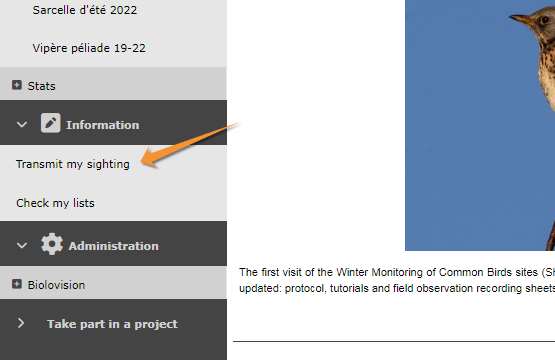
Step 1/3: Approximate choice of a site
Good to know:
We recommend to select a place By clicking on the map. All other options remains for your convenience.
1. Step 1/3: Approximate choice of a site
There are different ways to locate your observation. We recommend to use by clicking on the map.
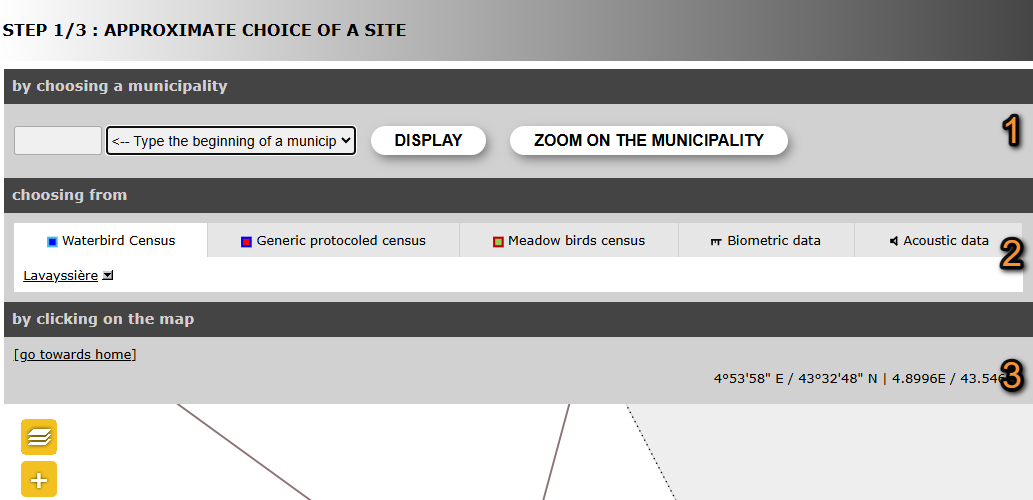

Step 1/3: Approximate choice of a site.
1. by choosing a municipality
2. choosing from
3. by clicking on the map
4. by typing text
5. by geographic coordinates
By choosing a municipality
Select a position by entering a municipality.
Type the beginning of the municipality's name on the left and select from the expandable panel on the right.

Approximate choice of a site by choosing a municipality.
Choose
· Display, to select a more precise location on a form, or
· Zoom on the municipality to select from the map below a more precise location.
[Top to Step 1/3: Approximate choice of a site]
[Top to Submitting records]
Choosing from
Choose one of the sites you have previously entered data to.
It shows up to 5 of the most visited sites during the last 6 months. Click on any of these sites to access options.
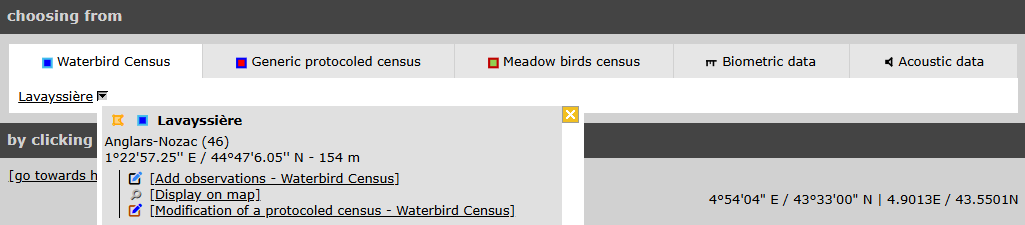
Approximate choice of a site by choosing from.
Select Attach to map to display the location on the map below. It is especially useful to approach a site you know is nearby.
[Top to Step 1/3: Approximate choice of a site]
[Top to Submitting records]
By clicking on the map
SELECT A SITE BY CLICKING ON THE MAP:
· Zoom in
· Select a location (dot)
· Select an option:
- Add sighting on this locality: Observations are associated to this location.
- Add a precise sighting: Enter exact position of the observation.
- Fill a daily form for this locality: Start a list at this location.
- (Projects or Protocols: only for observers with corresponding rights.).
- Add sighting on this locality: Observations are associated to this location.
Select a location by clicking on the map below.
1.Zoom in to see locations.
· Locations are represented by a dot.
· Visit wiki section Web interface > Local portal > Navigating the map to know how to navigate through the map.
· Visit wiki section Various > Symbols cheatsheet to see the meaning of different dots.
· Centre at your location by clicking on go towards home.
· See how to change your location at wiki section Web interface > My account > Personal data > Non-mandatory fields > Address).
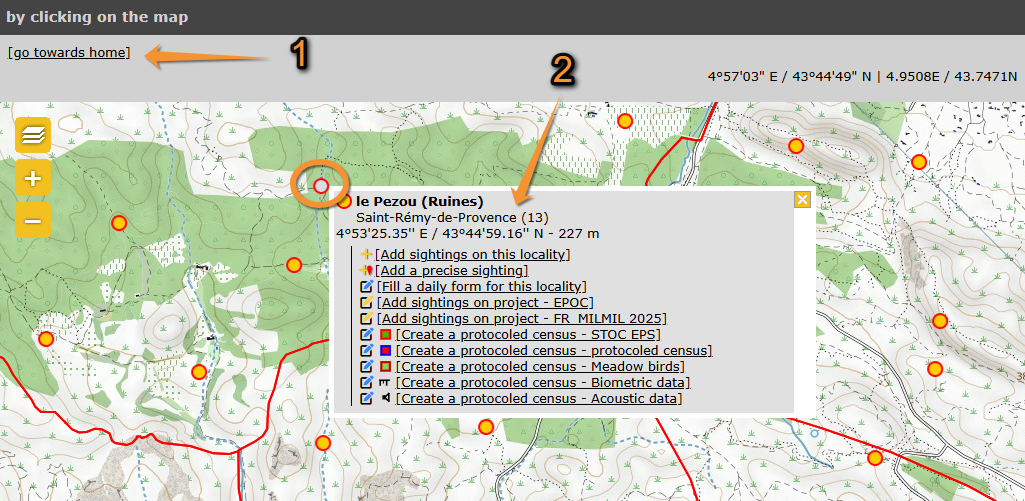
Choose a location by clicking on the map.
1 Center the map to your location.
2 Options associated to this point (active point becomes grey, encircled). Use  to close.
See how to navigate the map: Web interface > Navigating the map
See meaning of different dots: Various > Symbols cheatsheet
Change your location at: Web interface > My account > Personal data > Non-mandatory fields > Address
2. Click on a location to see options for this location, or
Click anywhere on the map to see options at the point.
· Visit wiki section Web interface > Local portal > Submitting records > Step 2/3: Precise site choice to see details of the options.
· If clicking outside of a dot, only Add a precise sighting is possible.
· Users with special rights will be given additional options like projects or protocols.
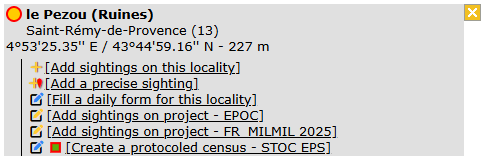
Choose a location by clicking on the map. Options.


- Add sightings on this locality
Access to next step Transmit my sightings.
Observations submitted do not show their exact position but all are associated to the selected location.
See wiki section Web interface > Submitting records > Step 3/3: Transmit my sighting > If accessed from add sightings on location or Add precise location for details.
- Add a precise sighting
Access to next step Transmit my sightings.
A red marker at the map section on top represents the position of your observation.
· Click and hold on the marker to move it to the exact position of the observation.
· Your observation gets automatically associated to the nearest existing location. It is marked by a yellow line.
· Use Ctrl and click (Cmd on Mac) to change the locality the observation is associated to.
· The predetermined altitude for the new location is shown on the field at the top left corner. Change altitude of observation if necessary.
· Depending on the portal, exact coordinates will only be visible to you and to administrators.
· Change site or Center the map on the pointer, if necessary.
· Expand/Collapse the map using the arrow at the bottom.
Visit wiki section Web interface > Local portals > Submitting records > Step 3/3: Transmit my sightings > add a precise sighting for details.

Red marker for precise data
- Fill a daily form for this locality
Enter a list associated to this location.
See wiki section Web interface > Local portals > Submitting records > Step 3/3: Transmit my sighting > If accessed from a list (fill a daily form) to know how to enter data.
[Top to by clicking on the map]
[Top to Step 1/3: Approximate choice of a site]
[Top to Submitting records]
By typing text
Search a location by typing its name.
Approximate choice of a site by typing text.
1. Type the name of the location.
2. Click Display.
3. Choose one of the options.
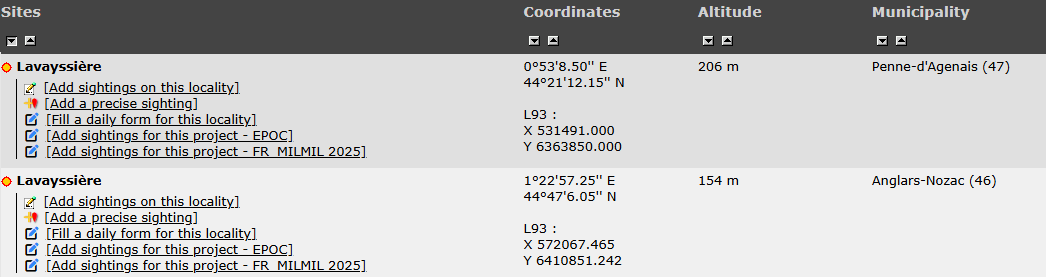
Approximate choice of a site by typing text. Options.
To know more about these options, go to wiki section Web interface > Submitting records > Step 2/3: Precise site choice.
[Top to Step 1/3: Approximate choice of a site]
[Top to Submitting records]
By geographic coordinates
Select a location by entering its coordinates.

Approximate choice of a site by geographic coordinates.
1. Enter coordinates.
· Coordinates should follow the WGS 84 datum, either in degrees, minutes and second (example 2°17'23.36 E 42°28'13.82'N) or in decimal degrees (exemple E002.28982° N42.47051°). The system will automatically detect if you are using degrees, minutes and seconds or decimal degrees.
· Use negative coordinates for Western longitudes.
2. Click Display to access Step 3/3: Transmit my sighting.
The location will be marked on a map and listed under the closest pre-determined site. A yellow line indicates under which pre-determined location your sighting is listed. The coordinates of your observation will only be visible to you and to administrators.
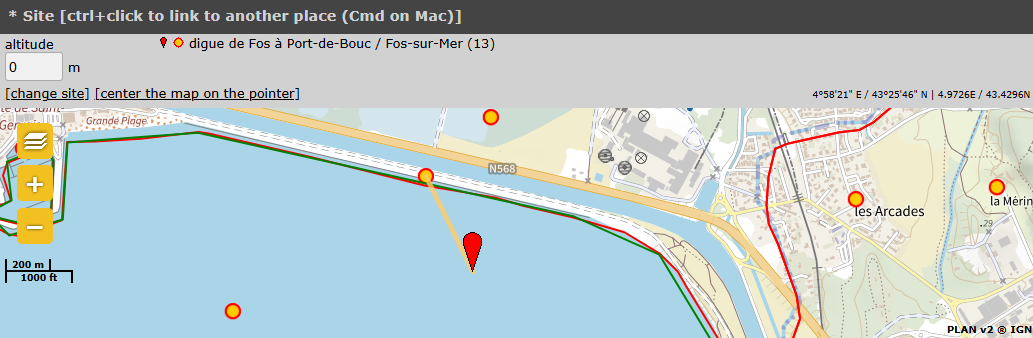
Sighting associated to a pre-determined location.
· Coordinates should follow the WGS 84 datum, either in degrees, minutes and second (example 2°17'23.36 E 42°28'13.82'N) or in decimal degrees (exemple E002.28982° N42.47051°). The system will automatically detect if you are using degrees, minutes and seconds or decimal degrees.
· Use negative coordinates for Western longitudes.
[Top to by geographical coordinates]
[Top to Step 1/3: Approximate choice of a site]
[Top to Submitting records]
Step 2/3: Precise site choice
If accessed from By choosing a municipality > Display, list of all possible sites for this municipality and all options for each of them (see image Step 2/3: Precise site choice).
Please select your preferred option for the site your observation took place.
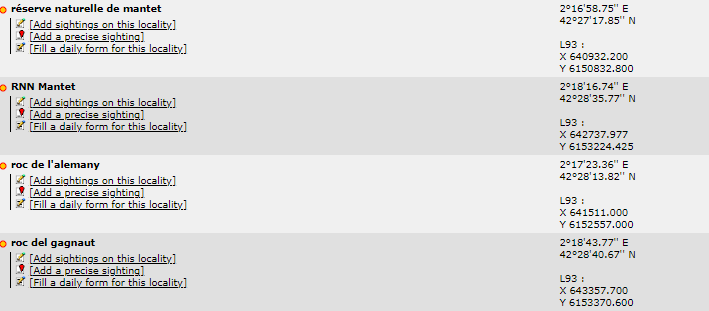
Step 2/3: Precise site choice.
| · |  |
Add sightings on this locality. |
| · |  |
Add a precise sighting. |
| . |  |
Fill in a daily form, or add records to a Protocol. |
| . |  |
Add records to a Project. |
Add sightings on this locality
Access to next step Transmit my sightings.
Observations submitted do not show their exact position but all are associated to the selected location.
See wiki section Web interface > Submitting records > Step 3/3: Transmit my sighting > If accessed from add sightings on location or Add precise location for details.
[Top to Step 2/3: Precise site choice]
[Top to Submitting records]
Add a precise sighting
Access to next step Transmit my sightings.
A red marker at the map section on top represents the position of your observation.
Click and hold on the marker to move it to the exact position of the observation.
Adding a precise sighting is especially useful when you know the exact point of the observation but cannot work out to which predetermined location it belongs to; or for studies that require exact positions, for example when mapping nests or territories.
· Your observation gets automatically associated to the nearest existing location. It is marked by a yellow line.
· Use Ctrl and click (Cmd on Mac) to change the locality the observation is associated to.
· The predetermined altitude for the new location is shown on the field at the top left corner. Change altitude of observation if necessary.
· Depending the portal, exact coordinates will only be visible to you and to administrators.
· Change site or Center the map on the pointer, if necessary.
· Expand/Collapse the map using the arrow at the bottom.
See wiki section Web interface > Submitting records > Step 3/3: Transmit my sighting > If accessed from add sightings on location or Add precise location for details.
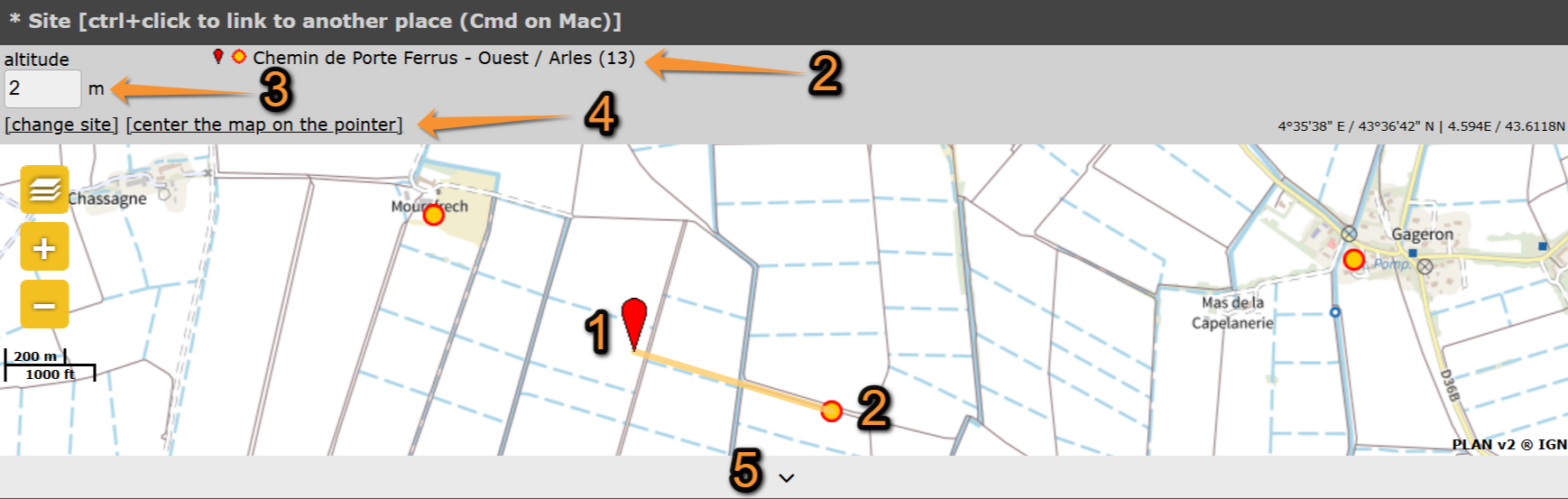
Add a precise site on the map.
1. Marker at exact location.
2. Location it gets associated to.
3. Altitud at allocated location.
4. Change site or center the map on the pointer.
5. Expand/Collapse map.
Both Add Sightings to this location and Add a precise sighting are most useful for partial lists and occasional recordings of some species. To make lists with more scientific value, see next subsection Fill a daily form for this locality.
[Top to add a precise sighting]
[Top to Step 2/3: Precise site choice]
[Top to Submitting records]
Fill a daily form for this locality
Access to Transmit my sighting.
It requires date and time and number of individuals for each species. You may add additional details.
Fill a daily form for this locality is the preferred option to record lists of observations. It requires more detailed information than if using add sightings on this location or add a precise sighting, but while it takes longer to submit, it also has more scientific value.
Visit wiki section Web interface > Submitting records > Step 3/3: Transmit my sighting > If accessed from a list (fill a daily form) for details.
[Top to Step 2/3: Precise site choice]
[Top to Submitting records]
Step 3/3: Transmit my sighting
Entering details of your observations.
The required information depends on whether you chose to add sightings to this locality, add a precise sighting or record a daily list.
3 Step 3/3: Transmit my sighting
-
3.1 If accessed from add sightings on this locality or add precise location
- 3.1.1 Mandatory fields
- 3.1.1.1 Date and time
3.1.1.2 Site
3.1.1.3 Taxa
3.1.1.4 Species
3.1.1.5 Number of individuals
3.1.1.6 Ending the observation entry
- 3.1.2 Additional information
- 3.1.2.1 Sex and age of individuals
3.1.2.2 Other data/Information
3.1.2.3 Comments
- 3.2 If accessed from a list (fill a daily form)
- 3.2.1 Starting a list
3.2.2 Adding observations
- 3.2.2.1 Site, date and time
3.2.2.2 Enter species
3.2.2.3 Number of individuals
3.2.2.4 Additional information
- 3.2.2.4.1 Details
3.2.2.4.2 Map
3.2.2.4.3 Duplicate the observation
If accessed from add sightings on this locality or add precise location
The first part of the form is mandatory information.
The second part of the form is optional.
The right hand side lists your last 30 observations submitted. There are options to edit or delete any of them (see wiki section Web interface > Local portals > Editing records).
3.1 If accessed from add sightings on this locality or add precise location
- 3.1.1 Mandatory fields
- 3.1.1.1 Date and time
3.1.1.2 Site
3.1.1.3 Taxa
3.1.1.4 Species
3.1.1.5 Number of individuals
3.1.1.6 Ending the observation entry
- 3.1.2 Additional information
- 3.1.2.1 Sex and age of individuals
3.1.2.2 Other data/Information
3.1.2.3 Comments
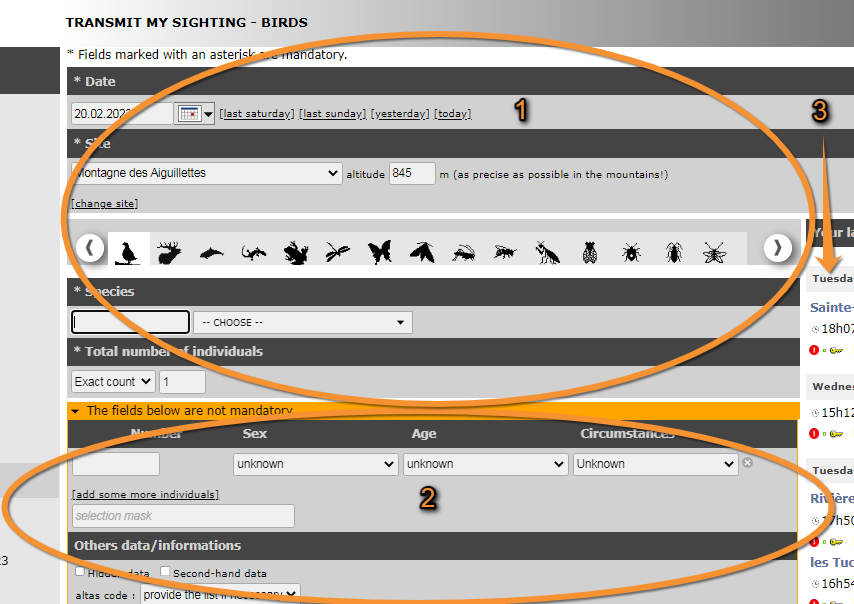
Step 3/3: Transmit my sightings.
1. Mandatory information.
2. Non mandatory information.
3. Your last records at this location.
1. Mandatory fields
The following information is required:
· Date and time
· Site
· Species
· Number of individuals
Please provide it in order to continue submitting the observation.

Step 3/3: Transmit my sightings. Mandatory fields.
1. Date and time
2. Site
3. Species
4. Submitting records#Number of individuals
5. Your latest sightings.
Date and time
Enter the date of the observation by
· typing the date on the left hand field,
· selecting the date from the expandable calendar, or
· Using one of the quick access options.
By default if gives the current date.
Enter time (optional) by typing it at the bottom of the expandable calendar. Click 'OK' when done.
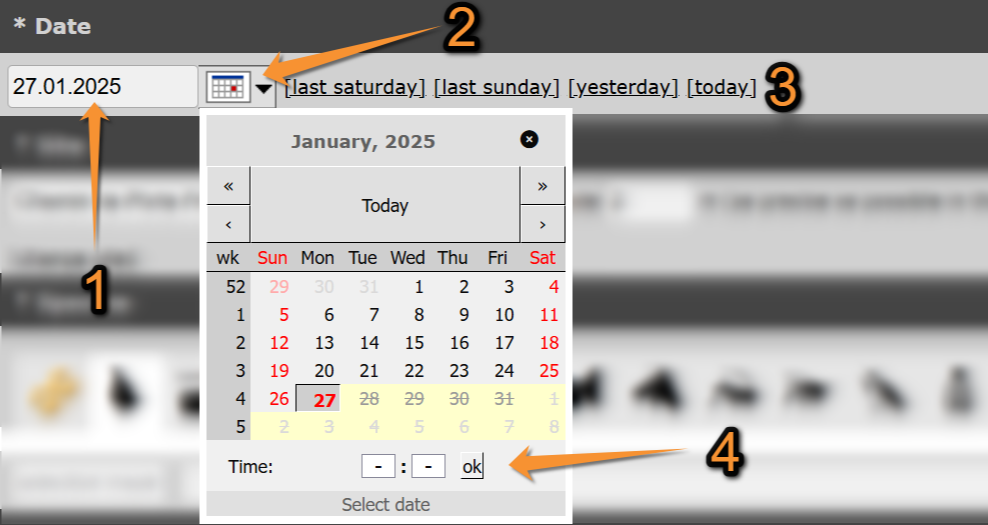
Transmitting sightings, mandatory fields. Date and Time.
1. Type date.
2. Select date from the expandable calendar.
3. Use timeframe from the quick access keys.
4. Enter time (optional).
[Top to Mandatory fields]
[Top to Step 3/3: Transmit my sighting]
[Top to Submitting records]
Site
Double check the site the observation is associated to.
Change site if necessary by
· selecting a new site on the expandable menu,
· clicking on change site (goes back to Step 1/3: Approximate choice of a sighting), or
· moving marker on the map (only available if accessed from add a precise sighting).
Change the altitude if necessary.
It is given automatically according to the site your observation is associated to. Pay special attention on slopes: two points may have the same coordinates but different altitudes.

Transmitting sightings, mandatory fields. Site when accessing from add a sighting to this list.
1. Change site on the expandable menu.
2. Change altitude.
3. Change site at Step 1/3: Approximate choice of a site.
Transmitting sightings, mandatory fields. Site when accessing from add a precise sighting.
[Top to Mandatory fields]
[Top to Step 3/3: Transmit my sighting]
[Top to Submitting records]
Species
1. Select the taxonomic group your observation belong to.
· Select from the horizontal bar.
· Use the arrow to see the remaining taxa.
· Place mouse pointer on the silhouettes to see which taxa they represent.
· DNA icon activates all taxa in the system.
· By default, active taxa are those indicated in your preferences. See wiki section Web interface > Local portals>
Getting started > My account > Website customisation to change your preferences.

Taxonomic groups.
An orange bar on top of the silhouette indicates only specialist can see and introduce records on this taxa.
A yellow bar on top of the silhouette indicates everybody can see records of this taxa, but only specialists can submit them.
No bar indicates everybody can see and submit records.
2. Select the species of the observation.
· Type the name of the species, or part of it, in the default language on the left field.
· Visit wiki section Web interface > Local portals > Getting started > My account > Website customisation > Recording language to assigned a default language to each taxonomic group.
· If the species is not available in the language of your choice, it will show its scientific name.
· You can type the different parts of the name in any order (ie. type either n r or r n to select Norther Raven).
· Select the name of the species on the expandable menu on the right.
· The species are listed alphabetically or systematically, depending on your preferences.
· If you selected all taxa (DNA icon, it lists for taxonomic group first, and the either alphabetically or systematically depending on your preferences.
· Visit wiki section Web interface > Local portals > My account > Website customisation > Global parameters to change the order.
· Move through the species with the keyboard arrows, moving the right hand bar with the mouse or rolling the mouse wheel.
· The letters used in the search are underlined.
· The scientific name is always included on the species name.
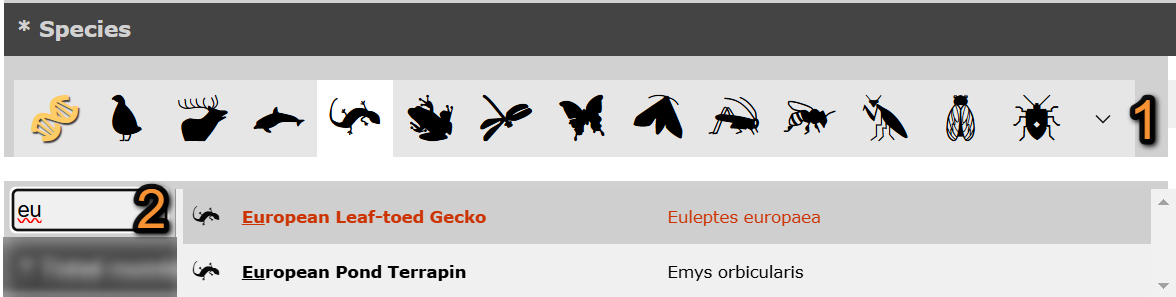
Transmitting sightings, mandatory fields. Taxa and Species.
1. Select taxonomic group.
2. Type name of the species, or part of it, on the left and select from the expandable menu on the right.
Get the name quickly typing only few letters. For example, if you search for common crane, enter "co cr" and it will be one of the species the system proposes to you; if you enter "c k " you will be proposed both Common Kestrel and Common Kingfisher. Note these abreviations are available in all supported languages in local portals, including German names of a single word -for example, type "s e" to find Samtente.
[Top to Mandatory fields]
[Top to Step 3/3: Transmit my sighting]
[Top to Submitting records]
Number of individuals
Indicate number of individuals on the observation.
· Select count precision from the expandable menu on the left.
· Type number of individuals on the right field.
· If you selected not counted on the expandable menu, leave the right field empty.
· Not counting number of individuals is often used for those species occurring very commonly. Note that an estimate or minimum if you can provide it even roughly, is always better than a non counted.

Transmitting sightings, mandatory fields. Number of individuals.
1. Select count precision.
2. Type number of individuals.
[Top to Mandatory fields]
[Top to Step 3/3: Transmit my sighting]
[Top to Submitting records]
Ending the observation entry
If not adding any additional information, press Save at the end of the page.
The observation appears automatically in the list on the right hand column.
Repeat the process if you wish to add any more records.
[Top to Mandatory fields]
[Top to Step 3/3: Transmit my sighting]
[Top to Submitting records]
2. Additional information
The following information is not mandatory, but interesting if known.
Select which data to provide:
· Details (Sex and age of individuals)
· Atlas code
· Singing
· Hidden record
· Second hand
· Ring
· Mortality / Injuries
· More details (Behaviour)
· Media
· Study code
· Comments
Move pointer on sections to see which information to provide in each section.
Fields containing additional information are highlighted by the yellow icon.

Detail (Age and sex of individuals)
Type the number of individuals per each sex, age and circumstances of recording by
- filling in the fields or
· Options are shown on expandable menus in each section.
· Click on add some more individuals to enter more than one age/sex group.
· Use  to delete entry.
· Note the field Circumstances is country-specific and may not be present in your local portal.
- typing the code.
· Place the mouse pointer on top of the bottom right field to see codes correspondences.
· If you filled in the fields on top, the code is formed automatically.

Detail: Sex and age of individuals.
1. Delete entry.
2. Add a new entry.
3. Type code / See forming code / See code correspondence.
[Top to Non Mandatory fields]
[Top to Step 3/3: Transmit my sighting]
[Top to Submitting records]
Atlas code
Select from the expandable menu the atlas code which corresponds to your observation.
See wiki section Various > Breeding evidence matching to see code correspondence in different countries.
Depending on the local portal, an atlas code may be mandatory for certain species or during certain times.
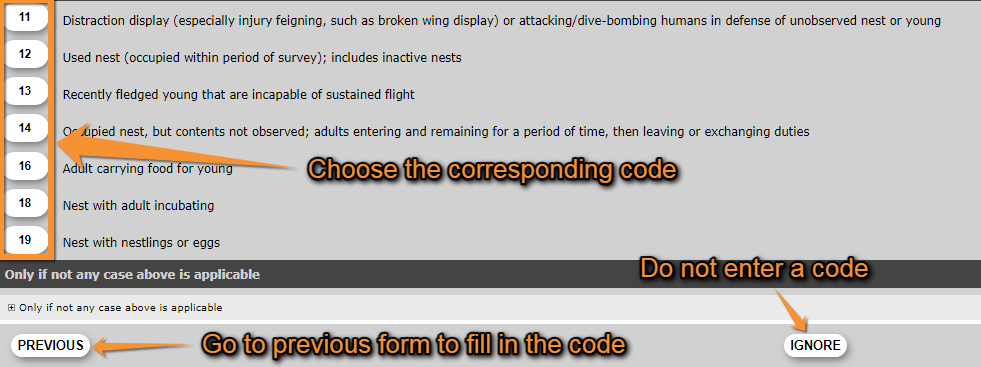
Atlas code.
[Top to Non Mandatory fields]
[Top to Step 3/3: Transmit my sighting]
[Top to Submitting records]
Singing
Activate the Singing field if the individual registered is singing even if it is not the breeding season.
Depending on the atlas code selected, if will activate automatically.
Singing active.
[Top to Non Mandatory fields]
[Top to Step 3/3: Transmit my sighting]
[Top to Submitting records]
Hidden data
Activate the Hidden record field to hide your record from the public.
If the record is hidden
· You and the administrators will still see it, but not other users.
· This will hide the record and all details associated to it, including pictures and sounds attached.

Hidden record active.
Hiding your observation is useful to protect certain species or nesting sites. Note that some of the species and sites are automatically hidden at least part of the year.
If you still consider any of the other species or sites sensitive and want to protect them, tick the option.
Go to wiki section Web interface > Species partially hidden to see which species will be automatically hidden and for which part of the year.
[Top to Non Mandatory fields]
[Top to Step 3/3: Transmit my sighting]
[Top to Submitting records]
Second hand
Activate the Second hand field if you are not the author of the observation.
This may occur if someone comments an observation to you, or if you are browsing old records.
Always seek permission from the author to publish the observation, even if shown as anonymous.
Second hand active.
[Top to Non Mandatory fields]
[Top to Step 3/3: Transmit my sighting]
[Top to Submitting records]
Ring
Activate the Ring field if the bird has any identificatory markings like a metal or colour ring, a wing tag, and so on.
It will activate the Ringing Module to provide details of the marking.
Depending on the local portal, ringing details provided are transferred automatically to the ringing scheme.

Ring active.
[Top to Non Mandatory fields]
[Top to Step 3/3: Transmit my sighting]
[Top to Submitting records]
Mortality / Injuries
Activate the Mortality / Injuries field if the animal observed is dead or wounded.
The mortality module will open before the record is saved. Please provide the details.

Mortality / Injuries active.
[Top to Non Mandatory fields]
[Top to Step 3/3: Transmit my sighting]
[Top to Submitting records]
More details (Behaviour)
Check the cell that best describes the behaviour of the individual/s observed.
Note this section is country-specific and is not present in all portals.

More details (Behaviour).
[Top to Non Mandatory fields]
[Top to Step 3/3: Transmit my sighting]
[Top to Submitting records]
Media
Attach an image or a sound to the record.
· Click on Choose file to select a file from your computer.
· There is no size limit to the picture to upload but it must be taken on the date the observation occurs.
· Sound files are limited to a maximum size of 16 MB.
· To attach more than one file, click again on Choose file.
· Pictures and sounds can also be added at a later stage. See wiki section Web interface > Local portals > Editing records
· Attach only those pictures or sound recordings you have taken yourself.
· To make the file private (only you can see it), check the cell on the right. This will hide the file, but not the observation or other details associated to it.
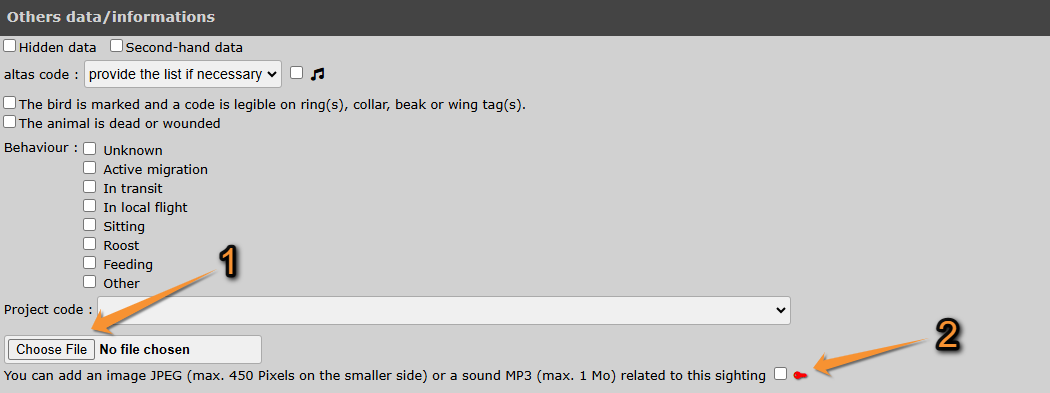
Attaching a file.
1. Click to attach a file.
2. Check to hide the file.
[Top to Non Mandatory fields]
[Top to Step 3/3: Transmit my sighting]
[Top to Submitting records]
Study code
Associate the observation to a project by selecting the project name from the expandable menu.
Leave blank if the observation is not part of a project.
This section is country dependent and may not appear if the local portal has no projects.

Study code.
[Top to Non Mandatory fields]
[Top to Step 3/3: Transmit my sighting]
[Top to Submitting records]
Comments
Leave a comment, if you find it appropriate.
1. Select from the tabs if the comment is private or public.
· By default, the system will make it public.
·  indicates the Hidden comment tab is selected.
· Only you can see a hidden comment.
2. Type a comment.

Comments.
1. Select if the comment is private or public.
2. Type a comment.
[Top to Non Mandatory fields]
[Top to Step 3/3: Transmit my sighting]
[Top to Submitting records]
Ending the observation entry
After entering all information, press Save at the end of the page.
The observation appears automatically in the list on the right hand column.
Repeat the process if you wish to add any more records on the same date and site.
Depending on the information provided, you will be required to fill in an additional form before your record can be saved. These are:
· information about a ringed individual,
· information about the cause of death or injury,
· or an atlas code if you asked to see the list or if it is required by your local portal for the species entered at this time of year.
[Top to Mandatory fields]
[Top to Step 3/3: Transmit my sighting]
[Top to Submitting records]
If accessed from a list (fill a daily form)
To enter several observations that took place the same day at the same place and during a short interval of time, consider entering your data as a list.
Fill in a daily form
-
1 Starting a list
2 Adding observations
- 2.1 Site, date and time
2.2 Enter species
2.3 Number of individuals
2.4 Additional information
- 2.4.1 Details
2.4.2 Map
2.4.3 Duplicate the observation
Starting a list
Provide some general information to start a list.
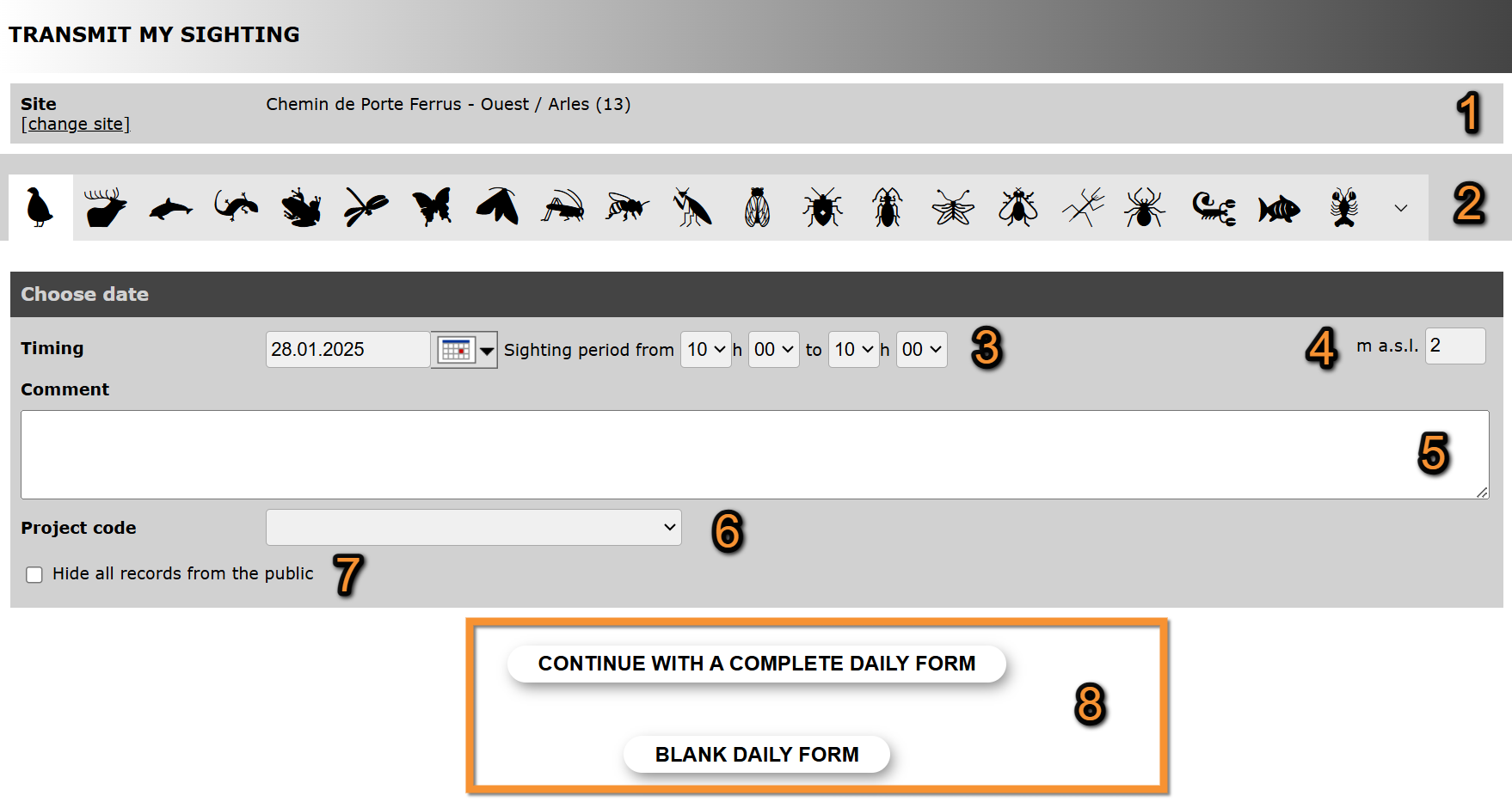
Transmitting sightings, list. Starting a list.
1. Site
2. Taxonomic group
3. Date and time
4. Altitude
5. Comment
6. Project
7. Hide records from the public
8. Save and continue
- Site
Site is pre-selected from previous step.
· Click on change site to change it if necessary.
- Taxonomic group
Select the taxonomic group of your observation.
· Place mouse pointer on top to see meaning of each icon.
· Use arrow to see all possibilities.
- Date and time
Enter date by typing on the left field or by selecting from the expandable calendar.
Enter time as accurately as possible by selecting from the expandable menus.
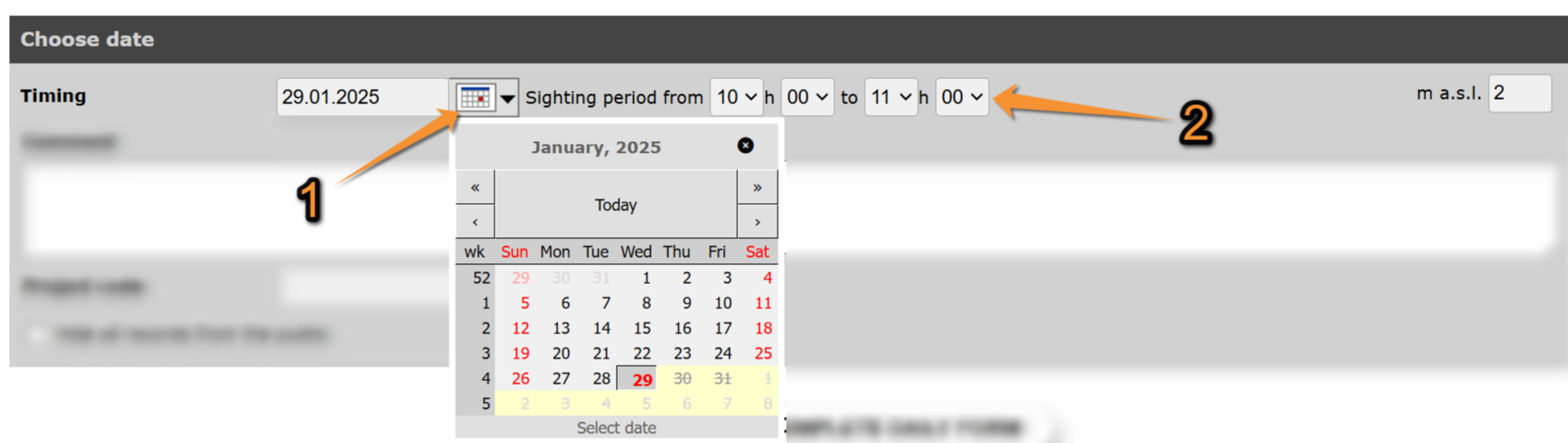
Transmitting sightings, list. Date and time.
1. Type date on the left or open expandable menu on the right.
2. Select time on the expandable menus.
- Altitude
Altitude at the selected site.
· Change it if necessary by typing the new altitude.
- Comment
Leave a comment about the observation if you consider it necessary.
· Select if the comment is private or public by choosing on the tabs.
· Only you can see a hidden comment.
· Type the comment.

Transmitting sightings, list. Comments.
1. Select if the comment is private or public, Note the yellow arrow indicating a private comment.
2. Type a comment.
- Project
If asked, choose from the expandable menu if observations you are submitting are part of a bigger study.
Leave blank if your list is not part of an established project.
- Hide records from the public
Check to hide the record from other users. Administrators can still see it and use it for statistics.
- Save and continue
Move to next section by choosing between
· Continue with a complete daily form (all species seen are reported) or
· Blank daily form (no species were seen).
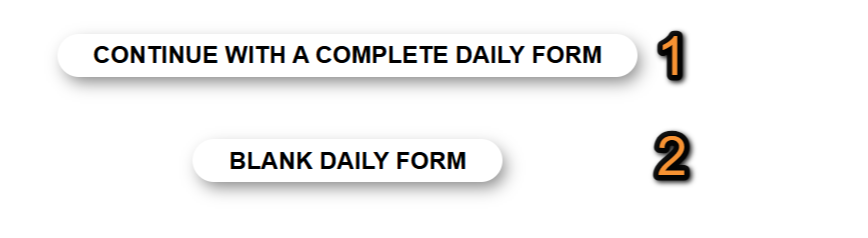
Transmitting sightings, list. Proceed to enter observations.
1. Select to enter all species seen.
2. Select to indicate the survey was done but no species were seen.
[Top to Starting a list]
[Top to Fill in a daily form]
[Top to Submitting records]
Adding observations
Enter observations:
1. Review site, date and time and modify if necessary.
2. Enter species.
3. Enter count precision and number of individuals.
4. Enter additional information.
5. Save record.
1. See site, date and time of the current observation. Change if necessary.
· Click on Change site to change site.
· Press Previous to go to previous screen. You can modify any of the general information.
2. Enter records:
Select the species of the observation.
· Type the name of the species, or part of it, in the default language on the left field.
· Visit wiki section Web interface > Local portals > Getting started > My account > Website customisation > Recording language to assigned a default language to each taxonomic group.
· If the species is not available in the language of your choice, it will show its scientific name.
· You can type the different parts of the name in any order (ie. type either n r or r n to select Norther Raven).
· Select the name of the species on the expandable menu on the right.
· The species are listed alphabetically or systematically, depending on your preferences.
· If you selected all taxa (DNA icon, it lists for taxonomic group first, and the either alphabetically or systematically depending on your preferences.
· Visit wiki section Web interface > Local portals > My account > Website customisation > Global parameters to change the order.
· Move through the species with the keyboard arrows, moving the right hand bar with the mouse or rolling the mouse wheel.
· The letters used in the search are underlined.
· The scientific name is always included on the species name.
· Click add that species to the list to save the record.
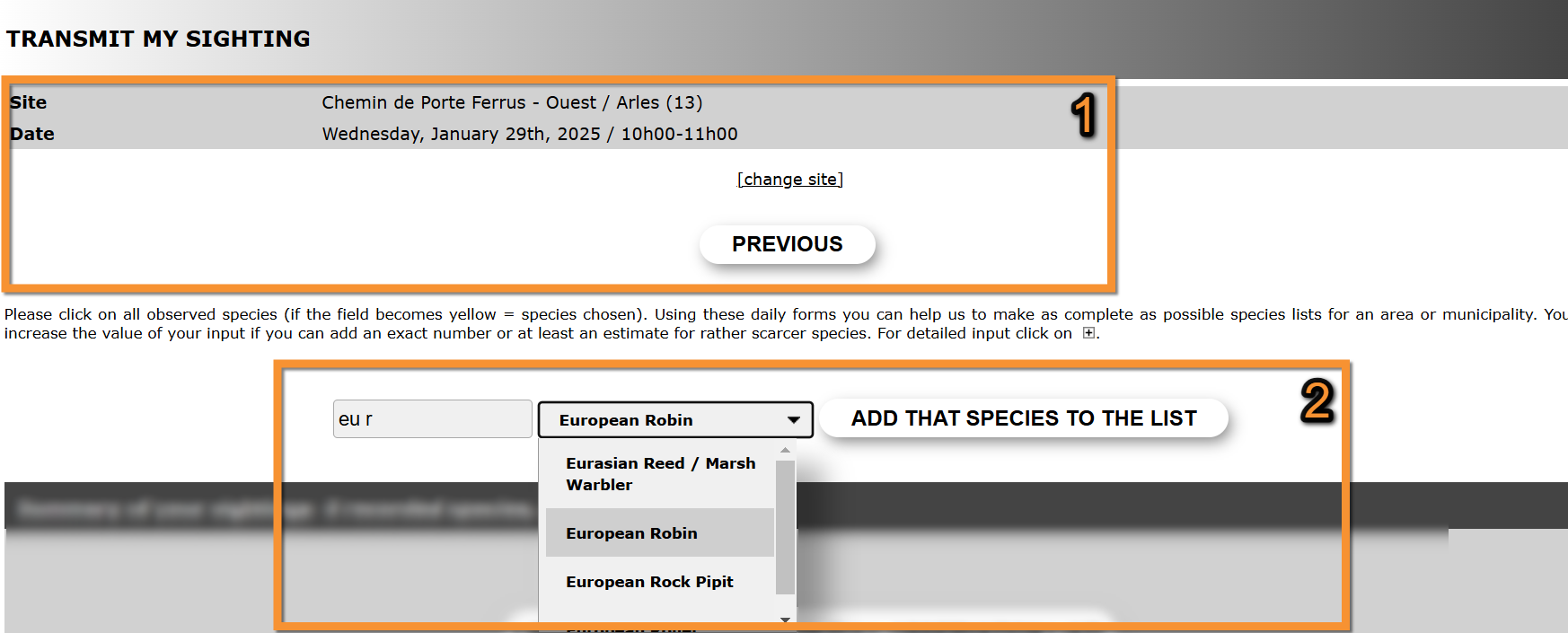
Transmitting sightings, list. Entering species.
1. Site, date and time. Change if necessary.
2. Enter observations.
3. Enter count precision and number of individuals.
· Type number of individuals on the right hand side.
· Select count precision from the expandable menu on left.
| X | Exact number. |
| ≥ | At least the indicated number of individuals were present. |
| ~ | Approximate number. |
| If blank, it will be considered exact. |
· If it is an exact count, do not choose count precision.
· If individuals were not counted, leave both fields empty.
· When the observations gets recorded, it becomes yellow and is listed underneath.
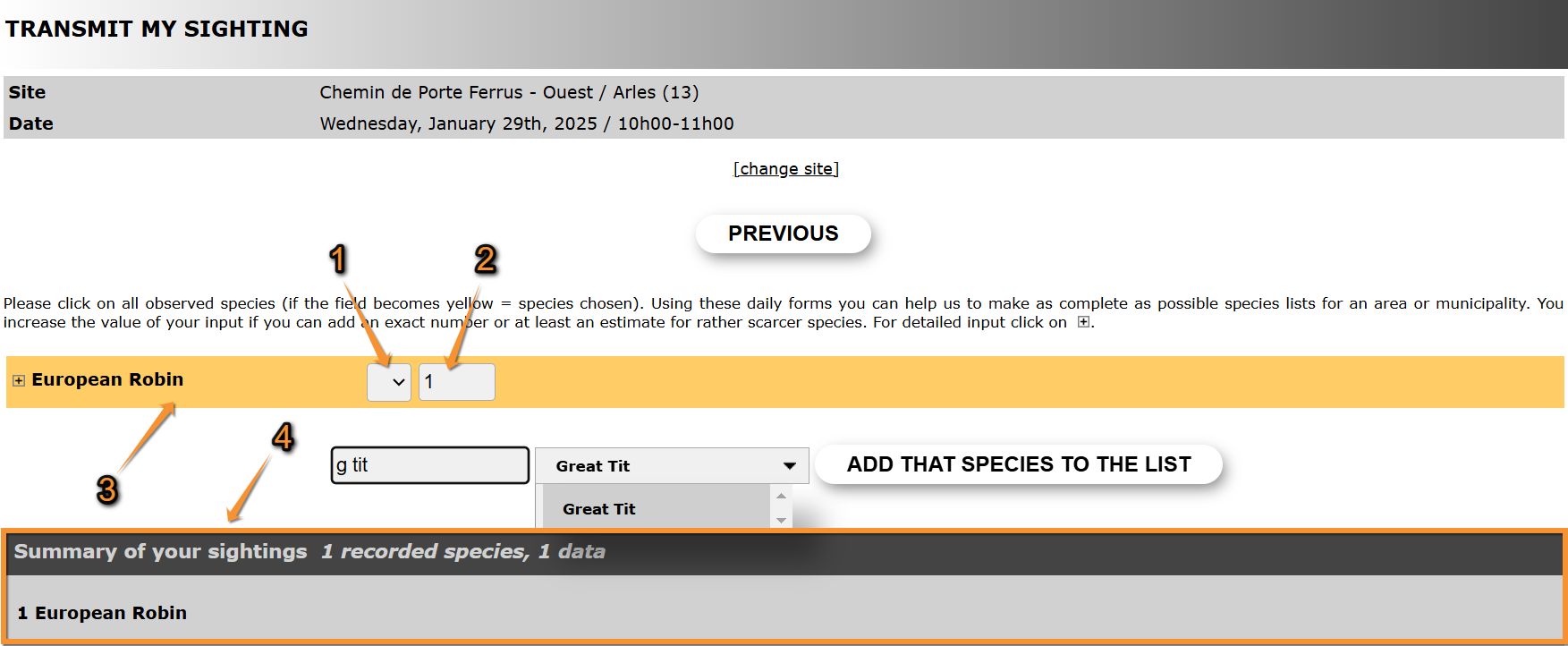
Transmitting sightings, list. Number of individuals.
1. Select count precision on the expandable menu.
2. Type number of individuals.
3. The observation has been recorded.
4. List of already recorded individuals.
4. Enter additional information.
4 Additional information
- 4.1 Details
- 4.1.1 Comment
4.1.2 Time
4.1.3 Sex and Age of individuals
4.1.4 Others data/Informations
4.2 Map
Alternate between the detail form and the exact position of the observation (Map).
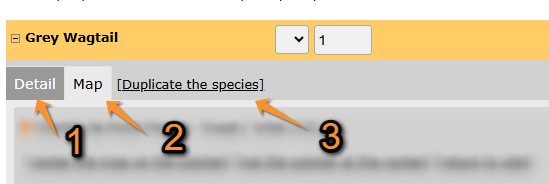







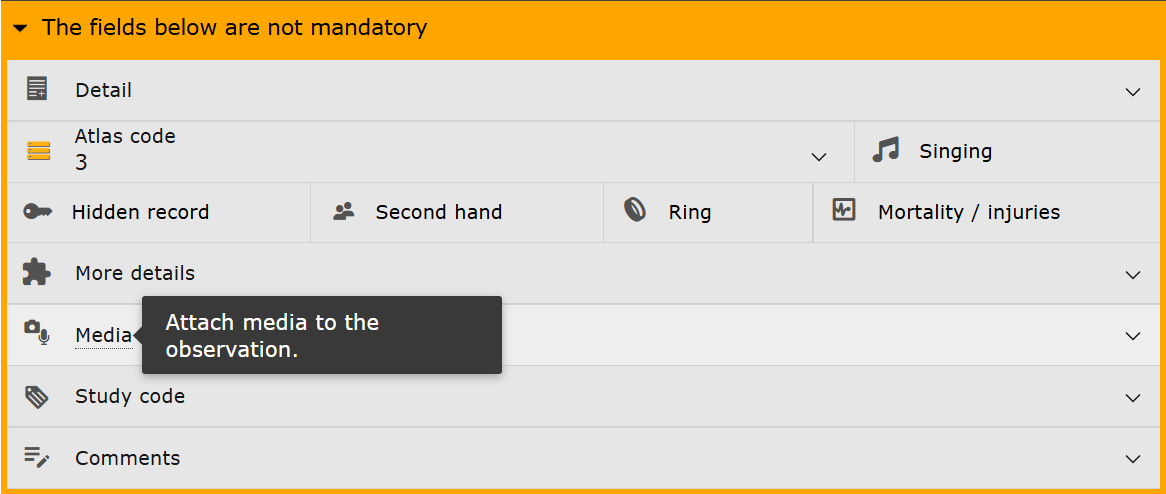


- Detail tab
Click on Detail tab to enter more information.
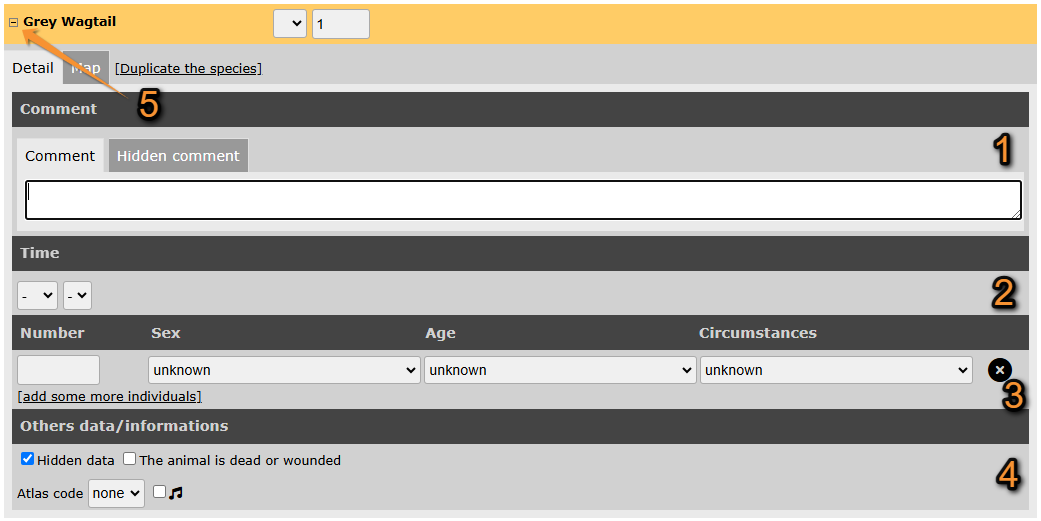
Transmitting sightings, list. Details tab.
1. Comment
2. Time
3. Additional information
4. Others data/Informations
5. Open/Close additional information panel.
- Comment
Leave a comment if you feel it necessary.
For more information, see wiki section Web interface > Local portals > Submitting records > Transmit my sightings > Comment.
- Time
Select from the expandable menus the exact time of his particular observation.
- Sex and age of individuals
Type the number of individuals per each sex, age and circumstances of recording.
· Options are shown on expandable menus in each section.
· Click on add some more individuals to enter more than one age/sex group.
· Use the cross next to a record to delete it.
· Note the field Circumstances is country-specific and may not be present in your local portal.

Transmitting sightings, list. Age and sex of individuals.
1. Fill in the field choosing from the expandable menus.
2. Delecte entry.
3. Add a new entry
- Others data/Informations
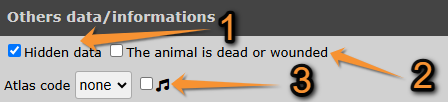
Transmitting sightings, list. Others data/Informations.
1. Hidden data
2. The animal is dead or injured
3. Atlas code
- Hidden data
- Hidden data
Check to hide the observations from the public.
Visit wiki section Web interface > Local portals > Submitting records > Step3/3:Transmit my sighting > If accessed from add sightings on this locality or add precise location > Additional information > Others data/Informations > Hidden data for details.
- The animal is dead or wounded
- The animal is dead or wounded
Check if the animal observed is dead or wounded. The mortality module will open before the record is saved. Please provide the details.
- Atlas code
- Atlas code
Select from the expandable menu the atlas code which corresponds to your observation.
· To see correspondence of codes, go to Web interface > Codes and symbols.
· If unknown, leave the default option “none” on the atlas code field.
· Depending on the country, an atlas code is required at least part of the year for some species. If no code is selected at this stage, it will be asked again before saving the record.
Check the 'singing cell' (see image below) if the individual is singing even if it is not the breeding season.
Map tab
Click on the Map tab to indicate the exact position of the observation.
· A red marker indicates the position of the observation.
· It is associated to the nearest existing site (indicated by a yellow line).
· Use Ctrl and click (Cmd on Mac) to change the site the observation is associated to.
· Depending the portal, exact coordinates will only be visible to you and to administrators.
· [center the map on the pointer], [put the pointer at the center], or [return to site] if necessary.
· Change altitude of observation if necessary.
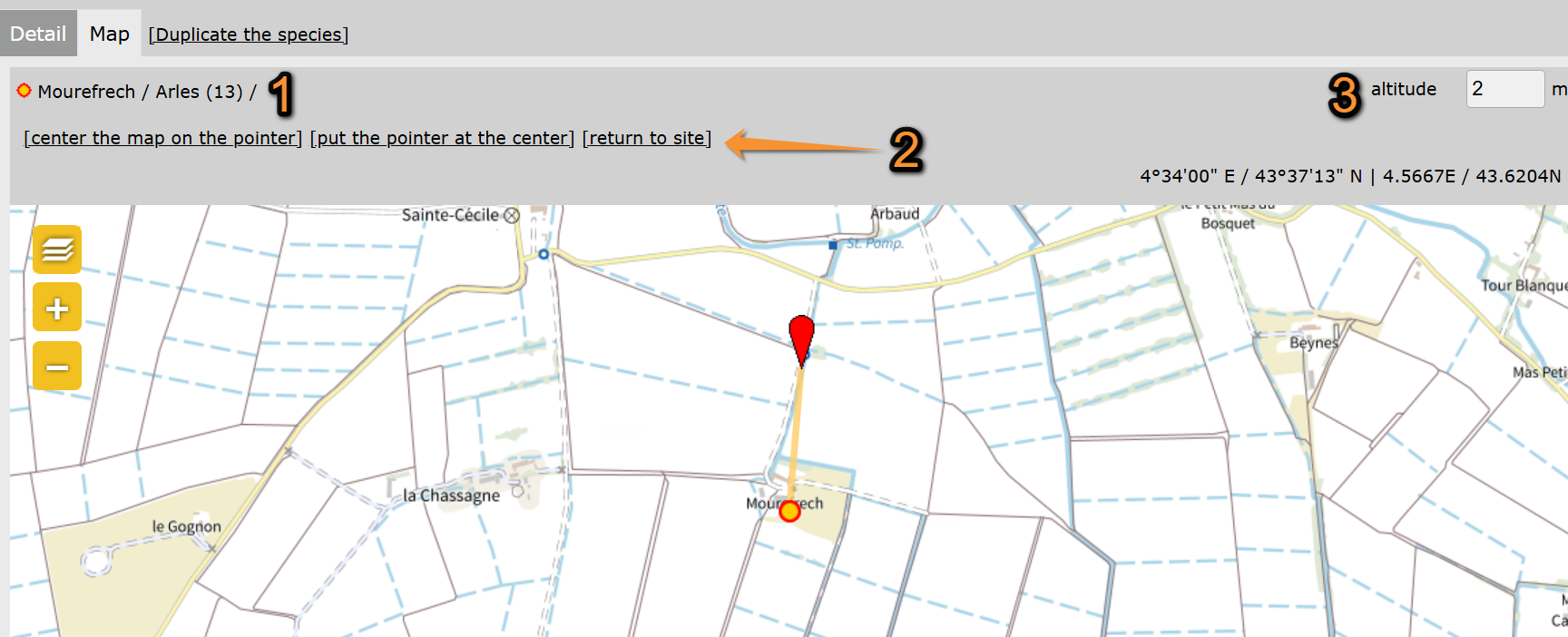
Transmitting sightings, list. Map tab.
1. Site the location is associated to.
2. Use quick keys to 'center the map on the pointer', 'put the pointer at the center' or 'return to site'.
3. Change altitude if necessary.
Duplicate the species
Click on Duplicate the species to introduce a new observation from the same species (ie.two individuals of the same species in different positions or of different ages).
May be useful when the additional information or the exact position on the map do not apply for all individuals of the same species seen while recording the list.
Only the species will be selected. Please fill in all other information.
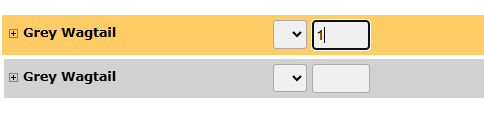
Transmitting sightings, list. Duplicate the species.
[Top to Adding observations]
[Top to Fill in a daily form]
[Top to Submitting records]
Ending the list entry
When all species are entered, indicate at the bottom of the page if it is a complete or a partial list.
- 1. Complete list: click on I recorded all species if you identified and recorded all species seen or heard.
- 2. Partial list: click on I recorded only a selection of the species if not all species seen or heard were identified or recorded.
If you marked any of the observations as dead or injured, the mortality module will open before saving the list. Please provide details for the relevant individuals.
[Top to Fill in a daily form]
[Top to Submitting records]
Note: images and examples are drawn from the French portal Faune-France. The design and position of some tools may vary slightly from portal to portal. To see a list of portals go to wiki section Local portals and partners. |