Getting started/es: Difference between revisions
(Created page with "<center> <table border="1" width="70%" ;>") |
No edit summary |
||
| Line 13: | Line 13: | ||
<tr style="padding: 25px; text-align: center; font-family: sans serif; color: black; background-color: LightGray"> | <tr style="padding: 25px; text-align: center; font-family: sans serif; color: black; background-color: LightGray"> | ||
<th> | <th>Funciones</th> | ||
<th>Usuario no registrado</th> | <th>Usuario no registrado</th> | ||
<th>Usuario registrado</th> | <th>Usuario registrado</th> | ||
| Line 19: | Line 19: | ||
<tr style="padding: 25px; text-align: center; font-family: sans-serif; color: black; background-color: white; border="> | <tr style="padding: 25px; text-align: center; font-family: sans-serif; color: black; background-color: white; border="> | ||
<td> | <td>Ver las últimas noticias</td> | ||
<td style="color:green">SÍ</td> | <td style="color:green">SÍ</td> | ||
<td style="color:green">SÍ</td> | <td style="color:green">SÍ</td> | ||
| Line 25: | Line 25: | ||
<tr style="padding: 25px; text-align: center; font-family: sans-serif; color: black; background-color: white;"> | <tr style="padding: 25px; text-align: center; font-family: sans-serif; color: black; background-color: white;"> | ||
<td> | <td>Ver información sobre el sol y la luna en la localidad registrada</td> | ||
<td style="color:red">NO</td> | <td style="color:red">NO</td> | ||
<td style="color:green">SÍ</td> | <td style="color:green">SÍ</td> | ||
| Line 31: | Line 31: | ||
<tr style="padding: 25px; text-align: center; font-family: sans-serif; color: black; background-color: white;"> | <tr style="padding: 25px; text-align: center; font-family: sans-serif; color: black; background-color: white;"> | ||
<td> | <td>Consultar las últimas observaciones</td> | ||
<td style="color:green">SÍ</td> | <td style="color:green">SÍ</td> | ||
<td style="color:green">SÍ</td> | <td style="color:green">SÍ</td> | ||
| Line 37: | Line 37: | ||
<tr style="padding: 25px; text-align: center; font-family: sans-serif; color: black; background-color: white;"> | <tr style="padding: 25px; text-align: center; font-family: sans-serif; color: black; background-color: white;"> | ||
<td>[[Customise website| | <td>[[Customise website|Personalizar la página]]</td> | ||
<td style="color:red">NO</td> | <td style="color:red">NO</td> | ||
<td style="color:green">SÍ</td> | <td style="color:green">SÍ</td> | ||
| Line 43: | Line 43: | ||
<tr style="padding: 25px; text-align: center; font-family: sans-serif; color: black; background-color: white;"> | <tr style="padding: 25px; text-align: center; font-family: sans-serif; color: black; background-color: white;"> | ||
<td>[[Browsing records| | <td>[[Browsing records|Consultar las obseravciones de los últimos 5 días]]</td> | ||
<td style="color:green">SÍ</td> | <td style="color:green">SÍ</td> | ||
<td style="color:green">SÍ</td> | <td style="color:green">SÍ</td> | ||
| Line 49: | Line 49: | ||
<tr style="padding: 25px; text-align: center; font-family: sans-serif; color: black; background-color: white;"> | <tr style="padding: 25px; text-align: center; font-family: sans-serif; color: black; background-color: white;"> | ||
<td>[[Browsing records| | <td>[[Browsing records|Consultar las obseravciones de los últimos 5 días]]</td> | ||
<td style="color:red">NO</td> | <td style="color:red">NO</td> | ||
<td style="color:green">SÍ</td> | <td style="color:green">SÍ</td> | ||
| Line 55: | Line 55: | ||
<tr style="padding: 25px; text-align: center; font-family: sans-serif; color: black; background-color: white;"> | <tr style="padding: 25px; text-align: center; font-family: sans-serif; color: black; background-color: white;"> | ||
<td>[[Browsing records| | <td>[[Browsing records|Acceso a la información adicional para una observación]]</td> | ||
<td style="color:red">NO</td> | <td style="color:red">NO</td> | ||
<td style="color:green">SÍ</td> | <td style="color:green">SÍ</td> | ||
| Line 61: | Line 61: | ||
<tr style="padding: 25px; text-align: center; font-family: sans-serif; color: black; background-color: white;"> | <tr style="padding: 25px; text-align: center; font-family: sans-serif; color: black; background-color: white;"> | ||
<td>[[Browsing records| | <td>[[Browsing records|Ver todas las entradas de una especie durante los últimos 15 días]]</td> | ||
<td style="color:red">NO</td> | <td style="color:red">NO</td> | ||
<td style="color:green">SÍ</td> | <td style="color:green">SÍ</td> | ||
| Line 73: | Line 73: | ||
<tr style="padding: 25px; text-align: center; font-family: sans-serif; color: black; background-color: white;"> | <tr style="padding: 25px; text-align: center; font-family: sans-serif; color: black; background-color: white;"> | ||
<td>[[Browsing records| | <td>[[Browsing records|Visualizar las obseravciones en un mapa]]</td> | ||
<td style="color:red">NO</td> | <td style="color:red">NO</td> | ||
<td style="color:green">SÍ</td> | <td style="color:green">SÍ</td> | ||
| Line 79: | Line 79: | ||
<tr style="padding: 25px; text-align: center; font-family: sans-serif; color: black; background-color: white;"> | <tr style="padding: 25px; text-align: center; font-family: sans-serif; color: black; background-color: white;"> | ||
<td>[[Browsing records| | <td>[[Browsing records|Acceder a las estadísticas de la especie]]</td> | ||
<td style="color:red">NO</td> | <td style="color:red">NO</td> | ||
<td style="color:green">SÍ</td> | <td style="color:green">SÍ</td> | ||
| Line 85: | Line 85: | ||
<tr style="padding: 25px; text-align: center; font-family: sans-serif; color: black; background-color: white;"> | <tr style="padding: 25px; text-align: center; font-family: sans-serif; color: black; background-color: white;"> | ||
<td>[[Browsing records| | <td>[[Browsing records|Búsqueda rápida para especies raras]]</td> | ||
<td style="color:red">NO</td> | <td style="color:red">NO</td> | ||
<td style="color:green">SÍ</td> | <td style="color:green">SÍ</td> | ||
| Line 91: | Line 91: | ||
<tr style="padding: 25px; text-align: center; font-family: sans-serif; color: black; background-color: white;"> | <tr style="padding: 25px; text-align: center; font-family: sans-serif; color: black; background-color: white;"> | ||
<td>[[Browsing records| | <td>[[Browsing records|Ver rarezas en un mapa]]</td> | ||
<td style="color:red">NO</td> | <td style="color:red">NO</td> | ||
<td style="color:green">SÍ</td> | <td style="color:green">SÍ</td> | ||
| Line 97: | Line 97: | ||
<tr style="padding: 25px; text-align: center; font-family: sans-serif; color: black; background-color: white;"> | <tr style="padding: 25px; text-align: center; font-family: sans-serif; color: black; background-color: white;"> | ||
<td>[[Submitting records| | <td>[[Submitting records|Enviar observaciones]]</td> | ||
<td style="color:red">NO</td> | <td style="color:red">NO</td> | ||
<td style="color:green">SÍ</td> | <td style="color:green">SÍ</td> | ||
| Line 103: | Line 103: | ||
<tr style="padding: 25px; text-align: center; font-family: sans-serif; color: black; background-color: white;"> | <tr style="padding: 25px; text-align: center; font-family: sans-serif; color: black; background-color: white;"> | ||
<td>[[Editing records| | <td>[[Editing records|Editar las propias observaciones]]</td> | ||
<td style="color:red">NO</td> | <td style="color:red">NO</td> | ||
<td style="color:green">SÍ</td> | <td style="color:green">SÍ</td> | ||
| Line 109: | Line 109: | ||
<tr style="padding: 25px; text-align: center; font-family: sans-serif; color: black; background-color: white;"> | <tr style="padding: 25px; text-align: center; font-family: sans-serif; color: black; background-color: white;"> | ||
<td> | <td>Editar las observaciones de otros</td> | ||
<td style="color:red">NO</td> | <td style="color:red">NO</td> | ||
<td style="color:red">NO</td> | <td style="color:red">NO</td> | ||
| Line 115: | Line 115: | ||
<tr style="padding: 25px; text-align: center; font-family: sans-serif; color: black; background-color: white;"> | <tr style="padding: 25px; text-align: center; font-family: sans-serif; color: black; background-color: white;"> | ||
<td>[[Editing records| | <td>[[Editing records|Buscar observaciones por cuadrícula de atlas o polígono]]</td> | ||
<td style="color:red">NO</td> | <td style="color:red">NO</td> | ||
<td style="color:green">SÍ</td> | <td style="color:green">SÍ</td> | ||
| Line 121: | Line 121: | ||
<tr style="padding: 25px; text-align: center; font-family: sans-serif; color: black; background-color: white;"> | <tr style="padding: 25px; text-align: center; font-family: sans-serif; color: black; background-color: white;"> | ||
<td> | <td>Mapas centrados en la localidad</td> | ||
<td style="color:red">NO</td> | <td style="color:red">NO</td> | ||
<td style="color:green">SÍ</td> | <td style="color:green">SÍ</td> | ||
| Line 127: | Line 127: | ||
<tr style="padding: 25px; text-align: center; font-family: sans-serif; color: black; background-color: white;"> | <tr style="padding: 25px; text-align: center; font-family: sans-serif; color: black; background-color: white;"> | ||
<td>[[Exporting your data| | <td>[[Exporting your data|Guardar y exportar las propias observaciones]]</td> | ||
<td style="color:red">NO</td> | <td style="color:red">NO</td> | ||
<td style="color:green">SÍ</td> | <td style="color:green">SÍ</td> | ||
| Line 133: | Line 133: | ||
<tr style="padding: 25px; text-align: center; font-family: sans-serif; color: black; background-color: white;"> | <tr style="padding: 25px; text-align: center; font-family: sans-serif; color: black; background-color: white;"> | ||
<td> | <td>Exportar las observaciones de otros</td> | ||
<td style="color:red">NO</td> | <td style="color:red">NO</td> | ||
<td style="color:red">NO</td> | <td style="color:red">NO</td> | ||
| Line 139: | Line 139: | ||
<tr style="padding: 25px; text-align: center; font-family: sans-serif; color: black; background-color: white;"> | <tr style="padding: 25px; text-align: center; font-family: sans-serif; color: black; background-color: white;"> | ||
<td> | <td>Ver perfiles de usuarios</td> | ||
<td style="color:red">NO</td> | <td style="color:red">NO</td> | ||
<td style="color:green">SÍ</td> | <td style="color:green">SÍ</td> | ||
| Line 150: | Line 150: | ||
<br /> | <br /> | ||
Algunos usuarios pueden tener además derechos administrativos. Para saber más sobre los derechos y responsabilidades de los administradores, ves a la sección wiki [[User administration| | Algunos usuarios pueden tener además derechos administrativos. Para saber más sobre los derechos y responsabilidades de los administradores, ves a la sección wiki [[User administration|Interfaz web > Administración > Administración de usuarios]]. | ||
<br /> | <br /> | ||
Revision as of 19:36, 19 December 2022
Cualquiera que acceda a la página puede leer las últimas noticias y ver qué especies se han registrado, cuándo y dónde.
Sin embargo, solo los usuarios registrados pueden compartir sus observaciones con la comunidad, o realizar búsquedas avanzadas.
Los usuarios registrados también tienen acceso a más información que los no registrados. Compara en el cuadro siguiente las funciones disponibles para cada tipo de usuario.
Para registrarte, sigue los pasos siguientes.
Algunos usuarios pueden tener además derechos administrativos. Para saber más sobre los derechos y responsabilidades de los administradores, ves a la sección wiki Interfaz web > Administración > Administración de usuarios.
Registrarse
|
PARA REGISTRARSE:
|
El registro es rápido y gratuito. Para registrarte ves a la página local de cualquier organización participante. Consulta la lista de todas las organizaciones en Various >Local partners.
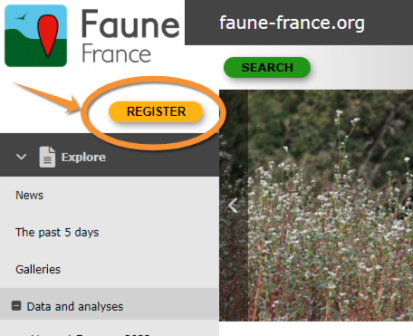
- Clica el botón principal de "REGISTER"
- Clica "Register" situado bajo el botón de LOGIN
- Rellena el formulario. Los campos marcados con un asterisco son obligatorios.
- Name
Necesitamos tu nombre real para dar crédito a tu contribución. Por razones científicas, las contribuciones anónimas no son útiles. Tu nombre se mostrará con tus conservaciones a menos que nos indiques lo contrario. Para permanecer anónimo marca la casilla check if you want to be anonymous. Tu nombre real continuará siendo visible para los administradores, o en caso de publicación de los datos, como se indica en Terms and Conditions.
- Birthyear
Necesitamos el año real de tu nacimiento, por cuestiones legales y para diferenciarte de otros usuarios con idéntico nombre. Nunca se hará público.
- County and Municipality
Esta información es útil para ti, para que recibas mapas, datos sobre el sol y la luna, y las últimas observaciones automáticamente relacionadas a tu localidad. - Email
Necesitamos una dirección de correo electrónico real y en uso. En ella recibirás la contraseña para acceder a la página, y coordinadores y administradores la usarás para ponerse en contacto contigo si hubiera algún problema con los registros. Por favor, mantenla siempre actualizada. La puedes cambiar en Web interface > Local portals > My account > Email and Password.
Nota: Tu dirección de correo electrónico será visible para otros usuarios a menos que lo indiques marcando la casilla correspondiente (esto esconde tu dirección, pero no tu nombre). Los administradores aún podrán ver tu dirección y contactarte si hubiese algún problema con los datos.
Aunque decidas enviar tus observaciones anónimamente (ni tu nombre ni tu dirección electrónica son visibles para otros usuarios) los administradores aun podrán ver tu nombre y dirección y contactarte si hubiera algún problema con tus observaciones.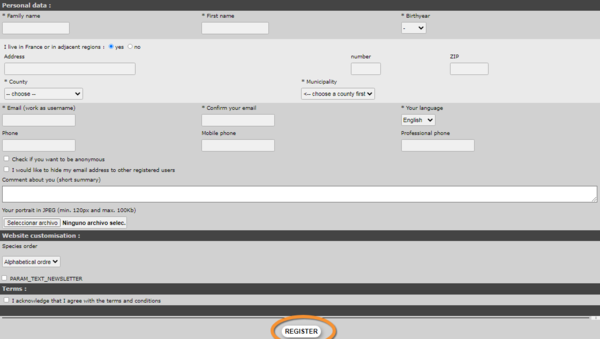
- Name
- Accept Terms and Condition, you should read carefully. These are your binding contract to us. You need to agree in order to continue with the registration process
- Clica Register
- Recibirás un mensaje de correo electrónico con tu contraseña. Por favor, mantenla en secreto. Puedes cambiar tu contraseña por otra que te sea más fácil de recordar (pero que no sea más sencilla)
- Ahora ya puedes entrar en la página con tus credenciales (e-mail y contraseña). Son válidas en todas nuestras herramientas (UNAS SOLAS CREDENCIALES VÁLIDAS PARA: páginas locales, data.biolovision.net, NaturaList)


Nota: asegúrate de que el mensaje con tu contraseña no está en tu bandeja de correo no deseado. Si no lo recibes ni en tu bandeja de entrada ni en la de correo no deseado, por favor contacta con tu administrador local o con support@biolovision.net
You will be able to modify at any time your data or/and Password at My account (see wiki section Web interface >Local portals > My account>).
Logging in
|
REMEMBER: *Your USERNAME = EMAIL ADDRESS *!UNIQUE LOGIN!: Same credentials (User name + password) to log in any of the Local portals and Naturalist and data.biolovision.net |
Once you have been registered, log in to access more content:
- Go to register
- Enter your username (this is the email address you registered with) and the password you received at this account or the one you choose by modifiying it.
- If you are on a secure personnal device, you can choose to store the Password, that allows you to reconnect automatically.
- Click on log in



In case you cannot remember your password, click on I have lost my password and a new password will be sent to your registered email address within minutes. Make sure you check the email address you registered with, and the spam folder within. We advise you to change your password immediately after logging into a more memorable one (but not a simplier one) and please keep it safely. If logging in from a safe device and connection, you can Store your password to facilitate the process next time.
Note: If you request a new password, you will need to select again "Store the password" to store the new one as the system store the old one and would'n't update automatically. Think to update also with NaturaList and data.biolovision.net if you use it.
Nota: las imágenes y los ejemplos de esta wiki están sacados de la página francesa Faune-France. El diseño y la posición de algunas de las funciones pude variar según la página. Puedes consultar la lista de todas las páginas locales en la sección wiki Páginas locales y entidades colaboradoras. |