Cómo empezar
Cualquiera que acceda a la página puede leer las últimas noticias y ver qué especies se han registrado, cuándo y dónde.
Sin embargo, solo los usuarios registrados pueden compartir sus observaciones con la comunidad, o realizar búsquedas avanzadas.
Los usuarios registrados también tienen acceso a más información que los no registrados. Compara en el cuadro siguiente las funciones disponibles para cada tipo de usuario.
Para registrarte, sigue los pasos siguientes.
| Functions | Usuario no registrado | Usuario registrado |
|---|---|---|
| See latest news | SÍ | SÍ |
| See sun and moon information at registered location | NO | SÍ |
| See latest records | SÍ | SÍ |
| Customise the website | NO | SÍ |
| Browse records of the past 5 days | SÍ | SÍ |
| Browse records of the past 15 days | NO | SÍ |
| Access aditional information for a record | NO | SÍ |
| Access all records for a species since 15 days ago | NO | SÍ |
| Access all records of a species for the last 15 days | NO | SÍ |
| See observations on a map | NO | SÍ |
| Access statistics for the species | NO | SÍ |
| Quick search for rare species | NO | SÍ |
| See rarities on a map | NO | SÍ |
| Submit observations | NO | SÍ |
| Edit own observations | NO | SÍ |
| Edit others' observations | NO | NO |
| Search records by atlas square or polygon | NO | SÍ |
| Maps centered at location | NO | SÍ |
| Save and export your own records | NO | SÍ |
| Export others' records | NO | NO |
| See users' profile | NO | SÍ |
Algunos usuarios pueden tener además derechos administrativos. Para saber más sobre los derechos y responsabilidades de los administradores, ves a la sección wiki Web interface > Administration > User administration > User administration.
Registrarse
|
PARA REGISTRARSE:
|
El registro es rápido y gratuito. Para registrarte ves a la página local de cualquier organización participante. Consulta la lista de todas las organizaciones en Various >Local partners.
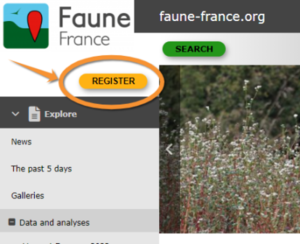
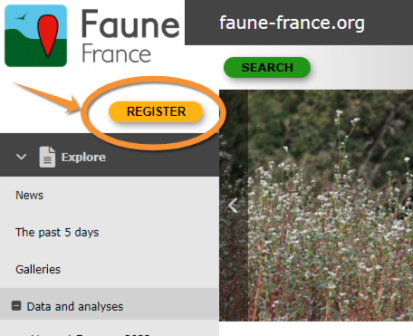
- Click "REGISTER" main button
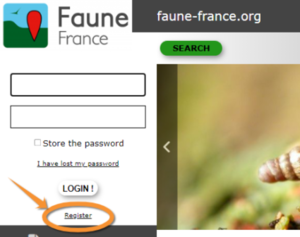
- Click "Register" link under LOGIN button
- Fill in the form. Fields marked with an asterisk are mandatory.
- Name
We need your real name so you can get credit for your contribution. For scientific purpose contribution with no name cannot be useful. Your name will be visible along with your observations unless you indicate otherwise. To opt out tick the check if you want to be anonymous cell. Note that your real name will still be visible to administrators, or in case of publication, as stated in Terms and Conditions.
- Birthyear
We need the real year you were born, for legal reasons and to identify users when two names are identical. It will never be public.
- County and Municipality
This information is most useful for you: it will target maps and important information regarding sun and moon, and latest observations automatically around your place.
- Email
We need a real and active email address. Here you will receive a password to log in, and coordinators and administrators will use it to contact you regarding confusing data. Please always keep it updated. You can change it at Web interface > Local portals > My account > Email and Password.
Note: Your registered email address will be visible to other registered users unless you opt out by ticking the corresponding cell (hide only the e-mail, not the name). Administrators would still see your address and can contact you regarding confusing records.
If you decide to submit your records anonymously (nor the name or the e-mail are visible to other users), administrators would still see your address and can contact you regarding confusing records.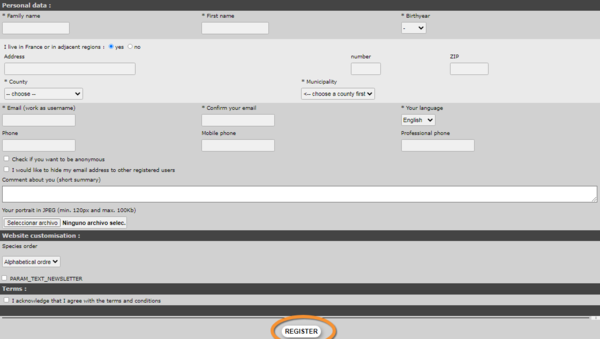
- Name
- Accept Terms and Condition, you should read carefully. These are your binding contract to us. You need to agree in order to continue with the registration process
- Click Register
- You will then receive an email with your password. Please keep your Password safe. You can modify your password for an more memorable one (but not a simplier one)
- You can now Login in with your identifiant (e-mail and Password) valid on all our tools (UNIQUE LOGIN valid for: Local portal, data.biolovision.net, NaturaList)


Note: Make sure the e-mail with the Password does not go into your spam folder. In case of no mail received nor in your e-mail nor in your spam, please contact your local adminstrator or support@biolovision.net
You will be able to modify at any time your data or/and Password at My account (see wiki section Web interface >Local portals > My account>).
Logging in
|
REMEMBER: *Your USERNAME = EMAIL ADDRESS *!UNIQUE LOGIN!: Same credentials (User name + password) to log in any of the Local portals and Naturalist and data.biolovision.net |
Once you have been registered, log in to access more content:
- Go to register
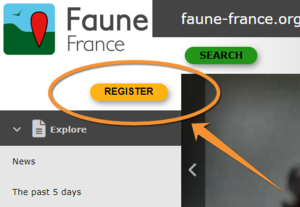
- Enter your username (this is the email address you registered with) and the password you received at this account or the one you choose by modifiying it.
- If you are on a secure personnal device, you can choose to store the Password, that allows you to reconnect automatically.
- Click on log in



In case you cannot remember your password, click on I have lost my password and a new password will be sent to your registered email address within minutes. Make sure you check the email address you registered with, and the spam folder within. We advise you to change your password immediately after logging into a more memorable one (but not a simplier one) and please keep it safely. If logging in from a safe device and connection, you can Store your password to facilitate the process next time.
Note: If you request a new password, you will need to select again "Store the password" to store the new one as the system store the old one and would'n't update automatically. Think to update also with NaturaList and data.biolovision.net if you use it.
Nota: las imágenes y los ejemplos de esta wiki están sacados de la página francesa Faune-France. El diseño y la posición de algunas de las funciones pude variar según la página. Puedes consultar la lista de todas las páginas locales en la sección wiki Páginas locales y entidades colaboradoras. |